User Manual for Serato DJ Pro Click to enlarge the picture
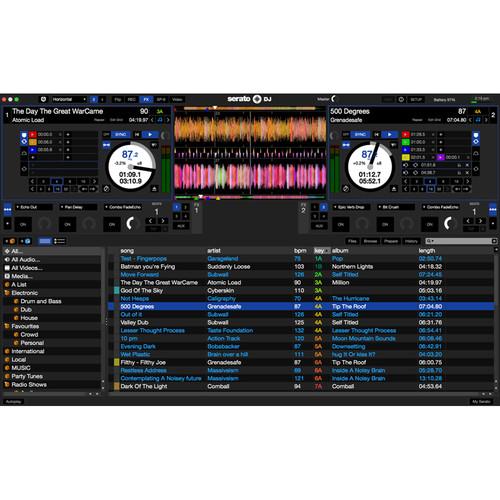 Contents of the user manual for the Serato DJ Pro
- Product category: DJ Software Serato
- Brand: Serato
- Description and content of package
- Technical information and basic settings
- Frequently asked questions – FAQ
- Troubleshooting (does not switch on, does not respond, error message, what do I do if...)
- Authorized service for Serato DJ Software
|
User manual for the Serato DJ Pro contain basic instructions
that need to be followed during installation and operation.
Before starting your appliance, the user manual should be read through carefully.
Follow all the safety instructions and warnings, and be guided by the given recommendations.
User manual is an integral part of any Serato product,
and if it is sold or transferred, they should be handed over jointly with the product.
Following the instructions for use is an essential prerequisite for protecting
health and property during use, as well as recognition of liability on the part of the manufacturer
for possible defects should you make a warranty claim. Download an official Serato user manual in which you will find instructions on how to install, use, maintain and service your product.
And do not forget – unsuitable use of a Serato product will considerably shorten its lifespan!
|
Product description Serato DJ Pro is an integrated software and hardware system, designed to give music selectors and DJs powerful control over their music library. Using the Serato DJ Pro software, you can DJ music on your computer with accurate control from a range of Serato supported hardware. Simply connect your Serato DJ Hardware to your computer, connect to your sound system, and you're in action. Serato DJ Pro works with a variety of supported controllers including models from Akai, Allen & Heath, Denon DJ, Numark, Novation, Roland, Pioneer, Rane, Reloop, and Vestax.
The software's functionality includes a number of improvements including a full-featured 2-deck Practice Mode, 64-bit support for better performance and stability, support for high-resolution screens, a refreshed UI and an improved help & support section in-app. Practice Mode allows you to mix two tracks together with no hardware connected, which is ideal for testing out your blends wherever you are, while the 64-bit support features virtually no limit on library size, allowing a huge number of crates and thousands of songs, all with fast search and loading. The Performance Pad view allows your cue points to be displayed in a familiar layout for streamlined planning and performance routines. The updated display is compatible with Retina, 4K, and UHD displays with Hi-DPI screen support and a scalable interface.
There are several add-on expansion packs for exciting elements and performance boosting features including Flip, Video, DVS, P'NT DJ, FX, and Remote. Flip allows you to create, save and playback custom edits of your tracks, while Video allows you to add and control video with in-depth effects and transitions. DVS allows you to add vinyl control and CD integration for supported hardware, while P'NT DJ provides key shift and key sync with professional-quality results. Serato FX provides a wide set of customizable effects, while Remote provides control of Serato DJ Pro's top functions. SoundSwitch allows you to create impressive lighting displays with Serato DJ Pro, while Ableton Link provides sync capabilities with Live and Serato DJ Pro. -
- 64-bit support for better performance and stability
- Improved support for high-resolution screens
- Practice Mode: Mix two tracks together with no hardware connected
- Plug-and-Play: Plug in the supported hardware and Serato DJ Pro is ready to go
- Intuitive Design: Streamlined design for quick and easy use of your favorite features
- Sampler: Trigger up to 32 samples, stings, or loops with the built-in Serato sampler
- Cues & Loops: Easily trigger and loop the favorite parts of your track
- FX: Add another dimension to your mix with powerful FX from iZotope
- Sync: Use Sync to get your tracks in time quickly
- Expansion Packs: Add even more functionality to Serato DJ Pro
- Easily add and organize your favorite music or simply DJ from your existing iTunes library
Table of Contents
|
Upload User Manual
Have you got an user manual for the Serato DJ Pro in electronic form? Please send it to us and help us expand our library of instruction manuals.
Thank you, too, on behalf of other users.
To upload the product manual, we first need to check and make sure you are not a robot. After that, your "Submit Link" or "Upload File" will appear.
Technical parametersSerato 10-15212 Specs | Compatibility | Akai Pro AMX
Allen & Heath: Xone:43C, Xone:DB2, Xone:DB4
Denon DJ: DS1, MC7000, MCX8000, X1800 Prime
Mixars: Duo, Quattro
Notation Twitch
Numark: NS6, NS6II, NS7, NS7 II, NS7 III, NV, NVII, V7
Pioneer DJ: DDJ-SR2, DDJ-SX, DDJ-SR, DDJ-SX2, DDJ-SZ, DDJ-SZ2, DJM-850, DJM-900NXS, DJM-900NXS2, DJM-900SRT, DJM-S3, DJM-S9, DDJ-S1
Rane: MP2015, Sixty-Eight, Sixty-Four, Sixty-One, Sixty-Two, SL2, SL5, SL4, TTM57MKII
Reloop: Mixon 4, RMX-90 DVS, Terminal Mix 8
Roland: DJ-505, DJ-808
Vestax: VCI-300, VCI-380 | | Mac System Requirements | Operating System:
macOS High Sierra 10.13
macOS Sierra 10.12
Mac OS X 10.11
Processor:
i3: 1.07 GHz
i5: 1.07 GHz
i7: 1.07 GHz
Screen Resolution: 1280 x 720
Memory: 4 GB
USB: Available USB 2.0 Port
HHD Space: 5 GB | | PC System Requirements | Operating System:
Windows 10
Windows 8.1
Windows 7
Processor:
i3: 1.07 GHz
i5: 1.07 GHz
i7: 1.07 GHz
Screen Resolution: 1280 x 720
Memory: 4 GB
USB: Available USB 2.0 Port
HHD Space: 5 GB |
Rating60% users recommend this product to others. And what about you?

This product has already been rated by 46 owners. Add your rating and experience with the product.
Discussion
 Ask our technicians if you have a problem with your settings,
or if anything is unclear in the user manual you have downloaded.
You can make use of our moderated discussion.
The discussion is public and helps other users of our website who may be encountering similar problems.
Ask our technicians if you have a problem with your settings,
or if anything is unclear in the user manual you have downloaded.
You can make use of our moderated discussion.
The discussion is public and helps other users of our website who may be encountering similar problems.
The discussion is empty - enter the first post
Post a new topic / query / comment:
|
|


