|
User Manual for SHAPE XC10SMKIT XC10 Camera Cage, Shoulder Mount, Matte Box, & Follow Focus Kit Click to enlarge the picture
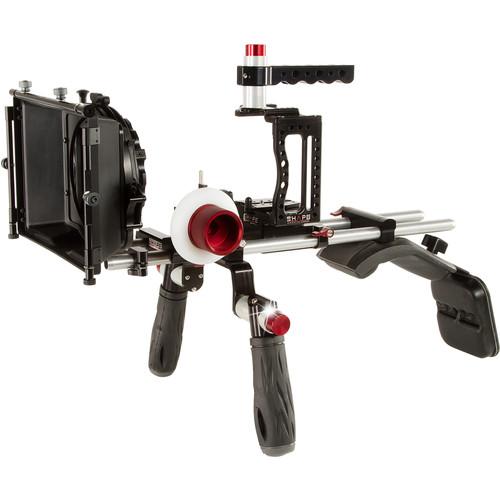 Contents of the user manual for the SHAPE XC10SMKIT XC10 Camera Cage, Shoulder
- Product category: Camcorder Supports & Rigs SHAPE
- Brand: SHAPE
- Description and content of package
- Technical information and basic settings
- Frequently asked questions – FAQ
- Troubleshooting (does not switch on, does not respond, error message, what do I do if...)
- Authorized service for SHAPE Camcorder Supports & Rigs
|
User manual for the SHAPE XC10SMKIT XC10 Camera Cage, Shoulder contain basic instructions
that need to be followed during installation and operation.
Before starting your appliance, the user manual should be read through carefully.
Follow all the safety instructions and warnings, and be guided by the given recommendations.
User manual is an integral part of any SHAPE product,
and if it is sold or transferred, they should be handed over jointly with the product.
Following the instructions for use is an essential prerequisite for protecting
health and property during use, as well as recognition of liability on the part of the manufacturer
for possible defects should you make a warranty claim. Download an official SHAPE user manual in which you will find instructions on how to install, use, maintain and service your product.
And do not forget – unsuitable use of a SHAPE product will considerably shorten its lifespan!
|
Product description The XC10SMKIT XC10 Camera Cage Kit from SHAPE features the XC10 Camera Cage, Quick Handle with Rod Bloc, Two-Stage 4 x 4 Matte Box, Follow Focus Friction and Gear Clic, Mini Composite Shoulder Pad, Back Pad, and two 18” 15mm rods. This kit is designed for using the Canon XC10 camera on the shoulder.The cage allows access to all the controls and ports on the camera. It also includes a black knob to secure and protect the HDMI cable. The cage features 1/4"-20 and 3/8"-16 threaded holes for attaching accessories, and the included top handle also has threaded holes. With push-button technology, this cage allows fast and easy 360° rotation adjustment with one push of the button. The top of the cage also allows access to the hot shoe on the camera. Built using CNC machined aluminum, this cage is strong and durable. The cage also features a quick release plate which allows for fast removal of the camera from the baseplate and cage. The quick release plate is balanced for the optical center of the camera.The Quick Handle with Rod Bloc features two independent handles that can rotate 360°. The push-button technology allows the handle to rotate on the push of the button. You can achieve precise positioning by sliding the Quick Handle along the included 18" 15mm rods and securing the handles by tightening the single red knob on the rod bloc. The Two-Stage 4 x 4 Matte Box is used for light control and for deploying and adjusting filters. It features a swing-away system and two 4 x 4" rotating filter stages. This matte box comes with a French flag/side wings and four matte box rings.The Follow Focus Friction and Gear Clic is designed for use with standard 15mm rods. It can be instantly attached or detached from the rods using a lever clamp system. This follow focus provides precise focusing, quick adjustments, and great durability. The focus disk is surrounded by a rubber ring that provides firm contact with the lens and ensures accurate and slip-free focusing. The focus mechanism can be used on the left or right side of the lens, and the focus disk can be positioned at the front or rear of the focus mechanism. The white mark disk is made of abrasion resistant Delrin thermoplastic.The included Mini Composite Shoulder Pad is suitable for switching rapidly from a camera rig to a tripod without having to remove the shoulder pad. It is padded for comfort and can remain on the rig permanently. This kit also includes the Back Pad, which is powder coated for a professional look and is padded on one side to offer comfort and stability. The position of the Back Pad can be adjusted to suit your body type with a vertical adjustment of 2" and a horizontal adjustment range of 360°. - XC10SM XC10 Camera Cage with Shoulder Mount Kit The XC10SM XC10 Camera Cage with Shoulder Mount Kit from SHAPE features the XC10 Camera Cage, Quick Handle with Rod Bloc, Mini Composite Shoulder Pad, Back Pad, and two 18” 15mm rods. This kit is designed for using the Canon XC10 camera on the shoulder.The cage allows for access to all the controls and ports on the camera. It also includes a black knob to secure and protect the HDMI cable. The cage features 1/4"-20 and 3/8"-16 threaded holes for attaching accessories, and the included top handle also has threaded holes. With push-button technology, this cage allows fast and easy 360° rotation adjustment with one push of the button. The top of the cage also allows access to the hot shoe on the camera. Built using CNC machined aluminum, this cage is strong and durable. The cage also features a quick release plate which allows for fast removal of the camera from the baseplate and cage. The quick release plate is balanced for the optical center of the camera.The Quick Handle with Rod Bloc features two independent handles that can rotate 360°. The push-button technology allows the handle to rotate on the push of the button. You can achieve precise positioning by sliding the Quick Handle along the included 18" 15mm rods and securing the handles by tightening the single red knob on the rod bloc.The included Mini Composite Shoulder Pad is suitable for switching rapidly from a camera rig to a tripod without having to remove the shoulder pad. It is padded for comfort and can remain on the rig permanently. This kit also includes the Back Pad, which is powder coated for a professional look and is padded on one side to offer comfort and stability. The position of the Back Pad can be adjusted to suit your body type with a vertical adjustment of 2" and a horizontal adjustment range of 360°.
Canon XC10 Cage with Quick Release Baseplate - Top handle with push-button technology
- Features 1/4"-20 and 3/8"-16 threaded holes for connecting accessories
- CNC machined aluminum body for durability
Quick Handle with Rod Bloc - Compatible with 15mm rods
- Single red knob for fast and easy adjustment
- Quick release handgrips, with three points of adjustment
- Ergonomic handles with rubber handgrips for stability and precision
- Spring loaded push-button technology for fast adjustment
- Individual rotation on a 360° axis
- CNC machined parts and hard anodized aluminum for resistance
- Stainless steel locking mechanism for durability
Mini Composite Shoulder Pad - Single red knob for fast, easy adjustment
- Features a 1/4"-20 threaded hole at the back
- Hard anodized aluminum for resistance
Back Pad - Padded on one side for comfort
- Features two 1/4"-20 threaded holes
- Supports SHAPE box attachment
- Easy attachment and removal
- Hard anodized aluminum for resistance
UPC: 629266004883 - 2-Stage 4 x 4" Matte Box The SHAPE 2-Stage 4 x 4" Matte Box accepts lenses with up to a 100mm front outside diameter. It mounts to 15mm LWS rods and utilizes a swing-away design, which lets you perform quick lens changes without having to remove the matte box from your rods. You can adjust the height of the matte box in relation to the rods, which comes in handy when your lens center to rod center height is slightly off from the standard.
Two rotating filter stages support the use of 4x4" filters. The matte box comes with a top flag (eyebrow), side flags, four matte box donuts in 66, 72, 82, and 90mm sizes, and elastic donut. - The matte box has a rear opening of 100mm for lenses.
- The included anti-reflection donuts prevent light behind the camera from reflecting off any filters in the matte box and degrading the image. Included with the matte box are anti-reflection donuts for lenses with a front outside diameter of 66, 72, 82, and 90mm. The included elastic donut supports lenses with a front outside diameter between 66 and 90mm, and it is especially useful with lenses that grow and shrink as you change focus or zoom.
- The side flags incorporate a hook design as a safety feature where they attach to the matte box. This helps prevent them from falling out of the matte box should the lock-down thumbscrew loosen accidentally.
- The swing-away bracket incorporates a height adjustment, enabling you to compensate a total of 0.65" vertically. This allows you to use this matte box with a variety of camera/rod support combinations that may vary slightly from the industry standard 85mm distance from LWS rod center to lens port center.
UPC: 629266001189 - Friction & Gear Follow-Focus Clic with Adjustable Marker The Shape Friction & Gear Follow-Focus Clic with Adjustable Marker is designed to attach onto standard 15mm rods of shoulder support rigs and other rigs. It attaches onto them via a clamp system, with simplicity. You would sit the Clic atop the rods, and then slide and close a Shape-patented lever clamp underneath the rods, and the lever locks and holds the Clic securely on the rods.
The Clic's focus mechanism also works with a clamp system, which when unlocked loosens the focus mechanism and allows it to be moved horizontally. It moves so to adjust itself closer to the lens. As it moves, its main feature -- the focus disk -- moves with it, and the focus disk is what reaches the lens. The focus disk can either be a friction wheel, as you see in the photo above, or a gear wheel. Both are present in this package, and replacing one with the other is accomplished with the help of the included Allen wrench. The friction wheel has a rubber outer surface that would press up against the lens, keep firm contact with it, and ensure accurate and slip-free focusing. The friction wheel would serve well for most lenses and is made of high-quality rubber that in cold temperatures won't get too cold to lose its grip. The gear wheel would accommodate those lenses that specifically have teeth on their focusing rings, and it would do so without any ring gears, by pressing its .8 pitch gears into the teeth.
The focus mechanism can be used on either the left or the right side of the lens, depending on the direction you place the Clic onto the rods in. And the focus disk itself can be used either in front of the focus mechanism, as you see in the photo above, or behind it, so to accommodate a wider variety of lens lengths. To move the disk to the rear, you would first just unscrew two screws from a cube-shaped gearbox that you can't see in the photo above because it sits behind the focus disk. Once the screws are off, the focus disk can just be flipped over for use with longer lens constructions.
In the photo above, the white mark disk that you see to the right of the red knob is made of highly resistant Delrin thermoplastic. It can be written on with non-permanent markers to mark up focus measurements for various predetermined shots, and it is interchangeable and thereby many predetermined measurements can be kept ready at your side. Additionally, a slide-adjustable marker made of aluminum is included to be attached beside the mark disk and to be moved and tightened into positions along the disk.
The Clic is CNC machined and made of lightweight anodized aluminum for strength and durability. - Designed to attach onto standard 15mm rods.
- Attaches onto the rods via a patented clamp system.
- The focus mechanism moves horizontally to adjust to the lens.
- The focus mechanism can be used on the left or right side of the lens.
- A friction wheel and a gear wheel are included to interchange as the focus disk.
- The focus disk flips to the rear of the focus mechanism to accommodate longer lenses.
- A thermoplastic mark disk can be written on with non-permanent markers and is interchangeable.
- An included marker attaches beside the mark disk and slides and tightens into positions along the disk.
UPC: 629266000946 In the Box Bundle Items XC10SM XC10 Camera Cage with Shoulder Mount Kit taavstaxwqssfexsftbzvqdftfestaredfdeye - Mini Composite Shoulder Pad
- Limited Lifetime Warranty
2-Stage 4 x 4" Matte Box Friction & Gear Follow-Focus Clic with Adjustable Marker Table of Contents
|
Upload User Manual
Have you got an user manual for the SHAPE XC10SMKIT XC10 Camera Cage, Shoulder Mount, Matte Box, & Follow Focus Kit in electronic form? Please send it to us and help us expand our library of instruction manuals.
Thank you, too, on behalf of other users.
To upload the product manual, we first need to check and make sure you are not a robot. After that, your "Submit Link" or "Upload File" will appear.
Technical parameters - XC10SM XC10 Camera Cage with Shoulder Mount Kit
| For Use with | Canon XC10 camera (not included) | | Dimensions | Maximum Length: 24" (61 cm)
Height: 14.5" (36.8 cm)
Width: 12" (30.5 cm) for the handle and 4" (10.2 cm) | | Weight | 5.4 lb (2.4 kg) | | | | Box Dimensions (LxWxH) | 21.0 x 7.5 x 4.6" | - 2-Stage 4 x 4" Matte Box
| Size | Matte Box Rings: 82, 90, 72, and 66 mm | | Height Adjustment Range | 0.65" / 1.65 cm | | Dimensions | 8 x 9 x 14" / 20.3 x 22.9 x 35.6 cm | | Weight | 2.5 lb / 1.1 kg | | | | Box Dimensions (LxWxH) | 20.9 x 7.5 x 5.6" | - Friction & Gear Follow-Focus Clic with Adjustable Marker
| | | Box Dimensions (LxWxH) | 9.606 x 5.906 x 3.937" |
Rating70% users recommend this product to others. And what about you?

This product has already been rated by 08 owners. Add your rating and experience with the product.
Discussion
 Ask our technicians if you have a problem with your settings,
or if anything is unclear in the user manual you have downloaded.
You can make use of our moderated discussion.
The discussion is public and helps other users of our website who may be encountering similar problems.
Ask our technicians if you have a problem with your settings,
or if anything is unclear in the user manual you have downloaded.
You can make use of our moderated discussion.
The discussion is public and helps other users of our website who may be encountering similar problems.
The discussion is empty - enter the first post
Post a new topic / query / comment:
|
|
|
| Request for user manual |
You can’t find the operation manual you are looking for? Let us know and we will try to add the missing manual:
I’m looking for a manual / Request for manual
Current requests for instruction manuals:
Call Of Duty World War Two For Xbox...
controller stratus XL...
stratus XL...
smart whatch serie S11 42mm...
Allen & Heath SQ-6 manual...
|
| Discussion |
Latest contributions to the discussion:
AEW R 4100
Name: MAURICIO ANGARITA
Audio-Technica AEW-R4100 UHF Diversity Receiver for
AEW R 4100 has the mute function blocked and does not allow audio to pass. I tried several times to turn off the mute from the transmitter but it does nothing, the mute stays on. Solution?
Thank you...
Instructions for assembling the 2015 Forecast Image Master Consoles GC3-A
Name: mike elam
Forecast Consoles GC3-A ImageMaster Editing Console
Looking for instructions for assembling this console. ...
EMPTY TONER ERROR MESSAGE AFTER REPLACING TONER
Name: LINDA BAD YELLOW EYES
Brother TN223BK Standard-Yield Toner
I HAD TO CHANGE OUT ALL THREE TONERS DUE TO LEAKS IN THE YELLOW AND CYAN. AFTER I REPLACED THEM, THE MACHINE KEEPS GIVING ME AN EMPTY TONER ERROR MESSAGE. HELP!!...
PS480D 20/24 pin Switching 480W Power Supply
Name: swkargo
Logisys 480W Power Supply
This item states in can run -5vdc .It is NOT listed on the board or I beleive is r4 is missing the resitior. Any body have thid issue. Shawn
...
Help needed
Name: Ann Carter
SanDisk 1TB Extreme Portable USB 3.1
When I click the link to download the user manual for my Sandisk Extreme external hard drive, it gives me the manual for the LG Cricket. Can you please change the link so I can download the Sandisk manual and begin using this drive? Thank you....
|
|


