User Manual for Shinybow 4x4 VGA with Terminal Block 5-Pin Stereo Analog Audio Matrix Routing Switcher Click to enlarge the picture
 Contents of the user manual for the Shinybow 4x4 VGA with Terminal Block
- Product category: Routers & Switchers Shinybow
- Brand: Shinybow
- Description and content of package
- Technical information and basic settings
- Frequently asked questions – FAQ
- Troubleshooting (does not switch on, does not respond, error message, what do I do if...)
- Authorized service for Shinybow Routers & Switchers
|
User manual for the Shinybow 4x4 VGA with Terminal Block contain basic instructions
that need to be followed during installation and operation.
Before starting your appliance, the user manual should be read through carefully.
Follow all the safety instructions and warnings, and be guided by the given recommendations.
User manual is an integral part of any Shinybow product,
and if it is sold or transferred, they should be handed over jointly with the product.
Following the instructions for use is an essential prerequisite for protecting
health and property during use, as well as recognition of liability on the part of the manufacturer
for possible defects should you make a warranty claim. Download an official Shinybow user manual in which you will find instructions on how to install, use, maintain and service your product.
And do not forget – unsuitable use of a Shinybow product will considerably shorten its lifespan!
|
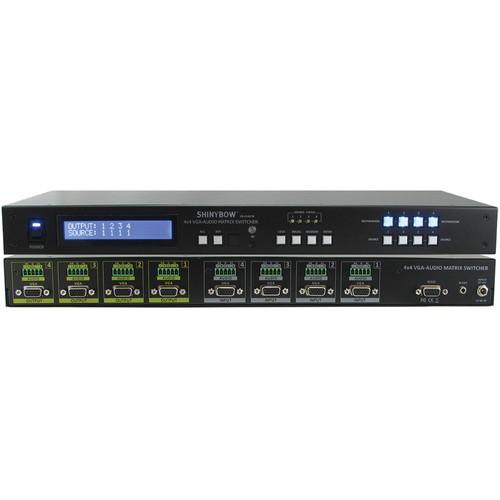
Product description The 4x4 VGA with Terminal Block 5-Pin Stereo Analog Audio Matrix Routing Switcher features four individual VGA (RGBHV) video inputs with four stereo audio inputs, and four individual VGA (RGBHV) video outputs with four stereo audio outputs. The stereo audio inputs and outputs use terminal block 5-pin female sockets. Because it is a matrix router, any input may be routed to any output, or the same input may be routed to all outputs, or any combination thereof. This is useful for switching and sending signals from VGA source devices, such as personal computers, set top boxes, and satellite receivers, to VGA destination devices such as monitors, HDTVs, and projectors.
Control is provided via front push-buttons, IR remote control, or RS-232. A two-line LCD display gives real-time status information, such as signal routing. The RS-232 interface lets you control the switcher using the GUI interface or with a third party controller. Windows-based control software is included to provide complete remote control of the switcher from a PC. Also included is an IR remote, IR extender receiver, RS-232 cable, CD-ROM with RS-232 driver, 12 VDC power supply, and rack mount brackets. -
- 4x Input signals: VGA (RGBHV), Stereo Audio(terminal block 5-pin)
- 4x Output Signals: VGA (RGBHV), Stereo Audio(terminal block 5-pin) to VGA Monitor displays
- Video bandwidth of 450Mz for each path R,G,B signals
- Supported HD high definition resolutions: XGA, SXGA, UXGA, WSXGA, WUXGA
- RS-232 Serial interface
- Compatible with all VGA video monitoring devices
- Control PC RS-232 drive compatible with Windows XP/2000/98/95
- Various User Interface controls:
- RS-232 port
- Front panel buttons
- IR remote control
- Function buttons: ALL / OFF / LOCK / RECALL / MEMORY / ENTER
- 12 VDC power supply, 100 to 230 VAC, universal 50/60Hz
- Brackets included for desktop or 19" rack mount support
In the Box Shinybow 4x4 VGA with Terminal Block 5-Pin Stereo Analog Audio Matrix Routing Switcher IR Remote IR Extender Receiver RS-232 Cable CD-ROM with RS-232 Driver 12 VDC Power Supply Rack Mount Brackets Limited 3-Year Warranty Table of Contents
|
Upload User Manual
Have you got an user manual for the Shinybow 4x4 VGA with Terminal Block 5-Pin Stereo Analog Audio Matrix Routing Switcher in electronic form? Please send it to us and help us expand our library of instruction manuals.
Thank you, too, on behalf of other users.
To upload the product manual, we first need to check and make sure you are not a robot. After that, your "Submit Link" or "Upload File" will appear.
Technical parametersShinybow SB-4144TB Specs | Chassis Material | Metal
Thickness: 0.04" (1 mm) | | Inputs | 4 x VGA, DB15F, female
4 x Stereo audio, 5-position terminal block, female | | Outputs | 4 x VGA, DB15F, female
4 x Stereo audio, 5-position terminal block, female | | Video Support | Analog VGA (75Ω), 1 Vp-p Output Signal (RGB) 0.7 Vp-p | | Supported Resolutions | VGA, SVGA, XGA, SXGA, UXGA, WUXGA (1920x1200) | | Audio Supported | Stereo audio | | Video Bandwidth | VGA (RGBHV): 425 MHz, (-3 dB) 200 mV p-p, 450 MHz, (-3 dB) 2V p-p
R=425 MHz, G=425 MHz, B=425 MHz, H=110 MHz, V=110 MHz | | Audio Frequency Response | 20 Hz to 20 KHz | | LED Indicators | Input status LEDs | | Gain Flatness | 90 MHz, 0.1 dB | | Differential Gain Error | 0.01%, 0.1 dB | | Differential Phase Error | 0.02, 0.1 dB (RL=150 W) | | Fast Settling Time | 15 ns to 0.1% | | All Hostile Crosstalk | -83 dB at 5 MHz
-54 dB at 50 MHz | | Channel Crosstalk | -56 dB at 100 MHz | | Slew Rate | 1000 V/us, G=+1.2 V Step | | High OFF Isolation | -100 dB at 10 MHz | | Output Current | 100 mA | | Infrared Frequency | 38 KHz | | IR Extender Port | Around 1000' (300 m) maximum distance | | Control | 1 x Function buttons on front panel (data status via LCM panel show out)
1 x IR Remote Controller
1 x IR External port
1 x RS 232 series interface | | Safety Approvals | CE, FCC, VCCl, Erp, WEEE | | Power Supply | 12 VDC, 2 A
Universal switch type 50/60 Hz, 100 to 230 VAC | | Power Consumption | 1.2 A, maximum | | Rackmountable | 1 RU, 19" rack (using included rack mount brackets) | | Dimensions (L x W x H) | 17.3 x 7.8 x 1.7" (44.0 x 20.0 x 4.4 cm) | | Weight | 5.95 lb (2.70 kg) |
Rating90% users recommend this product to others. And what about you?

This product has already been rated by 63 owners. Add your rating and experience with the product.
Discussion
 Ask our technicians if you have a problem with your settings,
or if anything is unclear in the user manual you have downloaded.
You can make use of our moderated discussion.
The discussion is public and helps other users of our website who may be encountering similar problems.
Ask our technicians if you have a problem with your settings,
or if anything is unclear in the user manual you have downloaded.
You can make use of our moderated discussion.
The discussion is public and helps other users of our website who may be encountering similar problems.
The discussion is empty - enter the first post
Post a new topic / query / comment:
|
|


