User Manual for SlingStudio Hub with CameraLink Kit
Click to enlarge the picture Contents of the user manual for the SlingStudio Hub with CameraLink Kit
Product category: Production Switchers SlingStudio
Brand: SlingStudio
Description and content of package
Technical information and basic settings
Frequently asked questions – FAQ
Troubleshooting (does not switch on, does not respond, error message, what do I do if...)
Authorized service for SlingStudio Production Switchers
User manual for the SlingStudio Hub with CameraLink Kit contain basic instructions
that need to be followed during installation and operation.
Before starting your appliance, the user manual should be read through carefully.
Follow all the safety instructions and warnings, and be guided by the given recommendations.
User manual is an integral part of any SlingStudio product,
and if it is sold or transferred, they should be handed over jointly with the product.
Following the instructions for use is an essential prerequisite for protecting
health and property during use, as well as recognition of liability on the part of the manufacturer
for possible defects should you make a warranty claim. Download an official SlingStudio user manual in which you will find instructions on how to install, use, maintain and service your product.
And do not forget – unsuitable use of a SlingStudio product will considerably shorten its lifespan!
Product description
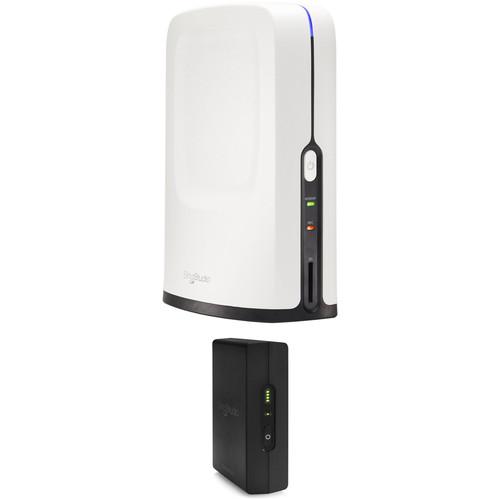
With this SlingStudio Hub with CameraLink Kit from , you can connect two video sources and record them, as well as switch and broadcast them wirelessly. The SlingStudio Hub contains all the broadcasting and recording facilities. It connects with the local network (via Ethernet or Wi-Fi) and storage media for broadcasting and recording, respectively. Connect the included CameraLink to your camera, and you can wirelessly connect that camera to your Hub, transmitting HD video. Its built-in battery means you don't have to scramble for messy power solutions with the CameraLink added to your rig. Combine the CameraLink source with a locally connected HDMI source plugged directly into the hub and two compatible mobile devices as well, and you have a capable HD multicamera production that can be switched on your iPad or Mac (required for operation). See below for more details on the products included with this kit.
SlingStudio Hub
Live Editing with SlingStudio
Bose SoundWear Companion - Unboxing + Setup
What is SlingStudio?
Multi-Camera Sports Broadcasting with SlingStudio
SlingStudio - Best Practices for Livestreaming
SlingStudio - Auto Switching
SlingStudio - User Interface Overview
Executing a multiple camera shoot with the SlingStudio Hub gives you the freedom to wirelessly connect multiple video sources for recording, streaming, or live switching. The compact, lightweight enclosure houses all the recording, streaming, and wireless tasks, while the production can be live-switched from an iPad or Mac running the Console app.SlingStudio Hub features include chroma keying to enable the use of live video sources such as backgrounds and motion-graphics importing for the creation of animated lower thirds. Video sources can be reordered and can be switched using voice-activation or custom-timed intervals. The Hub uses a special low-delay mode optimized for teleconferencing and can live stream without the use of a recording device. A PiP function features multiple positioning options, and instant replay intervals can last up to 10 minutes.Cameras can be connected to the SlingStudio Hub wirelessly or with an HDMI cable. Compatible iOS and Android mobile devices can connect directly over the Studio Hub's Wi-Fi connection, while standard video cameras can connect to separately available CameraLink Wi-Fi transmitters or directly via the Hub's HDMI connection. Up to ten sources can be connected simultaneously, any combination of four live 1080p30 or 720p60 input sources can be switched, recorded, and streamed, and up to 10 sources can be connected at any given time. If you only need to switch, record, or stream two sources, resolutions up to 1080p60 can be used.Not only can the SlingStudio Hub facilitate live streaming, it also offers a simple workflow for post-production. All media being input into the Hub can be recorded as industry-standard, high-quality H.264 ISO video files to either an SD card or hard drive connected via USB Type-C or via USB 3.0 through the separately available USB Type-C Expander. In all, isolated (ISO) feeds of each input channel, the final switched output, line-in audio, and multiview of the isolated channels can be recorded simultaneously. An HDMI to Mini HDMI adapter cable is included for connecting the video output to a standard display, projector, or secondary recording or streaming hardware. The HDMI output can be set to no-latency pass-through mode so any live video being displayed will be in sync with the house audio.Several separately available accessories can enhance the abilities of the SlingStudio Hub. A battery allows the Hub to operate without mains power, great for impromptu field setups where access to power is limited. The USB Type-C Expander offers multiple USB connections for storage, and a wired Ethernet connection for wired streaming. Altogether, you can build an extremely versatile video production platform.Note: Check the SlingStudio website for an updated list of compatible mobile devices, computers, iPads, and recording media.
Live Switching Features
Switcher: Switch between 10 different video sources using the Console app running on iPad or Mac
Live stream without a storage device when not recording
Ability to reorder video sources
Video transitions: Cut, dissolve, wipe
Instant replay segments of up to 10 minutes
Video compositions: Picture in Picture (PiP) with multiple positions and multiple split views
Audio mixer: Full audio mixer functionality with monitoring mode support, supports always-on audio (ON) or audio follows video (AFV) for all video input sources
Overlays: Lower-thirds (title and scoreboard), text overlays
Custom graphics: Insert, resize, and change the transparency of your own JPG and PNG graphics—including logos, lower-thirds, profile pics, ads, or background images—and overlay them on your live program feed
Chroma key: Use chroma key (green screen) in your productions, including using live video sources as backgrounds
Motion graphics: Import your own motion graphic overlays using chroma keying to use as animated lower thirds, logos, etc.
Auto-switching: Switch between video sources automatically using custom time intervals or voice-activated switching
Videoconferencing/low-delay mode: Special low-delay mode optimized for teleconferencing with talent in a remote location
Wireless Video Connection
While most common switchers require a physical connection via SDI or HDMI, the SlingStudio Hub can connect to up to ten wireless sources via 802.11ac Wi-Fi (up to four sources can be switched from at any given time). Cameras with an HDMI output can connect using separately available CameraLink transmitters, while select iOS and Android smart devices can use their own Wi-Fi connectivity to transmit video using the free Capture app, available in the App Store and on Google Play, respectively.
Live Wireless Switching via iPad or Mac
With the free Console app, your iPad or Mac can now become a switcher for all the video inputs, as well as an audio mixer. Titles, lower-thirds, transitions, captions, and more can be controlled in real time to give your live switch a professional look.
Post-Production Ready
All video and files recorded by the SlingStudio Hub are stored in a single location. No need to search for multiple cards and spend time syncing them inside your editing software. Just use the free Apple Final Cut Pro X or Adobe Premiere plug-in from Sling to conform the project file inside your NLE and start editing.If you recorded higher-resolution footage internally with the individual cameras used in your production, the plug-in can analyze the recorded footage and replace the lower-resolution SlingStudio Hub recordings with the camera originals. This allows you to remaster your live broadcasts in 4K, or higher resolutions, while keeping all the production choices you made in the moment.
UPC: 753960015026
SlingStudio CameraLink
Live Editing with SlingStudio
Bose SoundWear Companion - Unboxing + Setup
What is SlingStudio?
Multi-Camera Sports Broadcasting with SlingStudio
SlingStudio - Best Practices for Livestreaming
SlingStudio - Auto Switching
SlingStudio - User Interface Overview
Wirelessly connect your camcorder or other live video source to the SlingStudio Hub by plugging in the SlingStudio CameraLink. The CameraLink takes an HD video signal via HDMI and transmits it wirelessly over 802.11 ac Wi-Fi to the SlingStudio Hub for switching, streaming, or recording. Formats up to 1080p60 at 30 Mbps are supported. For power, the CameraLink has a built-in lithium-ion battery which provides over two hours of continuous usage. To recharge, use the included micro-USB cable to plug the transmitter into a separately available standard USB charger (a high-output 2A charger is recommended for best performance). A four-segment LED indicator reports the current battery capacity. Use the included shoe mount to secure the CameraLink unit to your camera, be it a DSLR or mirrorless camera, or a standard camcorder. A USB charging cable and a micro-HDMI (Type D) to Mini HDMI (Type C) adapter cable are included as well. Cables for cameras which use full-size HDMI ports and micro-HDMI ports are available separately. UPC: 753960015071
In the Box
Hub wasxtcvsyvywdbefqaw
Power Supply
HDMI to Mini HDMI Cable
Limited 1-Year Warranty
CameraLink
Table of Contents
Upload User Manual
Have you got an user manual for the SlingStudio Hub with CameraLink Kit in electronic form? Please send it to us and help us expand our library of instruction manuals.
Thank you, too, on behalf of other users.
To upload the product manual, we first need to check and make sure you are not a robot. After that, your "Submit Link" or "Upload File" will appear.
Technical parameters
SlingStudio Hub
A/V Inputs
Local: 1 x HDMI type A 1 x 3.5 mm analog stereo audio
Wireless: Up to 10 via Wi-Fi network
A/V Outputs
1 x HDMI Type C
Other I/O
1 x SD card slot 1 x USB Type-C
Wireless
1 x 5 GHz 802.11 ac 1 x Dual-band 2.4/5 GHz 802.11 ac
Video Recording
Format: H.264, High Profile, 4:2:0
Resolution: 1080p60 up to 30 Mb/s 1080p30 up to 16 Mb/s 720p60 up to 16 Mb/s 720p30 up to 4 Mb/s
Audio Recording
Format: 2-channel, 16-bit/48 kHz, up to 320 kb/s
Live Streaming
CDNs: Facebook Live, YouTube Live Maximum Bit Rate: 8 Mb/s
Power Supply
Input: 100-240 VAC, 50-60 Hz Output: 12 VDC, 4.2 A
Operating Temperature
32 to 95°F / 0 to 35°C
Humidity
0-95%, non-condensing
Dimensions
7.9 x 5.6 x 3.5" / 20 x 14 x 9 cm
Weight
1.4 lb / 653 g
Box Dimensions (LxWxH)
11.4 x 7.4 x 5.0"
SlingStudio CameraLink
A/V Inputs
1 x HDMI Type D
Format Support
Format: H.264, High Profile, 4:2:0
Resolution: 1080p60 up to 30 Mbps 1080p30 up to 16 Mbps 720p60 up to 16 Mbps 720p30 up to 4 Mbps
Audio: AAC-LC, 2-channel, 16-bit/48 kHz, up to 320 kbps
Other I/O
1 x USB Micro-B, charging
Battery Chemistry
Lithium-ion
Battery Capacity
11.47 Wh (3.7 VDC, 3100 mAh)
Battery Charging
3-4 hours, typical when CameraLink is off using USB cable with 10 W or greater power supply
Wireless
5 GHz, 802.11 ac
Transmission Distance
Up to 300' / 100 m (line of sight)
Operating Temperature
32 to 104°F / 0 to 40°C
Humidity
0-95%, non-condensing
Dimensions
1.4 x 4.6 x 2.9" / 3.5 x 11.6 x 7.3 cm
Weight
0.6 lb / 270 g
Box Dimensions (LxWxH)
7.4 x 5.0 x 3.2"
Rating
100% users recommend this product to others. And what about you?
This product has already been rated by 61 owners. Add your rating and experience with the product.
Discussion
Ask our technicians if you have a problem with your settings,
or if anything is unclear in the user manual you have downloaded.
You can make use of our moderated discussion.
The discussion is public and helps other users of our website who may be encountering similar problems.
Call Of Duty World War Two For Xbox...controller stratus XL...stratus XL...smart whatch serie S11 42mm...Allen & Heath SQ-6 manual...
Discussion
Latest contributions to the discussion:
AEW R 4100 Name: MAURICIO ANGARITA Audio-Technica AEW-R4100 UHF Diversity Receiver for AEW R 4100 has the mute function blocked and does not allow audio to pass. I tried several times to turn off the mute from the transmitter but it does nothing, the mute stays on. Solution?
Thank you...Instructions for assembling the 2015 Forecast Image Master Consoles GC3-A Name: mike elam Forecast Consoles GC3-A ImageMaster Editing Console Looking for instructions for assembling this console. ...EMPTY TONER ERROR MESSAGE AFTER REPLACING TONER Name: LINDA BAD YELLOW EYES Brother TN223BK Standard-Yield Toner I HAD TO CHANGE OUT ALL THREE TONERS DUE TO LEAKS IN THE YELLOW AND CYAN. AFTER I REPLACED THEM, THE MACHINE KEEPS GIVING ME AN EMPTY TONER ERROR MESSAGE. HELP!!...PS480D 20/24 pin Switching 480W Power Supply Name: swkargo Logisys 480W Power Supply This item states in can run -5vdc .It is NOT listed on the board or I beleive is r4 is missing the resitior. Any body have thid issue. Shawn
...Help needed Name: Ann Carter SanDisk 1TB Extreme Portable USB 3.1 When I click the link to download the user manual for my Sandisk Extreme external hard drive, it gives me the manual for the LG Cricket. Can you please change the link so I can download the Sandisk manual and begin using this drive? Thank you....
PDF User Manuals
We regularly supplement and update our library. Latest instruction manuals added for download:
Peter Morgan: "Thanks for this website! With help from your instructions I’ve got my dishwasher working again."
Nick Jackson: "Your site’s been a massive help because the user manual didn’t come with the product. Thanks a lot."
Leslie Scott: "I finally found the user's guide with you that I couldn’t find anywhere else! Totally happy!"
Take a look through our user manuals in our on-line library, with instruction manuals and service handbooks downloadable in PDF format. Our instructions database is constantly updated and supplemented with new products. Looking for instruction manuals? Ask us!
SEARCH-MANUAL.com Sitemap.xml




 Ask our technicians if you have a problem with your settings,
or if anything is unclear in the user manual you have downloaded.
You can make use of our moderated discussion.
The discussion is public and helps other users of our website who may be encountering similar problems.
Ask our technicians if you have a problem with your settings,
or if anything is unclear in the user manual you have downloaded.
You can make use of our moderated discussion.
The discussion is public and helps other users of our website who may be encountering similar problems.