|
User Manual for SmallHD 1303 HDR Value Bundle Click to enlarge the picture
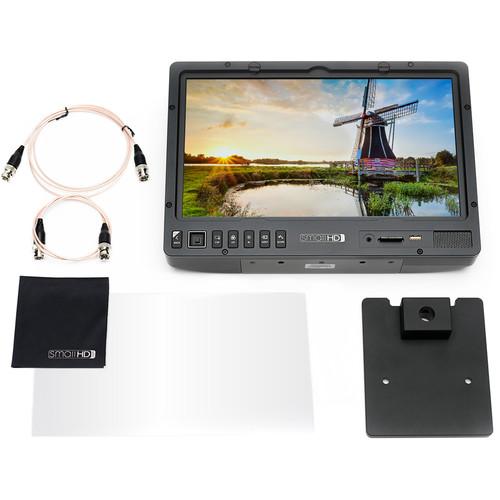 Contents of the user manual for the SmallHD 1303 HDR Value Bundle
- Product category: Production Monitors SmallHD
- Brand: SmallHD
- Description and content of package
- Technical information and basic settings
- Frequently asked questions – FAQ
- Troubleshooting (does not switch on, does not respond, error message, what do I do if...)
- Authorized service for SmallHD Production Monitors
|
User manual for the SmallHD 1303 HDR Value Bundle contain basic instructions
that need to be followed during installation and operation.
Before starting your appliance, the user manual should be read through carefully.
Follow all the safety instructions and warnings, and be guided by the given recommendations.
User manual is an integral part of any SmallHD product,
and if it is sold or transferred, they should be handed over jointly with the product.
Following the instructions for use is an essential prerequisite for protecting
health and property during use, as well as recognition of liability on the part of the manufacturer
for possible defects should you make a warranty claim. Download an official SmallHD user manual in which you will find instructions on how to install, use, maintain and service your product.
And do not forget – unsuitable use of a SmallHD product will considerably shorten its lifespan!
|
Product description The SmallHD 1303 HDR Value Bundle provides you with a 13" 1500 cd/m² monitor, a table mount, two different screen protectors, two thin BNC cables, and a microfiber cleaning cloth. The monitor features 1920 x 1080 resolution, supports HDR, and is equipped with SDI and HDMI loop-through inputs/outputs. The monitor also supports SmallHD's innovative Page Builder OS so you can quickly choose between menu settings and see the results of your choices by swiping between them.
The monitor has provisions for you to add your choice of screen protectors, and this bundle includes an impact-resistant polycarbonate screen protector and an Ultra Matte screen protector. The two included BNC cables are thin and flexible, and enable you to feed the monitor and loop the output to an SDI-compatible monitor. An included microfiber cleaning cloth is included for wiping the screen. - 1303 HDR 13" Production Monitor
- 1300 Series Announcement
- Torture Test- HDR Production Monitors by SmallHD
See beyond the restricted color and contrast of conventional monitoring with the SmallHD 1303 HDR 13" Production Monitor. Featuring HDR preview backed by a 10-bit Color Intelligence engine with calibration capabilities, the 1303 can display a large brightness range, encompassing log formats and other expanded-range picture styles. The 1500 cd/m², daylight-viewable, 1920x1080 Full HD resolution display panel can be driven by one of two SDI inputs or an HDMI input. Each input has a loop output for connecting other gear in-line without the need for a splitter. All functionality of this monitor is accessed via the innovative Page Builder OS. By implementing full aluminum construction and the provision for separately available user-replaceable polycarbonate screen protectors, SmallHD built this monitor to survive the rigors of production in studios and in the field. - Page Builder OS
- Originally featured in the 500 and 700-series models, and extrapolated for the Production Monitor series, the Page Builder OS is an intuitive graphical user interface (GUI) that puts all of the advanced functionality of the 1303 at your fingertips. Rather than have confusing menus, this GUI allows you to selectively apply monitoring tools such as waveforms, vectorscopes, multiview, and focusing aids to up to 4 different "pages". These pages can be easily flipped through using the joystick. The buttons on the front panel can also toggle monitoring tools on and off for each page.
- ColorFlow 3D LUT Processing
- In order to keep your images consistent from production through to post-production, ColorFlow allows you to import 3D LUTs and display the treated image side-by-side with the untreated image to correctly gauge exposure while visualizing what is being recorded by the camera. Side-by-side preview can also be used with the HDR preview function. Separate LUT-treated images can be sent downstream over SDI and HDMI so you can have the 1303 display a log image or LUT-treated image, while the director or client monitors connected to the outputs can receive images treated with a different LUT. An image-capture function saves a still frame from the incoming video stream onto an SD card and also records the applied 3D LUT for post-production reference.
- Color Intelligence Engine
- When a separately available color probe is connected to the monitor via USB, the SmallHD 1303 can automatically adjust a 10-bit 3D calibration LUT for maintaining accurate color reproduction over the life of the monitor.
- RapidRail Shoe-Mount System
- Quickly secure and detach accessories such as wireless units to the rear of the monitor using standard shoe-mount rails. This saves time over traditional screw-mounted methods and keeps your setup clean and neat. If required these accessories can be powered straight off the monitor using the integrated 12V LEMO power output or the 3 USB ports.
- Power Options
- Separately available V-mount or Gold-mount battery plates can be attached to the rear of the display. A mounted battery can power the monitor as well as attached accessories through the 12V LEMO connection. The USB ports on the rear of the monitor can also power accessories with a maximum draw of 0.5 amps per port.
UPC: 850324007458 - Ultra Matte Screen Protector for 1300 Series Monitors This SmallHD Ultra Matte Screen Protector for 1300 Series Monitors is flexible and features anti-reflection properties that minimize glare. It protects your screen from incidental contact, scratches, and wear. However, it does not provide impact protection to your screen. UPC: 855534007472
- Thin BNC Cable (24") At only 2.75mm in diameter this Thin BNC Cable from SmallHD will snake around nearly any component you have in your rig, perfect for use in compact camera setups with an EVF or on-camera monitor which uses SDI. UPC: 857497005960
- Thin BNC Cable (48") At only 2.75mm in diameter this Thin BNC Cable from SmallHD will snake around nearly any component you have in your rig, perfect for use in compact camera setups with an EVF or on-camera monitor which uses SDI. UPC: 857497005977
- Microfiber Cleaning Cloth Made from a non-abrasive material, this Microfiber Cleaning Cloth from SmallHD is a safe option for cleaning glass surfaces and coatings on a monitor or camera. It measures approximately 7 x 7" and is easily stored in a bag or pocket when not in use. UPC: 850246006126
- Smallhd 13" Table Stand
- Screen Impact Protector for 1300 Series Monitors
In the Box Bundle Items 1303 HDR 13" Production Monitor zvaqxvwzducr Smallhd 13" Table Stand Screen Impact Protector for 1300 Series Monitors Ultra Matte Screen Protector for 1300 Series Monitors zvaqxvwzducr Thin BNC Cable (24") Thin BNC Cable (48") Microfiber Cleaning Cloth Table of Contents
|
Upload User Manual
Have you got an user manual for the SmallHD 1303 HDR Value Bundle in electronic form? Please send it to us and help us expand our library of instruction manuals.
Thank you, too, on behalf of other users.
To upload the product manual, we first need to check and make sure you are not a robot. After that, your "Submit Link" or "Upload File" will appear.
Technical parameters - 1303 HDR 13" Production Monitor
| | | Panel Type | IPS | | Screen Size | 13" / 33 cm | | Resolution | 1920 x 1080 | | Pixel Density | 170 PPI | | Aspect Ratio | 16:9 | | Active Area | 11.59 x 6.52 | | Brightness | 1500 cd/m² | | Contrast Ratio | 1140:1 | | Color Gamut | 100% REC709 | | Bit Depth | 10-bit | | Viewing Angle | 178° | | Backlight Type | LED (adjustable) | | | | Video I/O | Inputs
2 x SDI
1 x HDMI
Outputs
2 x SDI
1 x HDMI | | Input Formats | SDI: 8-bit YCC 4:2:2
1080p23.98/24/25/29.97/30/50/59.94/60
1080PsF23.98/24/25/29.97/30
1080i50/59.94/60 (high-speed: 1080i100/119.88/120)
720p23.98/24/25/29.97/30/50/59.94/60
HDMI: 8-bit YCC 4:2:2, 8/10/12-bit RGB and YCC 4:4:4
1080p23.98/24/25/29.97/30/50/59.94/60
1080PsF23.98/24/25/29.97/30
1080i50/59.94/60 (high-speed: 1080i100/119.88/120)
720p23.98/24/25/29.97/30/50/59.94/60
576p50 (high-speed 576p100)
480p59.94/60 (high-speed 480p119.88/120)
Audio: HDMI and SDI embedded | | Output Formats | SDI: 8-bit YCC 4:2:2
1080p23.98/24/25/29.97/30/50/59.94/60
1080PsF23.98/24/25/29.97/30
1080i50/59.94/60 (high-speed: 1080i100/119.88/120)
720p23.98/24/25/29.97/30/50/59.94/60
HDMI: 8-bit YCC 4:2:2, 8-bit RGB and YCC 4:4:4
1080p23.98/24/25/29.97/30/50/59.94/60
1080PsF23.98/24/25/29.97/30
1080i50/59.94/60 (high-speed: 1080i100/119.88/120)
720p23.98/24/25/29.97/30/50/59.94/60
576p50 (high-speed 576p100)
480p59.94/60 (high-speed 480p119.88/120) | | | | Data I/O | 1 x SD card slot for LUTs, captured images, firmware updates | | Power | Inputs
1 x IEC AC input
1 x 4-pin XLR
Outputs
1 x 12 VDC LEMO
3 x USB (0.5 A max output) | | Compliance | FCC, IC, CE, RoHS | | Operating Temperature | 32 to 100°F / 0 to 37.8°C | | Storage Temperature | Not specified by manufacturer | | Dimensions | Not specified by manufacturer | | Weight | 8 lb / 3.6 kg | | | | Box Dimensions (LxWxH) | 18.0 x 13.5 x 9.5" | - Screen Impact Protector for 1300 Series Monitors
| | | Box Dimensions (LxWxH) | 12.25 x 8.8 x 0.65" | - Ultra Matte Screen Protector for 1300 Series Monitors
| Dimensions | 12.0 x 6.9" / 30.5 x 17.5 cm | | | | Box Dimensions (LxWxH) | 12.5 x 7.4 x 0.1" | - Thin BNC Cable (24")
| Cable Length | 2' / 0.6 m | | Weight | 0.1 lb / 0.0 kg | | | | Box Dimensions (LxWxH) | 7.4 x 5.3 x 0.5" | - Thin BNC Cable (48")
| Cable Length | 4' / 1.2 m | | Weight | 0.1 lb / 0.1 kg | | | | Box Dimensions (LxWxH) | 2.5 x 1.5 x 0.85" | - Microfiber Cleaning Cloth
| | | Box Dimensions (LxWxH) | 4.0 x 3.1 x 0.2" |
Rating100% users recommend this product to others. And what about you?

This product has already been rated by 64 owners. Add your rating and experience with the product.
Discussion
 Ask our technicians if you have a problem with your settings,
or if anything is unclear in the user manual you have downloaded.
You can make use of our moderated discussion.
The discussion is public and helps other users of our website who may be encountering similar problems.
Ask our technicians if you have a problem with your settings,
or if anything is unclear in the user manual you have downloaded.
You can make use of our moderated discussion.
The discussion is public and helps other users of our website who may be encountering similar problems.
The discussion is empty - enter the first post
Post a new topic / query / comment:
|
|
|
| Request for user manual |
You can’t find the operation manual you are looking for? Let us know and we will try to add the missing manual:
I’m looking for a manual / Request for manual
Current requests for instruction manuals:
Call Of Duty World War Two For Xbox...
controller stratus XL...
stratus XL...
smart whatch serie S11 42mm...
Allen & Heath SQ-6 manual...
|
| Discussion |
Latest contributions to the discussion:
AEW R 4100
Name: MAURICIO ANGARITA
Audio-Technica AEW-R4100 UHF Diversity Receiver for
AEW R 4100 has the mute function blocked and does not allow audio to pass. I tried several times to turn off the mute from the transmitter but it does nothing, the mute stays on. Solution?
Thank you...
Instructions for assembling the 2015 Forecast Image Master Consoles GC3-A
Name: mike elam
Forecast Consoles GC3-A ImageMaster Editing Console
Looking for instructions for assembling this console. ...
EMPTY TONER ERROR MESSAGE AFTER REPLACING TONER
Name: LINDA BAD YELLOW EYES
Brother TN223BK Standard-Yield Toner
I HAD TO CHANGE OUT ALL THREE TONERS DUE TO LEAKS IN THE YELLOW AND CYAN. AFTER I REPLACED THEM, THE MACHINE KEEPS GIVING ME AN EMPTY TONER ERROR MESSAGE. HELP!!...
PS480D 20/24 pin Switching 480W Power Supply
Name: swkargo
Logisys 480W Power Supply
This item states in can run -5vdc .It is NOT listed on the board or I beleive is r4 is missing the resitior. Any body have thid issue. Shawn
...
Help needed
Name: Ann Carter
SanDisk 1TB Extreme Portable USB 3.1
When I click the link to download the user manual for my Sandisk Extreme external hard drive, it gives me the manual for the LG Cricket. Can you please change the link so I can download the Sandisk manual and begin using this drive? Thank you....
|
|


