User Manual for Smart-AVI XTWALL UXGA Video, Stereo Audio, RS-232, and IR Extender Click to enlarge the picture
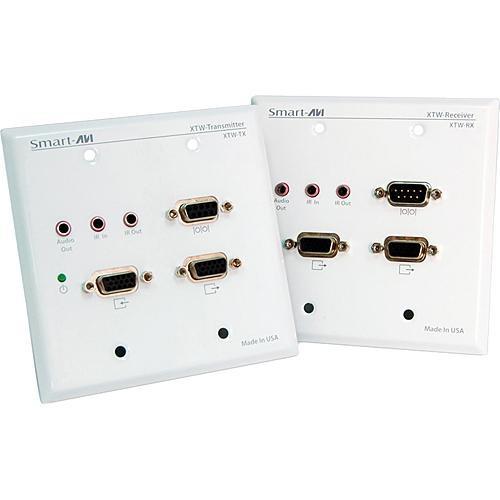 Contents of the user manual for the Smart-AVI XTWALL UXGA Video, Stereo Audio,
- Product category: Wall Plates & Installation Boxes Smart-AVI
- Brand: Smart-AVI
- Description and content of package
- Technical information and basic settings
- Frequently asked questions – FAQ
- Troubleshooting (does not switch on, does not respond, error message, what do I do if...)
- Authorized service for Smart-AVI Wall Plates & Installation Boxes
|
User manual for the Smart-AVI XTWALL UXGA Video, Stereo Audio, contain basic instructions
that need to be followed during installation and operation.
Before starting your appliance, the user manual should be read through carefully.
Follow all the safety instructions and warnings, and be guided by the given recommendations.
User manual is an integral part of any Smart-AVI product,
and if it is sold or transferred, they should be handed over jointly with the product.
Following the instructions for use is an essential prerequisite for protecting
health and property during use, as well as recognition of liability on the part of the manufacturer
for possible defects should you make a warranty claim. Download an official Smart-AVI user manual in which you will find instructions on how to install, use, maintain and service your product.
And do not forget – unsuitable use of a Smart-AVI product will considerably shorten its lifespan!
|
Product description Designed and built with both professional video facility installation pundits and HDTV home cinema enthusiasts in mind, the Smart-AVI XTWALL is a two-gang wall plate transmitter and receiver kit that offers the ability to extend UXGA video, stereo audio, RS-232, and IR signals over twisted pair (CAT5) cabling. It's HDTV (720p, 1080i, 1080p) compatible, supports resolutions up to 1900x1200, and offers a 300MHz bandwidth. This kit features (2) two-gang wall plates; (1) transmitter unit, (1) receiving unit that offers a dual-screen output, and (2) eternal power supplies. The XTWALL features all metal enclosures, IR command to single or multiple displays, and works with both MAC and PC. When paired together, the Smart-AVI XTWALL kit offers a system range of up to 1000' (300 m); it's an ideal solution for sending computer graphics video, audio, serial and IR control signals over unshielded twisted pair (UTP) cabling such as standard CAT5, 5e, 6, 7, or 8 (Ethernet network cable). - Supports High-Resolution Signals
- • Sends high-resolution VGA, stereo audio (line-level), RS232 or IR
• Supports high resolution video up to 1900x1200 (up to 300MHz bandwidth)
• HD compatible (720p, 1080i, 1080p)
• Supports dual screens on receiver - Superb Functionality
- • Uses easy to install, inexpensive CAT-5/5e/6/7/8 cabling
• Each output reaches up to 1000' (300 m)
• High ground loop immunity
• IR command to single or multiple displays
• Compatible with VGA, XGA, Sun, MAC and SGI
• Sync Format / Polarity Preservation
• Designated trimmer in the remote unit to compensate for cable length - Notable Features
- • Wall plate design for custom integrated look
• Compact metal case enclosure
• Includes external power supply
• Includes 6' male to male VGA cable - Applications
- • XTWALL enhances any presentation from commercial products to corporate financial data
• Show rooms, board rooms, trade shows and window displays
• Data Broadcasting such as news, stock prices, sports results, and flight information can be broadcast in real time to various monitors and/or speakers
• Learning and training; educational presentations to multiple locations, in schools and in other training facilities - IR Options
- • IR Eye Receiver (model SM-EYE)
• IR Emitter (model SM-LED) In the Box Smart-AVI XTWALL UXGA Video, Stereo Audio, RS-232, and IR Extender Transmitter Plate (XTW-TX) Receiver Plate (XTW-RX) 2 x Power Supplies HDD 15 Male to Male VGA Cable (6') 1-Year Limited Warranty Table of Contents
|
Upload User Manual
Have you got an user manual for the Smart-AVI XTWALL UXGA Video, Stereo Audio, RS-232, and IR Extender in electronic form? Please send it to us and help us expand our library of instruction manuals.
Thank you, too, on behalf of other users.
To upload the product manual, we first need to check and make sure you are not a robot. After that, your "Submit Link" or "Upload File" will appear.
Technical parametersSmart-AVI XTWALL Specs | Type | Transmitter/Receiver | | Supports | Video
RGBHV, RGsB, YUV, Y/C, CVBS (NTSC, PAL, SECAM), HDTV (1080p, 1080i, 720p)
Audio
Line-Level Stereo | | Resolution | Up to SXGA and 1900 x 1200 | | Connectivity | Front-Panel: 15-pin female HD, RS-232 male 9-pin D-Sub, 3.5mm Mini-Jack Unbalanced Stereo Audio, 3.5mm Mini-Jack IR Port, 2-Pole T-Block for Power
Rear-Panel: RJ-45 Connector (CAT5) | | Loop-Through | No | | Range | 1000' (300 m) | | Controls | Yes, Receiver RGB Channel Tuning | | Switch | None | | Compatibility | RJ-45 (CAT5, CAT5e, 6, 7, 8) | | Requirements | External Power (included) | | | | Power Requirements | 5VDC @ 500mA max. (supplied by power adapter) | | Dimensions (WxHxD) | 5.3 x 3.5 x 0.9" (135 x 90 x 23mm) | | Weight | 0.8 lb (0.36kg) | | Color | Aluminum |
Rating100% users recommend this product to others. And what about you?

This product has already been rated by 74 owners. Add your rating and experience with the product.
Discussion
 Ask our technicians if you have a problem with your settings,
or if anything is unclear in the user manual you have downloaded.
You can make use of our moderated discussion.
The discussion is public and helps other users of our website who may be encountering similar problems.
Ask our technicians if you have a problem with your settings,
or if anything is unclear in the user manual you have downloaded.
You can make use of our moderated discussion.
The discussion is public and helps other users of our website who may be encountering similar problems.
The discussion is empty - enter the first post
Post a new topic / query / comment:
|
|


