|
User Manual for Solid State Logic Sigma - Remote Controlled Analog Summing Mix Engine Click to enlarge the picture
 Contents of the user manual for the Solid State Logic Sigma - Remote
- Product category: Analog Recording Mixers Solid State Logic
- Brand: Solid State Logic
- Description and content of package
- Technical information and basic settings
- Frequently asked questions – FAQ
- Troubleshooting (does not switch on, does not respond, error message, what do I do if...)
- Authorized service for Solid State Logic Analog Recording Mixers
 |
User manual for the Solid State Logic Sigma - Remote contain basic instructions
that need to be followed during installation and operation.
Before starting your appliance, the user manual should be read through carefully.
Follow all the safety instructions and warnings, and be guided by the given recommendations.
User manual is an integral part of any Solid State Logic product,
and if it is sold or transferred, they should be handed over jointly with the product.
Following the instructions for use is an essential prerequisite for protecting
health and property during use, as well as recognition of liability on the part of the manufacturer
for possible defects should you make a warranty claim. Download an official Solid State Logic user manual in which you will find instructions on how to install, use, maintain and service your product.
And do not forget – unsuitable use of a Solid State Logic product will considerably shorten its lifespan!
|
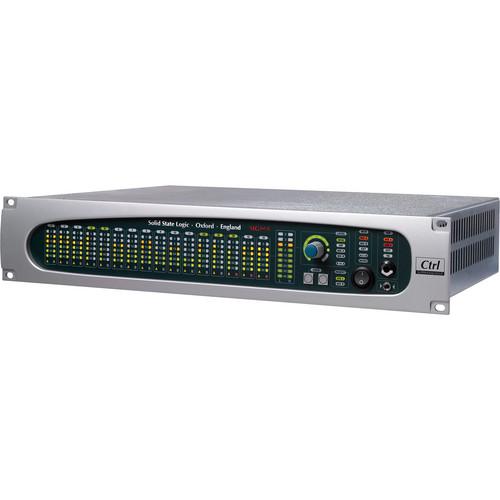
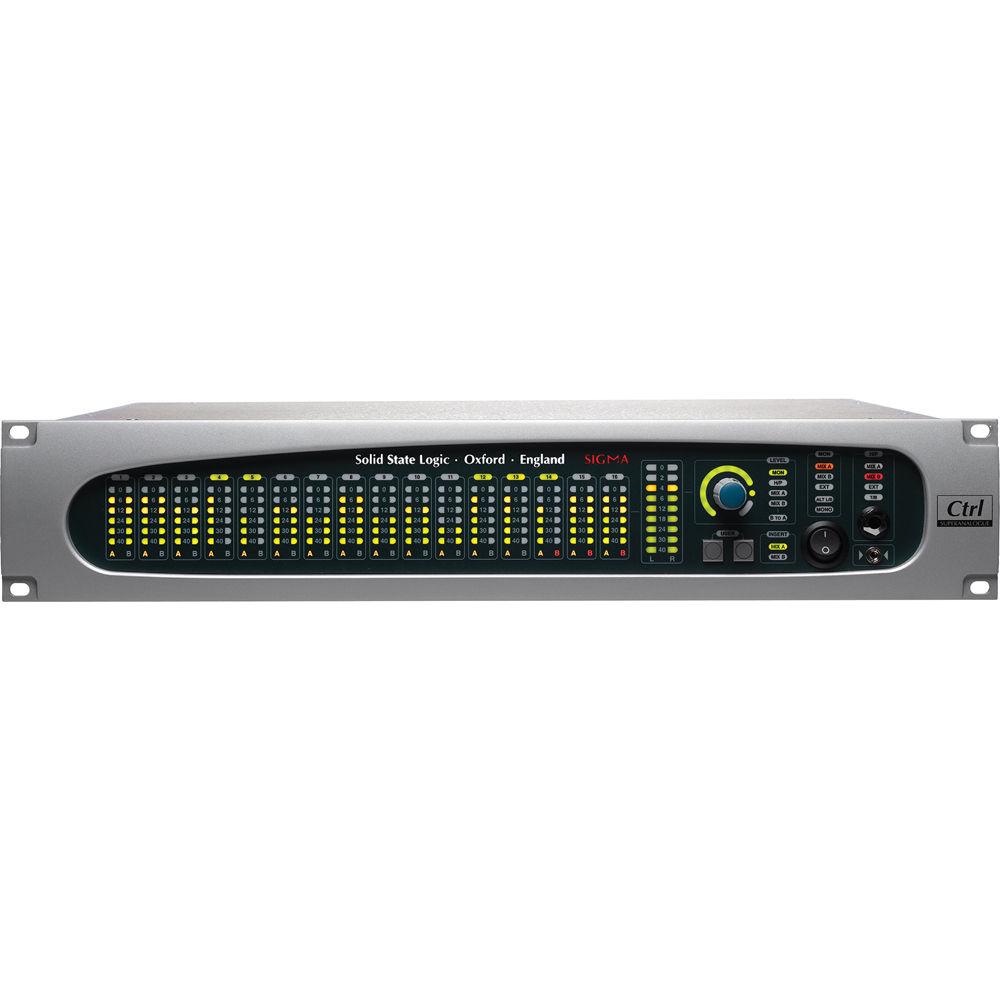
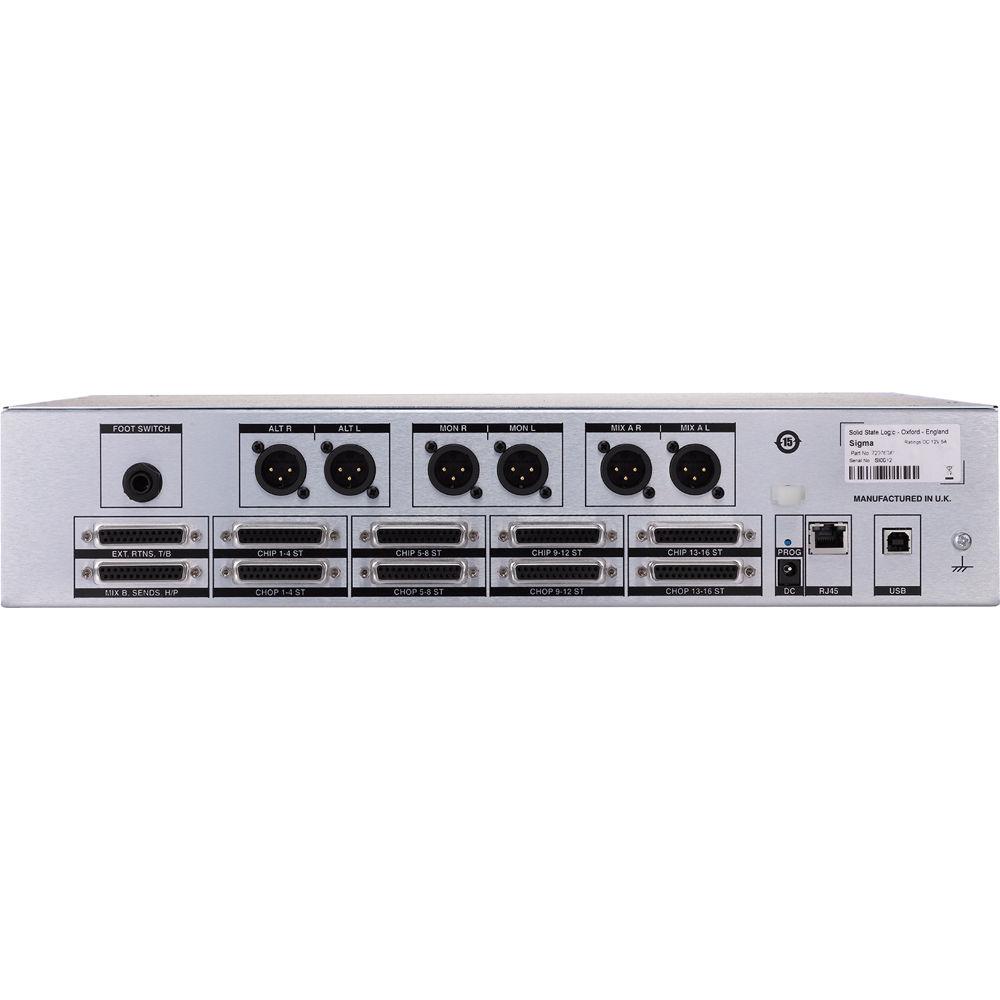
Product description The Sigma from Solid State Logic is a remote controlled analog summing mix engine that brings the sound of an SSL console together with the workflow advantages of mixing in a DAW. Sigma uses the same Superanalogue technology as SSL's Duality and AWS consoles, offering analog summing with an extended frequency response, precision stereo imaging, depth, and clarity. Additionally, the unit can be controlled remotely using MIDI control and automation data from a DAW or hardware control surface.Sigma's rear panel offers 16 inputs via DB25 that are switchable between mono and stereo, offering a total of 32 channels at mixdown. Each input also features an individual direct output for printing individual channels back to your DAW. Two pairs of stereo mix busses, each with dedicated outputs and stereo inserts for implementing parallel compression and convenient printing of stems back to the DAW. Additionally, Mix Bus B can be routed into Mix Bus A during final mixdown. The studio monitor section offers two pairs of monitor outputs; Mains and Alternative. A separate artist monitor output features a comprehensive matrix system for signal routing with front and rear panel output connections.The front panel offers accurate LED metering for all inputs and the master meter. Pressing the push-button rotary control cycles through monitors, headphone, Mix A, and Mix B, while turning the knob adjusts the level control. The LED ring around the level control offers visual feedback of level setting with the red LED indicating 0 dB. All levels are scalable between +18, +22, or +24 dBu. The two user buttons offer four controls and are user customizable. By default, they are set up to control main and alternative monitors, mono check, loud speaker mute, and loud speaker dim. A 1/8" stereo jack input on the bottom right of the interface offers connections for any audio playback device, such as MP3 players and iOS devices.While much of Sigma's controls are available from the front panel interface, the system offers complete control through a web browser interface. The Channels page is used to configure each of the 16 channels, while the Master page is used for monitor configuration, user button settings, and MIDI learn functionality. The Settings page provides additional configurations with DAW protocols, controller setup, network connections, and miscellaneous settings, while all settings can be saved and recalled. The web browser interface also allows the unit to be wirelessly controlled via iOS devices or other tablets.Once the system is set up, Sigma is controlled by the first 16 channels of your DAW, allowing for full automated control over the mix engine. Outboard processors are typically connected inline between an optional audio interface and Sigma. The DAW controlled mix engine circumvents the issue of DAW volume changes affecting outboard signal processors, like compressors, during mixing operations. The Sigma ships with an AC power adapter. - Key Features
-
- Advanced DAW automation-driven SSL SuperAnalogue mix engine
- Works with all major DAW's including Pro Tools, Logic, Cubase/Nuendo, Ableton Live
- 16 flexible channels individually switchable between stereo or mono for up to 32 channels at mixdown
- 2 stereo mix busses with individual stereo insert points
- Independent main and alternate monitor outputs
- Direct outputs on all channels
- Talkback facility with adjustable dim level
- Intuitive cross platform set-up and configuration software interface
- High speed external MIDI control via single Ethernet cable
- Sigma Setup Concepts
-
- Sigma is an analogue summing unit which can be controlled remotely using MIDI control and automation data from a DAW or a hardware control surface
- Sigma uses an application called 'IP MIDI' which runs on your computer and lets you use a standard Ethernet cable connected between your computer and Sigma to carry MIDI information. You need to install IP MIDI before you can use Sigma
- Sigma can also be remote controlled using a software browser. This browser is not a piece of software you install on your computer; it is actually a set of web pages which are hosted inside Sigma. You access those web pages using a standard internet browser such as Chrome, Firefox, Internet Explorer, etc. To access the Sigma Browser 'software' you simply open a tab in your internet browser and type in a number (the IP Address of your Sigma unit). This address can be bookmarked like any normal web page
- Both the Sigma browser and IP MIDI require that a network connection exists (via Ethernet) between your computer and Sigma. This is set up in a similar way to configuring a wireless hub and requires selection of appropriate settings in your network control panel in your computer
- To use a tablet/smartphone device (iPad, etc) to control Sigma you will need an optional wireless router, to which your computer and Sigma are already connected (using optional Ethernet cables). You connect your tablet via your WI-FI's wireless router/accent point, which allows you to connect to and control Sigma's web pages, in a tab within your web browser. This is necessary as Sigma does not have a wireless connection of its own
- The network and MIDI control aspects of Sigma are entirely separate to the audio side of Sigma. All audio connections are made between the Sigma unit and an optional computer audio interface/converters
In the Box Solid State Logic Sigma - Remote Controlled Analog Summing Mix Engine Power Adapter Standard Power Cord 6' Ethernet Cable Limited 2-Year Warranty Table of Contents
|
Upload User Manual
Have you got an user manual for the Solid State Logic Sigma - Remote Controlled Analog Summing Mix Engine in electronic form? Please send it to us and help us expand our library of instruction manuals.
Thank you, too, on behalf of other users.
To upload the product manual, we first need to check and make sure you are not a robot. After that, your "Submit Link" or "Upload File" will appear.
Technical parametersSolid State Logic Sigma Specs | Connections | Analog I/O: 25-Pin D-type socket, balanced, Zin > 10 kOhm, Zo ≈ 100 ohm / 3-pin XLR-M, balanced, Zo ≈ 100 ohm
Headphones: Stereo 1/4" jack socket, Zo ≈ 75 ohm
Footswitch Input: Stereo 1/4" jack socket (1 circuit)
iJack: Stereo 3.5mm jack socket, Zi ≈ 10k
Network: 8P8c Modular connector; 'RJ-45' type (100bT, Cat5)
USB: 1 x type-B chassis socket (SSL diagnostic use only) | | Maximum Level | Maximum I/O Level: +18 dBu, +22 dBu or 24 dBu | | Frequency Response | 20 Hz to 40 kHz (±0.3 dB) | | THD + N | < 0.025% (20 Hz to 20 kHz) | | Noise | CHIP to CHOP: < -83 dBu @ +24 dBu (20 Hz to 20 kHz)
CHIP to MIX A: < -75 dBu @ +24 dBu (20 Hz to 20 kHz)
(stereo, all channels routed) | | Power Requirement | Power Supply: IEC320 3-pin connector, 100 to 240 VAC, 50/60 Hz
DC Power: 2 mm DC power jack, +12 VDC, < 3 A | | Temperature | Operating: 41 to 86°F / 5 to 30°C
Non-operating: -4 to 122°F / -20 to 50°C
Max. gradient: 59°F / 15°C/ hour | | Relative Humidity | Operating: 20 to 80%
Non-Operating: 5 to 90%
Max. wet bulb: 84°F / 29°C
(non-condensing) | | Vibration | Operating: < 0.2 G (3 to 100 Hz)
Non-Operating: < 0.4 G (3 to 100 Hz) | | Shock | Operating: < 2 G (10 ms max.)
Non-Operating: < 10 G (10 ms max.) | | Altitude | Operating: 0 to 3000 m
Non-operating: 0 to 12000 m
(above sea level) | | Electromagnetic Compatibility | EN55103-1:2009, EN55103-2:2009
Environment E4
Initial in-rush current 10 A
5 sec in-rush current 10 A
Braid-screened cables should be used where applicable
Star Quad cables should be used where applicable | | EMC | Line level inputs and outputs
Measure at mid-gain, noise < -56 dBu | | Dimensions (D x H x W) | 12.8 x 3.5 x 17.0" / 32.4 x 8.9 x 43.2 cm | | Weight | 11.0 lb / 5.0 kg |
Rating60% users recommend this product to others. And what about you?

This product has already been rated by 99 owners. Add your rating and experience with the product.
Discussion
 Ask our technicians if you have a problem with your settings,
or if anything is unclear in the user manual you have downloaded.
You can make use of our moderated discussion.
The discussion is public and helps other users of our website who may be encountering similar problems.
Ask our technicians if you have a problem with your settings,
or if anything is unclear in the user manual you have downloaded.
You can make use of our moderated discussion.
The discussion is public and helps other users of our website who may be encountering similar problems.
The discussion is empty - enter the first post
Post a new topic / query / comment:
|
|
|
| Request for user manual |
You can’t find the operation manual you are looking for? Let us know and we will try to add the missing manual:
I’m looking for a manual / Request for manual
Current requests for instruction manuals:
Call Of Duty World War Two For Xbox...
controller stratus XL...
stratus XL...
smart whatch serie S11 42mm...
Allen & Heath SQ-6 manual...
|
| Discussion |
Latest contributions to the discussion:
AEW R 4100
Name: MAURICIO ANGARITA
Audio-Technica AEW-R4100 UHF Diversity Receiver for
AEW R 4100 has the mute function blocked and does not allow audio to pass. I tried several times to turn off the mute from the transmitter but it does nothing, the mute stays on. Solution?
Thank you...
Instructions for assembling the 2015 Forecast Image Master Consoles GC3-A
Name: mike elam
Forecast Consoles GC3-A ImageMaster Editing Console
Looking for instructions for assembling this console. ...
EMPTY TONER ERROR MESSAGE AFTER REPLACING TONER
Name: LINDA BAD YELLOW EYES
Brother TN223BK Standard-Yield Toner
I HAD TO CHANGE OUT ALL THREE TONERS DUE TO LEAKS IN THE YELLOW AND CYAN. AFTER I REPLACED THEM, THE MACHINE KEEPS GIVING ME AN EMPTY TONER ERROR MESSAGE. HELP!!...
PS480D 20/24 pin Switching 480W Power Supply
Name: swkargo
Logisys 480W Power Supply
This item states in can run -5vdc .It is NOT listed on the board or I beleive is r4 is missing the resitior. Any body have thid issue. Shawn
...
Help needed
Name: Ann Carter
SanDisk 1TB Extreme Portable USB 3.1
When I click the link to download the user manual for my Sandisk Extreme external hard drive, it gives me the manual for the LG Cricket. Can you please change the link so I can download the Sandisk manual and begin using this drive? Thank you....
|
|


