User Manual for Sonos Connect:Amp Click to enlarge the picture
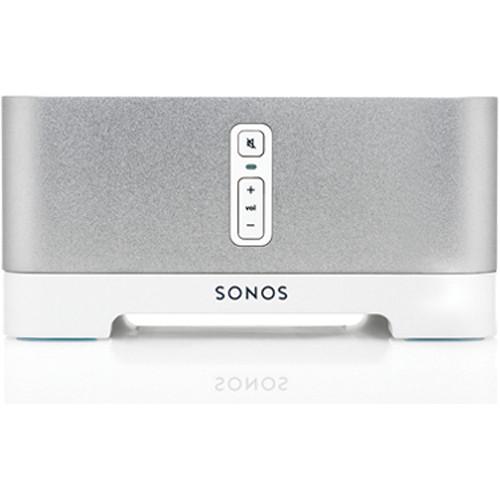 Contents of the user manual for the Sonos Connect:Amp
- Product category: Amplifiers Sonos
- Brand: Sonos
- Description and content of package
- Technical information and basic settings
- Frequently asked questions – FAQ
- Troubleshooting (does not switch on, does not respond, error message, what do I do if...)
- Authorized service for Sonos Amplifiers
 |
User manual for the Sonos Connect:Amp contain basic instructions
that need to be followed during installation and operation.
Before starting your appliance, the user manual should be read through carefully.
Follow all the safety instructions and warnings, and be guided by the given recommendations.
User manual is an integral part of any Sonos product,
and if it is sold or transferred, they should be handed over jointly with the product.
Following the instructions for use is an essential prerequisite for protecting
health and property during use, as well as recognition of liability on the part of the manufacturer
for possible defects should you make a warranty claim. Download an official Sonos user manual in which you will find instructions on how to install, use, maintain and service your product.
And do not forget – unsuitable use of a Sonos product will considerably shorten its lifespan!
|
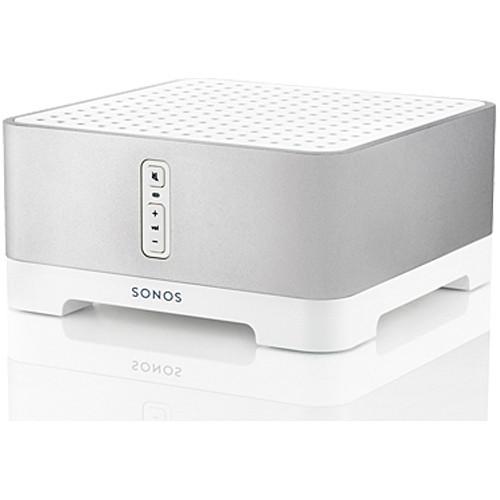
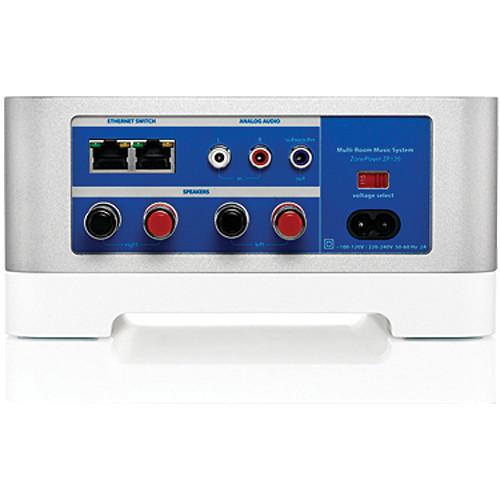
Product description The Sonos Connect:Amp includes two pairs of speaker binding posts, a subwoofer output, and an analog stereo input. As with other Sonos products, it can be controlled on an iPhone, iPod touch, iPad, Android phone, or many Android tablets (including the Kindle Fire) by downloading a free app. The Sonos Connect:Amp provides streaming digital audio to any room--you just need to supply the speakers. The Connect:Amp can go anywhere, delivering music to any room in your house, wirelessly. Players and controllers establish their own secure wireless mesh network that delivers the extensive range and superior performance you need to get music all over your house. Play music stored on up to 16 PCs, Macs or NAS (Network Attached Storage) devices on your home network, supporting the most popular audio formats, from iTunes to MP3. - Apple AirPlay Music Sources
- Connect an Apple AirPlay music source, such as an Apple AirPort Express to any Sonos player with line-in. Enjoy songs from your iPhone, iPad or iPod touch in any or every room of the home. Connect an Apple AirPort Express to any Sonos player via line-in and stream songs from your iPhone, iPad™ or iPod touch all over your home
- Built-In, Powerful Digital Amplifier
- Powers large or small speakers with 55W per channel
- Class-D Amplifier
- State of the art, great sounding amplifier is small, lightweight and very energy efficient
- Radiant Cooling
- Operates silently - all you hear is the music, as the amplifier is kept cool by the aluminum casing, not by a noisy fan
- Tone and Volume Controls Adjustable for Each Room
- Optimize sound performance for each room using room-specific bass, treble, balance, and loudness controls. Adjust volume by individual room or by groups of rooms
- Subwoofer Output with Automatic Crossover
- When adding a subwoofer, the Connect:Amp automatically adjusts the output to send the low frequencies to the subwoofer and the high frequencies to the speaker
- Pre-Loaded Internet Radio Stations - Free of Charge
- Get over 100,000 free radio stations, shows, and podcasts -- all for free. And you can tune in without turning on your computer. Browse for stations or type in specific call letters or a radio host you love
- Endless Music from the Most Popular Online Music Services
- Sonos works seamlessly with AUPEO!, Deezer, iHeartRadio, JUKE, Last.fm, MOG, Pandora, Rdio, Rhapsody, SiriusXM Internet Radio, Slacker Radio, Songl, Spotify, Stitcher SmartRadio, TuneIn, Wolfgang's Vault, WiMP, and downloads from any service offering DRM-free tracks (Service availability varies by region)
- Computer-Free Music Playback
- Get instant access to millions of songs and thousands of radio stations - without ripping, downloading or turning on a computer. Sonos connects directly to these services over the Internet and then streams the music to the rooms of your choice
- Play the Music on Your Computer in Any Room
- Play music stored on up to 16 PCs, Macs or NAS (Network Attached Storage) devices on your home network, supporting the most popular audio formats, from iTunes to MP3
- Stream Music from an iPhone, iPad or iPod touch
- Simply connect an Apple AirPort Express to any Sonos player with line-in and experience true multi-room AirPlay
- Listen to Music That's Stored on an iPod or iPhone
- Dock, charge and wirelessly play the music from an iPod or iPhone with the Sonos Dock (sold separately)
- Play Music and Audio from a CD or MP3 Player, TV and More Throughout the Home
- An analog audio input lets you connect to an external audio source (such as a CD or MP3 player, TV, DVD, VCR, or radio) and play that music or audio on all Sonos players in the system
- Wake Up to Music
- Set the alarm and wake up to your favorite music or Internet radio station in one room, or all over the house. Just hit snooze to get a few minutes more sleep. Fall asleep to soothing music with the sleep timer
- Schedule Your Music
- Use the scheduler to play music at a specific time for a set duration - great for that 30-minute workout
- Easy Internet Connectivity for Other Products in Your House
- The Connect:Amp has a two-port Ethernet switch to bring standard Internet connectivity to your set-top box, DVR, PC, game console or NAS drive
- Includes Sonos Desktop Controller Software and Setup Software for Your Computer
- Control all your music and all your rooms from any computer or laptop in your house. Setup software facilitates music sharing so music folders on your hard drive can be shared across all Sonos players
- Front Panel Volume Controls
- Provides quick access to volume and mute controls when you don't have a controller in hand
- Control All Your Music and Rooms with Your Android Device, iPhone, iPod touch and iPad
- Free Sonos controller apps for Android, iPhone and iPad let you control your Sonos players, music on the Internet and your computer right from the palm of your hand. Download the apps for free on the iTunes App Store or Android Market
- Integrated, Multi-Room Control
- If you have multiple music players, you can control what music is playing in every room in your house, from anywhere in your house. Sonos controllers aren't tied to a specific player, so you can use any controller to control the music and the volume in all your rooms
- Find and Play Your Favorite Songs in an Instant
- Browse or search for songs and stations, choose the music, and control the volume from anywhere in the home
- Wireless Connectivity
- Android devices, iPhone, iPod touch, and iPad connect to your Sonos system through your home Wi-Fi network
- Includes Sonos Controller for Mac or PC
- Turn any Mac or PC desktop or laptop computer in your home into a controller. The software is included for free with every Sonos component
- Dedicated Sonos Control
- Increase your control with a dedicated touch screen Sonos Control featuring instant-on, dedicated buttons and long battery life (sold separately)
- Built-In Wireless Capability
- The Connect:Amp can go anywhere, delivering music to any room in your house, wirelessly. Players and controllers establish their own secure wireless mesh network that delivers the extensive range and superior performance you need to get music all over your house
- SonosNet Wireless Mesh Network Technology
- Provides whole-house coverage, ensures synchronous music playback, and avoids sources of wireless interference. Incorporating sophisticated MIMO (multiple input, multiple output) technology, SonosNet uses multiple antennas and radios together to boost signal strength and reach remote locations
Works with any mix of Sonos components
Compatible with all previous generations of Sonos players, Control, and Bridge - Play a Different Song in Every Room, at the Same Time
- Tune in to an Internet radio station in the bedroom, stream a music service in the kitchen and play a song from your music library in the living room - simultaneously
- Listen to the Same Song in Every Room, in Perfect Synchronization
- Play the same song in different rooms, simultaneously, without echoes or delays. Add or drop rooms from your rooms grouping and still be in sync
- Simple Setup
- No technical or wireless expertise required. Put a Connect:Amp in any room where you want music, then plug in and connect to speakers. The Sonos system setup software provides simple on-screen prompts on any controller. With the touch of a few buttons, you'll be playing music all over the house in minutes
- Expandable Wireless System
- Expand your music system room by room - without adding wires. Add new Sonos components with the press of a single button
- New Features and Music Services Delivered Automatically - and for Free
- The Sonos system keeps getting better over time with new features and music services. Once the Sonos music system has been registered, Sonos will automatically notify you when software updates are available. Simply press one button and your system updates itself
UPC: 180501001017 In the Box Sonos Connect:Amp (Formerly the ZonePlayer 120) Power Cord Flat Ethernet Cable Quick Start Guide with Setup CD (Windows XP SP2, Windows Vista or Windows 7; Mac OS X v10.4 or Higher, Including v10.6), Table of Contents
|
Upload User Manual
Have you got an user manual for the Sonos Connect:Amp in electronic form? Please send it to us and help us expand our library of instruction manuals.
Thank you, too, on behalf of other users.
To upload the product manual, we first need to check and make sure you are not a robot. After that, your "Submit Link" or "Upload File" will appear.
Technical parametersSonos Connect:Amp Specs | Line In | Auto-detecting analog (RCA) line-in connection | | Amplifier | Class-D. Rated output 110W RMS (2 x 55W continuous average power into 8 ohms, THD+N<0.02%) with both channels driven, 22Hz-20KHZ-AES17 measurement bandwidth | | Speaker Connectors | Spring binding posts (in North America the Connect:Amp has the combined spring binding post / banana jack connectors) | | Subwoofer Output | Auto detecting RCA type, 80Hz crossover | | Supported | Sonos works seamlessly with AUPEO!, Deezer, iHeartRadio, JUKE, Last.fm, MOG, Pandora, Rdio, Rhapsody, SiriusXM Internet Radio, Slacker Radio, Songl, Spotify, Stitcher SmartRadio, TuneIn, Wolfgang's Vault, WiMP, and downloads from any service offering DRM-free tracks (Service availability varies by region) | | Operating Systems | Windows XP SP3 and higher; Mac OS X v10.6 and higher; NAS (Network Attached Storage) devices supporting CIFS | | Internet Radio Supported | Streaming MP3, WMA | | Audio Formats Support | Support for compressed MP3, iTunes Plus, WMA (including purchased Windows Media downloads), AAC (MPEG4), AAC+, Ogg Vorbis, Audible (format 4), Apple Lossless, Flac (lossless) music files, as well as uncompressed WAV and AIFF files
Native support for 44.1kHz sample rates. Additional support for 48kHz, 32kHz, 24kHz, 22kHz, 16kHz, 11kHz, and 8kHz sample rates
Note: Apple Fairplay, WMA DRM and WMA Lossless formats not currently supported. Previously purchased Apple Fairplay DRM-protected songs may be upgraded | | Album Art Supported | JPEG, PNG, BMP, GIF | | Playback Modes | Crossfade, shuffle, repeat | | Playlists Supported | iTunes, Rhapsody, WinAmp, Windows Media Player, and MusicMatch (.m3u, .pls, .wpl) | | Wireless Connectivity | SonosNet, a secure AES encrypted, peer-to-peer wireless mesh network | | Network | 2-port switch (10/100Mbps, auto MDI/MDIX) allows Ethernet devices to connect through SonosNet | | Power Supply | AC 120-240, 50/60Hz, user-switchable | | Buttons | Volume and mute | | LED | Indicate Sonos component status and mute status | | Finish | Anodized precision machined extrusion aluminum case. Aluminum casing also facilitates passive cooling | | Language Support | Danish, Dutch, English, French, German, Italian, Japanese, Norwegian, Simplified Chinese, Spanish, and Swedish | | Temperature | Operating: 32-104°F (0-40°C)
Storage: 4-158°F (-20-70°C) | | Dimensions (H x W x D) | 3.5 x 7.3 x 8.2" (89 x 185 x 207mm) | | Weight | 5.1 lb. (2.3kg) | | | | Package Weight | 7.1 lb | | Box Dimensions (LxWxH) | 10.6 x 9.8 x 6.8" |
Rating98% users recommend this product to others. And what about you?

This product has already been rated by 93 owners. Add your rating and experience with the product.
Discussion
 Ask our technicians if you have a problem with your settings,
or if anything is unclear in the user manual you have downloaded.
You can make use of our moderated discussion.
The discussion is public and helps other users of our website who may be encountering similar problems.
Ask our technicians if you have a problem with your settings,
or if anything is unclear in the user manual you have downloaded.
You can make use of our moderated discussion.
The discussion is public and helps other users of our website who may be encountering similar problems.
The discussion is empty - enter the first post
Post a new topic / query / comment:
|
|


