|
User Manual for Sonos PLAYBAR Wireless Soundbar, Wireless Speaker Pair, and Wireless Subwoofer Kit Click to enlarge the picture
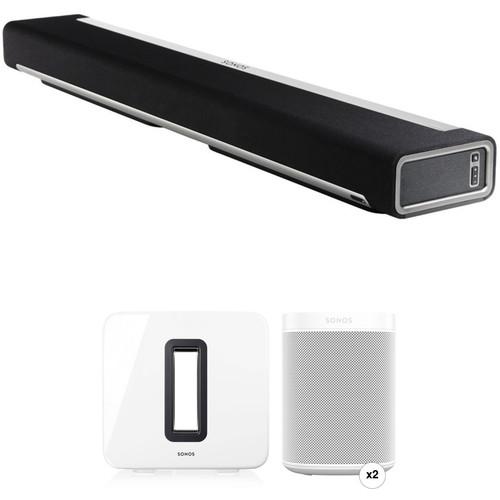 Contents of the user manual for the Sonos PLAYBAR Wireless Soundbar, Wireless Speaker
- Product category: Soundbar Speakers Sonos
- Brand: Sonos
- Description and content of package
- Technical information and basic settings
- Frequently asked questions – FAQ
- Troubleshooting (does not switch on, does not respond, error message, what do I do if...)
- Authorized service for Sonos Soundbar Speakers
|
User manual for the Sonos PLAYBAR Wireless Soundbar, Wireless Speaker contain basic instructions
that need to be followed during installation and operation.
Before starting your appliance, the user manual should be read through carefully.
Follow all the safety instructions and warnings, and be guided by the given recommendations.
User manual is an integral part of any Sonos product,
and if it is sold or transferred, they should be handed over jointly with the product.
Following the instructions for use is an essential prerequisite for protecting
health and property during use, as well as recognition of liability on the part of the manufacturer
for possible defects should you make a warranty claim. Download an official Sonos user manual in which you will find instructions on how to install, use, maintain and service your product.
And do not forget – unsuitable use of a Sonos product will considerably shorten its lifespan!
|
Product description How to Choose a Soundbar System Read More Enjoy enhanced audio from your favorite movies and music with this Kit of the Sonos PLAYBAR Wireless Soundbar, a pair of white One speakers, and the white SUB wireless subwoofer. They all connect wirelessly to create a 5.1-channel experience, or you can use the PLAYBAR and SUB with your display and the One speakers elsewhere. The subwoofer features flexible placement options in that it can be stood upright or laid flat under a piece of furniture. As part of the Sonos ecosystem, you can connect additional speakers to place in different rooms to create a wireless multi-room system. - Sonos PLAYBAR Wireless Soundbar The Sonos PLAYBAR Wireless Soundbar features a 9-speaker design with angled left and right tweeters. Plus, each speaker is driven by a Class-D amplifier. The soundbar supports wireless connectivity with your home network, but there is also an Ethernet jack for making a wired connection. The PLAYBAR supports connection to your TV using a digital optical cable. However, if you just want to stream music, the soundbar comes pre-loaded with thousands of free Internet radio stations that you can listen to without even turning on your computer. You can also stream audio from a variety of other sources including your iPhone, iPod, iPad or compatible mobile device. And, you can download the free Sonos Controller App and turn your iOS or Android mobile device into a convenient remote. The app will work with your PC or Mac computer as well. Other features include automatic firmware updates, an easy setup process and a Night Mode that boosts clarity at lower volumes. The PLAYBAR is also compatible with other Sonos devices including the Sonos Control, PLAYBAR SUB and more.
- PLAYBAR's 9-speaker design provides full-theater sound for TV, web, movies and video games
- Also works as a stand-alone Sonos player for streaming from iTunes, Internet radio or other music services
- Connects to your TV using a single optical cable and power cord
- Connects to your wireless router and links all Sonos players wirelessly with one touch - no rewiring required
- The PLAYBAR can sit above or beneath your TV table or it can be horizontally wall mounted
- Supports Dolby Digital and stereo audio
- Sonos connects directly to over 100,000 free Internet radio stations without turning on your computer. You can Browse for stations, type in specific call letters or name and stream music to the rooms of your choice
- Works seamlessly with Amazon Cloud Player, AUPEO!, Deezer, iHeartRadio, JB Hi-Fi NOW, JUKE, Last.fm, MOG, Pandora, Rdio, Rhapsody, SiriusXM Internet Radio, Slacker Radio, Songl, Songza, Spotify, Stitcher SmartRadio, TuneIn, Wolfgang's Vault, WiMP and downloads from any service offering DRM-free tracks
- Play music stored on up to 16 PC/Mac computers or NAS (Network Attached Storage) devices on your home network that support popular formats
- Dock, charge and wirelessly play the music from an iPod or iPhone with the Sonos DOCK (sold separately)
- Free Sonos Controller App for Android or iOS lets you operate your Sonos player, music on the Internet and your computer right from the palm of your hand
- If you have multiple music players, you can control what music is playing in every room in your house, from anywhere in your house. The Sonos Controller App isn't tied to a specific player, so you can use any Controller to control the music and the volume in all your rooms
- With the Sonos Controller App, you can browse or search for songs and stations, choose music and control the volume from anywhere in the home
- Android devices, iPhone, iPod touch iPad can also connect to your Sonos system through your home Wi-Fi network
- Turn any Mac or PC computer in your home into a Sonos Controller. The software is included for free with every Sonos component
- Increase your control with a dedicated touch screen Sonos CONTROL (sold separately) featuring instant-on, dedicated buttons and long battery life
- Expand your music system room by room - without adding wires. Add Sonos components with the press of a single button
- Once your Sonos device has been registered, Sonos will automatically notify you when software updates are available. Simply press one button and your system updates itself
UPC: 180501002847 - Sonos SUB Wireless Subwoofer with Integrated SONOSNet 2.0 Extender (Gloss White) Add more bass to your existing Sonos setup with the gloss white Sonos SUB Wireless Subwoofer. It connects to your system via Wi-Fi or Ethernet and has a built-in extender for SONOSNet 2.0 connectivity. The SUB works will all Sonos amplified components and features two Class-D digital amplifiers that power two force-cancelling face-to-face-mounted drivers that are designed to reduce unwanted cabinet resonance.
- Class-D Amplifiers
- The SUB's two Class-D digital amplifiers are tuned to match the acoustic architecture of the compatible Sonos speakers
- Force-Cancelling Design
- The SUB's two force-cancelling speakers are positioned face-to-face for an enhanced sound with minimized cabinet buzz and rattle
- Dual Acoustic Ports
- The two acoustic ports are tuned to enhance the SUB's performance
- All Digital Sound
- All filter settings, active equalization, and time alignment are done digitally through DSP (Digital Signal Processing) circuitry for reduced low loss in audio quality
- Automatic Equalization
- The system automatically adjusts audio settings across all connected components to ensure uniform sound quality
- Wireless Connectivity
- Connects to your home Wi-Fi Network
- SONOSNet Extender
- Extends and enhances the power of SONOSNet 2.0
- Multiple Orientations
- The SUB can stand upright or lay flat for flexible placement
- Status Indicator LEDs
- These LEDs indicate the status of your system
- Rubber and Felt Feet
- Rubber feet are built-in, and optional felt feet are included
UPC: 878269002260 - 2 x Sonos One (White, Gen 2) With integrated wireless connectivity, voice control, and home automation support, the 2nd generation white Sonos One isn't your typical wireless speaker. Equipped with Wi-Fi and an onboard microphone system, the Sonos One connects to your home's wireless network and allows you to intuitively play music, check the weather and traffic, hear sports scores, and more. Using far-field voice control technology powered by Alexa, the built-in microphones allow the Sonos One to pick up your voice from any direction in the room, even while music is playing. Note: Certain Alexa- and location-based features will have limited functionality outside the US. The 2nd generation Sonos One does not support Alexa voice calling. Please see the manufacturer's website for more information. Content acquired via certain apps may require subscription to a service.
- Control Sonos with Your Voice
- The Sonos One allows you to start and control your music with your voice with Amazon Alexa built-in. Use just your voice for hands-free control of your music and more. You can also control the speaker via the Sonos app, AirPlay, or your favorite music service's app.
- Does Everything that Alexa Does
- Play songs, check news and traffic, manage smart devices, and enjoy all the helpful Amazon Alexa skills using the Sonos One.
- Compact Design
- The compact construction of the Sonos One makes it versatile enough to fit in areas where space is at a premium.
- Expands with You
- The Sonos One is part of the Sonos ecosystem, allowing you to add more speakers to fill every room with sound.
- Class-D Amplification
- The Sonos One is powered by a pair of Class-D amplifiers, which are tuned to match the drivers and acoustic architecture to help provide rich, room-filling sound.
- Driver Features
- The tweeter is designed to create a crisp and clear high-frequency response, while the mid-woofer is engineered to provide mid-range vocal frequencies and deep bass.
- Adjustable Bass and Treble Controls
- Customize your sound in one room or groups of rooms with additional speakers.
- Far-Field Microphone Array
- The microphone array of the Sonos One is used for smart voice capture and features noise cancellation.
- Audio Chime Response
- Alexa provides an audio chime to let you know that the Sonos One heard you and is working on a response.
- Ethernet Port
- An Ethernet port is onboard in case your Wi-Fi signal is weak or unstable.
- Engineered to Help Ensure Privacy
- An illuminated LED indicator light lets you know when your speaker's microphone is active or turned off.
- Capacitive Touch Controls
- Use the touch controls to adjust the volume, skip to the previous or next track, pause or resume playback, or mute the microphone. The LED indicates status, mute status, and voice feedback.
- Modular Design
- Pair two Sonos Ones together in the same room for stereo sound, add a Sub for augmented bass, or pair with your display's Beam, Playbar, or Playbase for wireless home theater surround sound.
- Humidity Resistant
- Designed to resist humidity, the Sonos One can stream your favorite songs in music-starved places like bathrooms and outdoor patios. All you need is Wi-Fi and a power source.
- Trueplay Speaker Tuning
- Trueplay fine-tunes the Sonos One to help ensure that you get enhanced sound quality in nearly any room.
- Versatile Compatibility
- Sonos speakers play a variety of popular streaming services, on-demand internet radio, podcasts, audiobooks, and your collection of downloads.
- Designed for Simple Setup
- Download the Amazon Alexa app and either sign in or create a free account. Download the Sonos app, then connect your Sonos One to power. Follow the setup instructions in the Sonos app, then sit back and listen. During the initial setup, Bluetooth BLE is used to temporarily communicate with your compatible smart device.
- Additional Features
-
- Increased memory and updated processor compared to the original Sonos One
- Seamless matte finish
UPC: 878269007265 In the Box - PLAYBAR Wireless Soundbar ywrwqyfvzyaaxcysvesszzuxxq
- AC Power Cord
- Optical Audio Cable
- 1-Year Limited Warranty
- SUB Wireless Subwoofer with Integrated SONOSNet 2.0 Extender (Gloss White)
Bose: The New Lineup of Home Speaker Systems Richard L. Stevens 10/11/2014 Table of Contents
|
Upload User Manual
Have you got an user manual for the Sonos PLAYBAR Wireless Soundbar, Wireless Speaker Pair, and Wireless Subwoofer Kit in electronic form? Please send it to us and help us expand our library of instruction manuals.
Thank you, too, on behalf of other users.
To upload the product manual, we first need to check and make sure you are not a robot. After that, your "Submit Link" or "Upload File" will appear.
Technical parameters - Sonos PLAYBAR Wireless Soundbar
| | | Speaker Configuration | 3.0-Channel | | Midrange Drivers | 6 | | High-Frequency Drivers | 3 x Tweeter | | Amplification | 9 x Class-D | | | | Supported File Formats | AAC, AIFF, ALAC, Audible, BMP, FLAC, GIF, JPEG, MP3, OGG, PNG, WAV, WMA | | | | AC Input Power | 100 to 240 VAC, 50 / 60 Hz | | | | Operating Temperature | 32 to 104°F / 0 to 40°C | | Storage Temperature | 4 to 158°F / -20 to 70°C | | | | Wall Mountable | Yes | | Dimensions | 35.4 x 3.4 x 5.5" / 900.0 x 85.0 x 140.0 mm | | Weight | 11.9 lb / 5.4 kg | | | | Box Dimensions (LxWxH) | 34.5 x 10.5 x 8.5" | - Sonos SUB Wireless Subwoofer with Integrated SONOSNet 2.0 Extender (Gloss White)
| | | Supported Devices | All Sonos amplified components
CONNECT:AMP/ZP120/ZP100; PLAY:5/ZonePlayer S5; PLAY:3; PLAY:1; PLAYBAR | | Drivers | 2 x Force-cancelling speakers positioned face-to-face | | Amplifier Type | 2 x Class-D | | Frequency Response | As low as 25 Hz | | | | Wireless Technology | Wi-Fi | | Wired Connectivity | 1 x Ethernet 10/100 Mbps | | | | Power Supply | 100 to 240 VAC, 50/60 Hz | | Environmental Requirements | Operating Temperature: 32 to 104°F (0 to 40°C)
Storage Temperature: 4 to 158°F (-20 to 70°C) | | Dimensions (W x H x D) | 15 x 15.8 x 6.2" (380 x 402 x 158 mm) | | Weight | 36.3 lb (16 kg) | | | | Box Dimensions (LxWxH) | 21.0 x 20.5 x 11.0" | - 2 x Sonos One (White, Gen 2)
| | | Virtual Assistant Support | Amazon Alexa | | | | Amplifiers | 2 x Class-D | | Drivers | 1 x Tweeter
1 x Mid-Woofer | | | | Audio | None | | Ethernet | 1 x 10/100 Mbps | | USB | None | | Wi-Fi Standards | 802.11b/g | | Wi-Fi Bands | 2.4 GHz | | | | AC Input Power | 100 to 240 VAC, 50 / 60 Hz | | | | Dimensions (W x H x D) | 4.7 x 6.4 x 4.7" / 119.7 x 161.5 x 119.7 mm | | Weight | 4.1 lb / 1.9 kg | | | | Box Dimensions (LxWxH) | 10.0 x 7.7 x 6.8" |
Rating80% users recommend this product to others. And what about you?

This product has already been rated by 37 owners. Add your rating and experience with the product.
Discussion
 Ask our technicians if you have a problem with your settings,
or if anything is unclear in the user manual you have downloaded.
You can make use of our moderated discussion.
The discussion is public and helps other users of our website who may be encountering similar problems.
Ask our technicians if you have a problem with your settings,
or if anything is unclear in the user manual you have downloaded.
You can make use of our moderated discussion.
The discussion is public and helps other users of our website who may be encountering similar problems.
The discussion is empty - enter the first post
Post a new topic / query / comment:
|
|
|
| Request for user manual |
You can’t find the operation manual you are looking for? Let us know and we will try to add the missing manual:
I’m looking for a manual / Request for manual
Current requests for instruction manuals:
Call Of Duty World War Two For Xbox...
controller stratus XL...
stratus XL...
smart whatch serie S11 42mm...
Allen & Heath SQ-6 manual...
|
| Discussion |
Latest contributions to the discussion:
AEW R 4100
Name: MAURICIO ANGARITA
Audio-Technica AEW-R4100 UHF Diversity Receiver for
AEW R 4100 has the mute function blocked and does not allow audio to pass. I tried several times to turn off the mute from the transmitter but it does nothing, the mute stays on. Solution?
Thank you...
Instructions for assembling the 2015 Forecast Image Master Consoles GC3-A
Name: mike elam
Forecast Consoles GC3-A ImageMaster Editing Console
Looking for instructions for assembling this console. ...
EMPTY TONER ERROR MESSAGE AFTER REPLACING TONER
Name: LINDA BAD YELLOW EYES
Brother TN223BK Standard-Yield Toner
I HAD TO CHANGE OUT ALL THREE TONERS DUE TO LEAKS IN THE YELLOW AND CYAN. AFTER I REPLACED THEM, THE MACHINE KEEPS GIVING ME AN EMPTY TONER ERROR MESSAGE. HELP!!...
PS480D 20/24 pin Switching 480W Power Supply
Name: swkargo
Logisys 480W Power Supply
This item states in can run -5vdc .It is NOT listed on the board or I beleive is r4 is missing the resitior. Any body have thid issue. Shawn
...
Help needed
Name: Ann Carter
SanDisk 1TB Extreme Portable USB 3.1
When I click the link to download the user manual for my Sandisk Extreme external hard drive, it gives me the manual for the LG Cricket. Can you please change the link so I can download the Sandisk manual and begin using this drive? Thank you....
|
|


