User Manual for Sony E-Series SNC-EM600 720p Mini Dome PTZ Network Camera with Built-In Varifocal Lens Click to enlarge the picture
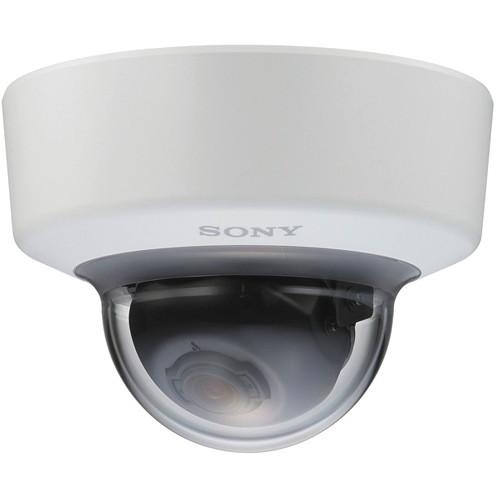 Contents of the user manual for the Sony E-Series SNC-EM600 720p Mini Dome
- Product category: Wired IP Cameras Sony
- Brand: Sony
- Description and content of package
- Technical information and basic settings
- Frequently asked questions – FAQ
- Troubleshooting (does not switch on, does not respond, error message, what do I do if...)
- Authorized service for Sony Wired IP Cameras
|
User manual for the Sony E-Series SNC-EM600 720p Mini Dome contain basic instructions
that need to be followed during installation and operation.
Before starting your appliance, the user manual should be read through carefully.
Follow all the safety instructions and warnings, and be guided by the given recommendations.
User manual is an integral part of any Sony product,
and if it is sold or transferred, they should be handed over jointly with the product.
Following the instructions for use is an essential prerequisite for protecting
health and property during use, as well as recognition of liability on the part of the manufacturer
for possible defects should you make a warranty claim. Download an official Sony user manual in which you will find instructions on how to install, use, maintain and service your product.
And do not forget – unsuitable use of a Sony product will considerably shorten its lifespan!
|
Product description The E-Series SNC-EM600 720p Mini Dome Network Camera from Sony is powered by IPELA ENGINE EX technology that offers features such as View-DR, XDNR, and DEPA Advanced technologies. With its Exmor CMOS sensor, this network camera delivers a maximum resolution of 1280 x 1024 pixels. It achieves a wide dynamic range up to 130 dB thanks to the View-DR technology for capturing objects clearly and adaptively even under very harsh, severe backlight or highlight conditions.The camera features a picture mode that optimizes picture quality in various applications. DEPA Advanced Intelligent Video Analytics allows you to trigger an alarm based on the rules defined by you. Plus, the camera’s advanced intelligent video analytics are further enhanced with tools like face detection. The camera uses H.264 video compression format for high, main, and baseline profiles and JPEG video codecs, which optimizes storage space and bandwidth utilization. In low-light conditions, this camera is capable of recording in color up to 0.05 lux and in black and white up to 0.04 lux (50 IRE @ 1/30 sec).This camera comes with a built-in varifocal lens and features an image stabilization feature for minimizing the effect of camera shake or vibration. This helps in achieving less blurry images. - IPELA ENGINE EX signal processing system provides View-DR, XDNR, and DEPA advanced technologies
- View-DR, a wide dynamic range technology captures objects clearly and adaptively even under very harsh, severe backlight, or highlight conditions
- VE (Visibility Enhancer) optimizes the brightness and color reproduction of an image dynamically on a pixel-by-pixel basis, while continuously adapting to the scene within the given dynamic range
- DEPA Advanced Intelligent Video Analytics triggers an alarm based on user-defined rules
- XDNR (eXcellent Dynamic Noise Reduction) technology allows capture of clear images with virtually no motion blur under low illumination
- Picture mode selectable from a range of camera scenes in the setting menu, which optimizes picture quality in various applications
- True D/N (Day/Night) function to switch to Day or Night mode depending on the light level
- Built-in HTML viewer compatible with most Smartphones
- Easy Focus allows installer / user to focus the camera locally or remotely using a PC
- Easy Zoom allows installer / user to change field of view locally or remotely using a PC
- Powered by PoE (IEEE 802.3af-compliant) devices for easy installation
- ONVIF (Open Network Video Interface Forum) Profile S conformance software ensures interoperability and flexibility in building multiple-vendor systems
- VBR (variable bit-rate) or CBR (constant bit-rate) compression mode selectable to correspond with various network conditions
- Easy initial network settings with supplied SNC Easy IP Setup Guide application
- Image stabilizer to help minimize the effect of camera shake or vibration to achieve less blurry images
- Features e-Flip, PTZ control, tamper alarm, multicast streaming support
- External Color Top Cover: Munsell 4.4BG 8.4/0.2
UPC: 027242869196 In the Box Sony E-Series SNC-EM600 720p Mini Dome PTZ Network Camera with Built-In Varifocal Lens CD-ROM (Supplied Programs) Template M3 Screw Bracket Wire Rope Table of Contents
|
Upload User Manual
Have you got an user manual for the Sony E-Series SNC-EM600 720p Mini Dome PTZ Network Camera with Built-In Varifocal Lens in electronic form? Please send it to us and help us expand our library of instruction manuals.
Thank you, too, on behalf of other users.
To upload the product manual, we first need to check and make sure you are not a robot. After that, your "Submit Link" or "Upload File" will appear.
Technical parametersSony SNC-EM600 Specs | | | Image Sensor | 1/3-type progressive scan Exmor CMOS sensor | | Number of Effective Pixels | Approximately 1.37 Mp | | Signal System | NTSC | | Sync System | Internal synchronization | | Minimum Illumination | At 50 IRE
Color: 0.05 lux (F1.2, View-DR OFF, VE OFF, AGC ON, 1/30 sec, 30 fps)
B/W: 0.04 lux (F1.2, View-DR OFF, VE OFF, AGC ON, 1/30 sec, 30 fps)
At 30 IRE
Color: 0.03 lux (F1.2, View-DR OFF, VE OFF, AGC ON, 1/30 sec, 30 fps)
B/W: 0.02 lux (F1.2, View-DR OFF, VE OFF, AGC ON, 1/30 sec, 30 fps) | | Dynamic Range | Equivalent to 130 dB with View-DR technology | | S/N Ratio | More than 50 dB (Gain 0 dB) | | Gain | Auto | | Shutter Speed | 1 to 1/10,000 sec | | Exposure Control | Exposure compensation, AGC, Shutter speed, Iris | | White Balance | ATW, ATW-PRO, fluorescent lamp, mercury lamp, sodium vapor lamp, metal halide lamp, white LED, one push WB, and manual | | Lens | Built-in varifocal lens | | Zoom Ratio | Optical: 3x
Digital: 4x
Total: 12x | | Horizontal Viewing Angle | 93.0 to 31.6° | | Vertical Viewing Angle | 50.6 to 17.8° | | Tilt Angle | 121.5° | | Focal Length | f = 3.0 to 9.0 mm | | F Number | F1.2 (Wide) to F2.1 (Tele) | | Minimum Object Distance | 11.8" (300 mm) | | Manual Controls | Pan: ±192°
Tilt: -7 to 75°
Rotation: ±99° | | | | Day/Night | True D/N | | Wide-D | View-DR | | Correction Method | Tone: Visibility Enhancer (VE) | | Noise Reduction | XDNR | | Privacy Masking | Number: 20
Shape: Quadrangle formed by any four corner points
Color/Effect: Opaque: 14 colors (black, white, red, green, blue, cyan, yellow, magenta, gray (6 scales)), mosaic | | Additional | Superimpose Number: 3 independent positions for character (Codec, Date & time, Event, Text (maximum 64 characters)), 1 independent position for logo mark
Superimpose Language: English | | Menu Language | 15 languages: English, Japanese, Chinese (Simplified), Chinese (Traditional), French, Spanish, German, Italian, Korean, Portuguese, Russian, Arabic, Hindi, Vietnamese, and Thai | | | | Resolution | 1280 x 1024, 1280 x 960, 1024 x 768, 1280 x 720, 800 x 600, 720 x 576, 720 x 480, 704 x 576, 640 x 480, 352 x 288, 320 x 240 (H.264, JPEG) | | Compression Format | H.264 (high / main / baseline profile), JPEG | | Maximum Frame Rate | H.264: 30 fps (1280 x 1024)
JPEG: 30 fps (1280 x 1024) | | Bitrate | Compression Mode: CBR/VBR (selectable)
Range of Bitrate Setting: 64 kb/s to 32 Mb/s | | Control | Adaptive Rate Control: H.264 | | Bandwidth Control | JEPG | | Multi-Streaming | Triple streaming | | Number of Clients | 20 | | | | Analytics | Analytics Architecture: DEPA Advanced | | Scene Analytics | Passing, appearance, left object detection, removed object detection | | | | Operating System | Windows XP (32 bit) Professional Edition, Vista (32 bit) Ultimate, Business Edition, 7 (32/64 bit) Ultimate, Professional Edition, 8 Pro (32/64 bit) | | Processor | Intel Corei7 2.8 GHz or higher | | Memory | 2 GB or more | | Web Browser | Microsoft Internet Explorer Version 7.0, Ver. 8.0, Ver. 9.0, Firefox Version 3.5 (Plug-in free viewer only), Safari Version 4.0 (Plug-in free viewer only), Google Chrome Version 4.0 (Plug-in free viewer only) | | | | Protocols | IPv4, TCP, UDP, ARP, ICMP, IGMP, HTTP, DHCP, DNS, NTP, RTP/RTCP, RTSP over TCP, RTSP over HTTP, SMTP, IPv6, HTTPS, SNMP (v1, v2c, v3), SSL IGMP: SSM (Source Specific Multimedia) is supported | | ONVIF Conformance | Profile S | | Authentication | IEEE 802.1X | | Interface | 1 x analog monitor output for setup phono jack
Network Port 10BASE-T / 100BASE-TX (RJ-45) | | | | Power Requirement | PoE system (IEEE 802.3af compliant) Class 2 | | Power Consumption | 5 W maximum | | Operating Temperature | 14 to 122°F (-10 to 50°C) | | Cold Start | 32 to 122°F (0 to 50°C) | | Storage Temperature | -4 to 140°F (-20 to 60°C) | | Operating Humidity | 20 to 80% | | Storage Humidity | 20 to 95% | | Construction | External Material
Top cover: ABS + PC
Dome cover: PC | | Fire Protection | UL2044 | | Safety Regulations | JATE Technical Standard (LAN), UL2044, IEC60950-1 (CB), VCCI (Class A), FCC (Class A), IC (Class A), Emission: EN55022 (Class A) + EN50130-4, Immunity: EN55022 (Class A) + EN55024, Emission: AS/NZS CISPR22 (Class A), KCC, EMC-TR | | Dimensions (Ø x H) | 5.8 x 4.3" (148.0 x 108.0 mm) | | Weight | Approximately 1.54 lb (760.00 g) | | | | Package Weight | 3.35 lb | | Box Dimensions (LxWxH) | 8.2 x 8.2 x 7.5" |
Rating100% users recommend this product to others. And what about you?

This product has already been rated by 54 owners. Add your rating and experience with the product.
Discussion
 Ask our technicians if you have a problem with your settings,
or if anything is unclear in the user manual you have downloaded.
You can make use of our moderated discussion.
The discussion is public and helps other users of our website who may be encountering similar problems.
Ask our technicians if you have a problem with your settings,
or if anything is unclear in the user manual you have downloaded.
You can make use of our moderated discussion.
The discussion is public and helps other users of our website who may be encountering similar problems.
The discussion is empty - enter the first post
Post a new topic / query / comment:
|
|


