|
User Manual for Sony HSC-100RF Optical Fiber Broadcast Camera Click to enlarge the picture
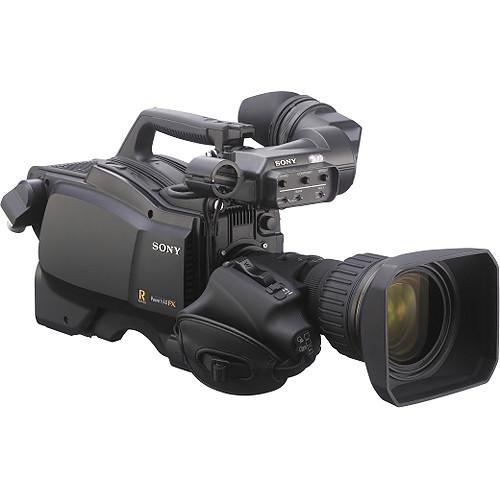 Contents of the user manual for the Sony HSC-100RF Optical Fiber Broadcast Camera
- Product category: Studio & EFP Cameras Sony
- Brand: Sony
- Description and content of package
- Technical information and basic settings
- Frequently asked questions – FAQ
- Troubleshooting (does not switch on, does not respond, error message, what do I do if...)
- Authorized service for Sony Studio & EFP Cameras
|
User manual for the Sony HSC-100RF Optical Fiber Broadcast Camera contain basic instructions
that need to be followed during installation and operation.
Before starting your appliance, the user manual should be read through carefully.
Follow all the safety instructions and warnings, and be guided by the given recommendations.
User manual is an integral part of any Sony product,
and if it is sold or transferred, they should be handed over jointly with the product.
Following the instructions for use is an essential prerequisite for protecting
health and property during use, as well as recognition of liability on the part of the manufacturer
for possible defects should you make a warranty claim. Download an official Sony user manual in which you will find instructions on how to install, use, maintain and service your product.
And do not forget – unsuitable use of a Sony product will considerably shorten its lifespan!
|
Product description The Sony HSC-100RF Optical Fiber Broadcast Camera is an HD/SD camera with an optical fiber CCU input that supports cable runs up to 6,562 ft to an optional CCU. The camera features a 2/3" type CCD sensor offering F10 sensitivity for 1080i59.94 and F11 for 1080i50, with -60dB signal-to-noise ratio. It also records in 720p and 1080PsF and down-converts to high-quality SD. An optional HZC-PSF3 software is required for 1080/29.97PsF/25PsF. The lens mount is Sony Bayonet. Inputs/outputs include XLR audio, XLR mic, HD/SD-SDI output, VF signal, return signal, SDI prompter output/genlock input/return input, and XLR intercom. An electronic color correction filter and four ND filters are built in.
A 16-bit A/D converter processes images with very high color precision. A Digital Extender function expands an image by a factor of two in the center of the sensor's captured image without any decrease in sensitivity. Auto Lens Aberration Compensation 2 automatically reduces chromatic aberration by horizontal and vertical compensation when using lenses that support this function. Seven standard-gamma and four hyper-gamma tables are available for use in adjusting contrast. A Multi-Matrix function applies color adjustments over a user-specified color range, and Adaptive-Matrix enables color conversion even when shooting under excessively strong ambient light. Master White Gain allows step-less gain level adjustments. Two types of focus assist are available -- Viewfinder Detail adds dedicated edge signals to the viewfinder, allowing easy recognition of a focusing point, and Focus Assist Indicator displays an indicator for adjustment at the bottom or elsewhere within the viewfinder frame.
The main chassis is made of durable magnesium-alloy casting. An integrated shoulder pad is adjustable back and forth without any tools. A protrusion on the front of the carrying handle allows added stability while shooting, and a non-slip structure on the handle's lower surface provides better grasp. Assignable switches are available on the side and rear panels and assignable buttons on the handle. - Multi-Format Operation
- The HSC-100RF records in 1080/59.94i/50i, 720/59.94p/50p, and 1080/29.97PsF/25PsF (an optional HZC-PSF3 software is required for 1080/29.97PsF/25PsF)
- 2/3" CCD Sensor
- A 2/3" type full-resolution 1920 x 1080 CCD sensor offers a high F10 sensitivity for 59.94 Hz and F11 for 50 Hz, with a signal-to-noise ratio of -60 dB.
- Optical Fiber Operation
- The HSC-100RF features an optical fiber CCU input/transmission system that offers cable runs up to 6,562 ft between the camera and optional CCU.
- 16-Bit A/D Conversion and DSP LSI
- A 16-bit A/D converter enables captured images to be processed with maximum precision, and the Auto Lens Aberration Compensation function can optimize lens performance.
- Digital Extender
- The Digital Extender function expands the size of the image by a factor of two in the center of the sensor's captured image. This function works without a decrease in sensitivity as is common with conventional optical extender functions.
- Auto Lens Aberration Compensation 2
- The ALAC2 function automatically reduces chromatic aberration by both horizontal and vertical compensation when using lenses that support this function.
- Versatile Interfaces
- A wide range of inputs and outputs including HD/SD-SDI output, VF signal, return signal, SDI Prompter signal, and an intercom channel (ENG/PROD).
- Robust Design
- The main chassis is made of a magnesium-alloy casting, which ensures the durability and helps protect the camera's lightweight precision components, such as integrated optical elements and electronics.
- Position-Adjustable Shoulder Pad
- The integrated shoulder pad can be adjusted forwards or backwards to provide weight balance, useful when the camera is docked with a lens or camera adapter. This adjustment doesn't require any tools.
- Two Types of Focus Assist
- "Viewfinder Detail" adds dedicated image-enhancing edge signals directly to the viewfinder, enabling the camera operator to recognize a focusing point. "Focus Assist Indicator" displays an indicator for adjustment at the bottom or other position of the viewfinder frame, particularly beneficial when shooting wide.
- Optimized Handle Shape for Stable Shooting
- The designed carrying handle enhances camera operability. A protrusion positioned on the front of the handle allows holding the camera with added stability while shooting. And the non-slip structure of the handle's lower surface helps grasp the handle firmly.
- Function-Assignable Switches
- The camera features assignable switches on the side and rear panels and assignable buttons on the handle.
- Built-In Down Converter
- This down converter allows superior SD images as standard.
- Multiple Gamma Tables
- Seven types of standard-gamma and four types of hyper-gamma tables are available for handling the contrast range and look of an image in-camera.
- HyperGamma
- HyperGamma is a set of transfer functions that provide contrast handling by making maximum use of the CCD sensor's capacity and wide dynamic range. These functions are quickly accessible via the set-up menu, and four curves are available to choose from. You can, for example, enhance natural reproduction in low-key areas to achieve greater flexibility in wide dynamic scenes.
- Multi-Matrix
- The Multi-Matrix function applies color adjustments over a user-specified color range. The color spectrum is divided into 16 areas of adjustment, where the hue and/or saturation of each area can be modified. This function is especially useful when only the hue of certain colors needs to be adjusted for special-effects work. Multi-Matrix is effective for capturing images with similar color tone in a system configured with existing SD cameras or other models of camera. This function enables the picture from another model of camera to be easily matched.
- Adaptive-Matrix
- This function enables color conversion even when shooting under excessively strong ambient light, like under bright monochromatic blue light. Such a condition typically causes a conventional matrix function to exceed the color conversion range.
- Master White Gain
- The Master White Gain function allows step-less adjustment of gain levels, allowing the gain levels to be adjusted more precisely compared to conventional stepwise adjustment.
- Compatible CCU Model
- HSCU-300RF, both 1.5 RU.
In the Box Sony HSC-100RF Optical Fiber Broadcast Camera Cable Clamp Belt Switch Label Operating Instructions Warranty Booklet 1-Year Limited Warranty Table of Contents
|
Upload User Manual
Have you got an user manual for the Sony HSC-100RF Optical Fiber Broadcast Camera in electronic form? Please send it to us and help us expand our library of instruction manuals.
Thank you, too, on behalf of other users.
To upload the product manual, we first need to check and make sure you are not a robot. After that, your "Submit Link" or "Upload File" will appear.
Technical parametersSony HSC-100RF Specs | Sensor | 3-chip 2/3" type CCD | | Effective Picture Elements | 1920 x 1080 | | Signal Format | 1080/59.94i/50i, 720/59.94p/50p, 1080/29.97PsF/25PsF (optional HZC-PSF3 software required for 1080/29.97PsF/25PsF) | | Spectrum System | F1.4 prism system | | Lens Mount | Sony bayonet mount | | Built-In Filters | Electronic color correction; ND Clear, 1/4 ND, 1/16 ND, 1/64 ND | | Sensitivity | F10 (59.94 Hz) / F11 (50 Hz) at 2000 lx, 3200 K, 89.9% reflectance | | Signal-to-Noise Ratio (Typical) | HD: -60 dB (1080i) | | Horizontal Resolution | HD: 1,000 TV lines
SD: 900 TV lines | | Shutter Speed Range | 1/100, 1/125, 1/250, 1/500, 1/1000, 1/2000 (s) (59.94i mode)
1/60, 1/125, 1/250, 1/500, 1/1000, 1/2000 (s) (50i mode) | | Modulation Depth | HD: 45% at 27.5 MHz (1080i)
SD: 90% at 5 MHz | | Input / Output | Audio input (Ch 1, Ch 2):
1x XLR 3-pin, female per channel
For Mic: -60 dBu (may be selected to -20 dBu by menu or HSCU operations), balanced
For Line: 0 dBu, balanced
Mic 1 input:
1x XLR 3-pin, female
Return control input:
1x 6-pin
Prompter output/Genlock input/Return input:
1x SDI, 1 Vp-p, 75 Ω
DC input:
1x XLR 4-pin, DC 10.5 V - 17 V
DC output:
1x 4-pin, DC 10.5 V - 17 V, 0.5 A (max.)
1x 2-pin, DC 10.5 V - 17 V, 2.5 A (max.)
Test output:
1x BNC
SDI output:
1x BNC
Earphone output:
1x stereo mini jack
CCU connection:
1x Fiber optic
Tracker:
1x 10-pin
Intercom:
1x XLR 5-pin, female
Remote:
1x 8-pin
Lens:
1x 12-pin
Viewfinder:
1x 20-pin | | Power Requirements | DC 180 V, 1.0 A (max.), DC 12 V, 7 A (max.) | | Operating Temperature | -4 to 113°F (-20 to 45°C) | | Storage Temperature | -4 to 113°F (-20 to 45°C) | | Weight | 9 lb 10 oz(4.1 kg) | | | | Package Weight | 11.8 lb | | Box Dimensions (LxWxH) | 18.2 x 14.3 x 9.9" |
Rating100% users recommend this product to others. And what about you?

This product has already been rated by 85 owners. Add your rating and experience with the product.
Discussion
 Ask our technicians if you have a problem with your settings,
or if anything is unclear in the user manual you have downloaded.
You can make use of our moderated discussion.
The discussion is public and helps other users of our website who may be encountering similar problems.
Ask our technicians if you have a problem with your settings,
or if anything is unclear in the user manual you have downloaded.
You can make use of our moderated discussion.
The discussion is public and helps other users of our website who may be encountering similar problems.
The discussion is empty - enter the first post
Post a new topic / query / comment:
|
|
|
| Request for user manual |
You can’t find the operation manual you are looking for? Let us know and we will try to add the missing manual:
I’m looking for a manual / Request for manual
Current requests for instruction manuals:
Call Of Duty World War Two For Xbox...
controller stratus XL...
stratus XL...
smart whatch serie S11 42mm...
Allen & Heath SQ-6 manual...
|
| Discussion |
Latest contributions to the discussion:
AEW R 4100
Name: MAURICIO ANGARITA
Audio-Technica AEW-R4100 UHF Diversity Receiver for
AEW R 4100 has the mute function blocked and does not allow audio to pass. I tried several times to turn off the mute from the transmitter but it does nothing, the mute stays on. Solution?
Thank you...
Instructions for assembling the 2015 Forecast Image Master Consoles GC3-A
Name: mike elam
Forecast Consoles GC3-A ImageMaster Editing Console
Looking for instructions for assembling this console. ...
EMPTY TONER ERROR MESSAGE AFTER REPLACING TONER
Name: LINDA BAD YELLOW EYES
Brother TN223BK Standard-Yield Toner
I HAD TO CHANGE OUT ALL THREE TONERS DUE TO LEAKS IN THE YELLOW AND CYAN. AFTER I REPLACED THEM, THE MACHINE KEEPS GIVING ME AN EMPTY TONER ERROR MESSAGE. HELP!!...
PS480D 20/24 pin Switching 480W Power Supply
Name: swkargo
Logisys 480W Power Supply
This item states in can run -5vdc .It is NOT listed on the board or I beleive is r4 is missing the resitior. Any body have thid issue. Shawn
...
Help needed
Name: Ann Carter
SanDisk 1TB Extreme Portable USB 3.1
When I click the link to download the user manual for my Sandisk Extreme external hard drive, it gives me the manual for the LG Cricket. Can you please change the link so I can download the Sandisk manual and begin using this drive? Thank you....
|
|


