|
User Manual for Sony PlayStation 4 Gaming Console Click to enlarge the picture
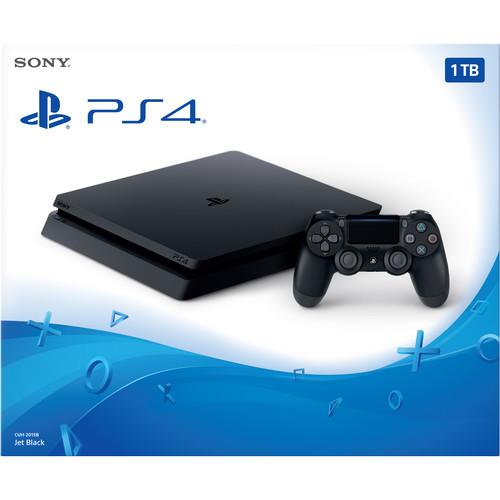 Contents of the user manual for the Sony PlayStation 4 Gaming Console
- Product category: PlayStation 4 Consoles Sony
- Brand: Sony
- Description and content of package
- Technical information and basic settings
- Frequently asked questions – FAQ
- Troubleshooting (does not switch on, does not respond, error message, what do I do if...)
- Authorized service for Sony PlayStation 4 Consoles
|
User manual for the Sony PlayStation 4 Gaming Console contain basic instructions
that need to be followed during installation and operation.
Before starting your appliance, the user manual should be read through carefully.
Follow all the safety instructions and warnings, and be guided by the given recommendations.
User manual is an integral part of any Sony product,
and if it is sold or transferred, they should be handed over jointly with the product.
Following the instructions for use is an essential prerequisite for protecting
health and property during use, as well as recognition of liability on the part of the manufacturer
for possible defects should you make a warranty claim. Download an official Sony user manual in which you will find instructions on how to install, use, maintain and service your product.
And do not forget – unsuitable use of a Sony product will considerably shorten its lifespan!
|
Product description How to Maximize Your Gaming Experience with the PS4 and Xbox One Read More tuqvrstyvarzwvbv The Sony PlayStation 4 Gaming Console is smaller, lighter, and more energy efficient than the original PS4. Despite its smaller design, it still provides the same performance found on earlier PS4 models — and it does so more quietly. It also supports High Dynamic Range (HDR) gaming and content, which takes advantage of increased color depth and contrast on compatible displays. - Compact Design
- The PS4 is now 30% smaller, 16% lighter, and 28% more energy efficient than the original PS4. Despite the smaller design, the redesigned PS4 still provides the same performance, so you can play at 1080p with ease.
- High Dynamic Range (HDR) Support
- The PS4 is fully compatible with the HDR10 specification. High Dynamic Range (HDR) is a display standard that allows for increased color depth and improved contrast compared to Standard Dynamic Range found on traditional HDTVs. In general, HDR-enabled content played on an HDR-compatible TV produces a noticeably fuller, richer image that is closer to what the human eye naturally sees. That means much deeper black levels that retain finer details, brighter highlights, and a much wider color spectrum than on traditional HDTVs.
- 1.84 Teraflops of PlayStation 4 Graphics
- The PlayStation's graphics processing unit (GPU) contains a unified array of 18 Compute Units, which collectively generate 1.84 teraflops of processing power that can be applied freely to graphics, simulation tasks, or a mixture of the two. The PS4 is also equipped with 8GB of unified system memory, easing game creation and increasing the richness of content achievable. High-speed GDDR5 is used for the memory, giving the system a total of 176 GB/s of bandwidth and providing a further boost to graphics performance.
- Personalized, Curated Content
- The PS4 has the ability to learn your preferences. It will gauge your likes and dislikes and suggest content to match them. This allows you to discover content specifically tailored to you. It can even download and install content on your console. Search for games in your favorite genres or by your favorite game developers. You can also look over game-related information shared by your friends, view your friends' gameplay, or get recommendations for content, such as games, TV shows, and movies.
- Play as You Download
- Spend less time waiting and more time playing with the PS4. When you purchase a game that is enabled with this feature, the PS4 downloads the core content so you can start playing as soon as possible. While you're playing, the PS4 downloads the rest of the game in the background.
- Remote Play
- Use Remote Play to stream gameplay to your Mac, PC, Xperia, and PlayStation Vita.
- PlayStation App
- The PlayStation App will enable iOS and Android smartphones and tablets to become second screens for the PS4. Once installed on these devices, players can view in game items, purchase PS4 games, download PS4 games directly to the console at home, and even watch the gameplay of other gamers remotely.
- DualShock 4 Wireless Controller
- The included DualShock 4 wireless controller features familiar controls from its predecessor, the DualShock 3, while also introducing innovative ways to interact with games and other players. Improved dual analog sticks and trigger buttons offer precise control while the capacitive touch pad provides a unique way of interacting with games. The Share button allows you to share your gameplay over social media. This DualShock 4 wireless controller has a slightly different design, which allows the light from the light bar to emit on the touch pad.
- PlayStation Plus
- While PlayStation Plus is not required for services such as Netflix, or sharing gameplay via the Share button, it does provide additional features to enhance your PS4 experience. The most important feature of PlayStation Plus is your ability to play online multiplayer. If you do not have a PlayStation Plus membership, you will not be able play online.
PlayStation Plus also provides exclusive access to a regular, curated selection of titles at no additional cost known as the Instant Game Collection. In addition to free monthly games, PlayStation Plus members also get regular discounts in the PlayStation Store. PlayStation Plus also provides members with the ability to automatically (or manually) upload game save files to the Online Game Save Storage for safekeeping. PlayStation Plus members will have up to 1GB of cloud storage to allocate their PS4 save files. Other benefits of having a PlayStation Plus membership include early access to exclusive game content, automatic game patch downloads and installations, and more.
Please note that a PlayStation Plus membership is required for online multiplayer. It is not included with the PS4 and must be purchased separately. UPC: 711719511793 In the Box Sony PlayStation 4 Gaming Console Black Sony DualShock 4 Wireless Controller HDMI Cable Micro-USB to USB Cable Wired Mono-Headset for Voice Chat Power Cord Limited 1-Year Warranty Table of Contents
|
Upload User Manual
Have you got an user manual for the Sony PlayStation 4 Gaming Console in electronic form? Please send it to us and help us expand our library of instruction manuals.
Thank you, too, on behalf of other users.
To upload the product manual, we first need to check and make sure you are not a robot. After that, your "Submit Link" or "Upload File" will appear.
Technical parametersSony 3003348 Specs | Processor | Single-chip custom processor low power x86-64 AMD Jaguar eight cores | | Graphics | AMD Radeon Graphics Core Next engine 1.84 TFLOPS | | Memory | 8 GB of GDDR5 RAM | | Storage | 1 TB 5400 rpm SATA II | | Optical Drive | Blu-ray Disc: 6 x CAV (read only) DVD: 8 x CAV (read only) | | Display | 1 x HDMI | | Supported Resolutions | 1080p, 1080i, 720p, 480p | | Audio | None | | USB Ports | 2 x USB 3.0 | | Ethernet | 1 x 10/100/1000 Mbps Gigabit Ethernet RJ-45 LAN | | Wi-Fi | 802.11a/b/g/n/ac | | Bluetooth | 4.0 + LE | | Dimensions | 10.4 x 1.5 x 10.4" / 26.5 x 3.8 x 26.5 cm | | Weight | 4.6 lbs / 2.1 kg | | | | Package Weight | 7.5 lb | | Box Dimensions (LxWxH) | 17.5 x 13.75 x 11.5" |
Rating98% users recommend this product to others. And what about you?

This product has already been rated by 20 owners. Add your rating and experience with the product.
Discussion
 Ask our technicians if you have a problem with your settings,
or if anything is unclear in the user manual you have downloaded.
You can make use of our moderated discussion.
The discussion is public and helps other users of our website who may be encountering similar problems.
Ask our technicians if you have a problem with your settings,
or if anything is unclear in the user manual you have downloaded.
You can make use of our moderated discussion.
The discussion is public and helps other users of our website who may be encountering similar problems.
The discussion is empty - enter the first post
Post a new topic / query / comment:
|
|
|
| Request for user manual |
You can’t find the operation manual you are looking for? Let us know and we will try to add the missing manual:
I’m looking for a manual / Request for manual
Current requests for instruction manuals:
Call Of Duty World War Two For Xbox...
controller stratus XL...
stratus XL...
smart whatch serie S11 42mm...
Allen & Heath SQ-6 manual...
|
| Discussion |
Latest contributions to the discussion:
AEW R 4100
Name: MAURICIO ANGARITA
Audio-Technica AEW-R4100 UHF Diversity Receiver for
AEW R 4100 has the mute function blocked and does not allow audio to pass. I tried several times to turn off the mute from the transmitter but it does nothing, the mute stays on. Solution?
Thank you...
Instructions for assembling the 2015 Forecast Image Master Consoles GC3-A
Name: mike elam
Forecast Consoles GC3-A ImageMaster Editing Console
Looking for instructions for assembling this console. ...
EMPTY TONER ERROR MESSAGE AFTER REPLACING TONER
Name: LINDA BAD YELLOW EYES
Brother TN223BK Standard-Yield Toner
I HAD TO CHANGE OUT ALL THREE TONERS DUE TO LEAKS IN THE YELLOW AND CYAN. AFTER I REPLACED THEM, THE MACHINE KEEPS GIVING ME AN EMPTY TONER ERROR MESSAGE. HELP!!...
PS480D 20/24 pin Switching 480W Power Supply
Name: swkargo
Logisys 480W Power Supply
This item states in can run -5vdc .It is NOT listed on the board or I beleive is r4 is missing the resitior. Any body have thid issue. Shawn
...
Help needed
Name: Ann Carter
SanDisk 1TB Extreme Portable USB 3.1
When I click the link to download the user manual for my Sandisk Extreme external hard drive, it gives me the manual for the LG Cricket. Can you please change the link so I can download the Sandisk manual and begin using this drive? Thank you....
|
|


