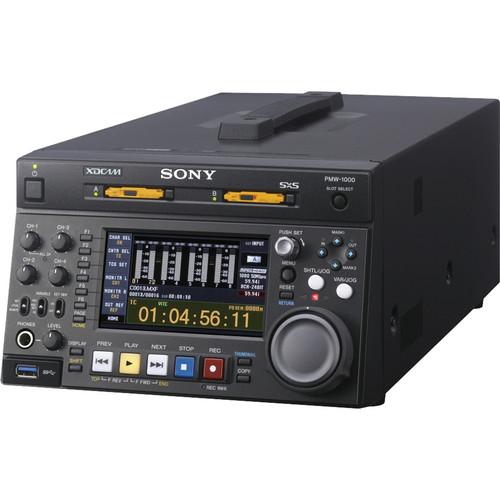
User Manual for Sony PMW-1000 XDCAM SxS Memory Recording Deck Click to enlarge the picture
 Contents of the user manual for the Sony PMW-1000 XDCAM SxS Memory Recording
- Product category: Recorders & Duplication Sony
- Brand: Sony
- Description and content of package
- Technical information and basic settings
- Frequently asked questions – FAQ
- Troubleshooting (does not switch on, does not respond, error message, what do I do if...)
- Authorized service for Sony Recorders & Duplication
 |
User manual for the Sony PMW-1000 XDCAM SxS Memory Recording contain basic instructions
that need to be followed during installation and operation.
Before starting your appliance, the user manual should be read through carefully.
Follow all the safety instructions and warnings, and be guided by the given recommendations.
User manual is an integral part of any Sony product,
and if it is sold or transferred, they should be handed over jointly with the product.
Following the instructions for use is an essential prerequisite for protecting
health and property during use, as well as recognition of liability on the part of the manufacturer
for possible defects should you make a warranty claim. Download an official Sony user manual in which you will find instructions on how to install, use, maintain and service your product.
And do not forget – unsuitable use of a Sony product will considerably shorten its lifespan!
|
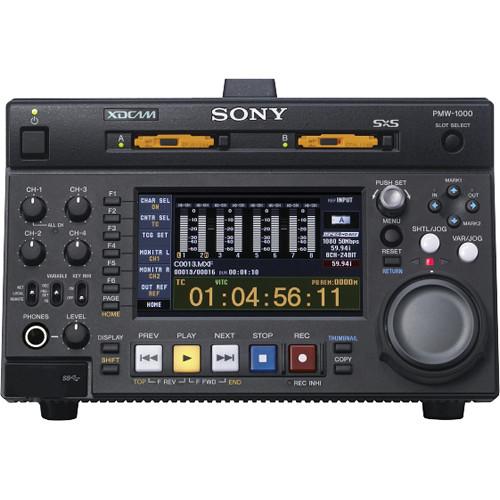
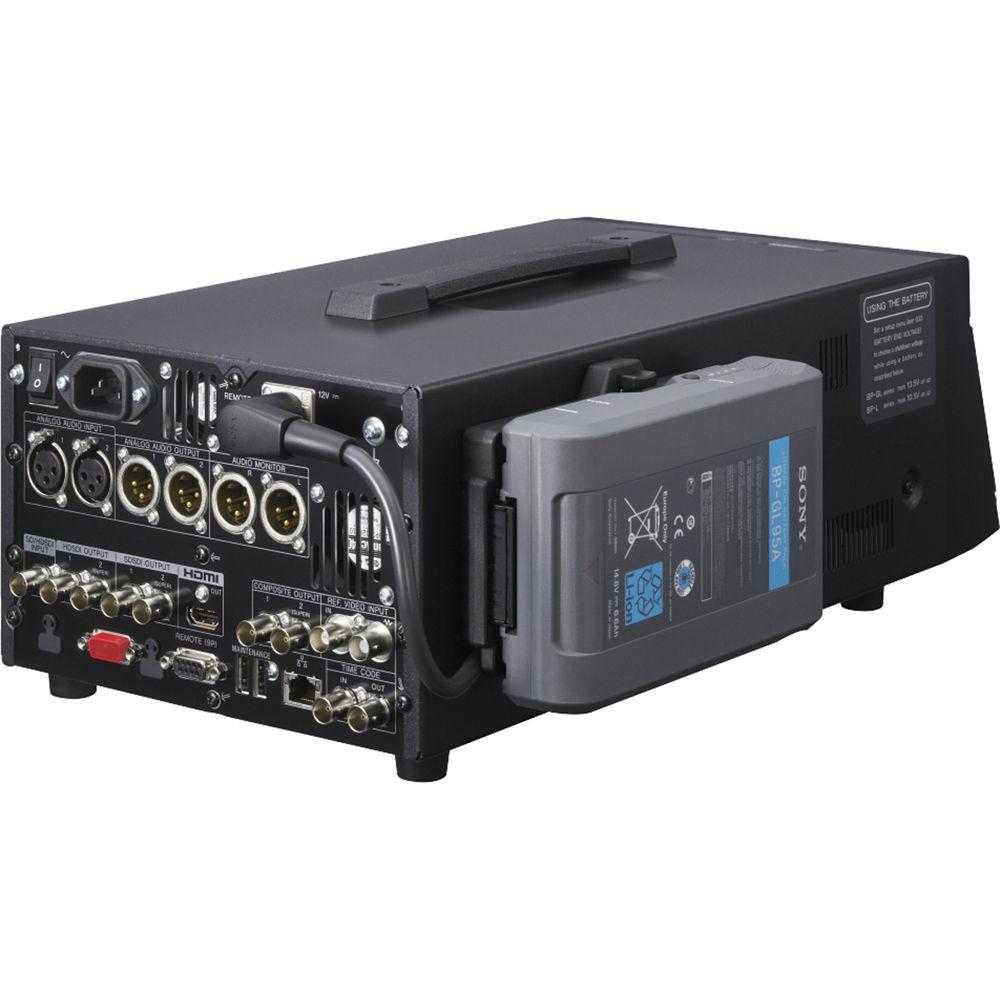
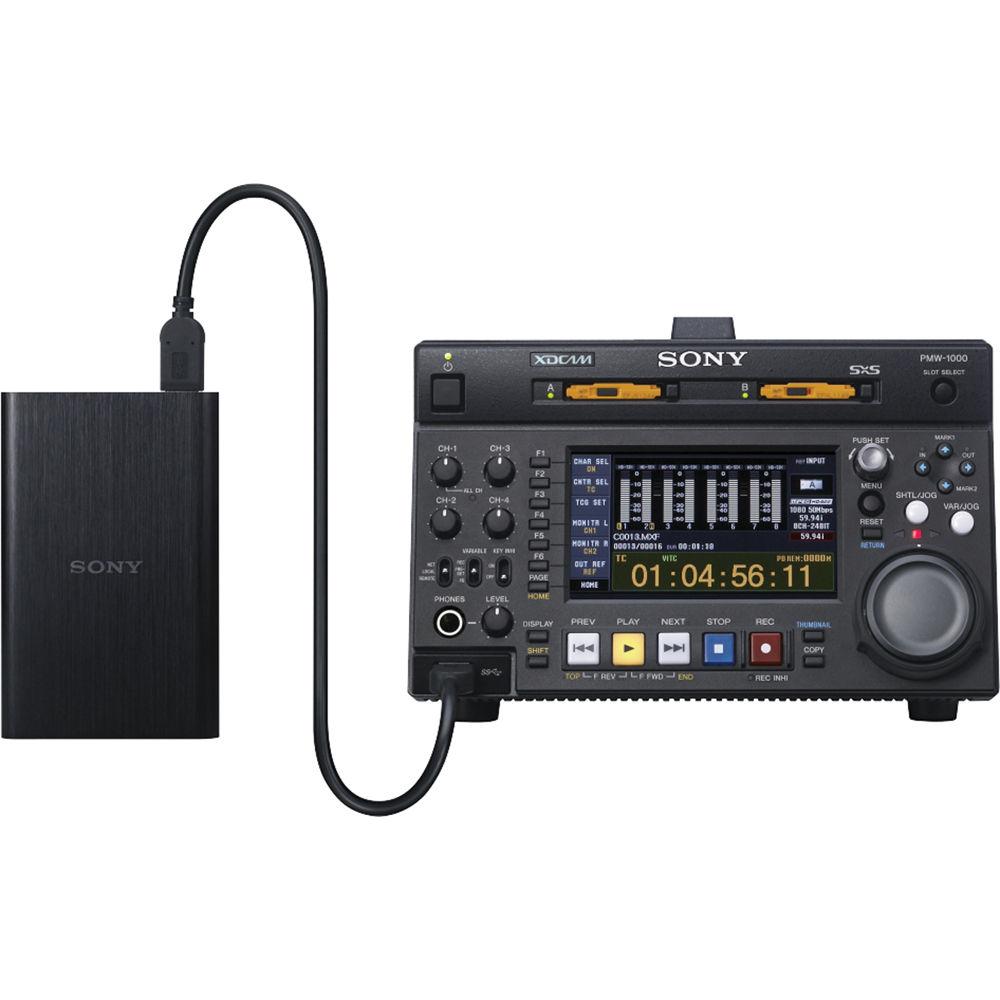
Product description The Sony PMW-1000 XDCAM SxS Memory Recording Deck can record a wide range of XAVC and XDCAM codecs from any HD-SDI source onto SxS Cards. The PMW-1000 provides outstanding MPEG HD422 picture quality as well as an uncompromising eight-channel (HD-SDI), 24-bit audio recording capability, all packed in a compact half-rack-size deck. In addition to MPEG HD422, XAVC Intra HD Record/Playback is supported, as well as MPEG IMX and DVCAM formats in the SD domain. The RS-422 interface and Gigabit Ethernet enables the PMW-1000 to be used as a player deck for linear editing and a feeder deck for non-linear editing. Note: 4K XAVC Intra HD record/playback is not supported. - By supporting XAVC Intra 100Mb/s, XDCAM HD workflow can be enhanced with PMW-F5/F55 camera operation. In addition, with its up- and down-conversion function, the PMW-1000 is ideal for integration into an existing SD production system and also for future HD operation.
- Highly flexible, multi-format capability lets users select recording and playback formats from HD (XAVC, MPEG HD422, and MPEG HD420) and SD (MPEG IMX50/40/30 and DVCAM) in a variety of frame frequencies 1
Please Note: IMX50/40/30 is Playback only. close - Equipped with a jog/shuttle dial and RS-422 control, providing VTR-like operation (Jog: -1 to +1 times normal speed; Variable: -2 to +2 times normal speed; Shuttle: -20 to +20 times normal speed). This gives the PMW-1000 a very familiar feel, and enables easy migration from tape-based operation.
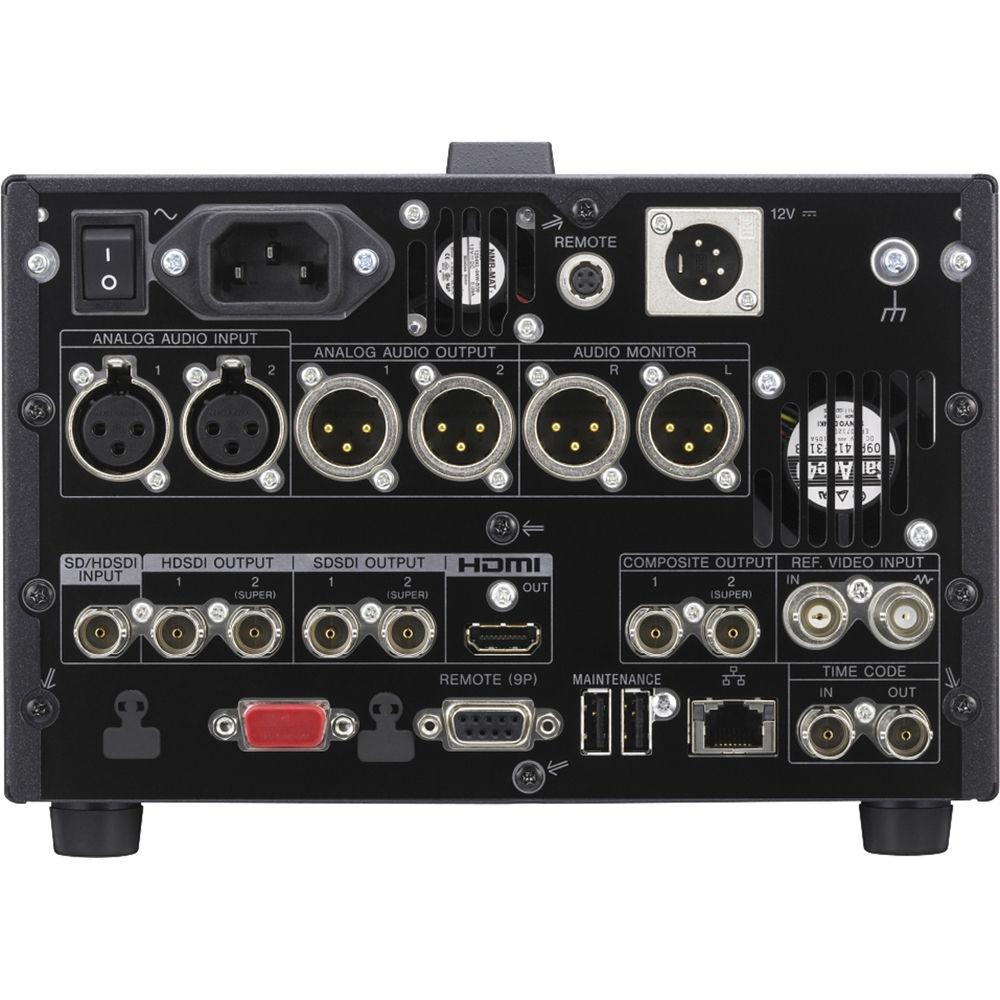
- Versatile input and output interfaces: RS-422 9-pin remote control interface to be used as a feeder for linear editing
Gigabit Ethernet for high speed file transfer for network operation - HDMI monitoring output for more flexible operation on any occasion
- USB interface for connection to an external USB HDD enables users to copy clips directly to a USB HDD without employing any other devices; helping to reduce storage costs, and means that users can make copies and backups simply and quickly. 2
Please Note: HDD is sold separately. close - Three-way power source selection lets the PMW-1000 to operate on AC, DC, and battery power, making it versatile and suitable for both in-house and field operations (for example, in a studio or OB vehicle).
In the Box Sony PMW-1000 XDCAM SxS Memory Recording Deck Limited 1-Year Warranty User Manual PDF 7.6mbwwdvwcsuf More from Manufacturer Table of Contents
|
Upload User Manual
Have you got an user manual for the Sony PMW-1000 XDCAM SxS Memory Recording Deck in electronic form? Please send it to us and help us expand our library of instruction manuals.
Thank you, too, on behalf of other users.
To upload the product manual, we first need to check and make sure you are not a robot. After that, your "Submit Link" or "Upload File" will appear.
Technical parametersSony PMW-1000 Specs | Recording/Playback | Video
MPEG HD422 (CBR, 50 Mb/s)
MPEG HD: HQ mode (VBR, maximum bit rate: 35 Mb/s), SP mode (CBR, 25 Mb/s), LP mode (VBR, maximum bit rate: 18 Mb/s), MPEG IMX (CBR, 50/40/30 Mb/s)
DVCAM: CBR, 25 Mb/s, XAVC: CBR, 100 Mb/s MPEG IMX playback only. | | Recording/Playback | Audio
MPEG HD422: 8-channel/24-bit/48 kHz
MPEG HD: 4-channel /16-bit /48 kHzM
MPEG IMX: 8-channel/16-bit/48 kHz or 4-channel/24-bit/48 kHz
DVCAM: 4-channel/16-bit/48 kHz, XAVC: 8-channel/24-bit/48 kHz MPEG IMX playback only. | | Recording/Playback | Proxy Video: MPEG-4 | | Recording/Playback | Proxy Audio: A-law (8-channel/8-bit/8 kHz) | | Recording/Playback Time | XAVC
exFAT/MXF (100 Mb/s CBR)
Approximately 120 min (128 GB), Approximately 60 min (64 GB), Approximately 30 min (32 GB), Approximately 15 min (16 GB) | | Recording/Playback Time | MPEG HD422
UDF/MXF (50 Mb/s CBR)
Approximately 240 min (128 GB), Approximately 120 min (64 GB), Approximately 60 min (32 GB), Approximately 30 min (16 GB) | | Recording/Playback Time | MPEG HD
UDF/MXF (35 Mb/s VBR)
Approximately 360 min (128 GB), Approximately 180 min (64 GB), Approximately 90 min (32 GB), Approximately 45 min (16 GB) FAT/MP4 (35 Mb/s VBR)
Approximately 400 min (128 GB), Approximately 200 min (64 GB), Approximately 100 min (32 GB), Approximately 50 min (16 GB), FAT/MP4 (25 Mb/s CBR)
Approximately 560 min (128 GB), Approximately 280 min (64 GB), Approximately 140 min (32 GB), Approximately 70 min (16 GB) | | Playback Time | MPEG IMX
UDF/MXF (50 Mb/s Intra) Approximately 240 min (128 GB), Approximately 120 min (64 GB), Approximately 60 min (32 GB), Approximately 30 min (16 GB) | | Recording/Playback Time | DVCAM
UDF/MXF (25 Mb/s CBR) Approximately 440 min (128 GB), Approximately 220 min (64 GB), Approximately 110 min (32 GB), Approximately 55 min (16 GB)
FAT/AVI (25 Mb/s CBR)
Approximately 520 min (128 GB), Approximately 260 min (64 GB), Approximately 130 min (32GB), Approximately 65 min (16 GB) | | Search Speed Range | Shuttle Mode: -20 times to +20 times normal speed (max +/-50 by Remote)
Variable Mode: -2 times to +2 times normal speed
Jog Mode: -1 time to +1 time normal speed (-2 to +2 by Remote)
Fast Forward/Reverse: -35/+35 times normal speed (max +/-50 by Remote) | | Media Type | SxS Memory Card Drive, ExpressCard/34 (x2) | | Reference Input | BNC (x2) (including loop-through), HD Tri-level sync (0.6 Vp-p/75 Ω/negative) or SD blackburst/composite sync (0.286 Vp-p/75 Ω/negative) | | HD-SDI Input | BNC (x1) (HD/SD switchable)
HD-SDI: SMPTE 292M (w/embedded audio)
SD-SDI: SMPTE 259M (w/embedded audio) | | Analog Audio Input | XLR-type 3-pin (female) (x2) (channel selectable), +4/0/-3/-6 dBu (selectable), 10 kΩ, balanced | | Digital Audio Input (AES/EBU) | Timecode Input: BNC (x1), SMPTE timecode, 0.5 to 18 Vp-p / 3.3 kΩ / unbalancedAnalog Composite Output:BNC (x2),1: 1.0 Vp-p/75 Ω/negative, SMPTE 170M2: 1.0 Vp-p/75 Ω/negative, SMPTE 170M, character On/OffHD-SDI OutputBNC (x2),1: SMPTE 292M (w/embedded audio)2: SMPTE 292M (w/embedded audio), character on/offSD-SDI Output BNC (x2),1: SMPTE 259M (w/embedded audio)2: SMPTE 259M (w/embedded audio), character on/offHDMI Monitor: TYPE A 19-pin (x1) Video : 1080i, 720P, 480i, 480P, 576i, 576P Audio : 2-ch/16-bit/48 kHz Analog Audio Output XLR-type 3-pin (male) (x2) (channel selectable),+4/0/-3/-6 dBu (selectable), 600 Ω, Lo-z, balanced Analog Audio Monitor: XLR-type 3-pin (male) (x2), +4 dBu, 600 Ω, Lo-Z, balanced | | Digital Audio Output | Headphone Output: JM-60 Stereo phone jack (x1), -13 dBu, 8 Ω, unbalanced
Timecode Output: BNC (x1), SMPTE timecode, 1.0 Vp-p/75 Ω/unbalanced | | Ethernet | 1 x RJ-45
1000BASE-T: IEEE 802.3ab
100BASE-TX: IEEE 802.3u
10BASE-T: IEEE 802.3 | | Remote Input | D-sub 9-pin (female) (x1), RS-422A | | USB | 1 x USB 3.0 | | Maintenance | Rear: (x2) for Maintenance, USB Keyboard, USB Mouse | | DC Input | XLR-type 4-pin (male) (x1) | | DC Output | 4-pin (female) (x1), 12 VDC, 7.5 W | | Battery Compatibility | V-Mount | | AC Input | AC Input (x1), 100 to 240 V, 50/60 Hz | | Sampling Frequency | Y: 74.25 MHz, Pb/Pr: 37.125MHz | | Video Level | -∞ to +3 dB | | Chroma Levels | -∞ to +3 dB | | Set Up/Black Level | -30 IRE to +30 IRE/-210 mV to +210 mV | | Chroma Phase | -30 to +30° | | Phase | System Sync Phase: -15 to +15 μs
System SC Phase: 0 to 400 ns | | Sampling Frequency | 48 kHz | | Quantization | 24-bit | | Frequency Response | 20 Hz to 20 kHz +0.5/-1.0 dB (0 dB at 1 kHz) | | Dynamic Range | > 90 dB | | Distortion | < 0.05% (at 1 kHz) | | Headroom | 20/18/16/12/9 dB (selectable) | | Built-In Display | 4.3" (109.2 mm) 3-type color LCD monitor | | Built-in Speaker | 1 x Monaural | | Power Requirements | 100 to 240 VAC, 50/60 Hz, 12 VDC | | Power Consumption | AC: 80 W, 12 VDC, 5.7 A | | Operating Temperature | 42 to 104°F (5 to 40°C) | | Storage Temperature | -4 to +140°F (-20 to +60°C) | | Humidity | 20 to 90% (relative humidity) | | Dimensions (W x H x D) | 8.3 x 5.25 x 16.5" (210.0 x 132.0 x 418.0 mm) (excluding protrusions) | | Weight | 11.1 lb (5.0 kg) | | | | Package Weight | 14.95 lb | | Box Dimensions (LxWxH) | 21.5 x 12.9 x 10.7" |
Rating70% users recommend this product to others. And what about you?

This product has already been rated by 98 owners. Add your rating and experience with the product.
Discussion
 Ask our technicians if you have a problem with your settings,
or if anything is unclear in the user manual you have downloaded.
You can make use of our moderated discussion.
The discussion is public and helps other users of our website who may be encountering similar problems.
Ask our technicians if you have a problem with your settings,
or if anything is unclear in the user manual you have downloaded.
You can make use of our moderated discussion.
The discussion is public and helps other users of our website who may be encountering similar problems.
The discussion is empty - enter the first post
Post a new topic / query / comment:
|
|


