User Manual for Sony SNC-ER585 E-Series Network Rapid Dome Camera Click to enlarge the picture
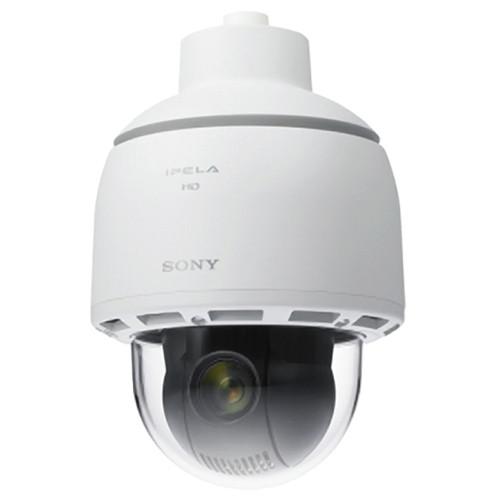 Contents of the user manual for the Sony SNC-ER585 E-Series Network Rapid Dome
- Product category: Wired IP Cameras Sony
- Brand: Sony
- Description and content of package
- Technical information and basic settings
- Frequently asked questions – FAQ
- Troubleshooting (does not switch on, does not respond, error message, what do I do if...)
- Authorized service for Sony Wired IP Cameras
|
User manual for the Sony SNC-ER585 E-Series Network Rapid Dome contain basic instructions
that need to be followed during installation and operation.
Before starting your appliance, the user manual should be read through carefully.
Follow all the safety instructions and warnings, and be guided by the given recommendations.
User manual is an integral part of any Sony product,
and if it is sold or transferred, they should be handed over jointly with the product.
Following the instructions for use is an essential prerequisite for protecting
health and property during use, as well as recognition of liability on the part of the manufacturer
for possible defects should you make a warranty claim. Download an official Sony user manual in which you will find instructions on how to install, use, maintain and service your product.
And do not forget – unsuitable use of a Sony product will considerably shorten its lifespan!
|
Product description The Sony SNC-ER585 E-Series Network Rapid Dome Camera is a suitable outdoor surveillance solution. This camera is IP66 (waterproof) and IK10 (impact resistant) rated, which makes it suitable for use in tough outdoor environments.This camera captures high quality 1080p full HD images over a wide area of view with its pan, tilt, and zoom capabilities. Its panning features high-speed 360° endless rotation, and it can tilt 15.0” (38.1cm) above the horizon, yielding a total tilt range of 210.0” (533.4cm). The camera possesses a powerful 30x optical zoom.The SNC-ER585 Camera records videos in full HD in H.264, JPEG, and MPEG-4 compression formats. It operates down to 1.7 lux color (F1.6, AGC ON, 1/30s, 50 IRE by IP). - Full integrated outdoor PTZ camera package, compatible with standard mounting solutions
- Noise reduction and wide dynamic range for challenging lighting conditions
- Water, dust, and vandal resistant for reliable outdoor performance
- IP66 rated for dust and water resistance, and IK10 certified for vandal resistance
- Suitable for mission critical surveillance, the camera's high-speed 360° endless panning capability enables it to cover a wide area quickly in a high degree of detail
- The camera's 15.0" (38.1cm) tilt-up and total tilt range of 210.0" (533.4cm) make it suitable for outdoor environments and surveillance of wide areas
- Supports 3 Compression Formats: JPEG is the best choice for high-quality still images; MPEG-4 provides clear video images over limited-bandwidth networks; and H.264 is the alternative for severely limited bandwidth networks, with twice the efficiency of MPEG-4
- 1080p full HD picture quality at 30 fps (1920 x 1080 maximum resolution)
- Exmor CMOS sensor allows for capturing of high-quality and low-noise images
- 3 codecs (H.264, MPEG-4, JPEG) and dual-streaming capability 1
Please Note: Dual streaming (Any combination with JPEG/MPEG-4/H.264, including multiple streams of the same format) close - Above-the-Horizon Tilt: 15° tilt-up and total tilt range of 210°
- DynaView Wide-D technology to handle various lighting conditions in a scene
- Suitable for outdoor surveillance (dust-tight) and indoor usage (IP66 rated; waterproof) where water ingress may pose an issue
- Vandal-resistant housing (IK10 rated)
- True day/night function allows the camera to switch to day or night mode depending on the light level
- DEPA Intelligent video analytics system can be set up with a DEPA-enabled recorder (sold separately)
- Image stabilizer to minimize the effect of camera shaking or vibration, avoiding blurry images
- SD memory card slot for on-board recording capability 2
Please Note: The on-board recording function cannot be used simultaneously with the intelligent motion detection function and the tamper alarm function. close - Smartphone viewer for accessing the camera from a smartphone Note: For details, please contact your local Sony office.
- Additional Features: ONVIF (Open Network Video Interface Forum) profile S conformance; high shutter speed; Wide-D technology; image stabilizer (default setting: Off); intelligent motion detection; and powered focus and zoom
- Safety Regulations: JATE Technical standard (LAN), UL2044, IEC60950-1 (CB),VCCI (Class A), FCC (Class A), IC (Class A), EN55022 (Class A) + EN50130-4 (Emission), EN55022 (Class A) + EN55024 (Immunity), AS/NZS CISPR22 (Class A) (Emission), C-Tick Class A, Russia GOST-R, KCC, IP66 (Ingress protection)
UPC: 027242861169 In the Box Sony SNC-ER585 E-Series Network Rapid Dome Camera CD-ROM (Supplied Programs) Dome Cover Top Sunshade Coupling Wire Fixing Belt Wire Bracket 2 x Bolt Power Supply Connector I/O Harness Harness Band Band Mount Table of Contents
|
Upload User Manual
Have you got an user manual for the Sony SNC-ER585 E-Series Network Rapid Dome Camera in electronic form? Please send it to us and help us expand our library of instruction manuals.
Thank you, too, on behalf of other users.
To upload the product manual, we first need to check and make sure you are not a robot. After that, your "Submit Link" or "Upload File" will appear.
Technical parametersSony SNC-ER585 Specs | | | Image Sensor | 1/2.8-type Exmor CMOS | | Number of Effective Pixels | Approximately 3.27 Mp | | Minimum Illumination | 50 IRE
Color: 1.7 lux (F1.6, shutter 1/30 sec, AGC ON, 50 IRE)
B/W: 0.3 lux (F1.6, shutter 1/30 sec, AGC ON, Night Mode, 50 IRE)
30 IRE
Color: 1.2 lux (F1.6, shutter 1/30 sec, AGC ON, 30 IRE)
B/W: 0.18 lux (F1.6, shutter 1/30 sec, AGC ON, Night Mode, 30 IRE) | | Dynamic Range | Theoretically 86 dB with DynaView Technology | | Signal to Noise Ratio | More than 50 dB (Gain 0 dB) | | Gain | Auto/Manual (-3 dB to +28 dB) | | Shutter Speed | 1/1 to 1/10,000 sec | | Sync System | 1/1 s to 1/10000 s
Internal synchronization | | Exposure Control | Full auto, shutter priority, iris priority, manual | | White Balance | Auto, advanced auto, ATW, indoor, outdoor, one-push, manual, sodium vapor lamp | | Lens | Auto-focus zoom Lens | | Zoom Ratio | Optical Zoom: 30x
Digital Zoom: 12x
Total Zoom: 360x | | Horizontal Angle of View | 59.5 to 2.1° | | Focal Length | f = 4.3 to 129.0 mm | | F-Number (f) | F1.6 to F4.7 | | Minimum Object Distance | 300 (wide) to 1200 mm (tele) | | Pan/Tilt Angle | 360° endless rotation / 210° | | Pan/Tilt Speed | Maximum 300°/sec | | Preset Positions | 256 | | Tour | 5 | | | | Day/Night | True D/N | | Wide-D | DynaView | | | | Codec image size (H x V) | 1920 x 1080, 1680 x 1056, 1280 x 1024, 1440 x 912, 1280 x 960, 1376 x 768, 1280 x 800, 1280 x 720, 1024 x 768, 1024 x 576, 800 x 600, 800 x 480, 768 x 576, 720 x 576, 704 x 576, 720 x 480, 640 x 480, 640 x 368, 384 x 288, 320 x 240, 320 x 192 | | Video Compression Format | H.264, MPEG-4, JPEG | | Codec Streaming Capability | Dual streaming Dual streaming (Any combination with JPEG/MPEG-4/H.264, including multiple streams of the same format) | | Maximum Frame Rate | H.264: 30 fps (1920 x 1080)
MPEG-4: 30 fps (1440 x 912)
JPEG: 30 fps (1440 x 912) When using DynaView technology, the maximum frame rate becomes 15 fps | | | | Audio Compression Format | G.711/G.726 | | | | Protocol | IPv4, IPv6, TCP, UDP, ARP, ICMP, IGMP, HTTP, HTTPS, FTP, SMTP, DHCP, DNS, NTP, RTP/RTCP, RTSP, SNMP (MIB-2) | | ONVIF Conformance | Profile S | | Number of Clients | 5 | | Authentication | IEEE802.1X | | | | Line Output | Mini jack (monaural), maximum output level: 1 Vrms | | Port | 10BASE-T / 100BASE-TX (RJ-45) | | Sensor Input | 2x (normally open / normally closed / configurable) | | Alarm Output | 24 VAC/DC, 1 A (mechanical relay outputs electrically isolated from the camera) | | Microphone Input | Mini jack (monaural) | | Card Slot | 1x SD card (sold separately) | | | | Operating System | Windows XP (32 bit) Professional Edition Windows Vista (32 bit) Ultimate, Business Edition Windows 7 (32/64 bit) Ultimate, Professional Edition | | Processors | Intel Corei7 2.8 GHz or higher | | Memory | 2 GB or more | | Web Browser | Microsoft Internet Explorer Ver. 7.0, Version 8.0, Version 9.0 Firefox Version 3.5 (Plug-in free viewer only)
Safari Version 4.0 (Plug-in free viewer only)
Google Chrome Version 4.0 (Plug-in free viewer only) | | | | Power Requirements | 24 VAC | | Power Consumption | Heater On: 76 W maximum, Heater Off: 26 W maximum | | Operating Temperature | -40 to +60°C (-40 to +140°F) | | Starting Temperature | -40 to +60°C (-40 to +140°F) | | Storage Temperature | -20 to +60°C (-4 to +140°F) | | Operating Humidity | 20 to 80% | | Storage Humidity | 20 to 95% | | Vandal Resistant | IK10 | | Dimensions | ø8.75 x 12.87" (ø222.0 x 324.1 mm) | | Weight | Approximately 9.00 lb (4.08 kg) | | | | Package Weight | 13.665 lb | | Box Dimensions (LxWxH) | 17.8 x 12.4 x 0.6" |
Rating100% users recommend this product to others. And what about you?

This product has already been rated by 05 owners. Add your rating and experience with the product.
Discussion
 Ask our technicians if you have a problem with your settings,
or if anything is unclear in the user manual you have downloaded.
You can make use of our moderated discussion.
The discussion is public and helps other users of our website who may be encountering similar problems.
Ask our technicians if you have a problem with your settings,
or if anything is unclear in the user manual you have downloaded.
You can make use of our moderated discussion.
The discussion is public and helps other users of our website who may be encountering similar problems.
The discussion is empty - enter the first post
Post a new topic / query / comment:
|
|


