|
User Manual for Sony SRW-5100 2 HDCAM-SR Studio Player Click to enlarge the picture
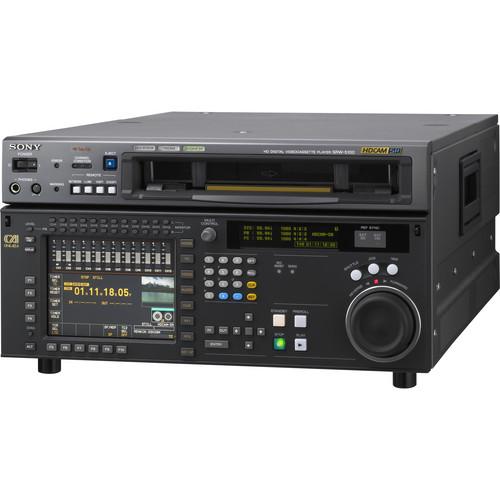 Contents of the user manual for the Sony SRW-5100 2 HDCAM-SR Studio Player
- Product category: Recorders & Duplication Sony
- Brand: Sony
- Description and content of package
- Technical information and basic settings
- Frequently asked questions – FAQ
- Troubleshooting (does not switch on, does not respond, error message, what do I do if...)
- Authorized service for Sony Recorders & Duplication
|
User manual for the Sony SRW-5100 2 HDCAM-SR Studio Player contain basic instructions
that need to be followed during installation and operation.
Before starting your appliance, the user manual should be read through carefully.
Follow all the safety instructions and warnings, and be guided by the given recommendations.
User manual is an integral part of any Sony product,
and if it is sold or transferred, they should be handed over jointly with the product.
Following the instructions for use is an essential prerequisite for protecting
health and property during use, as well as recognition of liability on the part of the manufacturer
for possible defects should you make a warranty claim. Download an official Sony user manual in which you will find instructions on how to install, use, maintain and service your product.
And do not forget – unsuitable use of a Sony product will considerably shorten its lifespan!
|
Product description The Sony SRW-5100/2 HDCAM-SR Studio Player is a full-bandwidth HDCAM-SR studio player. The deck is used in conjunction with Sony's top-quality CineAlta line of cameras, to deliver the pinnacle in high-definition program ingest and transfer. The HDCAM-SR format has been widely accepted by top professionals as the HD format of choice due to Sony's commitment to providing the highest quality solutions for the most demanding cinematographers and HD broadcasters.
The SRW-5100/2 is capable of playing both standard HDCAM-SR frame rates while still providing a wide range of other uses including output proxy files through MPEG-2 editorial output for HDV copies of source footage. Additionally, the /2 upgrade adds 1080 50/60p playback support along with 3D RGB and double-speed playback. This--combined with legacy playback of HDCAM or Digital BETA (using optional HKSR-5802 board)--makes the SRW-5100/2 the ideal solution for top-end HDTV, broadcast, commercial production, and 3D HD programming. - HDCAM-SR Format
- The SRW-5100/2 player adopts the HDCAM-SR format and plays back 1920 x 1080 resolution high-definition signals using the MPEG-4 Studio Profile compression scheme with a very mild compression ratio of 2.7:1 (4:2:2), 4:1 (4:4:4 SQ) or 2:1 (4:4:4 HQ) and 10-bit color depth. It enables both full-bandwidth 4:4:4 RGB and high-quality 4:2:2 Y/Cb/Cr playback, delivering optimal picture performance to suit many different production requirements.
- HQ mode
- The SRW-5100/2 player can play back tapes recorded at the high data rate of 880Mbps, for 4:2:2/1080/60P and 50P mode, and 4:4:4 High Quality (HQ) mode with the HKSR-5103 option board.
The 4:2:2/1080/60P and 50P recording mode is highly compatible with computer graphics, games and other progressive-based programs. It also offers exceptional picture performance when converting material originated in 1080/60P or 50P format to 720P format, due to its original high resolution of 1920 x 1080 (requires HKSR-5001/20 option board). Another benefit of using the 4:2:2/1080/60P and 50P recording mode is that it enables image creation with perfect playback slow-motion effects. The F35 recording mode of RGB 444 50P recording is also supported for playback at speeds below 30P.
HQ mode also allows 4:4:4 RGB recordings with a milder compression ratio of 2:1. This can achieve higher picture quality compared with recording at 440Mbps, depending on the picture, and is ideal when the highest possible image quality is the top priority. - Double Speed Playback
- The SRW-5100/2 allows all material whether 422 or RGB 444 to be transfered to servers and nonlinear editing systems at twice the normal speed using a standard Dual-link HD-SDI or single 3G interface. RGB 444 x2 playback using Dual 3G links is also supported.
- 3D Support
- Both 422 and RGB 444 playback (RGB using Dual 3G interface) are supported, so recording is onto one tape for extreme security, perfect L/R synchronization and 12 channels of audio.
- 96KHz Audio Sampling Support
- At SQ mode (440Mbps) 6 channels of 96KHZ playback are supported, while at HQ mode (880Mbps) 12 channels are supported. This is particularly useful for BluRay mastering.
- 2K Mode
- The 5100/2 can now support 3 different 2K modes with real-time playback: firstly 2048 x 1080 RGB 10 bit, then the DCI standard of 2048 x 1080 12 bit XYZ (Digital Cinema standard), and lastly full open gate 2048 x 1556 playback.
- 3G-SDI Interface
- The SRW-5100/2 comes equipped with 3G-SDI (2.97 Gbps) interfaces, which allow users to transfer 4:2:2/1080p or 4:4:4/1080i materials via a single SDI connection, for less complexity in system configuration. Users can select either dual-link HD-SDI, or 3G-SDI via the menu. Furthermore, dual-link 3G-SDI is also supported for transferring 4:4:4 signals in double-speed mode and 3D stereoscopic mode.
- HDMI Output
- The SRW-5100/2 can output materials in 4:4:4/1080i and 4:2:2/1080p (with optional HKSR-5103 board), 1080i, or 720p formats via its HDMI port (which requires the HKSR-5105 board). This allows users to instantly view the HDCAM-SR contents in their native signal format on a wide range of displays such as televisions and projectors. This capability enables the SRW-5100 player to be used at exhibitions and conferences for simple viewings, screenings, and presentations.
- HDV1080i Output
- The SRW-5100/2 can output a 25Mbps HDV1080i stream (MPEG-2 TS) to HDV products or HDV-based nonlinear editors via its i.LINK port (using the optional HKSR-5105 board). It supports 59.94i/50i output, and 23.98PsF materials are output as 1080/59.94i signals via 2-3 pull-down conversion. 1080p and 720p materials can also be output as 1080i signals. This capability is useful for offline editing.
- Legacy Playback Capability
- The SRW-5100/2 can optionally play back HDCAM and Digital Betacam format tapes for more flexible operation (using the optional HKSR-5802 board).
- Internal Format Conversion
- The SRW-5100/2 is optionally equipped with a powerful internal format converter that enables many different types of conversion such as 3:2 pulldown, upconversion, downconversion, cross-conversion and color-space conversion. This powerful optional HKSR-5001 format converter board makes the SRW-5100/2 very versatile in post-production.
- Easy Management of Setup/System Menus
- The SRW-5100/2 offers a highly effective way to manage its System Menu. Up to eight groups of parameters in the System Menu and Setup Menu can be individually saved as bank memory onto the internal memory of the VTR. They can also be saved onto Memory Stick media, enabling them to be copied onto other SRW-5100 VTRs for quick and consistent setup of multiple VTRs.
Furthermore, equipped with an Ethernet interface, the SRW-5100 allows operators to remotely view the setup parameters saved in the VTR's memory bank, and to select a bank they want to use through a PC. - Dual-sync Operation
- A unique feature of the SRW-5100/2 allows users to seamlessly integrate the VTR into a 59.94 editing environment. In doing so, users can directly perform insert editing--from a 23.98PsF master tape to either a 1080/59.94i or a 525/59.94i recording--without having to first dub the master to 59.94 format.
- Audio Output Channel Selection
- The SRW-5100/2 is equipped with a unique internal audio-output router, which enables flexible audio-output channel routing without the use of an external audio-routing device. Any of the tape's available channels can be assigned to the embedded HD-SDI (Ch 1-12) and SDI (Ch 1-8) audio-output channels. This feature provides the flexibility needed when recording audio to different tape formats.
- High-Speed Color Picture Search
- The SRW-5100/2 provides recognizable color pictures in Shuttle mode at speeds of up to 42 times normal playback for the HDCAM-SR format, and at speeds of up to 50 times normal playback for the HDCAM and Digital BETACAM formats.
- Long Playback Time on a Single Cassette
- Utilizing the technologically advanced HDCAM-SR format's high-density recording capability and compression technology, the SRW-5100/2 is capable of playing back up to 155 minutes at 1080/24PsF and up to 124 minutes at 1080/59.94i or 720/59.94p on a single L-sized cassette. S-sized cassettes can also be used, playing back up to 50 minutes of recorded material at 1080/24PsF and up to 40 minutes at 1080/59.94i or 720/59.94p.
- Noiseless Picture Playback
- The SRW-5100/2 comes with a playback capability that provides high-quality pictures in a range of -0.5 to +1 times normal playback speed during the playback of HDCAM-SR tapes.
- Digital Jog Sound
- In Jog mode, all 12 audio digital channels of the HDCAM-SR format or all four channels of the HDCAM format can be reproduced with a responsiveness and sound quality reminiscent of analog audio. This feature is essential to quickly and precisely establish an editing point while monitoring digital audio signals that remain synchronized with the pictures.
- Off-speed Playback Capability
- In order to play back material at different speeds for applications such as slow-motion or fast-motion, the SRW-5100/2 is equipped with a built-in off-speed playback capability.
- Selectable Picture Modes
- Three modes of operation--SQUEEZE, LETTER BOX, and EDGE CROP--are available to provide the correct presentation for each application type.
- Playback of Tapes Recorded by SRW-1
- The SRW-5100/2 VTR is capable of playing back tapes recorded by the SRW-1 recorder in several unique modes: 3D Stereoscopic (Dual Stream); 1080/4:2:2/60p; or Select FPS mode.
- User-friendly Controls
- The front control panel of the SRW-5100/2 is extremely user friendly, with a design and functionality inherited from the widely used HDW-F500. In addition, the control panel has a large 6.4" type LCD display that provides comprehensive information, including color thumbnails for quick location of parameters, which is used in combination with eight menu buttons placed along the side of the display.
- Easy Maintenance
- Drum maintenance is always a concern for VTR users. So, just like the majority of VTRs from Sony, the SRW-5100/2 drum assembly has been designed with an auto-adjustment function that simplifies and reduces maintenance time.
In the Box Sony SRW-5100/2 HDCAM-SR Studio Player Operation Manual Installation Manual 1-Year Parts Warranty
90-Day Labor Warranty araytucyvdeexcrefcfsxdzrvryawa Table of Contents
|
Upload User Manual
Have you got an user manual for the Sony SRW-5100 2 HDCAM-SR Studio Player in electronic form? Please send it to us and help us expand our library of instruction manuals.
Thank you, too, on behalf of other users.
To upload the product manual, we first need to check and make sure you are not a robot. After that, your "Submit Link" or "Upload File" will appear.
Technical parametersSony SRW-5100/2 Specs | Signal System | NTSC/PAL | | Tape Format | HDCAM-SR | | Tape Speed | HDCAM-SR: 94.1 mm/s (24 Hz)
HDCAM: 77.4 mm/s (24 Hz)
Digital BETACAM: 96.7 mm/s | | Maximum Playback Time | HDCAM-SR: 155 min.
HDCAM: 155 min.
Digital BETACAM: 124 min. | | Signal-to-Noise Ratio | 56dB | | Audio Signal Format | HDCAM-SR | | Frequency Response | 20 Hz to 20 kHz, +0.5 dB/-1.0 dB (0 dB at 1 kHz) | | Signal to Noise Ratio | Not Specified By Manufacturer | | Input and Output Connectors | HD/SD Reference: BNC (x2 Input)
HD-SDI: BNC (x2 Output)
SD-SDI: BNC (x1 Output)
Composite: BNC (x1 Output)
SD Sync: BNC
Analog Reference: BNC (x2 Output)
Digital Audio (AES/EBU Unbalanced): BNC (x6 Output)
Monitor Audio L/R: XLR 3-Pin (x2 Output)
Ethernet: RJ-45 (x1)
RS-232C: 9-pin D-Sub (x1)
USB: USB 2.0 (x1) | | Power Requirements | 100-240VAC, ±10%, 50/60 Hz | | Power Consumption | 380W | | Operating Temperature | 41-104°F (5-40°C) | | Dimensions (WxHxD) | 16.8 x 8.6 x 21.5" (42.7 x 21.8 x 54.4 cm) | | Weight | 66.1 lbs (30kg) |
Rating60% users recommend this product to others. And what about you?

This product has already been rated by 19 owners. Add your rating and experience with the product.
Discussion
 Ask our technicians if you have a problem with your settings,
or if anything is unclear in the user manual you have downloaded.
You can make use of our moderated discussion.
The discussion is public and helps other users of our website who may be encountering similar problems.
Ask our technicians if you have a problem with your settings,
or if anything is unclear in the user manual you have downloaded.
You can make use of our moderated discussion.
The discussion is public and helps other users of our website who may be encountering similar problems.
The discussion is empty - enter the first post
Post a new topic / query / comment:
|
|
|
| Request for user manual |
You can’t find the operation manual you are looking for? Let us know and we will try to add the missing manual:
I’m looking for a manual / Request for manual
Current requests for instruction manuals:
Call Of Duty World War Two For Xbox...
controller stratus XL...
stratus XL...
smart whatch serie S11 42mm...
Allen & Heath SQ-6 manual...
|
| Discussion |
Latest contributions to the discussion:
AEW R 4100
Name: MAURICIO ANGARITA
Audio-Technica AEW-R4100 UHF Diversity Receiver for
AEW R 4100 has the mute function blocked and does not allow audio to pass. I tried several times to turn off the mute from the transmitter but it does nothing, the mute stays on. Solution?
Thank you...
Instructions for assembling the 2015 Forecast Image Master Consoles GC3-A
Name: mike elam
Forecast Consoles GC3-A ImageMaster Editing Console
Looking for instructions for assembling this console. ...
EMPTY TONER ERROR MESSAGE AFTER REPLACING TONER
Name: LINDA BAD YELLOW EYES
Brother TN223BK Standard-Yield Toner
I HAD TO CHANGE OUT ALL THREE TONERS DUE TO LEAKS IN THE YELLOW AND CYAN. AFTER I REPLACED THEM, THE MACHINE KEEPS GIVING ME AN EMPTY TONER ERROR MESSAGE. HELP!!...
PS480D 20/24 pin Switching 480W Power Supply
Name: swkargo
Logisys 480W Power Supply
This item states in can run -5vdc .It is NOT listed on the board or I beleive is r4 is missing the resitior. Any body have thid issue. Shawn
...
Help needed
Name: Ann Carter
SanDisk 1TB Extreme Portable USB 3.1
When I click the link to download the user manual for my Sandisk Extreme external hard drive, it gives me the manual for the LG Cricket. Can you please change the link so I can download the Sandisk manual and begin using this drive? Thank you....
|
|


