User Manual for Sony W Series SNCWR600 Rapid Dome Indoor HD Network Camera with IPELA ENGINE PRO Technology & 4.3 to 129mm Lens Click to enlarge the picture
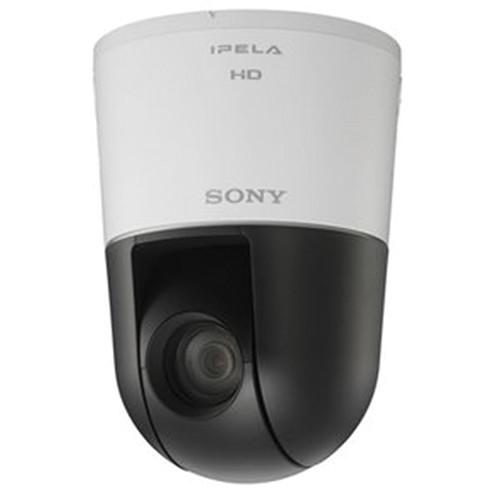 Contents of the user manual for the Sony W Series SNCWR600 Rapid Dome
- Product category: Wired IP Cameras Sony
- Brand: Sony
- Description and content of package
- Technical information and basic settings
- Frequently asked questions – FAQ
- Troubleshooting (does not switch on, does not respond, error message, what do I do if...)
- Authorized service for Sony Wired IP Cameras
|
User manual for the Sony W Series SNCWR600 Rapid Dome contain basic instructions
that need to be followed during installation and operation.
Before starting your appliance, the user manual should be read through carefully.
Follow all the safety instructions and warnings, and be guided by the given recommendations.
User manual is an integral part of any Sony product,
and if it is sold or transferred, they should be handed over jointly with the product.
Following the instructions for use is an essential prerequisite for protecting
health and property during use, as well as recognition of liability on the part of the manufacturer
for possible defects should you make a warranty claim. Download an official Sony user manual in which you will find instructions on how to install, use, maintain and service your product.
And do not forget – unsuitable use of a Sony product will considerably shorten its lifespan!
|
Product description The W Series SNCWR600 Rapid Dome Indoor HD Network Camera with IPELA ENGINE PRO Technology & 4.3 to 129mm Lens from Sony provides unique features for capturing clear images in wide variety of conditions. The View-DR wide dynamic range technology allows capturing the images of objects clearly and adaptively even under severe backlight or highlight conditions. The effect of camera shaking or vibration is reduced with the help of the Gyroscopic Image Stabilizer, which helps minimize image blur. The Focal Plane Distortion Correction technology in this camera corrects any image distortion generated in a scene by the CMOS sensor focal plane phenomenon. It also includes additional features such as the DEPA advanced intelligent video analytics to trigger an alarm based on user-defined rules and defog image processing to increase image visibility in poor weather conditions such as rain, fog, or smog.The Visibility Enhancer (VE) feature helps dynamically optimize the brightness and color reproduction of an image on a pixel-by-pixel basis while continuously adapting to the scene within the given dynamic range. It also captures images with virtually no motion blur under low illumination thanks to the XDNR (excellent Dynamic Noise Reduction) technology.The camera features 30x optical zoom capability to shoot various scenes over a wide area for capturing high-resolution images even from a great distance. It captures images with a frame rate of 60 fps to provide smooth and less blurry pictures of moving objects. - IP Rapid Dome 720p/60 fps camera
- Powered by IPELA ENGINE PRO technology
- Maximum resolution of 1280 x 720 pixels with the Exmor CMOS sensor
- 30x optical zoom capability
- Dynamic range equivalent to 130dB in HD mode achieved with View-DR technology
- Gyroscopic image stabilizer
- Focal plane distortion correction technology
- High frame rate of 60 fps
- Picture mode selectable from a range of camera scenes in the settings menu to optimize picture quality in various applications
- True D/N (Day/Night) function to switch to day or night mode depending on the light level
- VBR (Variable Bitrate) or CBR (Constant Bitrate) compression mode selectable to correspond with various network conditions
- Edge storage function to record video and audio data with an SD/SDHC card attached to the camera 1
Please Note: Memory card not included close - Easy initial network settings by supplied SNC Easy IP Setup Guide application
- Smartphone viewer to display an image of the camera on the smartphone's screen and control the camera's pan, tilt, and zoom functions by simple touch-panel manipulation
- ONVIF (Open Network Video Interface Forum) Profile S conformance firmware that ensures interoperability and flexibility in building multi-vendor system
In the Box Sony W Series SNCWR600 Rapid Dome Indoor HD Network Camera with IPELA ENGINE PRO Technology & 4.3 to 129mm Lens CD-ROM (Supplied Programs) Ceiling Bracket 3 x Fixing Screw (M4 x 10) 3-Pin Power Connector BNC Cable I/O Cable Template Cable Clamp 2 x Cable Clamp Fixing Screw (M2.6 x 8, Tapping Screw) Limited 3-Year Warranty Table of Contents
|
Upload User Manual
Have you got an user manual for the Sony W Series SNCWR600 Rapid Dome Indoor HD Network Camera with IPELA ENGINE PRO Technology & 4.3 to 129mm Lens in electronic form? Please send it to us and help us expand our library of instruction manuals.
Thank you, too, on behalf of other users.
To upload the product manual, we first need to check and make sure you are not a robot. After that, your "Submit Link" or "Upload File" will appear.
Technical parametersSony SNC-WR600 Specs | | | Image Sensor | 1/2.8" Progressive Scan Exmor CMOS | | Number of Effective Pixels | Approximately 1.37 MP | | Signal System | NTSC | | Sync System | Internal | | Minimum Illumination | (50 IRE) Color: 1.0 lux (F1.6, View-DR Off, VE Off, AGC On, 1/30 sec, 30 fps)
B&W: 0.03 lux (F1.6, View-DR Off, VE Off, AGC On, 1/30 sec, 30 fps) | | Dynamic Range | Equivalent to 130 dB with View-DR technology | | S/N Ratio | More than 50 dB (Gain 0 dB) | | Gain | Auto/Manual (-3 to 28 dB) | | Shutter Speed | 1 to 1/10,000 sec | | Exposure Control | Full auto, Shutter priority, Iris priority, Manual | | White Balance | ATW, ATW PRO, Indoor, Outdoor, Fluorescent lamp, Mercury lamp, Sodium vapor lamp, Metal halide lamp, White LED, One-push WB, Manual | | Lens | Auto-focus zoom lens with powered focus | | Zoom | Optical: 30x
Digital: 12x
Total: 360x | | Viewing Angle | Horizontal: 2.1 to 58.3° | | Focal Length | f = 4.3 mm to 129.0 mm | | F-Number (f) | F1.6 (Wide) to F4.7 (Tele) | | Minimum Object Distance | 11.8" (30.0 cm) | | Pan/Tilt Angle | Powered: 360° endless rotation/220° | | Pan / Tilt Speed | Pan: 700°/sec (maximum)
Tilt: 700°/sec (maximum) Available when the preset mode is on | | Number of Preset Positions | 256 | | Tours | Number of Tour Programs: 5 | | | | Day/Night | True D&N | | Wide-D | View-DR | | Additional | Tone Correction ( Visibility Enhancer (VE)), Wide-D View-DR, Defog Image Processing, Noise Reduction XDNR, Picture Mode, Edge Storage, Voice Alert, and Smartphone viewer
Superimpose Number: 3 independent positions for characters (Codec, Date & Time, Event, Direction, Text (maximum 64 characters)), 1 independent position for logo marks | | Image Stabilizer | Gyroscopic Image Stabilizer | | Privacy Masking | Number: 12
Shape: Quadrangle
Color/Effect: Opaque: 14 colors (Black, White, Red, Green, Blue, Cyan, Yellow, Magenta, Gray (6 scales)), Mosaic | | Language | Superimpose Language: English
Menu Language: English, Japanese, Chinese (simplified), Chinese (traditional), French, Spanish, German, Italian, Korean, Portuguese, Russian, Arabic, Hindi, Vietnamese, Thai | | | | Resolution | 1280 x 720, 1024 x 576, 720 x 576, 704 x 576, 720 x 480, 640 x 480, 640 x 360, 352 x 288, 320 x 184, (H.264, JPEG) | | Compression Format | H.264 (High/Main/Baseline Profile), JPEG | | Maximum Frame Rate | H.264: 60 fps (1280 x 720)
JPEG: 60 fps (1280 x 720) | | Control | Bitrate Compression Mode: CBR/VBR (selectable)
Range of Bitrate Setting: 64 kb/s to 32 Mb/s
Adaptive Rate Control: H.264 | | Streaming | Triple streaming | | Number of Clients | 20 | | | | Architecture | DEPA Advanced | | Features | Intelligent Motion Detection, Face Detection, Tamper Alarm | | Scene Analytics | Passing, Intrusion, Left Object Detection, Removed Object Detection | | | | Compression Format | G.711/G.726/AAC (16 kHz, 48 kHz) | | | | Operating System | Windows XP (32 bit) Professional Edition, Vista (32 bit) Ultimate, Business Edition, 7 (32/64 bit) Ultimate, Professional Edition, 8 Pro (32/64 bit) | | Processor | Intel Corei7 2.8 GHz or higher | | Memory | 2 GB or more | | Web Browser | Microsoft Internet Explorer Ver. 7.0, 8.0, 9.0, 10.0, FirefoxR Ver. 19.02 (plug-in free viewer only), SafariR Ver. 5.1 (plug-in free viewer only), Google Chrome Ver. 25.0 (plug-in free viewer only) | | | | Protocols | IPv4, TCP, UDP, ARP, ICMP, IGMP, HTTP, DHCP, DNS, NTP, RTP/RTCP, RTSP over TCP, SMTP over HTTP, IPv6, HTTPS, SNMP (v1, v2c, v3), SSL SSM (Source Specific Multicast) is supported. | | ONVIF Conformance | Profile S | | QoS | DSCP | | Authentication | IEEE 802.1X | | | | Analog Video Output | BNC x1, 1.0 Vpp, 75 Ω, unbalance, sync negative | | Microphone | Mini jack (monaural), Mic In/Line In: 2.5 VDC plug-in power | | Line Input | Mini jack (monaural) | | Line Output | Mini jack (monaural), Maximum output level: 1 Vrms | | Network Access | 10BASE-T/100BASE-TX (RJ-45) | | Alarm Input | x4, make contact, break contact | | Alarm Output | x2, 24 V AC/DC, 1 A (mechanical relay outputs electrically isolated from the camera) | | Serial Interface | RS-422/RS-485 (PELCO D protocol) | | Card Slots | 1 x SD card slot | | Memory Card Support | 4/8/16/32 GB SDHC (no support for SDXC) | | | | Power Requirements | IEEE802at compliant (HPoE system, 24 VAC / 12 VDC | | Power Consumption | 25 W maximum | | Operating Temperature | 23 to 122°F (-5 to 50°C) | | Cold Start | 32 to 122°F (0 to 50°C) | | Storage Temperature | -4 to 140°F (-20 to 60°C) | | Operating Humidity | 20 to 80% | | Storage Humidity | 20 to 95% | | Material of Construction | Base, Camera, & Side Cabinet: PC + ABS | | Color | Base Cabinet: 4.4BG 8.4/0.2
Camera & Side Cabinet: 3.9PB 0.3/1.0 | | Safety Regulations | JATE Technical Standard (LAN), UL2044, IEC60950-1 (CB), VCCI (Class A), FCC (Class A), IC (Class A)
Emission: EN55022 (Class A) + EN50130-4, AS/NZS CISPR22 (Class A) KCC, EMC-TR
Immunity: EN55022 (Class A) + EN55024
Emission: AS/NZS CISPR22 (class A), KCC, EMC-TR | | Dimensions (Ø x H) | 5.8 x 8.1" (14.7 x 20.5 cm) | | Weight | 3.7 lb (1.7 kg) |
Rating50% users recommend this product to others. And what about you?

This product has already been rated by 20 owners. Add your rating and experience with the product.
Discussion
 Ask our technicians if you have a problem with your settings,
or if anything is unclear in the user manual you have downloaded.
You can make use of our moderated discussion.
The discussion is public and helps other users of our website who may be encountering similar problems.
Ask our technicians if you have a problem with your settings,
or if anything is unclear in the user manual you have downloaded.
You can make use of our moderated discussion.
The discussion is public and helps other users of our website who may be encountering similar problems.
The discussion is empty - enter the first post
Post a new topic / query / comment:
|
|


