|
User Manual for SOURCE AUDIO One Series Ventris Dual Reverb Pedal Click to enlarge the picture
 Contents of the user manual for the SOURCE AUDIO One Series Ventris Dual
- Product category: Effects Pedals SOURCE AUDIO
- Brand: SOURCE AUDIO
- Description and content of package
- Technical information and basic settings
- Frequently asked questions – FAQ
- Troubleshooting (does not switch on, does not respond, error message, what do I do if...)
- Authorized service for SOURCE AUDIO Effects Pedals
 |
User manual for the SOURCE AUDIO One Series Ventris Dual contain basic instructions
that need to be followed during installation and operation.
Before starting your appliance, the user manual should be read through carefully.
Follow all the safety instructions and warnings, and be guided by the given recommendations.
User manual is an integral part of any SOURCE AUDIO product,
and if it is sold or transferred, they should be handed over jointly with the product.
Following the instructions for use is an essential prerequisite for protecting
health and property during use, as well as recognition of liability on the part of the manufacturer
for possible defects should you make a warranty claim. Download an official SOURCE AUDIO user manual in which you will find instructions on how to install, use, maintain and service your product.
And do not forget – unsuitable use of a SOURCE AUDIO product will considerably shorten its lifespan!
|
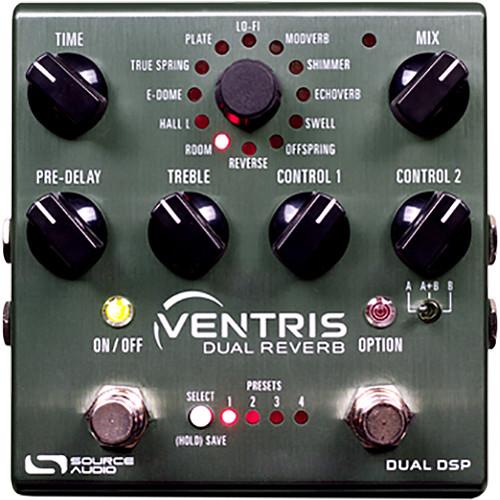
Product description The SOURCE AUDIO One Series Ventris Dual Reverb pedal is a stompbox designed for electric guitars, keyboards, or any instrument with a 1/4" output in dire need of expressive, versatile reverberations. The pedal itself sports more than 20 reverb engines (12 built-in, eight more available over a free, corresponding app), as well as two signal processors. With a dual engine, 56-bit data path at your disposal, you can switch between two reverbs at any time, blend them in parallel, or cascade them in switchable series. MIDI functionality allows you to control the Ventris with your host sequencer or DAW, while the pedal’s 1/4" I/O path packs a hefty assortment of features. For instance, you can use the Ventris in stereo (it will automatically configure to the appropriate stereo routing mode), or you can utilize the secondary 1/4" jacks to route signal to an external effects loop for coloring your verb. Additionally, you can interface with the Neuro App over these secondary 1/4" connections. For a brief explanation of how to do this, please see the features section below these initial paragraphs.Rooms, halls, springs, and more are available straight from the pedal, with custom ambiances editable over the Desktop mobile or Neuro apps. Set controls are provided for pre-delay, reverb time, and treble. Two other knobs, labeled Control 1 and Control 2, change depending on the reverb engine selected.Once you’ve explored a desired reverb to its fullest potential, you can save your findings as a preset, eight of which can be saved and stored within the pedal itself. There are 2 expression jacks supplied, one for conventional expression pedals/external footswitches, and the other for Hot Hand Control—a proprietary SOURCE AUDIO technology which allows you to control various parameters from an accelerometer ring worn around your finger (this ring is available separately). A 9 VDC power supply is included with the Ventris. - Controls at a Glance
- Time Knob: This controls the duration of the reverb. Turn the knob counter-clockwise to shorten the circulation time of the reverb, and clockwise to lengthen it. Setting the Time knob fully clockwise will cause the reverb to circulate indefinitely.Pre-Delay Knob: This adjusts the amount of time between the dry signal and the beginning of the reverb. Turn the Pre-Delay knob clockwise to create echo reflections similar to slapback or delay effects.Mix Knob: This Controls the relative level between the dry input signal and the wet. When set at 3 o'clock, the wet and dry signals will be at equal volume. Fully counter-clockwise is 100% dry, and fully clockwise is 100% wet.Treble Knob: Controls the cut-off point of a low-pass filter on the wet signal. Turn the knob clockwise for brighter reverb trails and counter-clockwise for darker trails.Control Knobs: The functions of these knobs vary depending on the selected reverb engine.Engine Selector Knob: This selects between the 12 main effect engines. To access the additional reverb engines, use the Neuro Mobile App or Desktop Editor.On/Off Footswitch: This engages or bypasses the reverb effect. The corresponding ON/OFF LED will be lit when the reverb effect is engaged. In addition (while the pedal is engaged), pressing and holding the ON/OFF Footswitch scrolls to the next Preset.Option Footswitch: This dual-action footswitch sports two independent control functions that vary depending on the selected engine. The footswitch responds to two actions: quickly tapping, or pressing and holding. Each of the two actions prompts a different function. Option Footswitch commands include tap-tempo for the Pre-Delay or modulation, hold, build, A/B reverb toggling, and more. It is also possible to program alternative control options with the Neuro App or Desktop Editor.A/B Reverb Selector Toggle: This switch between reverbs A, B, or A+B. Save two independent reverb effects (one for each processor) in each of the Ventris’s 128 presets and use the A/B Toggle Switch to select which is active. Selecting A + B will engage both reverbs simultaneously. Note: The initial engagement position of this switch can be saved as part of a preset.Preset Select / Save Button: Scrolls through the four user presets (or eight in Preset Extension Mode) saved in the Ventris. To save a preset into the currently selected spot, press and hold this button.
- Reverb Effects at a Glance
- ROOM: This captures the ambient reverberations of a real acoustic space. In contrast with the E-DOME engine (which offers a more arena-sized reverb) the ROOM engine can summon a variety of room sizes from a warm and intimate living room to a larger theatre sized space.HALL L: Patterned after the studio rack units from the 80s, the HALL L engine is distinguished by its diffuse tones and blooming characteristics. Pay attention to the L in “HALL L,” and you’ll have an idea of which classic manufacturer this algorithm is emulating.E-DOME: This setting produces long, lush reverb trails for invoking the sound of massive arena settings.TRUE SPRING: This algorithm aims to evoke the idiosyncrasies of a vintage spring reverb tank.PLATE: A simulation of vintage plate reverb units for the 50s and 60, this algorithm replicates the simple, yet beautiful sound created by blasting audio into the face of a large plate of suspended sheet metal.LO-FI: This setting embraces destructive elements like distortion, oversaturation, and pitch fluctuation, for a dirty and nasty tone.MODVERB: This modulating effect revisits the earthy combination of tremolo and spring reverb found in many vintage guitar amplifiers. Apply varying degrees of tremolo to your dry signal, your wet signal, or both.SHIMMER: This pitch-shifting reverb engine mixes traditional room sounds with octave-up reflections for an angelic reverb effect. Connect the Shimmer engine to the Neuro Desktop Editor and swap the octave-up for variety of additional pitch intervals. Hold down the OPTION footswitch for a dive-bombing pitch effect.ECHOVERB: For those in need of simultaneous reverb and delay effects, the Echoverb engine provides an echo effect with ambient repeats. You can also tone down the cavernous reverberations and use the Echoverb engine like a classic delay pedal.SWELL: This applies a volume swell effect to your instrument’s dry signal, which is then fed into the reverb effect, engendering evocative clouds of sound.OFFSPRING: This esoteric effect aims to create ambiances not easily described.REVERSE: This creates a reverse-reverb effect.
- Connections at a Glance
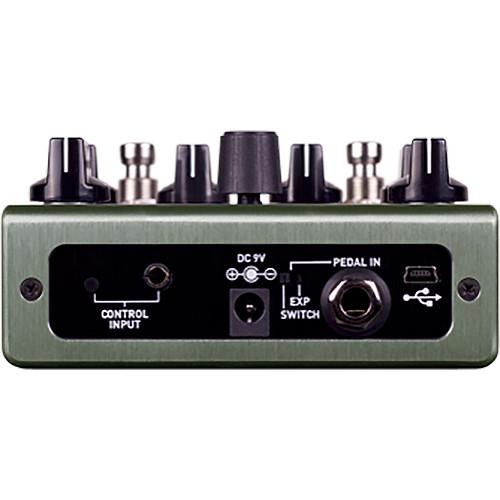
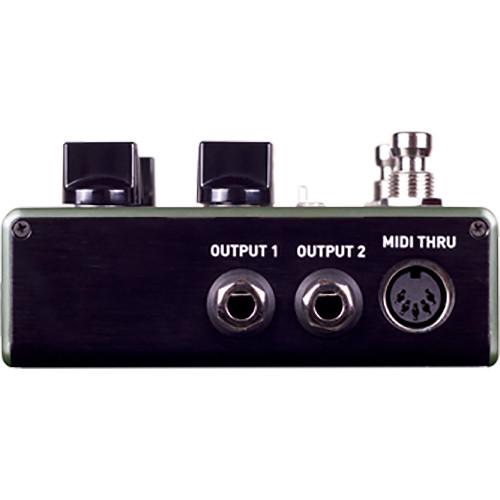
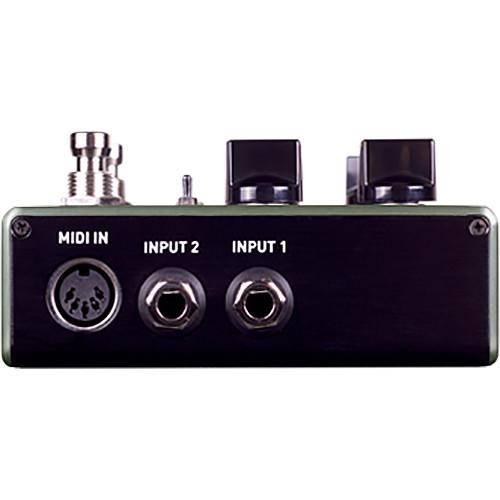
- Input 1: This is the primary input for guitar, bass, or other instruments. It can also accept line-level inputs and will work in your amp’s effect loop. Connect it to your instrument or other audio source using a mono (TS) 1/4" cable.Input 2: In contrast to Input 1, this jack has quite a few possible uses; you can route secondary audio input for stereo sources, and you can also use this jack as an external feedback loop input (i.e., a return), or as the data connection to your mobile device when using the Neuro App. In this way, the Neuro App sends data to the pedal using your mobile device’s headphone jack. Connect it to your mobile device using an included stereo 3.5mm to 1/4" cable. The input can also accept daisy-chained Neuro data from another Neuro-compatible pedal in the chain, if a TRS cable is used. The audio signal (if applicable) will be on the tip contact of the plug, and the Neuro App data will be on the ring contact. This allows audio and Neuro data to flow on the same cable.Output 1: This is the primary audio output. Connect it to your amplifier, recording interface, or the next device in your effects signal chain using a mono (TS) 1/4" cable.Output 2: Much like Input 2, this jack can act as the secondary audio output, as an External Loop Send (if the pedal is configured in a routing mode that includes an external loop), or as a data connection for the Neuro App, passing data from the Ventris to the next Source Audio effect in your signal chain. You can daisy-chain the Neuro App data regardless of whether Output 2 is configured to output audio or not. Connect Output 2 to the next device’s Neuro App Data input (usually Input 2) using a stereo (TRS) 1/4" cable. As described above, the audio signal (if applicable) will be on the tip contact of the plug, and the Neuro App data will be on the ring contact. This allows audio and Neuro data to flow on the same cable.Control Input: This 3.5mm port connects to external control devices such as the Source Audio Dual Expression Pedal, Reflex Universal Expression Pedal, Neuro Hub, and Hot Hand Motion Controller. Using this port, you can access Source Audio’s proprietary Hot Hand technology, which allows you to control assignable parameters from a ring-like accelerometer (available separately) that you’d wear around a finger on your picking hand.Expression/Switch Pedal Input: Yes, you can hook up a compatible expression pedal via the 3.5mm input described above. However, this jack will allow you to plug in an external passive expression pedal or footswitch. A Pedal In Switch near the jack lets you select which type of external controller is being used. Set to Exp for expression control or Switch for footswitch control.MIDI Input: This is a standard 5-pin DIN connector that accepts MIDI control messages from external devices, including program changes, continuous controllers (CCs), and MIDI clock.MIDI Thru: This is a standard 5-pin DIN connector that echoes MIDI messages from the MIDI Input jack and sends them to other devices. The Ventris does not generate any of its own MIDI data, but it will copy and output any data it receives.
UPC: 890729001538 In the Box SOURCE AUDIO One Series Ventris Dual Reverb Pedal 9 VDC Power Supply Limited 2-Year Warranty Table of Contents
|
Upload User Manual
Have you got an user manual for the SOURCE AUDIO One Series Ventris Dual Reverb Pedal in electronic form? Please send it to us and help us expand our library of instruction manuals.
Thank you, too, on behalf of other users.
To upload the product manual, we first need to check and make sure you are not a robot. After that, your "Submit Link" or "Upload File" will appear.
Technical parametersSOURCE AUDIO SA262-US Specs | Controls | Time Knob
Engine Selector Knob
Mix Knob
Pre-Delay Knob
Treble Knob
Control 1 Knob
Control 2 Knob
Option Footswitch
On/Off Footswitch | | I/O | 2 x 1/4" inputs, phone type
2 x 1/4" outputs, phone type
1 x 1/4" TRS expression input, phone type
1 x 3.5 mm TRRS control input, phone type
1 x 5-Pin DIN MIDI input
1 x 5-Pin DIN MIDI thru
1 x Micro-USB port | | Housing | Anodized aluminum | | Maximum Input Level | +6.54 dBV / +8.78 dBu | | Output Level | Full Scale: +6.54 dBV / +8.78 dBu | | Impedance | Input: 1 MOhm
Output: 600 Ohms | | Dynamic Range | 110 dB | | DSP | 24-bit (56-bit digital data path) | | Power Consumption | 280 mA | | Power Supply | 9 VDC power supply (400 mA, negative tip) | | Dimensions | 4.6 x 4.4 x 1.4" / 11.6 x 11.2 x 3.7 cm (not including knobs and footswitches)
4.6 x 4.4 x 2.2" / 11.6 x 11.2 x 5.6 cm (including knobs and footswitches) | | Weight | 1 lb / 450 g | | | | Package Weight | 1.65 lb | | Box Dimensions (LxWxH) | 8.2 x 5.3 x 2.5" |
Rating60% users recommend this product to others. And what about you?

This product has already been rated by 19 owners. Add your rating and experience with the product.
Discussion
 Ask our technicians if you have a problem with your settings,
or if anything is unclear in the user manual you have downloaded.
You can make use of our moderated discussion.
The discussion is public and helps other users of our website who may be encountering similar problems.
Ask our technicians if you have a problem with your settings,
or if anything is unclear in the user manual you have downloaded.
You can make use of our moderated discussion.
The discussion is public and helps other users of our website who may be encountering similar problems.
The discussion is empty - enter the first post
Post a new topic / query / comment:
|
|
|
| Request for user manual |
You can’t find the operation manual you are looking for? Let us know and we will try to add the missing manual:
I’m looking for a manual / Request for manual
Current requests for instruction manuals:
Call Of Duty World War Two For Xbox...
controller stratus XL...
stratus XL...
smart whatch serie S11 42mm...
Allen & Heath SQ-6 manual...
|
| Discussion |
Latest contributions to the discussion:
AEW R 4100
Name: MAURICIO ANGARITA
Audio-Technica AEW-R4100 UHF Diversity Receiver for
AEW R 4100 has the mute function blocked and does not allow audio to pass. I tried several times to turn off the mute from the transmitter but it does nothing, the mute stays on. Solution?
Thank you...
Instructions for assembling the 2015 Forecast Image Master Consoles GC3-A
Name: mike elam
Forecast Consoles GC3-A ImageMaster Editing Console
Looking for instructions for assembling this console. ...
EMPTY TONER ERROR MESSAGE AFTER REPLACING TONER
Name: LINDA BAD YELLOW EYES
Brother TN223BK Standard-Yield Toner
I HAD TO CHANGE OUT ALL THREE TONERS DUE TO LEAKS IN THE YELLOW AND CYAN. AFTER I REPLACED THEM, THE MACHINE KEEPS GIVING ME AN EMPTY TONER ERROR MESSAGE. HELP!!...
PS480D 20/24 pin Switching 480W Power Supply
Name: swkargo
Logisys 480W Power Supply
This item states in can run -5vdc .It is NOT listed on the board or I beleive is r4 is missing the resitior. Any body have thid issue. Shawn
...
Help needed
Name: Ann Carter
SanDisk 1TB Extreme Portable USB 3.1
When I click the link to download the user manual for my Sandisk Extreme external hard drive, it gives me the manual for the LG Cricket. Can you please change the link so I can download the Sandisk manual and begin using this drive? Thank you....
|
|


