|
User Manual for SOURCE AUDIO Soundblox 2 Dimension Reverb Pedal Click to enlarge the picture
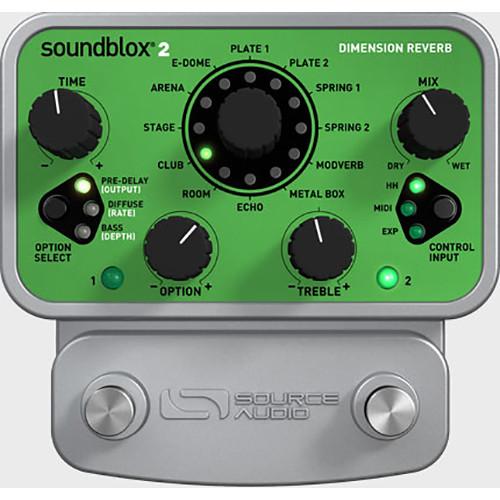 Contents of the user manual for the SOURCE AUDIO Soundblox 2 Dimension Reverb
- Product category: Effects Pedals SOURCE AUDIO
- Brand: SOURCE AUDIO
- Description and content of package
- Technical information and basic settings
- Frequently asked questions – FAQ
- Troubleshooting (does not switch on, does not respond, error message, what do I do if...)
- Authorized service for SOURCE AUDIO Effects Pedals
 |
User manual for the SOURCE AUDIO Soundblox 2 Dimension Reverb contain basic instructions
that need to be followed during installation and operation.
Before starting your appliance, the user manual should be read through carefully.
Follow all the safety instructions and warnings, and be guided by the given recommendations.
User manual is an integral part of any SOURCE AUDIO product,
and if it is sold or transferred, they should be handed over jointly with the product.
Following the instructions for use is an essential prerequisite for protecting
health and property during use, as well as recognition of liability on the part of the manufacturer
for possible defects should you make a warranty claim. Download an official SOURCE AUDIO user manual in which you will find instructions on how to install, use, maintain and service your product.
And do not forget – unsuitable use of a SOURCE AUDIO product will considerably shorten its lifespan!
|
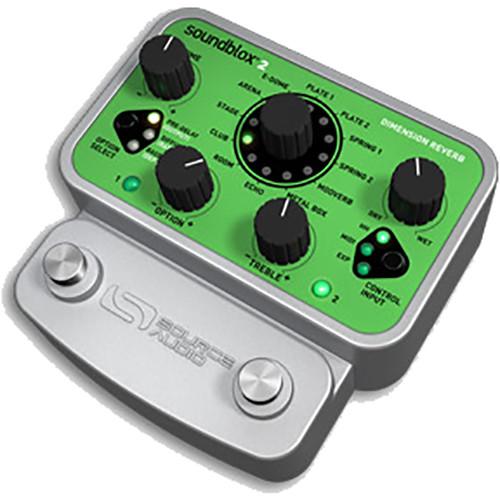
Product description Designed for electric guitarists, the Soundblox 2 Dimension Reverb from Source Audio is a pedal with 12 different reverbs, including five rooms, two plates, two springs, a modulation verb, something that sounds like the inside of a metal box, and an echo. With a compact and durable housing, the pedal offers two user-assignable preset slots that can be switched on or bypassed via two onboard footswitches.Even though the pedal takes up relatively little real estate at 4.5 x 4.5 x 2.3”, you have significant control over nine different parameters. Sure, you can change the wet/dry mix, the reverb time, and tone, but you can also manipulate diffusion, pre-delay, and the rate/depth of an LFO. The pedal utilizes a 56-bit digital data path, and both stages of conversion are industry standard 24-bit.As this is a Soundblox series pedal, it’s enabled for multiple methods of external control, namely, MIDI, expression input, and Hot Hand technology, all of which can be routed into the multipurpose 4-pole 3.5mm jack. For further explanation of external control, as well as the operation of the pedal and its various timbres, please peruse the features section. A DC Power supply is included. - Key Features at a Glance
- 12 rich-sounding reverb effects based on physical spaces and mechanical reverbs.Access to Reverb-control parameters typically found only on rack systems.The unit features Source Audio’s 56-bit Digital Signal Processor—the SA601—and crystal clear 24-bit converters.The pedal utilizes a cast-aluminum housing for durability.Select either analog buffered or relay-based True Bypass.A multipurpose control input provides integration with expression pedals, compatible MIDI controllers, and Hot Hand controllers.A DC power supply is included.
- Controls at a Glance
- TIME: The primary reverb control, this TIME parameter sets how long the reverb sound will last before decaying. It can also be thought of as a feedback control to set how long the input will circulate through the reverb effect before dying away. The minimum time corresponds to zero feedback within the reverb. This will produce a single echo spread out by the difference in times of the various delay lines inside the pedal. The shortest times are not realistic in a traditional reverb sense and the longest times are extreme, but both can produce interesting effects.OPTION: The OPTION knob manipulates the level of six secondary parameters, selectable via the OPTION SELECT button.OPTION SELECT: This button selects six secondary parameters which, upon engaging, you can attenuate or boost with the OPTION knob. Parameters include PRE-DELAY, DIFFUSE, BASS, OUTPUT, DEPTH, and RATE. PRE-DELAY sets the initial time before the reverb begins. OUTPUT sets the overall output level of the effect, which is useful for matching levels between processed signal and bypassed signal. DIFFUSE sets the amount of natural “spreading” within the feedback loop, smearing out transients over time. RATE adjusts the speed of the LFO applied to a reverb, allowing you to animate the sound—or conversely, provide a realistic sense of randomization. DEPTH also applies to the LFO, controlling the amount of modulation applied to the reverbed signal, and useful for achieving chorusing effects. BASS allows you to damp or raise the level of bass frequencies within the reverb.MIX: This control adjusts the balance of the wet reverb sound and the clean input signal. Full counter-clockwise is a completely dry tone, while full clockwise is the processed tone with no dry signal added.TREBLE: This knob controls the high frequency damping (or roll-off) in the feedback loop. As the knob is turned down (full counter-clockwise), more damping is applied, and higher frequencies will die out more quickly, giving you a duller sound. Turn the knob fully clockwise for the least amount of damping; this will result in more overall treble in the timbre.CONTROL INPUT: This button changes the control input. Options include Hot Hand, Expression, and MIDI. By default, the expression pedal and Hot Hand inputs are assigned to control the TIME parameter. This can easily be changed to control any other knob parameter or an additional REVERB SEND parameter.REVERB SEND: This is an additional parameter that does not have a corporeal control associated with it, but can be accessed with an expression pedal input or with Hot Hand technology. Similar to the MIX knob, the REVERB SEND controls how much of the input will be sent to the reverb effect and how much will be sent to the output. However, unlike the MIX knob, REVERB SEND comes before the actual reverb. By using the REVERB SEND, you can tailor the reverb more for the situation—for instance, letting the tail of a previous, reverberated section of music play out while your dry, unprocessed signal plays on top.FOOTSWITCHES: There are two footswitches on the Dimension Reverb. The left footswitch corresponds to preset one and the right footswitch corresponds to preset two. Pressing either of the footswitches will engage the respective preset. Pressing the same footswitch again will put the effect back into bypass mode. Pressing the other footswitch will engage the other preset without going into bypass.
- Reverb Types
- ROOM SOUNDS: The first five EFFECT choices are intended to represent real acoustical spaces progressing in size from small to enormous. The room sounds are labeled: Room, Club, Stage, Arena, and E-Dome.PLATE AND SPRING REVERBS: Plate and Spring reverbs are simulations of two popular mechanically constructed reverb units. The critical component in a real plate is, as you might expect, a large plate of sheet metal. Plate reverbs tend to have a high diffusion rate, so for an accurate representation the DIFFUSE knob should be on the high side. The Spring Reverbs simulate the effect of broadcasting a signal into a coiled metal spring. Spring reverbs are often built into many guitar amplifiers.MODVERB: All of the reverbs have LFO modulation applied to the delay line lengths, but these particular verbs sport delay lines nearly as long as the E-Dome delays, as well as an additional modulation in which the internal wiring of the reverb smoothly changes at the LFO rate.METAL BOX: This reverb type also sports extra modulation, replicating a very small space, perhaps the size of a metal cargo-shipping container. It will give a chorused sound with very short reverb times and a lot of modulation.ECHO: This a basic delay algorithm, using all the same controls that the reverbs employ. The TIME knob sets the feedback amount, while the PRE-DELAY sets the echo time. Add some diffusion to create more interesting delay effects.
- Reverb Send for Bypass Trailing
- A common problem when bypassing reverb and delay effects is that the trailing sound is lost. When the REVERB SEND is assigned to the Expression Pedal, the pedal can work as a "soft" bypass. With the expression pedal in the toe down position, the reverb will be fully engaged. By moving to the expression pedal to the heel down position, this will effectively bypass the effect but allow the reverb to trail off.
- MIDI Control
- The Dimension Reverb can be controlled via generic MIDI messages. To access MIDI functionality, the pedal requires the Source Audio Neuro Hub (available separately).
- Hot Hand Control
- The Hot Hand technology provided by Source Audio let you smoothly control parameters of the pedal through its onboard sensor and a corresponding two-axis accelerometer that you can wear like a ring. In essence, by changing the position of your hand, you can modulate parameters of the pedal in a fluid fashion. An additional sensor is built into the pedal to facilitate the daisy-chaining of other Hot Hand enabled pedals, giving you one ring to rule them all.
In the Box SOURCE AUDIO Soundblox 2 Dimension Reverb Pedal DC Power Supply Limited 2-Year Warranty Table of Contents
|
Upload User Manual
Have you got an user manual for the SOURCE AUDIO Soundblox 2 Dimension Reverb Pedal in electronic form? Please send it to us and help us expand our library of instruction manuals.
Thank you, too, on behalf of other users.
To upload the product manual, we first need to check and make sure you are not a robot. After that, your "Submit Link" or "Upload File" will appear.
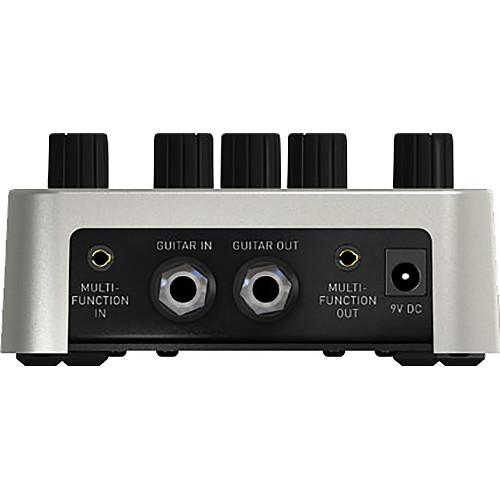
Technical parametersSOURCE AUDIO Dimension Reverb Specs | I/O | 1 x 1/4" Instrument input, phone type
1 x 1/4" Instrument output, phone type
1 x 4-pole 3.5 mm Multi-Function input
1 x 4-pole 3.5 mm Multi-Function output | | Controls | TIME knob
EFFECT knob
MIX knob
TREBLE knob
OPTION knob
OPTION SELECT button
CONTROL INPUT button
PRESET ENGAGE/BYPASS footswitch (x2) | | Maximum Input Level | 2.0 Vrms (+6 dBV) | | Impedance | Input: 1 MOhm
Output: 1 kOhm | | Dynamic Range | 115 dB | | A/D and D/A Conversion | 24-bit resolution | | DSP | 56-bit digital data path | | Bypass | Buffered or relay-based true bypass | | Dimensions (L x W x H) | 4.5 x 4.5 x 2.3" / 11.4 x 11.4 x 5.7 cm | | Weight | 1.0 lb / 0.5 kg |
Rating80% users recommend this product to others. And what about you?

This product has already been rated by 32 owners. Add your rating and experience with the product.
Discussion
 Ask our technicians if you have a problem with your settings,
or if anything is unclear in the user manual you have downloaded.
You can make use of our moderated discussion.
The discussion is public and helps other users of our website who may be encountering similar problems.
Ask our technicians if you have a problem with your settings,
or if anything is unclear in the user manual you have downloaded.
You can make use of our moderated discussion.
The discussion is public and helps other users of our website who may be encountering similar problems.
The discussion is empty - enter the first post
Post a new topic / query / comment:
|
|
|
| Request for user manual |
You can’t find the operation manual you are looking for? Let us know and we will try to add the missing manual:
I’m looking for a manual / Request for manual
Current requests for instruction manuals:
Call Of Duty World War Two For Xbox...
controller stratus XL...
stratus XL...
smart whatch serie S11 42mm...
Allen & Heath SQ-6 manual...
|
| Discussion |
Latest contributions to the discussion:
AEW R 4100
Name: MAURICIO ANGARITA
Audio-Technica AEW-R4100 UHF Diversity Receiver for
AEW R 4100 has the mute function blocked and does not allow audio to pass. I tried several times to turn off the mute from the transmitter but it does nothing, the mute stays on. Solution?
Thank you...
Instructions for assembling the 2015 Forecast Image Master Consoles GC3-A
Name: mike elam
Forecast Consoles GC3-A ImageMaster Editing Console
Looking for instructions for assembling this console. ...
EMPTY TONER ERROR MESSAGE AFTER REPLACING TONER
Name: LINDA BAD YELLOW EYES
Brother TN223BK Standard-Yield Toner
I HAD TO CHANGE OUT ALL THREE TONERS DUE TO LEAKS IN THE YELLOW AND CYAN. AFTER I REPLACED THEM, THE MACHINE KEEPS GIVING ME AN EMPTY TONER ERROR MESSAGE. HELP!!...
PS480D 20/24 pin Switching 480W Power Supply
Name: swkargo
Logisys 480W Power Supply
This item states in can run -5vdc .It is NOT listed on the board or I beleive is r4 is missing the resitior. Any body have thid issue. Shawn
...
Help needed
Name: Ann Carter
SanDisk 1TB Extreme Portable USB 3.1
When I click the link to download the user manual for my Sandisk Extreme external hard drive, it gives me the manual for the LG Cricket. Can you please change the link so I can download the Sandisk manual and begin using this drive? Thank you....
|
|


