|
User Manual for SOURCE AUDIO Soundblox 2 Orbital Modulator Pedal Click to enlarge the picture
 Contents of the user manual for the SOURCE AUDIO Soundblox 2 Orbital Modulator
- Product category: Effects Pedals SOURCE AUDIO
- Brand: SOURCE AUDIO
- Description and content of package
- Technical information and basic settings
- Frequently asked questions – FAQ
- Troubleshooting (does not switch on, does not respond, error message, what do I do if...)
- Authorized service for SOURCE AUDIO Effects Pedals
 |
User manual for the SOURCE AUDIO Soundblox 2 Orbital Modulator contain basic instructions
that need to be followed during installation and operation.
Before starting your appliance, the user manual should be read through carefully.
Follow all the safety instructions and warnings, and be guided by the given recommendations.
User manual is an integral part of any SOURCE AUDIO product,
and if it is sold or transferred, they should be handed over jointly with the product.
Following the instructions for use is an essential prerequisite for protecting
health and property during use, as well as recognition of liability on the part of the manufacturer
for possible defects should you make a warranty claim. Download an official SOURCE AUDIO user manual in which you will find instructions on how to install, use, maintain and service your product.
And do not forget – unsuitable use of a SOURCE AUDIO product will considerably shorten its lifespan!
|
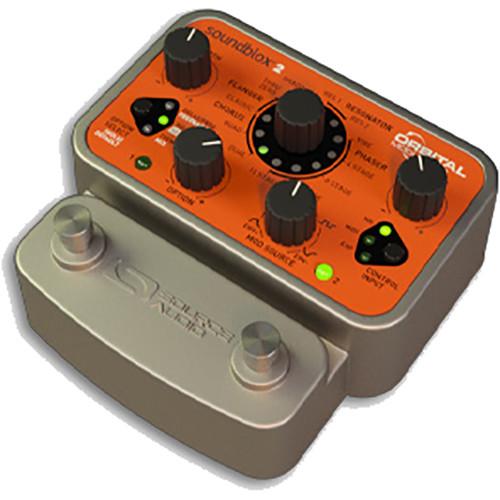
Product description Designed for electric guitar players and other instrumentalists, the Source Audio Soundblox 2 Orbiter Modulator is a stompbox with 12 onboard effects including flangers, phasers, chorus, and tremolos. 9 adjustable parameters are provided, giving you a degree of control more on par with studio rackmount effects than your average guitar pedal. On the pedal itself, you can control aspects of these parameters with modulation sources such as envelope followers or LFOs.This being a Soundblox series pedal, the Orbiter Modulator sports many external control possibilities, giving you a 3.5mm multi-purpose control input for use with compatible expression pedals, MIDI controls, and Hot Hand enabled controls. All of the pedal’s effects are achieved by means of Source Audio’s proprietary 56-bit DSP, with 24-bit converters provided on both the A/D and D/A stages.Two presets can be stored and saved within the pedal. Using the footswitches, you can select between presets, enter tap tempo mode to further control LFOs, and bypass the effects altogether. Buffered and true bypass are both configurable on this pedal. The pedal includes a 9 VDC power supply. - Key Features at a Glance
- 12 different flanger, phaser, chorus, and tremolo effects.9 Adjustable Parameters — Depth, Delay, Frequency, Feedback, Volume, LoRetain, Tremolo, Mix, and Speed.Access to a wide array of control parameters typically found on large rackmount Modulator’s effect types for the added dimension of amplitude modulation.Proprietary SA601 56-bit Digital Signal Processor and industry-standard 24-bit converters.Compact and rugged cast-aluminum housing.Bypass selectable between analog-buffered or relay-based true.2 easy-to-configure user presets recallable via two footswitches.Multi-purpose control input for use with Hot Hand, the Source Audio Dual Expression Pedal, or MIDI.Multi-purpose control output for daisy-chaining expression control parameters throughout two or more Soundblox series pedals.6 Modulation Sources — Sine Wave LFO, Square Wave LFO, Envelope Follower, Hot Hand, Expression Pedal, and MIDI.
- Controls at a Glance
-
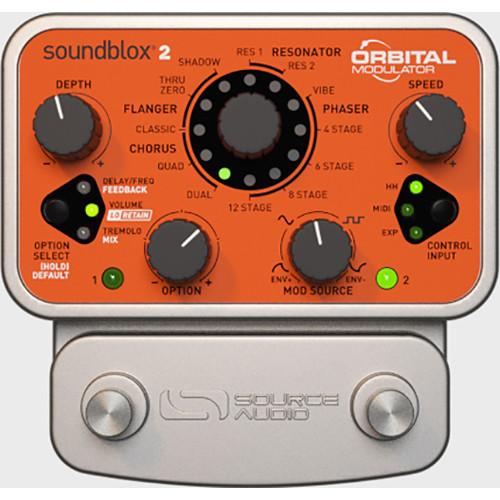
- DEPTH Knob: This control adjusts the range of the modulating signals.
- OPTION Knob: This controls six different parameters in conjunction with the OPTION SELECT button. The button selects the parameter, while the knob dictates the value, level, or frequency of the effect. The selected parameter is indicated by the three red/green LEDs. Green indicates the upper parameter, while red indicates the lower parameter.
- EFFECT Knob: This selects which effect type will be used.
- MOD SOURCE Knob: When Hot Hand, MIDI, or an expression pedal is not being used, the Orbital Modulator features three different types of modulation control within the pedal: Envelope Follower, Sine Wave LFO, and Square Wave LFO. This knob controls a gradual blend between them, so setting this knob between two of the modulation graphics will create a sound with elements of both modulation forms.
- SPEED Knob: Depending on the modulation source, this knob controls either the rate of the LFO, the attack and decay times of the envelope follower, or the smoothing of Hot Hand.
- OPTION SELECT Button: This button is used to choose which parameter will be controlled by the Option knob. Your choices are DELAY/FREQUENCY, FEEDBACK, VOLUME, LoRETAIN, TREMOLO, and MIX. DELAY adjusts the delay time between dry and modulated signals in Flanger and Chorus modes. In Phaser modes, FREQUENCY dictates the center frequency point of phase modulation. FEEDBACK controls the amount of wet signal fed back into the effect, creating a more resonant and ringing response the more you crank the effect. VOLUME adjusts output level, while LoRETAIN selects the frequency below with the signal remains unprocessed; this is useful in preserving the clarity and punch of lower frequencies. TREMOLO adjusts the amplitude modulation, and MIX controls the ratio between dry and processed signals.
- CONTROL INPUT Button: The CONTROL INPUT button cycles between external control options. There are four possible settings for OFF (where the MOD SOURCE knob remains the primary source of control), EXP (for apposite expression pedals), MIDI, and HH (for Hot Hand Control, explained later in the feature section).
- PRESET SELECT/BYPASS Footswitch: Allows you to store presets, switch between presets, and bypass the pedal altogether.
- Effect Types
- CLASSIC: Flanger and chorus effects are very similar—both combine the original dry signal with additional modulating clone signals. For this reason, the CLASSIC effect type, which uses a single modulating signal, is positioned in both the FLANGER and CHORUS effect categories. As a rule, short delay times between the dry and modulated signals create the traditional jet engine “whoosh” associated with flangers, while longer delay times create lush chorus effects. When using CLASSIC, set the DELAY knob between 7 and 11 o’clock for a flange effect and between 3 and 5 o’clock for chorus.DUAL and QUAD: The DUAL and QUAD effect types are multi-voiced choruses. Both produce a more animated chorus than the CLASSIC effect type. The DUAL CHORUS has two modulating delay signals, while the QUAD utilizes four.THRU ZERO: The THRU ZERO effect type is Source Audio’s version of tape flanging. The pedal achieves this effect with two delay lines. The first is a very short but stationary delay line, which functions as the dry signal while the other signal modulates. As the modulating signal passes through and moves ahead of the stationary tap, the particularities of the effect are achieved.SHADOW: The SHADOW flanger features two modulating signals. This set-up generates a more animated flange effect, with the primary flange closely shadowed by a subtle, more resonant reflection.RES 1 and RES 2: These RESONATOR flangers have four modulating signals. They are highly resonant and create a distinctly hollow sound with ringing overtones.PHASER: The classic phaser is similar to a flanger, as both require two identical signals running in parallel. However, while the flanger’s modulating frequency peaks create that recognizable “whoosh” sound, a phaser generates modulating frequency notches, which create an undulating sound similar to that found in a rotating Leslie speaker.VIBE: The VIBE effect type was modeled after the Shin-Ei Univibe, the original rotating speaker simulator. This effect contains 2 relatively wide frequency notches spaced farther from one another than a typical phaser.VARIABLE STAGE PHASERS: As a rule, every pair of phase shift stages creates one notch in the frequency response, so these four-, six-, eight-, and 12-stage phasers produce two, three, four, and six frequency notches, respectfully. As you progress from the four to the twelve stage phasers, the effect will sound more complex and pronounced.TREMOLO: Though TREMOLO is not one of the effects listed around the EFFECT SELECTOR knob, turning up the Orbital Modulator’s TREMOLO knob can produce several traditional or non-traditional tremolo effects.
- External Control
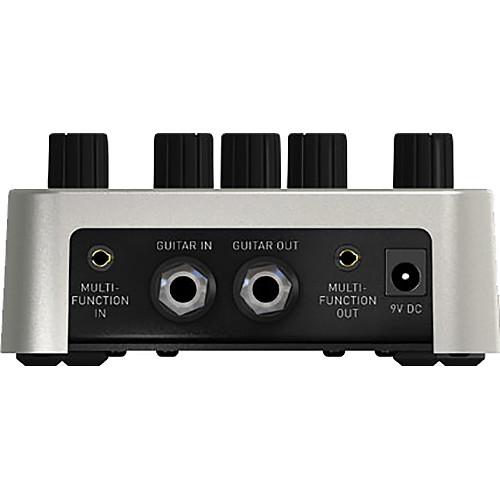
- The MULTI-FUNCTION input is an intelligent control input that accepts both digital and analog control signals. It replaces the SENSOR input on previous Soundblox pedals. The MULTI-FUNCTION input connects to wired or wireless Hot Hand accessories, the Source Audio Expression Pedal, and compatible Audio-MIDI interfaces that enable full MIDI-I/O access to the pedal.
- Tap Tempo Mode
- The Orbital Modulator's LFO rate can also be adjusted on the fly via TAP TEMPO. To enter TAP TEMPO mode put the pedal into bypass, then press and hold the footswitch (and corresponding preset) to which you would like TAP TEMPO applied. When the preset LED opposite the pressed footswitch begins to blink, the pedal is in TAP TEMPO mode. The footswitch below the blinking LED now controls the LFO rate. Tap the footswitch at least two times in rhythm to set a new LFO speed. The LFO rate is reflected in the blinking LED-the time between each blink represents one cycle of the LFO. Follow the same procedure to disengage TAP TEMPO.
- Hot Hand Control
- All Soundblox pedals are compatible with Hot Hand accessories. Hot Hand units consist of a ring-mounted accelerometer that detects motion and controls effect parameters. In essence, by changing the position of your hand, you can modulate parameters of the pedal in a fluid fashion.
In the Box SOURCE AUDIO Soundblox 2 Orbital Modulator Pedal DC Power Supply Limited 2-Year Warranty Table of Contents
|
Upload User Manual
Have you got an user manual for the SOURCE AUDIO Soundblox 2 Orbital Modulator Pedal in electronic form? Please send it to us and help us expand our library of instruction manuals.
Thank you, too, on behalf of other users.
To upload the product manual, we first need to check and make sure you are not a robot. After that, your "Submit Link" or "Upload File" will appear.
Technical parametersSOURCE AUDIO Orbital Modulator Specs | I/O | 1 x 1/4" Instrument input, phone type
1 x 1/4" Instrument output, phone type
1 x 4-pole 3.5 mm Multi-Function input
1 x 4-pole 3.5 mm Multi-Function output | | Controls | DEPTH knob
OPTION knob
EFFECT knob
MOD SOURCE knob
SPEED knob
OPTION SELECT button
CONTROL INPUT button
PRESET SELECT/BYPASS footswitch (x2) | | Maximum Input Level | 2.0 Vrms (+6 dBV) | | Impedance | Input: 1 MOhm
Output: 1 kOhm | | Dynamic Range | 115 dB | | A/D and D/A Conversion | 24-bit resolution | | DSP | 56-bit digital data path | | Bypass | Buffered or relay-based true bypass | | Current Consumption | 140 mA at 9 VDC (max 180 mA with Hot Hand Wireless Adapter) | | Dimensions (L x W x H) | 4.5 x 4.5 x 2.3" / 11.4 x 11.4 x 5.7 cm | | Weight | 1.0 lb / 0.5 kg |
Rating70% users recommend this product to others. And what about you?

This product has already been rated by 18 owners. Add your rating and experience with the product.
Discussion
 Ask our technicians if you have a problem with your settings,
or if anything is unclear in the user manual you have downloaded.
You can make use of our moderated discussion.
The discussion is public and helps other users of our website who may be encountering similar problems.
Ask our technicians if you have a problem with your settings,
or if anything is unclear in the user manual you have downloaded.
You can make use of our moderated discussion.
The discussion is public and helps other users of our website who may be encountering similar problems.
The discussion is empty - enter the first post
Post a new topic / query / comment:
|
|
|
| Request for user manual |
You can’t find the operation manual you are looking for? Let us know and we will try to add the missing manual:
I’m looking for a manual / Request for manual
Current requests for instruction manuals:
Call Of Duty World War Two For Xbox...
controller stratus XL...
stratus XL...
smart whatch serie S11 42mm...
Allen & Heath SQ-6 manual...
|
| Discussion |
Latest contributions to the discussion:
AEW R 4100
Name: MAURICIO ANGARITA
Audio-Technica AEW-R4100 UHF Diversity Receiver for
AEW R 4100 has the mute function blocked and does not allow audio to pass. I tried several times to turn off the mute from the transmitter but it does nothing, the mute stays on. Solution?
Thank you...
Instructions for assembling the 2015 Forecast Image Master Consoles GC3-A
Name: mike elam
Forecast Consoles GC3-A ImageMaster Editing Console
Looking for instructions for assembling this console. ...
EMPTY TONER ERROR MESSAGE AFTER REPLACING TONER
Name: LINDA BAD YELLOW EYES
Brother TN223BK Standard-Yield Toner
I HAD TO CHANGE OUT ALL THREE TONERS DUE TO LEAKS IN THE YELLOW AND CYAN. AFTER I REPLACED THEM, THE MACHINE KEEPS GIVING ME AN EMPTY TONER ERROR MESSAGE. HELP!!...
PS480D 20/24 pin Switching 480W Power Supply
Name: swkargo
Logisys 480W Power Supply
This item states in can run -5vdc .It is NOT listed on the board or I beleive is r4 is missing the resitior. Any body have thid issue. Shawn
...
Help needed
Name: Ann Carter
SanDisk 1TB Extreme Portable USB 3.1
When I click the link to download the user manual for my Sandisk Extreme external hard drive, it gives me the manual for the LG Cricket. Can you please change the link so I can download the Sandisk manual and begin using this drive? Thank you....
|
|


