|
User Manual for SOURCE AUDIO Soundblox Pro Poly-Mod Filter Pedal Click to enlarge the picture
 Contents of the user manual for the SOURCE AUDIO Soundblox Pro Poly-Mod Filter
- Product category: Effects Pedals SOURCE AUDIO
- Brand: SOURCE AUDIO
- Description and content of package
- Technical information and basic settings
- Frequently asked questions – FAQ
- Troubleshooting (does not switch on, does not respond, error message, what do I do if...)
- Authorized service for SOURCE AUDIO Effects Pedals
 |
User manual for the SOURCE AUDIO Soundblox Pro Poly-Mod Filter contain basic instructions
that need to be followed during installation and operation.
Before starting your appliance, the user manual should be read through carefully.
Follow all the safety instructions and warnings, and be guided by the given recommendations.
User manual is an integral part of any SOURCE AUDIO product,
and if it is sold or transferred, they should be handed over jointly with the product.
Following the instructions for use is an essential prerequisite for protecting
health and property during use, as well as recognition of liability on the part of the manufacturer
for possible defects should you make a warranty claim. Download an official SOURCE AUDIO user manual in which you will find instructions on how to install, use, maintain and service your product.
And do not forget – unsuitable use of a SOURCE AUDIO product will considerably shorten its lifespan!
|
Product description Intended for electric guitar and electric keyboard, the Soundblox Pro Poly-Mod Envelope Filter from Source Audio provides 23 different envelope filter effects. It gives you a variety of 2-pole and 4-pole low-pass options, as well as single peak filters, triple peak, peak/notch, and anything else that could fulfill your filtering needs—be they envelope, wah, or more dubstep in nature. Also included is a no-frills 7-band EQ, for tonal shaping without moving, modulating frequencies.A slew of controls is offered to encourage much in the way of experimentation. For instance, in addition to knobs affecting the sweep range, attack/decay speed, and center frequency, you’ll discover loads of secondary controls over LFO shapes, Q levels, customized expression pedal routing, and more. Combine the level of control with a 7-band equalizer and 6 user-assignable presets, and you’ll find yourself with a very flexible effects processor indeed.Note that there are multiple methods for controlling effects, including an envelope follower, a low-frequency oscillator (complete with tap tempo option), or various types of external control. For example, you can plug an expression pedal into its TRS input to manipulate filters as you would a wah pedal. You can also manipulate various secondary functions externally. MIDI control is also possible via a standard 5-pin DIN connection.Then you have a quirky method of manipulation sure to pique your fancy: Hot Hand control. The Hot Hand technology provided by Source Audio lets you smoothly control parameters of the pedal through its onboard sensor and a corresponding two-axis accelerometer that you can wear like a ring. In essence, by changing the position of your hand, you can modulate parameters of the pedal in a fluid fashion. Also, a sensor output is built into the pedal to facilitate the daisy-chaining of other Hot Hand enabled pedals, giving you one ring to rule them all (your pedals, that is).All the effects are achieved digitally, via the pedal’s 56-bit DSP architecture, and utilizing 24-bit conversion stages at the AD and DA stages to preserve signal integrity as your audio travels through the pedal. A 9 VDC power supply is provided with the unit. - Key Features at a Glance
- Features 23 types of envelope filter and phaser effects.Provides a flexible envelope follower with multiple sweep and speed control options.Proprietary 56-bit Digital Signal Processor and industry-standard 24-bit converters.LO-RETAIN mixing algorithm carefully preserves the lowest frequencies.6 Easy-to-configure user presets in two banks selectable via 3 footswitches for quick access to favorite sounds.7-Band equalizer for in-depth tone control, storable per preset.Filter effects can be modulated with an envelope follower, an LFO (low-frequency oscillator), an expression pedal, or Source Audio’s patented Hot Hand Motion Control sensor ring.A second level of control functions called “Backpage Parameters” proves access to different LFO shapes, Q levels, and customized expression pedal routing.Bypass is fully routed around the DSP.Active input ensures zero signal degradation.
- Controls at a Glance
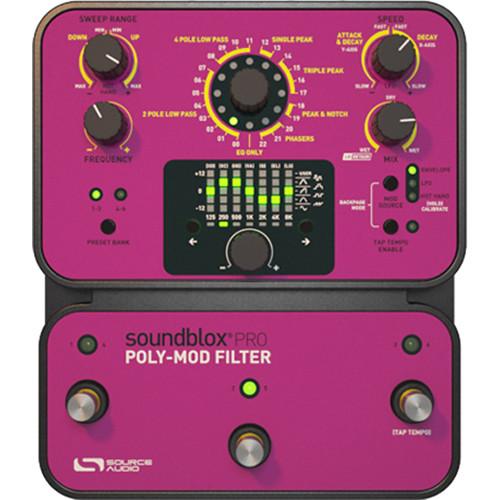
- SWEEP RANGE Knob: In Envelope and Hot Hand modes, the Sweep Range knob controls the direction and breadth of the filter sweep. The right side of the knob (labeled UP) adjusts the breadth of the upward sweep, adding greater range as you turn the knob clockwise. The left side of the knob (labeled DOWN) adjusts the breadth of the downward sweep, adding greater range as you turn the knob counterclockwise. In LFO mode the knob also controls the depth of the upward and downward sweep, but keep in mind that symmetric LFO shapes (i.e. sine, square, 6- and 8-step triangle, and random) will sound the same in either sweep direction. Conversely, non-symmetrical LFO shapes (i.e. rising saw and step sequences) will sound very different, depending on the direction of the sweep.FREQUENCY Knob: The Frequency knob sets the center frequency of the filter sweep in all modulation modes. Turning the knob counterclockwise will result in the filter moving over lower frequencies for an overall darker sound. Turning the knob clockwise will result in the filter sweep moving over higher frequencies for a brighter sound.SPEED Knob: The Speed knob controls the attack and decay time of the envelope follower, or the rate of the LFO, depending on the mode. In Envelope mode, the range of the speed control is divided into two parts. Turn the knob to the left of 12 o’clock to adjust both the attack and decay times—as the knob is turned counterclockwise both will slow down equally. Turn the knob to the right of 12 o'clock and the attack will stay fixed at its fastest setting while the decay time gets slower. In Hot Hand mode, this knob controls the sensitivity of the motion sensor and selects which axis of the sensor will be used.MIX Knob: The Mix knob adjusts the ratio of dry to wet signal. This knob is also divided into two halves. Setting the Mix knob to 12 o’clock results in a 100% dry signal. Turning the knob to the right of 12 o’clock increases the amount of wet signal while decreasing the dry. The right most position results in a 100% wet signal. Turning the Mix knob left of 12 o’clock increases the amount of wet signal using LO-RETAIN (a kind of high-cut filter on the dry sound) to preserve more of the low-end frequencies.EFFECT Knob: The Effect knob selects which filter type will be used. There are 23 effect positions (0 through 22) around the knob as well as a setting for EQ ONLY. In EQ ONLY mode, the envelope-filter effect is bypassed but the equalizer still applies.EQ SECTION Knob: The Equalizer knob changes the value of the selected band up or down in 1 dB steps.EQ BAND SELECT Buttons: The two buttons on either side of the EQ knob select the frequency band to edit.PRESET BANK Button: These two buttons select between your bank of presets. Choose between Preset bank A (Presets 1, 2, and 3) or B (Presets 4, 5, and 6).MOD SOURCE Button: Pressing this button selects between the three choices of modulation source: Envelope, LFO, and Hot Hand. When Hot Hand is selected as the modulation source, press and hold the MOD SOURCE button to start the Hot Hand Calibration procedure.TAP TEMPO ENABLE Button: When LFO is selected as the modulation source, press this button to enable Tap Tempo Mode. The rightmost footswitch will be converted to a tap tempo control. Press the TAP TEMPO MODE button again to disable tap tempo. Tap tempo only applies in LFO mode.PRESET SELECT / ENGAGE Footswitch: There are three footswitches on the Poly-Mod Pro. From left to right, the footswitches correspond to Presets 1, 2, and 3 for Preset Bank A, and 4, 5, and 6 for Bank B. Pressing any of the buttons will engage a given preset. Pressing the footswitch for the currently engaged effect will put the unit into bypass mode. Pressing another switch will engage the corresponding preset without going into bypass.
In the Box SOURCE AUDIO Soundblox Pro Poly-Mod Filter Pedal DC Power Supply Limited 1-Year Warranty Table of Contents
|
Upload User Manual
Have you got an user manual for the SOURCE AUDIO Soundblox Pro Poly-Mod Filter Pedal in electronic form? Please send it to us and help us expand our library of instruction manuals.
Thank you, too, on behalf of other users.
To upload the product manual, we first need to check and make sure you are not a robot. After that, your "Submit Link" or "Upload File" will appear.
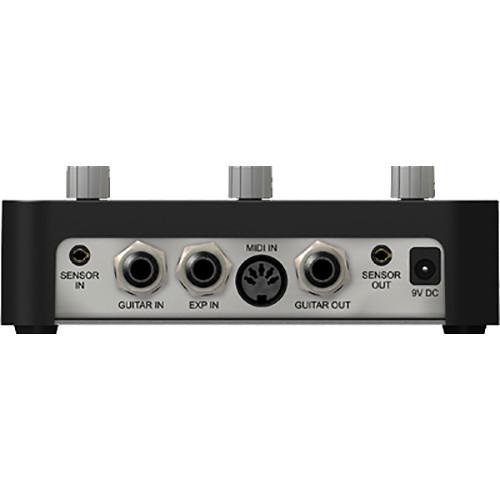
Technical parametersSOURCE AUDIO Poly-Mod Filter Specs | I/O | 1 x 1/4" Instrument input, phone type
1 x 1/4" Expression input, phone type
1 x 5-Pin DIN MIDI input
1 x 3.5 mm Sensor input
1 x 3.5 mm Sensor output
1 x 1/4" Instrument output, phone type | | Controls | SWEEP RANGE knob
FREQUENCY knob
SPEED knob
MIX knob
EFFECT knob
EQ SECTION knob
EQ BAND SELECT button (x2)
PRESET BANK button
MOD SOURCE button
TAP TEMPO ENABLE button
PRESET SELECT / ENGAGE footswitch (x3) | | Dynamic Range ADC | 115 dB | | DSP | 56-bit digital data path | | AD/DA Conversion | 24-bit | | Power | 110 mA at 9 VDC (max 145 mA with Hot Hand Wireless Adapter) | | Dimensions (L x W x H) | 7.0 x 6.0 x 2.1" / 17.8 x 15.2 x 5.4 cm | | Weight | 1.8 lb / 0.8 kg |
Rating80% users recommend this product to others. And what about you?

This product has already been rated by 02 owners. Add your rating and experience with the product.
Discussion
 Ask our technicians if you have a problem with your settings,
or if anything is unclear in the user manual you have downloaded.
You can make use of our moderated discussion.
The discussion is public and helps other users of our website who may be encountering similar problems.
Ask our technicians if you have a problem with your settings,
or if anything is unclear in the user manual you have downloaded.
You can make use of our moderated discussion.
The discussion is public and helps other users of our website who may be encountering similar problems.
The discussion is empty - enter the first post
Post a new topic / query / comment:
|
|
|
| Request for user manual |
You can’t find the operation manual you are looking for? Let us know and we will try to add the missing manual:
I’m looking for a manual / Request for manual
Current requests for instruction manuals:
Call Of Duty World War Two For Xbox...
controller stratus XL...
stratus XL...
smart whatch serie S11 42mm...
Allen & Heath SQ-6 manual...
|
| Discussion |
Latest contributions to the discussion:
AEW R 4100
Name: MAURICIO ANGARITA
Audio-Technica AEW-R4100 UHF Diversity Receiver for
AEW R 4100 has the mute function blocked and does not allow audio to pass. I tried several times to turn off the mute from the transmitter but it does nothing, the mute stays on. Solution?
Thank you...
Instructions for assembling the 2015 Forecast Image Master Consoles GC3-A
Name: mike elam
Forecast Consoles GC3-A ImageMaster Editing Console
Looking for instructions for assembling this console. ...
EMPTY TONER ERROR MESSAGE AFTER REPLACING TONER
Name: LINDA BAD YELLOW EYES
Brother TN223BK Standard-Yield Toner
I HAD TO CHANGE OUT ALL THREE TONERS DUE TO LEAKS IN THE YELLOW AND CYAN. AFTER I REPLACED THEM, THE MACHINE KEEPS GIVING ME AN EMPTY TONER ERROR MESSAGE. HELP!!...
PS480D 20/24 pin Switching 480W Power Supply
Name: swkargo
Logisys 480W Power Supply
This item states in can run -5vdc .It is NOT listed on the board or I beleive is r4 is missing the resitior. Any body have thid issue. Shawn
...
Help needed
Name: Ann Carter
SanDisk 1TB Extreme Portable USB 3.1
When I click the link to download the user manual for my Sandisk Extreme external hard drive, it gives me the manual for the LG Cricket. Can you please change the link so I can download the Sandisk manual and begin using this drive? Thank you....
|
|


