|
User Manual for SOURCE AUDIO Toolblox Programmable EQ Pedal for Electric Guitar and Bass Click to enlarge the picture
 Contents of the user manual for the SOURCE AUDIO Toolblox Programmable EQ Pedal
- Product category: Effects Pedals SOURCE AUDIO
- Brand: SOURCE AUDIO
- Description and content of package
- Technical information and basic settings
- Frequently asked questions – FAQ
- Troubleshooting (does not switch on, does not respond, error message, what do I do if...)
- Authorized service for SOURCE AUDIO Effects Pedals
 |
User manual for the SOURCE AUDIO Toolblox Programmable EQ Pedal contain basic instructions
that need to be followed during installation and operation.
Before starting your appliance, the user manual should be read through carefully.
Follow all the safety instructions and warnings, and be guided by the given recommendations.
User manual is an integral part of any SOURCE AUDIO product,
and if it is sold or transferred, they should be handed over jointly with the product.
Following the instructions for use is an essential prerequisite for protecting
health and property during use, as well as recognition of liability on the part of the manufacturer
for possible defects should you make a warranty claim. Download an official SOURCE AUDIO user manual in which you will find instructions on how to install, use, maintain and service your product.
And do not forget – unsuitable use of a SOURCE AUDIO product will considerably shorten its lifespan!
|
Product description Designed to be a streamlined tone controller on your pedalboard, the Source Audio Programmable EQ is a Toolblox Series utility pedal intended for electric guitar and bass, though it’s also compatible with any instrument that has a 1/4" output jack. This is an EQ pedal with seven adjustable bands, four user-editable presets, a sturdy aluminum enclosure, and a whole host of secondary functions that can be accessed from the pedal itself.With 56-bit DSP and industry-standard 24-bit AD/DA converters, the unit provides a ±18 dB range. You can dial in the perfect tonal profile for any given song or section, and then save that profile as a preset. Then, when you want to cycle to another preset, you can do so straight from the footswitch. If you’d like to use a MIDI controller to switch presets, you can do so through the pedal’s MIDI input. Secondary features (which Source Audio deems “Backpage parameters”) let you switch the footswitch into auto-scrolling mode. Now, when you press down on the footswitch, the pedal can cycle through all four onboard presets at a rate of your choosing. You can get creative with this, as you now have a frequency-based step sequencer or tremolo at your beck and call.This is just one example of the pedal’s secondary features. Here’s another: In addition to its EQ capabilities, the pedal can be used to achieve volume boosts of up to 12 dB, doing so in a transparent way, or in a manner that pushes your amp into a pleasant, harmonically distorted breaking-up point. This stompbox, which can operate with the included 9V battery or with compatible power supplies, also boasts a switchable bypass. True or buffered? The decision is yours. - Key Features at a Glance
- ±18 dB of range over seven bands. An eighth band at 62 Hz can be edited using the Octave Extend Backpage function.A compact, rugged, cast aluminum housing.56-bit DSP processing and industry-standard 24-bit converters.Presets can be quickly saved and restored. All presets can be accessed via the footswitch.Selectable bypass modes. Use either relay-based true bypass or buffered analog bypass.Recall presets, control parameters, and engage/bypass remotely via MIDI.
- Controls at a Glance
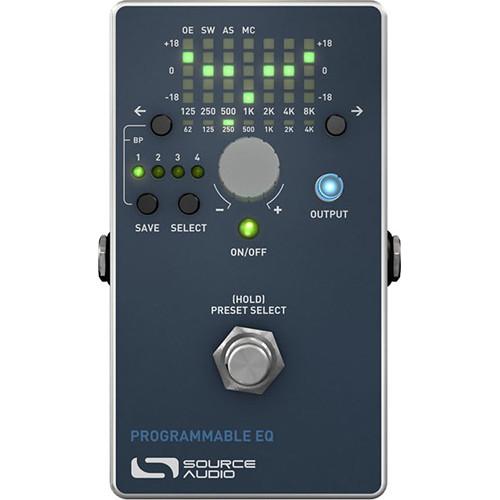
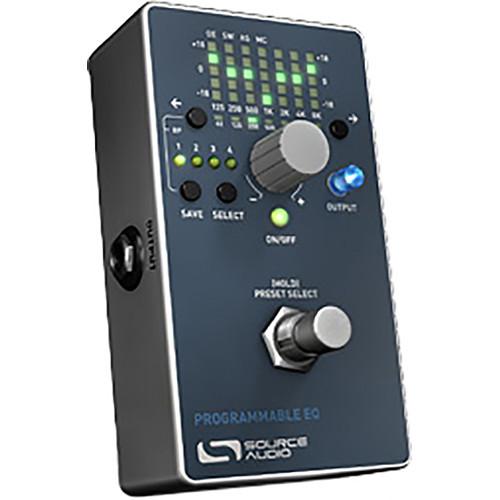
- EQ Display: The heart of the Programmable EQ is the seven-band graphic equalizer display. This LED display shows the currently active settings of the equalizer within a range of ±18 dB for each of the seven accessible bands. The left- and right-arrow buttons select the frequency band to be adjusted, while the main encoder knob adjusts the level of the selected band, either up or down. The center frequency of each band is indicated in Hz at the bottom of the display.BAND SELECT Buttons: The band select buttons flank the display and are indicated by left and right arrows. Press a corresponding button to select a higher or lower frequency to be edited.ENCODER Knob: The main knob on the unit is an encoder-style control that allows incremental up or down level changes to the selected frequency band in 1 dB steps. The maximum range is +18 dB and the minimum is -18 dB for each frequency band.SELECT Button: Pressing the select button will scroll through your four user presets. The display will update to show the saved equalizer curve and output for each preset location. Also, the four LEDs above the SELECT button will indicate which of the four presets is currently selected.SAVE Button: Once a preset has been selected, it can be edited. When any of the controls are changed from their saved value, the preset LEDs will begin to blink to indicating that the preset has been edited. To save the new settings, press and hold the SAVE button for two seconds. The preset LED will blink three times quickly when the saving process is complete.OUTPUT: This small knob adjusts the final output volume after the equalizer, it can be used to compensate the overall volume for any loss or gain in the equalizer. The OUTPUT knob setting will be saved along with the equalizer curve per preset. The OUTPUT knob is also illuminated by a blue LED which will increase in brightness as the knob is turned up. This way, the brightness of the OUTPUT knob will give some indication of the output volume setting when scrolling through presets.ON/OFF Footswitch: Pressing and releasing the footswitch engages or bypasses the unit. When engaged, the audio input will be routed through equalizer and the output volume knob. When bypassed, the audio is routed through a hardwired relay connection directly to the output. This is sometimes referred to as “hardwire” or “true bypass.” There are no buffers or components between the input and output in bypass. The footswitch can also duplicate the function of the SELECT button. Pressing and holding the footswitch will make the unit begin to scroll through the four presets in the same manner as pressing the SELECT button. Releasing the footswitch will stop the scrolling on the last selected preset.
- Additional Parameters Available in "Backpage" Mode
- OE (Octave Extension): This parameter allows an eighth band to be added to the equalizer. The eighth band is at a frequency of 62 Hz, one octave below the normal low of 125 Hz. This frequency is especially helpful for use with bass. The lowest position on the display indicates this features is off. The next LED position up from the bottom indicates the octave extension is enabled. After exiting Backpage mode, the 62 Hz band can be accessed by pressing the left band select button until the 125 Hz column is selected. Pressing the left button again will shift the display and allow the 62 Hz band to be displayed and edited by the encoder. Press the right band select button to resume the normal seven-band view.SW (Switching Speed): This parameter controls the scrolling speed when using the footswitch to scroll through presets, or when using the auto-scroll mode (see below for an auto-scroll mode overview). The full range of the display is used for this parameter. Slowest speed is at the bottom, while fastest at the top.AS (Auto-Scroll): This parameter enables/disables the auto-scroll function. When in auto-scroll mode, the footswitch preset scroll will continue to scroll automatically even after the footswitch is released. This can be a fun way to achieve esoteric tremolo or sequencer sounds, as the unit steps through the four equalizer presets at a given programmable rate. The rate of the scrolling is controlled by the switching-speed (SW) parameter. Auto-scrolling will stop when the footswitch is pressed again. Like the OE function, this parameter uses the two bottom LEDs on the display to indicate ON or OFF.MC (MIDI Channel): Use this parameter to edit the MIDI channel for the Programmable EQ. The display will numerically indicate the currently selected channel from 1 to 16.
UPC: 890729001224 In the Box SOURCE AUDIO Toolblox Programmable EQ Pedal for Electric Guitar and Bass 9V Battery Limited 1-Year Warranty Table of Contents
|
Upload User Manual
Have you got an user manual for the SOURCE AUDIO Toolblox Programmable EQ Pedal for Electric Guitar and Bass in electronic form? Please send it to us and help us expand our library of instruction manuals.
Thank you, too, on behalf of other users.
To upload the product manual, we first need to check and make sure you are not a robot. After that, your "Submit Link" or "Upload File" will appear.
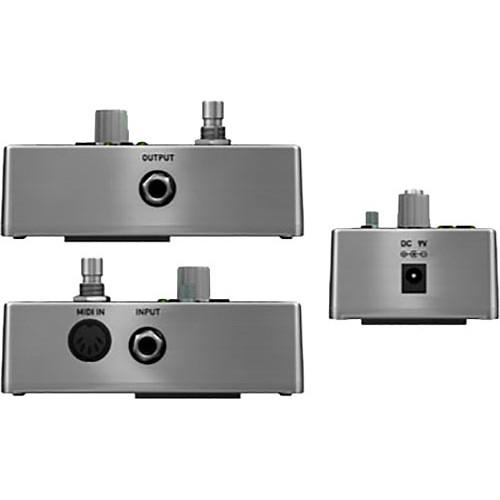
Technical parametersSOURCE AUDIO SA170 Specs | I/O | 1 x 1/4" Instrument input, phone type
1 x 5-pin DIN MIDI input
1 x 1/4" Instrument output, phone type | | Controls | SAVE button
SELECT button
ENCODER knob
SHIFT FREQUENCY button (x2)
OUTPUT knob
PRESET SELECT/BYPASS footswitch | | Input Impedance | 1 MOhm | | Input Range | 2.2 Vrms | | Dynamic Range ADC | 115 dB | | AD/DA Conversion | 24-bit | | DSP | 56-bit | | Power | 80 mA at 9 V max | | Dimensions (L x W x H) | 4.5 x 2.5 x 2.0" / 11.4 x 6.4 x 5.1 cm | | Weight | 0.63 lb / 0.28 kg | | | | Package Weight | 0.9 lb | | Box Dimensions (LxWxH) | 5.2 x 3.4 x 2.8" |
Rating100% users recommend this product to others. And what about you?

This product has already been rated by 04 owners. Add your rating and experience with the product.
Discussion
 Ask our technicians if you have a problem with your settings,
or if anything is unclear in the user manual you have downloaded.
You can make use of our moderated discussion.
The discussion is public and helps other users of our website who may be encountering similar problems.
Ask our technicians if you have a problem with your settings,
or if anything is unclear in the user manual you have downloaded.
You can make use of our moderated discussion.
The discussion is public and helps other users of our website who may be encountering similar problems.
The discussion is empty - enter the first post
Post a new topic / query / comment:
|
|
|
| Request for user manual |
You can’t find the operation manual you are looking for? Let us know and we will try to add the missing manual:
I’m looking for a manual / Request for manual
Current requests for instruction manuals:
Call Of Duty World War Two For Xbox...
controller stratus XL...
stratus XL...
smart whatch serie S11 42mm...
Allen & Heath SQ-6 manual...
|
| Discussion |
Latest contributions to the discussion:
AEW R 4100
Name: MAURICIO ANGARITA
Audio-Technica AEW-R4100 UHF Diversity Receiver for
AEW R 4100 has the mute function blocked and does not allow audio to pass. I tried several times to turn off the mute from the transmitter but it does nothing, the mute stays on. Solution?
Thank you...
Instructions for assembling the 2015 Forecast Image Master Consoles GC3-A
Name: mike elam
Forecast Consoles GC3-A ImageMaster Editing Console
Looking for instructions for assembling this console. ...
EMPTY TONER ERROR MESSAGE AFTER REPLACING TONER
Name: LINDA BAD YELLOW EYES
Brother TN223BK Standard-Yield Toner
I HAD TO CHANGE OUT ALL THREE TONERS DUE TO LEAKS IN THE YELLOW AND CYAN. AFTER I REPLACED THEM, THE MACHINE KEEPS GIVING ME AN EMPTY TONER ERROR MESSAGE. HELP!!...
PS480D 20/24 pin Switching 480W Power Supply
Name: swkargo
Logisys 480W Power Supply
This item states in can run -5vdc .It is NOT listed on the board or I beleive is r4 is missing the resitior. Any body have thid issue. Shawn
...
Help needed
Name: Ann Carter
SanDisk 1TB Extreme Portable USB 3.1
When I click the link to download the user manual for my Sandisk Extreme external hard drive, it gives me the manual for the LG Cricket. Can you please change the link so I can download the Sandisk manual and begin using this drive? Thank you....
|
|


