User Manual for SPC Calendars Professional 2015 Click to enlarge the picture
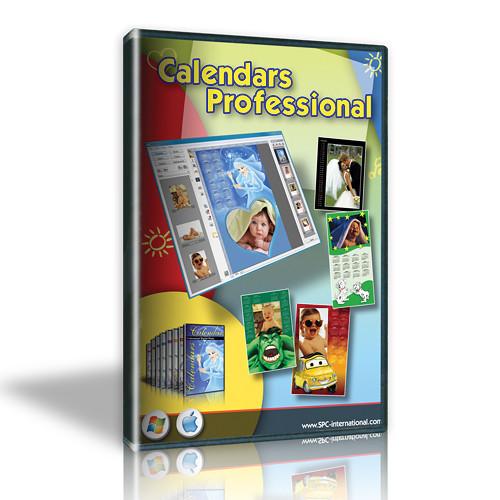 Contents of the user manual for the SPC Calendars Professional 2015
- Product category: Photo Software SPC
- Brand: SPC
- Description and content of package
- Technical information and basic settings
- Frequently asked questions – FAQ
- Troubleshooting (does not switch on, does not respond, error message, what do I do if...)
- Authorized service for SPC Photo Software
|
User manual for the SPC Calendars Professional 2015 contain basic instructions
that need to be followed during installation and operation.
Before starting your appliance, the user manual should be read through carefully.
Follow all the safety instructions and warnings, and be guided by the given recommendations.
User manual is an integral part of any SPC product,
and if it is sold or transferred, they should be handed over jointly with the product.
Following the instructions for use is an essential prerequisite for protecting
health and property during use, as well as recognition of liability on the part of the manufacturer
for possible defects should you make a warranty claim. Download an official SPC user manual in which you will find instructions on how to install, use, maintain and service your product.
And do not forget – unsuitable use of a SPC product will considerably shorten its lifespan!
|
Product description Women of Influence: Katrin Eismann Read More The download version of Calendars Professional 2015 from SPC enables you to create and customize calendars using your own imagery as well as pre-installed graphics, backgrounds, borders, frames, and other effects. A wide-variety of global formatting options allows you to personalize calendars based on different language or regional requirements, with the ability to further refine the design based on size and orientation. When exporting finished calendars, files can be saved in common image file formats for easy print handling.
The interface of Calendars Professional 2015 is designed to permit fast, intuitive creation of calendars, with the added capability of being able to refine your photographs' color settings. Further design customization is possible using a layer-based working method for controlling and placing different portions of the calendar independently. Additionally, this program is fully compatible with optional external photo editing programs for a seamless overall workflow.
- Presets and Formats
- Over 700 different templates are available for creating calendars best-suited to individual needs. For enhancing the appearance of calendars, 180 masks, 130 frames, 400 clip art graphics, and 400 backgrounds can be applied. Furthermore, a variety of preset formats allow you to customize the finalized layout depending on printing needs, with the ability to organize calendars vertically or horizontally.
- Data Grids
- Over 40 different language/region combinations are available to display location-specific holidays:
- Albanian, Arabian, Armenian, Azerbaijan, Basque, Belorussian, Bulgarian, Catalan, Chinese, Croatian, Czech, Danish, Dutch, English (no holidays), English (UK), English (USA), Estonian, Finnish, French, French (no holidays), Galician, German, German (no holidays), Greek, Hebrew, Hungarian, Irish, Italian, Italian (Vatican), Japanese, Korean, Latvian, Lithuanian, Maltese, Norwegian, Polish, Portuguese, Portuguese (Brasil), Portuguese (no holidays), Rumanian, Russian, Serbian, Slovak, Slovenian, Spanish, Spanish (Argentina), Spanish (Mexico), Spanish (no holidays), Swedish, Turkish, Ukrainian, and United Arab Emirates
- Tools and Layers
- Similar to other image editing programs, a Layer window permits advanced image and graphic compositing. When working with multiple layers, the ability to block, shackle, make objects invisible, rename, delete, and align objects is possible as well as apply different fades and effects.
- Decor Libraries
- Access to libraries of graphics, backgrounds, clip art, frames, masks, and templates is provided for creatively refining the look of different calendars. To expand the set of graphics initially available, additional libraries are available from SPC.
- Photo Editing and Exporting
- Photographs can be edited using dedicated color correction tools or, alternatively, support is available for a seamless workflow between optional image editing programs, such as Adobe Photoshop and Lightroom, and Calendars Professional.
When exporting finalized calendars, different color profiles can be applied and files can be saved in the JPG, TIFF, PSD, PDF, and PNG formats. - Beyond Calendars
- In addition to calendar creation, this program can also be used to create digital compositions comprised of multiple images along with different frames, borders, masks, and effects.
- Language Support
- While calendars can be formatted in over 40 languages, the interface design supports 15 different languages:
- English, Spanish, French, Italian, Portuguese, Polish, German, Japanese, Russian, Chinese, Greek, Hebrew, Korean, Dutch, Turkish
Table of Contents
|
Upload User Manual
Have you got an user manual for the SPC Calendars Professional 2015 in electronic form? Please send it to us and help us expand our library of instruction manuals.
Thank you, too, on behalf of other users.
To upload the product manual, we first need to check and make sure you are not a robot. After that, your "Submit Link" or "Upload File" will appear.
Technical parametersSPC 8 032610 880644 Specs | Mac System Requirements | Mac OS X 10.6 or later
Intel processor, minimum of 1.8 GHz
2 GB of RAM, 4 GB recommended
16 GB of free hard disk space, 40 GB recommended
Internet connection | | Windows System Requirements | Microsoft Windows XP (SP2), Vista (SP1 or SP2), 7.x, 8.x
Pentium 4 processor (2.8 GHz) or better
2 GB of RAM, 4 GB recommended
16 GB of free hard disk space, 40 GB recommended
Internet connection |
Rating80% users recommend this product to others. And what about you?

This product has already been rated by 82 owners. Add your rating and experience with the product.
Discussion
 Ask our technicians if you have a problem with your settings,
or if anything is unclear in the user manual you have downloaded.
You can make use of our moderated discussion.
The discussion is public and helps other users of our website who may be encountering similar problems.
Ask our technicians if you have a problem with your settings,
or if anything is unclear in the user manual you have downloaded.
You can make use of our moderated discussion.
The discussion is public and helps other users of our website who may be encountering similar problems.
The discussion is empty - enter the first post
Post a new topic / query / comment:
|
|


