User Manual for Speco Technologies HT Series 8-Channel 5MP Hybrid HD-TVI DVR with 2TB HDD Click to enlarge the picture
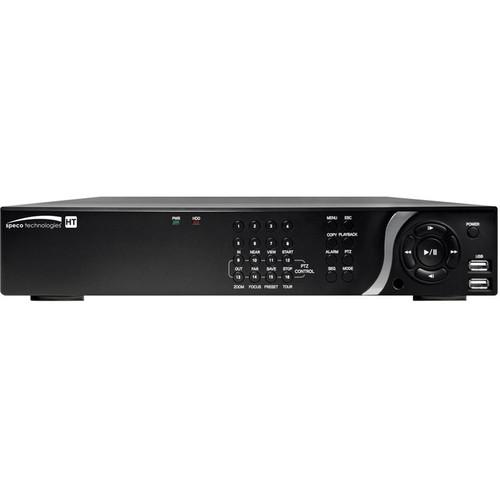 Contents of the user manual for the Speco Technologies HT Series 8-Channel 5MP
- Product category: Digital Video Recorders (DVRs) Speco Technologies
- Brand: Speco Technologies
- Description and content of package
- Technical information and basic settings
- Frequently asked questions – FAQ
- Troubleshooting (does not switch on, does not respond, error message, what do I do if...)
- Authorized service for Speco Technologies Digital Video Recorders (DVRs)
|
User manual for the Speco Technologies HT Series 8-Channel 5MP contain basic instructions
that need to be followed during installation and operation.
Before starting your appliance, the user manual should be read through carefully.
Follow all the safety instructions and warnings, and be guided by the given recommendations.
User manual is an integral part of any Speco Technologies product,
and if it is sold or transferred, they should be handed over jointly with the product.
Following the instructions for use is an essential prerequisite for protecting
health and property during use, as well as recognition of liability on the part of the manufacturer
for possible defects should you make a warranty claim. Download an official Speco Technologies user manual in which you will find instructions on how to install, use, maintain and service your product.
And do not forget – unsuitable use of a Speco Technologies product will considerably shorten its lifespan!
|
Product description Compatible with IP, HD-TVI, and analog cameras, the HT Series 8-Channel 5MP Hybrid HD-TVI DVR with 2TB HDD from Speco Technologies is capable of recording up to 5MP video from IP cameras and up to 1080p video from HD-TVI cameras. The DVR comes with a preinstalled 2TB HDD to save footage. S.M.A.R.T technology provides self-monitoring, as well as analysis and reporting for the HDD to ensure proper operation. EZ features make setup easy, including EZ Wizards, EZ Search, and EZ Copy. A remote control and mouse are included, as well as mounting hardware for mounting the DVR to a rack unit. - Network-enabled hybrid DVR for IP, HD-TVI, and analog camera compatibility
- Up to 5MP recording resolution on each channel at up to 30 fps
- Each channel is configurable for either an IP, HD-TVI, or analog camera
- EZ Camera quickly discovers and installs network-attached cameras
- EZ Setup helps speed up the installation and setup process
- EZ Network provides quick network setup and port forwarding
- EZ Record for setting up recording resolutions and recording type
- EZ Search helps you find events from thumbnails
- EZ Copy automatically copies video that is being watched onto a connected USB drive (available separately)
- UTC function for OSD and zoom/focus control over coax cable
- HDMI, VGA, and CVBS/Spot video outputs
- SecureGuard app for Windows, Mac, iOS, and Android
UPC: 030519019477 In the Box Speco Technologies HT Series 8-Channel 5MP Hybrid HD-TVI DVR with 2TB HDD USB Mouse Power Adapter AC Power Cable Audio Cable Remote Control 2 x AAA Batteries Rack Mounting Hardware 6 x Mounting Screws Software CD Limited 5-Year Warranty on Hardware Limited 3-Year Warranty on HDD Table of Contents
|
Upload User Manual
Have you got an user manual for the Speco Technologies HT Series 8-Channel 5MP Hybrid HD-TVI DVR with 2TB HDD in electronic form? Please send it to us and help us expand our library of instruction manuals.
Thank you, too, on behalf of other users.
To upload the product manual, we first need to check and make sure you are not a robot. After that, your "Submit Link" or "Upload File" will appear.
Technical parametersSpeco Technologies HT Series Specs | | | Inputs | 8 | | Outputs | 1 x HDMI (1280 x 720, 1920 x 1080, 1600 x 1200)
1 x VGA (1280 x 720, 1920 x 1080, 1600 x 1200)
1 x CVBS/Spot (analog only)
8 x Loop-outs (HD-TVI and analog only) | | | | Input | 8 x line
8 x IP | | Output | 1 x RCA | | Codec | G.711 | | | | Sensor Input | Local Input: 4
Remote Input from IP Camera: 8 | | Output | 1 | | | | Resolution | IP: 2592 x 1944 (5 MP), 2098 x 1536 (3 MP), 1920 x 1080 (2 MP), 1280 x 720 (720p)
HD-TVI: 1920 x 1080 (1080p), 1280 x 720 (720p)
Analog: 960H | | Recording Speed | Total: 240 fps
Per Channel: 30 fps | | Recording Quality Grade | 5 levels (analog only) | | Recording Mode | Continuous, motion, sensor, schedule, manual, continuous and sensor, continuous and motion | | Pre-Recording | Maximum: 20 min | | Post-Recording | Maximum: 60 sec | | | | Search | EZ search, date/time, event, archive, log, smart search | | Multi-Decoding | 1, 4, 8 | | Playback Speed | 0.25, 0.5, 2, 4, 8, 16, 32, 64x | | | | Media | USB, external HDD, network | | Format | BMP, AVI, proprietary format (NSP) | | Large Backup | Yes, maximum 24 hours | | | | Primary Storage | Supports up to 3 x 4 TB HDD, 2 TB included | | Secondary Storage | 1 x eSATA | | USB | 2 x ports in front, 1 x port in rear | | | | Menu Display | GUI | | Input Method | Front buttons, IR, mouse, keyboard controller | | | | Interface | Dual network ports 10/100/1000Base-T | | Streaming | IP: Profile dependent
HD-TVI and Analog Channel: 640 x 360, 320x 180 at 30 fps per channel | | Encoding | Dual | | Throughput | 48 Mbps maximum | | | | Viewer | SecureGuard Mobile
PC Web: IE, Chrome, Firefox, Safari (live, search, backup, PTZ, remote setup)
Computer Client: SecureGuard | | | | Digital Deterrent | Default and up to 8 audio files | | Backup | Cloud backup on event | | DDNS | Yes | | NTP (Network Time Protocol) | Yes | | Power Voltage | 12 VDC, 5 A | | Operating Temperature | 41 to 104°F (5 to 40°C) | | Humidity | 20 to 80% RH, non-condensing | | Storage Temperature | 14 to 122°F (-10 to 50°C) | | Dimensions | 15 x 2.8 x 13.4" (38.1 x 7.2 x 34 cm) | | Weight | 12 lb (5.4 kg) | | | | Package Weight | 11.55 lb | | Box Dimensions (LxWxH) | 17.6 x 16.2 x 5.9" |
Rating70% users recommend this product to others. And what about you?

This product has already been rated by 98 owners. Add your rating and experience with the product.
Discussion
 Ask our technicians if you have a problem with your settings,
or if anything is unclear in the user manual you have downloaded.
You can make use of our moderated discussion.
The discussion is public and helps other users of our website who may be encountering similar problems.
Ask our technicians if you have a problem with your settings,
or if anything is unclear in the user manual you have downloaded.
You can make use of our moderated discussion.
The discussion is public and helps other users of our website who may be encountering similar problems.
The discussion is empty - enter the first post
Post a new topic / query / comment:
|
|


