|
User Manual for Studio Network Solutions 16B96TB-2X10S EVO Shared Storage 16-Bay Base Media Server with ShareBrowser Click to enlarge the picture
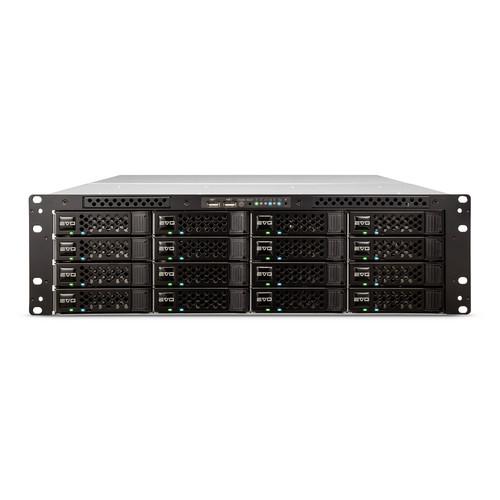 Contents of the user manual for the Studio Network Solutions 16B96TB-2X10S EVO Shared
- Product category: Network Attached Storage Drives Studio Network Solutions
- Brand: Studio Network Solutions
- Description and content of package
- Technical information and basic settings
- Frequently asked questions – FAQ
- Troubleshooting (does not switch on, does not respond, error message, what do I do if...)
- Authorized service for Studio Network Solutions Network Attached Storage Drives
|
User manual for the Studio Network Solutions 16B96TB-2X10S EVO Shared contain basic instructions
that need to be followed during installation and operation.
Before starting your appliance, the user manual should be read through carefully.
Follow all the safety instructions and warnings, and be guided by the given recommendations.
User manual is an integral part of any Studio Network Solutions product,
and if it is sold or transferred, they should be handed over jointly with the product.
Following the instructions for use is an essential prerequisite for protecting
health and property during use, as well as recognition of liability on the part of the manufacturer
for possible defects should you make a warranty claim. Download an official Studio Network Solutions user manual in which you will find instructions on how to install, use, maintain and service your product.
And do not forget – unsuitable use of a Studio Network Solutions product will considerably shorten its lifespan!
|
Product description The 16B96TB-2X10S EVO Shared Storage 16-Bay Base Media Server from Studio Network Solutions is a RAID-protected SAN and NAS shared media storage server with 96TB RAID storage preinstalled. It is designed for video and audio editing and other DCC (digital content creation) applications with high-bandwidth demands where multiple users need access to the same content at once. EVO includes in-the-box support for features like project sharing and bin sharing. Storage can be configured in RAID 0, 1, 4, 5, 6, or 10.
The 16B96TB-2X10S is equipped with two ports of 1Gb Ethernet and two ports of 10 Gigabit optical connectivity. Plus, the EVO's connectivity interface can be expanded to include up to 26 GbE ports and up to twelve 10 GbE optical ports. Separately available expansion hardware allows you to upgrade to faster network interfaces. EVO supports iSCSI and can be a SAN, a NAS, or both at the same time. It is purpose-built for digital media workflows and demanding use with leading professional applications such as Avid Media Composer, Final Cut Pro / FCP X, Adobe Premiere Pro/CC, and DaVinci Resolve. - 64-bit, multi-CPU, multi-core, 3 RU storage server
- 2 x 1 Gb/s Ethernet SAN/NAS ports
- 2 x 10 Gigabit optical ports
- Unlimited licenses of ShareBrowser desktop client
- Unlimited licenses of globalSAN iSCSI Initiator for Mac OS X
- Unlimited licenses of EVO-only SANmp sharing software
- Unlimited licenses of EVO-only iSCSI Initiator
Workflow Tools - Project and Bin Sharing
- Use the native Project and Bin sharing functions of Avid, and take advantage of project sharing for FCPX and Adobe Premiere Pro. EVO also unlocks the sharing capabilities of Media Composer—with several editors working on the same Avid project, teams can easily collaborate by using shared Bins, exchanging access to Media and Sequences directly within Media Composer.
- File and Volume Sharing
- EVO enables you to use file sharing, volume sharing, or a combination of the two, providing multi-user write workspaces for sharing projects and bins, in addition to high-performance SAN volumes for multi-cam and uncompressed workflows.
- Slingshot Automations GUI and API
- With Slingshot, you can create and run automated file workflows that span EVO, other storage systems, and Amazon S3/Glacier cloud services. Slingshot helps boost productivity by enabling you to automate repetitive file management tasks.
- ShareBrowser Desktop Client
- ShareBrowser is a unified file-, project-, and asset-management interface for Mac OS X and Windows. It improves visibility of your team's storage systems and access to them, and enables automatic project locking for FCP, Premiere Pro, and Pro Tools—as well as Avid project and bin sharing. ShareBrowser allows you to search across all EVO storage as well as local, offline, and other network disks. File metadata can be instantly indexed to the database to help users more easily find, preview, and share media assets and projects.
Performance - I/O Profiles
- EVO is designed and built for digital artists who use applications such as Avid Media Composer, Adobe CC / Premiere Pro, DaVinci Resolve, and Final Cut Pro. These apps can have extraordinary I/O requirements, and EVO is tuned to give them exactly what they need, right out of the box.
- Caching
- EVO uses advanced caching algorithms to increase the number of video streams per array it can handle. This means you can do more work with a fewer number of disks, which results in a less expensive and more reliable and energy-efficient storage solution.
- Preset for Video Apps
- EVO is configured with its defaults preset for use with professional video editing applications. These presets are designed to perform well with other applications too, but if you're primarily using audio applications like Pro Tools or Logic Pro with very high track counts, simply change the EVO's I/O profile from Video to Audio for maximum performance.
- Expandability
- EVO expansion units (available separately) allow you to increase storage capacity as well as upgrade connectivity.
- Ethernet Ports
- The EVO can be expanded to have a maximum of 26 Gigabit (1 Gb/s) Ethernet ports. You can also choose to add up to 50 Gb/s Ethernet ports for maximum bandwidth over iSCSI and NAS.
- Fiber Channel Ports
- The EVO accommodates up to 12 directly attached fiber channel ports in each base unit. If you need more fiber channel ports you can connect a switch to any available port.
- Enterprise-Class Drives
- The base unit comes with 16 preinstalled disks. Expansion units are available, bringing the total number of disks per managed system to 80. As you add capacity, you can also increase the system's overall capability. An unlimited number of base/expansion nodes can be integrated into a facility.
- Up to 26 Directly Attached Users
- Up to 26 users (workstations, notebooks, servers) can be directly attached through EVO's Ethernet and fiber channel ports. If you need to support more users, any available fiber channel or Ethernet port can be connected to a switch. And with EVO, there's no per-seat software licensing costs for ShareBrowser, SANmp, and globalSAN.
Compatibility - Media Applications
- EVO is designed and built for professional media editing and post-production applications like Final Cut Pro, Avid Media Composer, CC/Premiere Pro, Resolve, Smoke, Scratch, and Pro Tools. Although it can be used with any application, it is designed in particular to handle the intense demands of video and audio editing, in real-time, by many concurrent users.
- HBAs, Initiators & Ethernet NICs
- Ethernet/NAS users can connect to EVO using a 1 Gb/s, 10 Gb/s, or 10GBase-T Ethernet adapter. Fiber channel SAN workstations can connect to EVO using an HBA from ATTO, Emulex, Apple, or Qlogic. iSCSI SAN users can connect to EVO using an Ethernet adapter and the globalSAN iSCSI initiator for Mac OS X or the Microsoft iSCSI initiator.
- Operating Systems
- EVO supports Mac OS X and Windows. It can also be used with Linux-based operating systems like RHEL and CentOS. In fact, any operating system that supports iSCSI, fiber channel, SMB, AFP, NFS, FTP, or SFTP can be used with EVO.
Administration - Web-Based Admin Tools
- EVO's user interface is designed to be intuitive, and offers features ranging from the very basic to the very advanced. And since it's web-based, it can be administered from just about anywhere.
- UPS Monitoring
- By connecting the EVO to an optional APC uninterruptible power supply, you are able to configure and monitor the UPS through EVO's web interface. If a power problem is detected, EVO can notify you by email and even power itself off if necessary.
- Drive Replacement
- Only enterprise-class, RAID-edition SATA disks are used in EVO. However, the unfortunate reality is that disks sometimes fail. EVO can send an email to let you know when this happens. You can then do a hot swap or a cold swap to replace the failed disk with a new one. To help with the installation, step-by-step instructions are displayed in the web interface.
- Email/SNMP Remote Monitoring
- Select which events are important and monitor them via SNMP, or tell EVO to send an email or text message if it detects something happening.
- Batch RAID Creation
- Use the Queue Manager utility to get your RAID settings defined just as you want them, with options for RAID 0, 1, 4, 5, 6, or 10. Once configured, each new volume comes online almost instantly, and you can have EVO send you an email to let you know when it's finished processing your queue.
- Software Upgrades
- Continuous development of the EVO OS means that with EVO you have an investment in an efficient and flexible storage server that can potentially improve its tool set and usefulness over time.
In the Box Studio Network Solutions 16B96TB-2X10S EVO Shared Storage 16-Bay Base Media Server with ShareBrowser (96TB) USB to DB-9 Adapter DB-9 Female to Female Cable (6') 3 x Power Cables Limited 1-Year Warranty Table of Contents
|
Upload User Manual
Have you got an user manual for the Studio Network Solutions 16B96TB-2X10S EVO Shared Storage 16-Bay Base Media Server with ShareBrowser in electronic form? Please send it to us and help us expand our library of instruction manuals.
Thank you, too, on behalf of other users.
To upload the product manual, we first need to check and make sure you are not a robot. After that, your "Submit Link" or "Upload File" will appear.
Technical parametersStudio Network Solutions 16B96TB-2X10S Specs | | | Connections | 2 x RJ45 (Gigabit Ethernet)
2 x RJ45 (10GbE) | | Form Factor | Rackmount (3 RU) | | RAID Modes | RAID 0, 1, 10, 4, 5, 6 | | | | Supported Protocols | SAN
iSCSI | | | | AC Input Power | 100 to 240 VAC, 50 / 60 Hz at 10 to 20 A | | PSU Wattage | 3 x 650 W | | | | Operating Temperature | 40 to 72°F / 5 to 22°C | | | | Noise Level | 60 dBA | | Mounting Rails Included | Yes | | Dimensions | 5.3 x 17.0 x 28.5" / 13.5 x 43.2 x 72.4 cm |
Rating80% users recommend this product to others. And what about you?

This product has already been rated by 62 owners. Add your rating and experience with the product.
Discussion
 Ask our technicians if you have a problem with your settings,
or if anything is unclear in the user manual you have downloaded.
You can make use of our moderated discussion.
The discussion is public and helps other users of our website who may be encountering similar problems.
Ask our technicians if you have a problem with your settings,
or if anything is unclear in the user manual you have downloaded.
You can make use of our moderated discussion.
The discussion is public and helps other users of our website who may be encountering similar problems.
The discussion is empty - enter the first post
Post a new topic / query / comment:
|
|
|
| Request for user manual |
You can’t find the operation manual you are looking for? Let us know and we will try to add the missing manual:
I’m looking for a manual / Request for manual
Current requests for instruction manuals:
Call Of Duty World War Two For Xbox...
controller stratus XL...
stratus XL...
smart whatch serie S11 42mm...
Allen & Heath SQ-6 manual...
|
| Discussion |
Latest contributions to the discussion:
AEW R 4100
Name: MAURICIO ANGARITA
Audio-Technica AEW-R4100 UHF Diversity Receiver for
AEW R 4100 has the mute function blocked and does not allow audio to pass. I tried several times to turn off the mute from the transmitter but it does nothing, the mute stays on. Solution?
Thank you...
Instructions for assembling the 2015 Forecast Image Master Consoles GC3-A
Name: mike elam
Forecast Consoles GC3-A ImageMaster Editing Console
Looking for instructions for assembling this console. ...
EMPTY TONER ERROR MESSAGE AFTER REPLACING TONER
Name: LINDA BAD YELLOW EYES
Brother TN223BK Standard-Yield Toner
I HAD TO CHANGE OUT ALL THREE TONERS DUE TO LEAKS IN THE YELLOW AND CYAN. AFTER I REPLACED THEM, THE MACHINE KEEPS GIVING ME AN EMPTY TONER ERROR MESSAGE. HELP!!...
PS480D 20/24 pin Switching 480W Power Supply
Name: swkargo
Logisys 480W Power Supply
This item states in can run -5vdc .It is NOT listed on the board or I beleive is r4 is missing the resitior. Any body have thid issue. Shawn
...
Help needed
Name: Ann Carter
SanDisk 1TB Extreme Portable USB 3.1
When I click the link to download the user manual for my Sandisk Extreme external hard drive, it gives me the manual for the LG Cricket. Can you please change the link so I can download the Sandisk manual and begin using this drive? Thank you....
|
|


