User Manual for StudioLinked Drumma - Drum Machine Instrument Plug-In Click to enlarge the picture
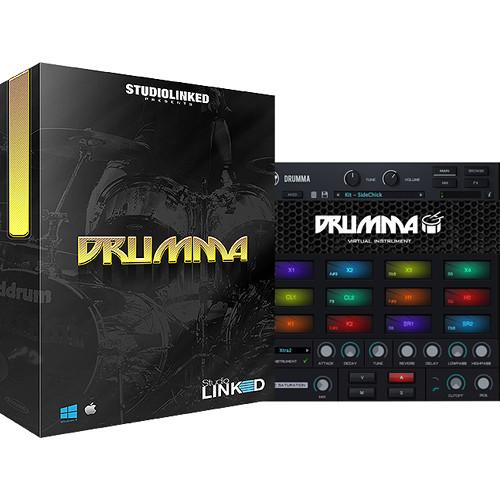 Contents of the user manual for the StudioLinked Drumma - Drum Machine Instrument
- Product category: Virtual Instruments StudioLinked
- Brand: StudioLinked
- Description and content of package
- Technical information and basic settings
- Frequently asked questions – FAQ
- Troubleshooting (does not switch on, does not respond, error message, what do I do if...)
- Authorized service for StudioLinked Virtual Instruments
|
User manual for the StudioLinked Drumma - Drum Machine Instrument contain basic instructions
that need to be followed during installation and operation.
Before starting your appliance, the user manual should be read through carefully.
Follow all the safety instructions and warnings, and be guided by the given recommendations.
User manual is an integral part of any StudioLinked product,
and if it is sold or transferred, they should be handed over jointly with the product.
Following the instructions for use is an essential prerequisite for protecting
health and property during use, as well as recognition of liability on the part of the manufacturer
for possible defects should you make a warranty claim. Download an official StudioLinked user manual in which you will find instructions on how to install, use, maintain and service your product.
And do not forget – unsuitable use of a StudioLinked product will considerably shorten its lifespan!
|
Product description StudioLinked Drumma is a virtual drum machine plug-in that comes with 4000 one-shot drum samples for the modern producer and beat maker, from punchy kicks, claps, and hi-hats that are common in trap music to boom-bap-style snares and rim shots. It also includes a wide array of percussion from Africa, Brazil, Cuba, and more.The sounds are organized in 14 libraries with a browser that enables you to quickly find and organize samples to create your own drum kits. Each kit contains two kicks, two snares, two claps, two hi-hat pads, as well as four extra pads with percussion, vocals, crashes, stabs, hits, and more.A set of controls allows you to tweak each drum sound separately by applying reverb, delay, attack, and decay. You can also tune the samples and add filtering effects. Tape saturation and a set of four modeling filters emulate classic drum machines such as the SP-1200. Global filtering is available to alter the overall output of the plug-in.Drumma's mixer page provides an intuitive interface for setting the level and pan position of each sample, and comes with mixing presets to get you started right away. The software is augmented with a collection of MIDI drum groove presets organized across popular tempos and styles. - Key Features
-
- Virtual drum machine plug-in packed with 14 drum libraries—trap, boom bap, hip hop, R&B, west coast, live drum sets, and more
- 4000 one-shot drum samples
- Percussion from Africa, Brazil, Cuba, and more
- Each kit contains 2 kicks, 2 snares, 2 claps, 2 hi-hats, and 4 extra pads with percussion, vocals, crashes, stabs, hits, and more
- Tape saturation effect
- Four filter models emulate classic drum machines
- Reverb, delay, phaser, attack, decay, and detune effects
- Full control over tweaking and mixing of individual drum samples—solo, mute, tune, or send samples through hi- and low-pass filters
- MIDI drum groove presets
- Global filter affects overall output
- Library rack allows you to browse between and organize expansion packs
- Drum library contains unique animation clip so there is always something visually moving or lighting up when notes are being triggered
Table of Contents
|
Upload User Manual
Have you got an user manual for the StudioLinked Drumma - Drum Machine Instrument Plug-In in electronic form? Please send it to us and help us expand our library of instruction manuals.
Thank you, too, on behalf of other users.
To upload the product manual, we first need to check and make sure you are not a robot. After that, your "Submit Link" or "Upload File" will appear.
Technical parametersStudioLinked 1282-4 Specs | System Requirements | Mac and Windows (64-bit)
Free Space: 1 GB, recommended | | Supported A/V Plug-In Formats | Audio Unit, VST, AAX (supports Pro Tools 11 and later) |
Rating70% users recommend this product to others. And what about you?

This product has already been rated by 61 owners. Add your rating and experience with the product.
Discussion
 Ask our technicians if you have a problem with your settings,
or if anything is unclear in the user manual you have downloaded.
You can make use of our moderated discussion.
The discussion is public and helps other users of our website who may be encountering similar problems.
Ask our technicians if you have a problem with your settings,
or if anything is unclear in the user manual you have downloaded.
You can make use of our moderated discussion.
The discussion is public and helps other users of our website who may be encountering similar problems.
The discussion is empty - enter the first post
Post a new topic / query / comment:
|
|


