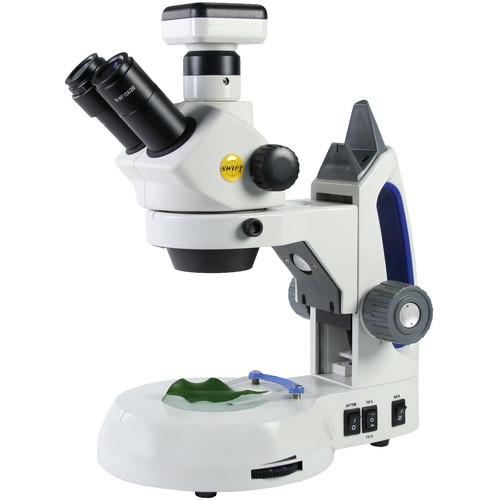
User Manual for Swift SM105T-C-USB Stereo 10x-30x Zoom Trinocular Microscope with 2MP Camera Click to enlarge the picture
 Contents of the user manual for the Swift SM105T-C-USB Stereo 10x-30x Zoom Trinocular
- Product category: Microscopes Swift
- Brand: Swift
- Description and content of package
- Technical information and basic settings
- Frequently asked questions – FAQ
- Troubleshooting (does not switch on, does not respond, error message, what do I do if...)
- Authorized service for Swift Microscopes
|
User manual for the Swift SM105T-C-USB Stereo 10x-30x Zoom Trinocular contain basic instructions
that need to be followed during installation and operation.
Before starting your appliance, the user manual should be read through carefully.
Follow all the safety instructions and warnings, and be guided by the given recommendations.
User manual is an integral part of any Swift product,
and if it is sold or transferred, they should be handed over jointly with the product.
Following the instructions for use is an essential prerequisite for protecting
health and property during use, as well as recognition of liability on the part of the manufacturer
for possible defects should you make a warranty claim. Download an official Swift user manual in which you will find instructions on how to install, use, maintain and service your product.
And do not forget – unsuitable use of a Swift product will considerably shorten its lifespan!
|
Product description The Swift Optical SM105T-C-USB Stereo 10x-30x Zoom Trinocular Microscope makes it easy and comfortable to share the magnified view of large and small specimens through the eyepieces or streamed to various media devices. This model comes with National Optical's Moticam HD camera that mounts directly onto the trinocular head's dedicated camera port.Using a binocular head lets you view with both eyes open, which is not only more comfortable, but preserves true 3D stereoscopic vision with a rich depth of view. The two eyepieces are set at a comfortable 45° angle, and the eyepiece head rotates in a full 360° circle so people standing or sitting at a table or desk can all enjoy the view without having to have everyone move to the eyepieces. Optically the microscope is outfitted with two 10x power eyepieces that, when combined with the objectives, provide 10x, 20x, and 30x magnifications. The objectives are parfocal and parcentered, requiring little or no focus adjustment when changing magnifications and ensuring the same center of view for each objective so there will be no need to recenter specimens after changing objectives. These relatively low magnifications are ideal for larger objects like rocks and gems, textiles, models, circuit boards, and artwork. A diopter adjustment on the left eyepiece helps to compensate for individual eye strength and the eyepiece's interpupillary adjustment range makes it easy for all users to place their distance exactly where they need it.The stage is integrated into the base to offer improved stability for larger specimens. Upper and lower LED illuminators light the stage and independent power control allows you to have just the upper LED on, just the lower, or both. Two stage plates are included: a frosted glass that passes light without the harsh glare, and a reversible white/black contrast plate that provides a stark difference between your specimen and background to enhance the view.Included with the M10T is a National Optical Moticam 1080 microscope camera. The camera mounts into the port on top of the head using the included adapters, allowing you to live stream the microscope's view to a computer, monitor, or TV via HDMI and USB2.0 ports. The 2MP 1/2.8" CMOS sensor delivers HD-quality still images and video at 1980x1080 with a smooth video frame rate of 60 fps. An SD slot on the housing is compatible with cards up to 32GB so you can save your microscopy work and transfer and analyze the files on a computer at a later time. Use the included Moticam Motic Images Plus 3.0 software to capture, measure, and annotate your specimens—it's compatible with both Windows and Mac OS operating systems. - Optical Performance
-
- Two paired 10x eyepieces
- Zoom magnification knob allows you to choose from 10x, 20x, and 30x power with a simple turn
- Relatively low magnification range is ideal for larger specimens like rocks, gems, textiles, parchment, paper, stamps, and coins
- Achromatic lens design virtually eliminates chromatic aberration so colors are accurate and true to life
- Parfocal objectives will require little or no focus adjustment when changing objectives
- Parcentered objectives ensure the same center of view for each objective, eliminating the need to recenter specimens after changing magnification
- Trinocular head design has a port on top to directly mount optional cameras or imaging systems to easily capture or stream view
- Single-speed rack-and-pinion focusing mechanism brings the view into sharp detail, with a slip clutch to prevent damage due to overfocusing
- Tension adjustment on the focus eliminates focus drift
- Camera
-
- National Optical Moticam 1080 microscope camera
- Mounts onto the top of the microscope's trinocular head
- 2MP 1/2.8" CMOS sensor
- 1920x1080 live image resolutions at 60 fps
- Motic Images Plus 3.0 for Windows XP/Vista/7/8 and Mac OS operating systems
- HDMI and USB2.0 ports for outputs to computers, monitors, and TVs
- SD memory card slot, supports cards up to 32GB
- Use and Handling
-
- Binocular design makes it easier and more comfortable to use versus monocular heads, while also preserving a true 3D view and rich depth of field when viewing rocks or gems
- Left-eye diopter correction enables precise accommodation for individual eye prescriptions to ensure views are tack sharp for all users
- Head set at a 45° angle to place user's head in a comfortable viewing position
- Head rotates a full 360° to make it easier to share with a group or class
- Wide 55-75mm interpupillary adjustment range accommodates a variety of users
- Runs on three included AA NiMH rechargeable batteries; charging cord included to charge them in the microscope
- Integrated 5 VDC, 500mAh USB charging port to power accessories or charge devices like phones
- Built-in handle facilitates proper handling
- Specimen Stage and Illumination
- Stage:
- Stage is integrated into the base to provide a wide area for larger specimens like circuit boards, rocks, parchment, fabric, etc.
- Frosted glass stage plate transmits light without harsh glare
- Reversible plastic black/white contrast plate enhances the view by providing a stark color difference between the specimen and the background
- Blue filter for transmitted light
- Locked-on stage clips hold specimen slides in place
Illumination:- Low-power LED illumination is energy efficient with a long life
- The upper (incident) illuminator is used for opaque specimens, the bottom (trans-illuminator) illuminates the internal structure of transparent specimens. Translucent specimens may be seen in greater detail if both illuminators are used simultaneously
- One angled 0.5W LED provides light from the top at a 45° angle for irregular shapes
- Six 0.06W LED array around the turret lights from directly above the specimen
- Lower 0.5W LED located in the base to provide trans-illumination through a slide or transparent/translucent specimen
- Rheostat for upper turret illumination allows precise control of the light intensity
- Independent on/off control allows top or bottom illumination only, or both
In the Box Swift SM105T-C-USB Stereo 10x-30x Zoom Trinocular Microscope with 2MP Camera Blue Stage Plate Filter Frosted Glass Stage Plate Reversible Black/White Contrast Stage Plate Battery Charging Cable 3 x AA NiMH Battery Limited Lifetime Warranty Table of Contents
|
Upload User Manual
Have you got an user manual for the Swift SM105T-C-USB Stereo 10x-30x Zoom Trinocular Microscope with 2MP Camera in electronic form? Please send it to us and help us expand our library of instruction manuals.
Thank you, too, on behalf of other users.
To upload the product manual, we first need to check and make sure you are not a robot. After that, your "Submit Link" or "Upload File" will appear.
Technical parametersSwift SM105T-C-USB Specs | Head | 45
Rating90% users recommend this product to others. And what about you?

This product has already been rated by 53 owners. Add your rating and experience with the product.
Discussion
 Ask our technicians if you have a problem with your settings,
or if anything is unclear in the user manual you have downloaded.
You can make use of our moderated discussion.
The discussion is public and helps other users of our website who may be encountering similar problems.
Ask our technicians if you have a problem with your settings,
or if anything is unclear in the user manual you have downloaded.
You can make use of our moderated discussion.
The discussion is public and helps other users of our website who may be encountering similar problems.
The discussion is empty - enter the first post
Post a new topic / query / comment:
|
|
|
| Request for user manual |
You can’t find the operation manual you are looking for? Let us know and we will try to add the missing manual:
I’m looking for a manual / Request for manual
Current requests for instruction manuals:
Call Of Duty World War Two For Xbox...
controller stratus XL...
stratus XL...
smart whatch serie S11 42mm...
Allen & Heath SQ-6 manual...
|
| Discussion |
Latest contributions to the discussion:
AEW R 4100
Name: MAURICIO ANGARITA
Audio-Technica AEW-R4100 UHF Diversity Receiver for
AEW R 4100 has the mute function blocked and does not allow audio to pass. I tried several times to turn off the mute from the transmitter but it does nothing, the mute stays on. Solution?
Thank you...
Instructions for assembling the 2015 Forecast Image Master Consoles GC3-A
Name: mike elam
Forecast Consoles GC3-A ImageMaster Editing Console
Looking for instructions for assembling this console. ...
EMPTY TONER ERROR MESSAGE AFTER REPLACING TONER
Name: LINDA BAD YELLOW EYES
Brother TN223BK Standard-Yield Toner
I HAD TO CHANGE OUT ALL THREE TONERS DUE TO LEAKS IN THE YELLOW AND CYAN. AFTER I REPLACED THEM, THE MACHINE KEEPS GIVING ME AN EMPTY TONER ERROR MESSAGE. HELP!!...
PS480D 20/24 pin Switching 480W Power Supply
Name: swkargo
Logisys 480W Power Supply
This item states in can run -5vdc .It is NOT listed on the board or I beleive is r4 is missing the resitior. Any body have thid issue. Shawn
...
Help needed
Name: Ann Carter
SanDisk 1TB Extreme Portable USB 3.1
When I click the link to download the user manual for my Sandisk Extreme external hard drive, it gives me the manual for the LG Cricket. Can you please change the link so I can download the Sandisk manual and begin using this drive? Thank you....
|
|


