|
User Manual for Synology DiskStation DS3617xs 120TB 12-Bay NAS Enclosure Kit with WD NAS Drives Click to enlarge the picture
 Contents of the user manual for the Synology DiskStation DS3617xs 120TB 12-Bay NAS
- Product category: Network Attached Storage Drives Synology
- Brand: Synology
- Description and content of package
- Technical information and basic settings
- Frequently asked questions – FAQ
- Troubleshooting (does not switch on, does not respond, error message, what do I do if...)
- Authorized service for Synology Network Attached Storage Drives
|
User manual for the Synology DiskStation DS3617xs 120TB 12-Bay NAS contain basic instructions
that need to be followed during installation and operation.
Before starting your appliance, the user manual should be read through carefully.
Follow all the safety instructions and warnings, and be guided by the given recommendations.
User manual is an integral part of any Synology product,
and if it is sold or transferred, they should be handed over jointly with the product.
Following the instructions for use is an essential prerequisite for protecting
health and property during use, as well as recognition of liability on the part of the manufacturer
for possible defects should you make a warranty claim. Download an official Synology user manual in which you will find instructions on how to install, use, maintain and service your product.
And do not forget – unsuitable use of a Synology product will considerably shorten its lifespan!
|
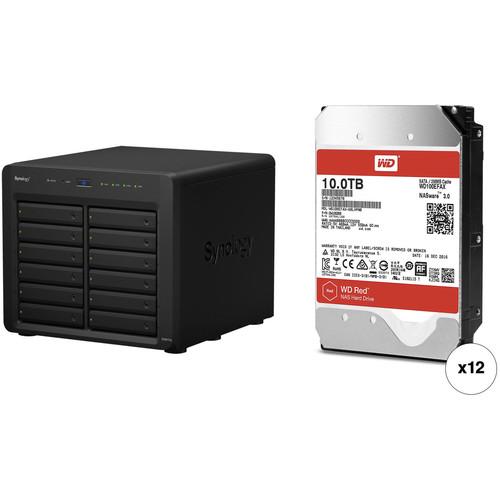
Product description This Kit combines the Synology DiskStation DS3617xs 12-Bay NAS Enclosure with twelve WD 10TB Red 5400 rpm SATA III 3.5" Internal NAS HDDs for a total storage capacity of 120TB. - Synology DiskStation DS3617xs 12-Bay NAS Enclosure The DiskStation DS3617xs 12-Bay NAS Enclosure from Synology is designed for business environments in mind by offering 12 hot-swappable storage bays, an Intel Xeon CPU, 16GB of ECC RAM, and extensive redundancy features for protecting your data. The DiskStation DS3617xs comes with four failover Gigabit Ethernet ports with link-aggregation enabled as well as support for various RAID modes, so you can provide always-available data for your network. Once drives are installed into the enclosure's bays, you can configure your drives in a JBOD, Basic, RAID 0, 1, 5, 6, or 10 array to meet the needs of your business.
For performance, the DiskStation DS3617xs sports an Intel Xeon D-1527 quad-core processor and 16GB of DDR4 ECC memory to run the DiskStation Manager operating system and multiple VMs smoothly. Each of the cores on the processor has a stock speed of 2.2 GHz and can operate at speeds of up to 2.7 GHz while running demanding apps. Other notable features include two USB 3.0 ports as well as two expansion ports for connecting sold separately DX1215 expansion units, allowing you to expand its storage capacity with up to 36 drives without disrupting service. There's also an available PCIe 3.0 x8 slot for adding an optional 10GbE adapter to deliver 2358 MB/s read speeds under a RAID 5 drive configuration.
Synology has provided apps along with support for advanced technologies to enhance the DiskStation DS3617xs' capabilities. With Cloud Station, you can have your own private cloud to sync files across multiple devices. Another useful syncing feature is Synology High Availability (SHA) technology, which replicates data in real-time to another Synology NAS at a remote location, giving you a piece of mind if one location has a fire or flood. Virtualization and iSCSI are also possible, enabling you to create multiple VMs while providing users with simulated locally-attached disks. - Performance
- Equipped with an Intel Xeon-D quad-core processor, the DS3617xs delivers over 2,358 MB/s read speeds under a RAID 5 configuration with optional 10GbE and Link Aggregation enabled. Initially equipped with 16GB DDR4 ECC RAM (upgradable to 48GB), it ensures data accuracy when handling high-value data and mission-critical tasks.
- Scale on Demand
- The DS3617xs can be connected to one or two dedicated DX1215 expansion units, allowing you to expand storage capacity to up to 36 drives without disrupting service. The high-bandwidth cable ensures instant and lossless connections between the main server and the expansion units.
- 10GbE Upgradability
- In addition to the four built-in Gigabit ports, the DS3617xs comes with a PCIe 3.0 x8 slot to support an optional 10GbE Network Interface Card (NIC), maximizing bandwidth and meeting high performance requirements for data-intensive applications.
- Redundancy
- Synology's DS3617xs comes with comprehensive redundancy mechanisms to ensure business continuity. Four built-in LAN ports with failover provide reliable redundancy in the event of an unexpected network failure. The high-reliability system design, including fanless CPU heat-sink and passive cooling technologies, prevents a single point of failure.
- DiskStation Manager
- Synology DiskStation Manager (DSM) is a browser-based operating system that makes managing your Synology NAS a breeze. Featuring an intuitive user interface, DSM makes accessing and sharing your data smarter and simpler. Synology's Package Center lets you download and install useful add-on packages designed specifically for individual or business needs, meaning you can enjoy more entertainment in your life or better productivity at work.
- Ready for Businesses
- With the support of Windows AD, LDAP, and Domain Trust, the DS3617xs enables seamless account integration. The User Home feature can automatically create a "home" folder for every user account to minimize the administrator's effort in repeatedly creating "home" folders for all accounts. Windows ACL support on DS3617xs allows IT administrators to fine tune access controls and set up privileges to files and folders on DS3617xs through a familiar Windows user interface. With compatibility for major protocols, the DS3617xs can eliminate server configuration overhead and enhance IT administrators' efficiency.
- Data Protection
- When dealing with large-scale data storage, businesses require a solution that offers reliable backup and prevents file corruption. With support for Btrfs file system, the DS3617xs ensures information is stored with a high level of data integrity, while providing flexible and efficient data protection tools.
- Snapshots
- Snapshots preserve the history of a shared folder allowing you to save up to 1024 backup copies for point-in-time recovery. Snapshots can be automatically captured up to every 5 minutes, without noticeably impacting system performance.
- Metadata Mirroring and Survivability
- Btrfs file system stores two copies of critical metadata on a volume, improving the availability and ensuring the integrity of your file system.
- Corruption Detection and Correction
- Btrfs generates checksums for data and metadata, and then verifies the checksums during each read process to ensure the integrity of the filesystem and files. If the file system discovers a mismatch, metadata will be repaired to keep file system consistent. In the meantime, corrupted files will be reported and logged.
- Customizable Quotas for Shared Folders
- With Btrfs, you can specify a storage limit for each shared folder, making it possible to precisely control space consumption when multiple teams or departments save files on the same Synology NAS server.
- Virtualization Environments
- The DS3617xs provides seamless storage solutions for virtualization environments, including VMware, Citrix, and Microsoft Hyper-V. With VMware vSphere & VAAI integration, it helps offload specific storage operations and optimizes computation power in VMware environments. Windows ODX support speeds up data manipulation as the data transfer is offloaded. iSCSI also lets SMB users consolidate storage into data center storage arrays while providing hosts with the illusion of locally-attached disks.
- Unified Storage System
- Synology's DS3617xs enables businesses to cost-effectively manage multi-protocol data by integrating file-level (NAS) and block-level (SAN) storage into one unified storage system. Files can be shared across Windows, Mac, and Linux platforms seamlessly with comprehensive network protocol support (CIFS/SMB, AFP, and NFS). The DS3617xs provides a cost-effective iSCSI solution, allowing large scale businesses to consolidate storage into data center storage arrays. With thin provisioning available for file-level iSCSI LUN, you can maximize storage utilization by oversubscribing provisions and grow storage space as needed.
- Protection with LUN Backup, Snapshot, and Clone
- The DS3617xs enhances the ease of moving and copying data in a virtualized environment with LUN Snapshot, clone, and replication. Synology's LUN Clone and LUN Snapshot only consume 1/1000 of the original size for optimizing storage usage. In addition, Synology's LUN Snapshot lets you create up 256 snapshots per LUN using point-in-time technology without having any impact on system performance. With better support to servers under VMware vSphere or Windows environment, IT managers can expect reliable VM status and data consistency through application-consistent snapshots.
- Synology Central Management System (CMS)
- For enterprises with more than one Synology NAS server, CMS offers the flexibility and convenience for IT administrators to manage all of them from a single point of entry. Through a simple interface, you can obtain a clear overview on resource consumption and logs, helping you identify any issue right away. With group policies, CMS can do much more for your daily tasks. Once a NAS joins a group, it will automatically adopt its rules and behave as intended, without extra configuration.
- Increase Business Productivity with Cloud Solutions
- With comprehensive cloud solutions, the DS3617xs lets you create your own private cloud easily. Cloud Station is a suitable package to sync files across multiple devices. Files can be edited in offline mode and later synced to Cloud Station, which keeps up to 32 historical versions, allowing you to restore a file back to previous version or recover deleted files. With the mobile app DS cloud, any change made to a file is automatically synced to your smartphones and tablets. For distributed enterprises, Synology's 2-way sync between different DiskStations ensures employees at different locations share the same information in real-time. IT administrators can handpick individual folders that they want to sync to different devices, manually or automatically based on file format and size. Folders synced by Cloud Station can be encrypted on DSM—no one will be able to access its content without your private key.
- Ensuring Business Continuity and Reliability
- The DS3617xs offers Synology High Availability (SHA) technology for combining an active and passive server into one cluster, the former always mirrored to the latter. Shared Folder Sync can replicate data in real-time to another Synology NAS at a remote location, giving your business the Recovery Time Objective (RTO) for prompt disaster recovery. With multiple LAN ports, the DS3617xs also ensures redundancy in the event of unexpected network failure.
- Secure Data
- This NAS enclosure offers advanced security measures to protect you from potential security holes. Security Advisor analyzes system settings, password strength, and network preferences and removes any possible malware. AppArmor blocks malicious programs from accessing unauthorized system resources. You can also customize the trust level in Package Center to avoid installing packages from untrusted sources, safeguarding your NAS from unknown or tampered files. In addition, the DS3617xs provides other security add-ons, such as AES encryption, 2-Step verification, IP block & allow list, Antivirus packages, firewall, and DoS attack prevention.
UPC: 846504002467 In the Box - DiskStation DS3617xs 12-Bay NAS Enclosure ayzrbbyztrrfvyyrvbbxyyrvruvzq
- Accessory Pack
- Power Cord
- 2 x Ethernet Cables
- Limited 5-Year Warranty
Table of Contents
|
Upload User Manual
Have you got an user manual for the Synology DiskStation DS3617xs 120TB 12-Bay NAS Enclosure Kit with WD NAS Drives in electronic form? Please send it to us and help us expand our library of instruction manuals.
Thank you, too, on behalf of other users.
To upload the product manual, we first need to check and make sure you are not a robot. After that, your "Submit Link" or "Upload File" will appear.
Technical parameters - Synology DiskStation DS3617xs 12-Bay NAS Enclosure
| | | Number of Bays | 12 x 2.5"/3.5" | | Media Card Slots | None | | Maximum Filled Capacity | 200 TB | | Connections | 2 x USB Type-A (USB 3.1 Gen 1 (5 Gb/s))
2 x Infiniband
4 x RJ45 (Gigabit Ethernet) | | RAID Modes | RAID 0, 1, 10, 5, 6, JBOD | | Hot-Swap Support | Yes | | Expansion Slots | 1 x PCIe 3.0 x8 | | Link Aggregation and Failover Support | Yes | | | | Total Raw Capacity | None | | Type | None | | Flash Memory | None | | | | Processor | Intel Xeon D-1527 Quad-Core | | Clock Speed | Base: 2.2GHz / Maximum Boost: 2.7 GHz | | Total Installed Memory | 16 GB ECC DDR4 | | User-Replaceable Memory | 2 x 8 GB | | Total Memory Slots | 4 x SO-DIMM | | Maximum Memory Capacity | 48 GB | | | | iSCSI LUN | 512 | | iSCSI Target | 64 | | | | File System Formats Supported | External: Btrfs, EXT3, EXT4, FAT, HFS+, NTFS, exFAT
Internal: Btrfs, EXT4 | | | | Power Consumption | 108.2 W | | Power Source | Internal Power Supply | | PSU Wattage | 1 x 500 W | | AC Input Power | 100 to 240 VAC, 50 / 60 Hz | | | | VPN Server Connections | 30 | | | | Operating Temperature | 40 to 104°F / 4 to 40°C | | Operating Humidity | 5 to 95% | | Storage Temperature | -5 to 140°F / -21 to 60°C | | Certifications | BSMI, CE, FCC, RoHS, as per Manufacturer | | | | Cooling | 2 x 120 mm Fans | | Noise Level | 22.3 dBA | | Dimensions | 10.6 x 11.8 x 13.4" / 270.0 x 300.0 x 340.0 mm | | Weight | 21.6 lb / 9.8 kg | | | | Box Dimensions (LxWxH) | 18.5 x 17.3 x 16.8" |
Rating90% users recommend this product to others. And what about you?

This product has already been rated by 26 owners. Add your rating and experience with the product.
Discussion
 Ask our technicians if you have a problem with your settings,
or if anything is unclear in the user manual you have downloaded.
You can make use of our moderated discussion.
The discussion is public and helps other users of our website who may be encountering similar problems.
Ask our technicians if you have a problem with your settings,
or if anything is unclear in the user manual you have downloaded.
You can make use of our moderated discussion.
The discussion is public and helps other users of our website who may be encountering similar problems.
The discussion is empty - enter the first post
Post a new topic / query / comment:
|
|
|
| Request for user manual |
You can’t find the operation manual you are looking for? Let us know and we will try to add the missing manual:
I’m looking for a manual / Request for manual
Current requests for instruction manuals:
Call Of Duty World War Two For Xbox...
controller stratus XL...
stratus XL...
smart whatch serie S11 42mm...
Allen & Heath SQ-6 manual...
|
| Discussion |
Latest contributions to the discussion:
AEW R 4100
Name: MAURICIO ANGARITA
Audio-Technica AEW-R4100 UHF Diversity Receiver for
AEW R 4100 has the mute function blocked and does not allow audio to pass. I tried several times to turn off the mute from the transmitter but it does nothing, the mute stays on. Solution?
Thank you...
Instructions for assembling the 2015 Forecast Image Master Consoles GC3-A
Name: mike elam
Forecast Consoles GC3-A ImageMaster Editing Console
Looking for instructions for assembling this console. ...
EMPTY TONER ERROR MESSAGE AFTER REPLACING TONER
Name: LINDA BAD YELLOW EYES
Brother TN223BK Standard-Yield Toner
I HAD TO CHANGE OUT ALL THREE TONERS DUE TO LEAKS IN THE YELLOW AND CYAN. AFTER I REPLACED THEM, THE MACHINE KEEPS GIVING ME AN EMPTY TONER ERROR MESSAGE. HELP!!...
PS480D 20/24 pin Switching 480W Power Supply
Name: swkargo
Logisys 480W Power Supply
This item states in can run -5vdc .It is NOT listed on the board or I beleive is r4 is missing the resitior. Any body have thid issue. Shawn
...
Help needed
Name: Ann Carter
SanDisk 1TB Extreme Portable USB 3.1
When I click the link to download the user manual for my Sandisk Extreme external hard drive, it gives me the manual for the LG Cricket. Can you please change the link so I can download the Sandisk manual and begin using this drive? Thank you....
|
|


