|
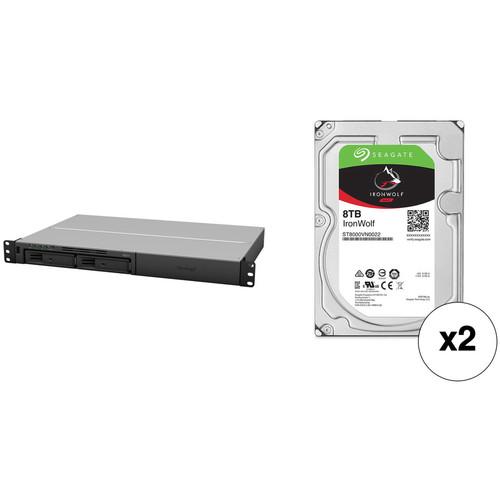
User Manual for Synology RackStation 16TB RS217 2-Bay NAS Enclosure Kit with Seagate NAS Drives Click to enlarge the picture
 Contents of the user manual for the Synology RackStation 16TB RS217 2-Bay NAS
- Product category: Network Attached Storage Drives Synology
- Brand: Synology
- Description and content of package
- Technical information and basic settings
- Frequently asked questions – FAQ
- Troubleshooting (does not switch on, does not respond, error message, what do I do if...)
- Authorized service for Synology Network Attached Storage Drives
|
User manual for the Synology RackStation 16TB RS217 2-Bay NAS contain basic instructions
that need to be followed during installation and operation.
Before starting your appliance, the user manual should be read through carefully.
Follow all the safety instructions and warnings, and be guided by the given recommendations.
User manual is an integral part of any Synology product,
and if it is sold or transferred, they should be handed over jointly with the product.
Following the instructions for use is an essential prerequisite for protecting
health and property during use, as well as recognition of liability on the part of the manufacturer
for possible defects should you make a warranty claim. Download an official Synology user manual in which you will find instructions on how to install, use, maintain and service your product.
And do not forget – unsuitable use of a Synology product will considerably shorten its lifespan!
|
Product description This Kit combines the Synology RackStation RS217 2-Bay NAS Enclosure with two Seagate 8TB IronWolf 7200 rpm SATA III 3.5" hard drives for a total storage capacity of 16TB. - Synology RackStation RS217 2-Bay NAS Enclosure The RackStation RS217 2-Bay NAS Enclosure from Synology provides two storage bays and two Gigabit Ethernet ports, so you can create a storage pool of shared data with network-connected users. The two SATA-based bays are capable of supporting 2.5"/3.5" hard drives and 2.5" solid-state drives. Once drives are installed, you can configure the drives as a RAID 0, 1, JBOD, Hybrid, or Basic array. Furthermore, managing the Synology DiskStation Manager operating system is done with an Armada 385 processor and 512MB of DDR3 memory.
With link aggregation and failover support, the RS217 can deliver data stored on your drives reliably and quickly. For cooling the drives, it comes with three 40mm fans that can be set in either cool or quiet modes. There are also one USB 2.0 port, two USB 3.0 ports, and one eSATA port for connecting external devices to this enclosure. - Performance
- Powered by a 1.33 GHz dual-core processor, RS217 delivers performance with encrypted reading and writing speeds of 113 MB/s and 67 MB/s with link aggregation enabled, reaching a 214% improvement in overall encrypted data processing when compared with its predecessor. The RS217 also provides non-encrypted performance exceeding 210 MB/s in reading and 127 MB/s in writing.
- Compact
- RS217 fits into two-post racks and wall mount racks without additional rail kits. It is also resilient enough to withstand an operating temperature of up to 122°F (50°C). The compact design offers an affordable solution for both industrial standard environments and smaller server rooms with limited space.
- Dual LAN Design
- RS217 comes with dual Gigabit Ethernet LAN ports with failover support to ensure continual network service in case of LAN failure. The hot-swappable design facilitates easy and risk-free hard drive replacement. The hard drive tray lock further secures your hard drives from unauthorized or accidental withdrawal.
- Convenient Connectivity
- To ensure scalability, RS217 provides an eSATA and two USB 3.0 ports in the back, along with one USB 2.0 port on the front panel for quick access.
- DiskStation Manager
- Synology DiskStation Manager (DSM) is a browser-based operating system running on every DiskStation and RackStation, which makes managing your Synology NAS a breeze. Featuring an intuitive user interface, DSM makes accessing and sharing your data smarter and simpler. Synology's Package Center lets you download and install useful add-on packages designed specifically for individual or business needs.
- Collaboration Tools
- RS217 comes with a comprehensive set of office applications, allowing you to maximize work productivity and improve team dynamics. Whether you are keeping track of household expenses or updating your project status, via SpreadSheet, you can work together with other people on the same document in real-time as if you were sitting next to each other - even when you are miles apart. In addition, Note Station lets you and your team keep detailed notes and accomplish more tasks with features such as charts, presentation view, mail clipper, and more.
- Compatible Sharing
- Enjoy seamless file sharing across Windows, Mac, and Linux platforms as RS217 offers comprehensive network protocol support including FTP, SMB2, AFP, NFS and WebDAV. With Windows AD and LDAP integration, RS217 can fit effortlessly into any existing network environment - there is no need for IT administrators to maintain two sets of credentials. You also won't worry about missing files with the Recycle Bin feature which is supported on AFP, CIFS, File Station, and WebDAV. All files deleted in a shared folder will be automatically moved into the Recycle Bin.
- Business Environments Friendly
- With the support of Windows AD, LDAP, and Domain Trust, RS217 enables seamless account integration. The User Home feature can automatically create a "home" folder for every user account to minimize the administrator's effort in repeatedly creating "home" folders for all accounts. Windows ACL support on RS217 allows IT administrators to fine tune access controls and set up privileges to files and folders on RS217 through the familiar Windows user interface. With compatibility for major protocols, RS217 can eliminate server configuration overhead and enhance IT administrators' efficiency.
- Cloud Service
- Cloud Station lets you sync files among DiskStations and multiple devices, including Windows PC, Mac, Linux, iOS, Android, as well as Windows mobile devices, whereas 2-way sync allows file synchronization among different DiskStations. With Cloud Sync, you can even sync your DiskStation with popular cloud-based services, establishing a hybrid cloud to enjoy more storage flexibility and prevent data loss.
- Backup Data
- Synology RS217 can serve as a centralized backup target. Whether you are a Windows or Mac user, you can back up everything on your computer directly to Synology NAS using Cloud Station Backup. Whenever you modify a file, the changes are backed up to RS217 automatically. Mac users also enjoy native Apple Time Machine support. You can also back up data from your RS217 to another DiskStation, rsync servers, external drives, or even Amazon S3, Glacier cloud service, Microsoft Azure, SFR, and hicloud. Synology Hyper Backup allows you to schedule backup tasks and restore the server to any particular point in time, while minimizing storage consumption and processing time by saving only the specific data block that has been changed between versions.
- Connect Your Data Quickly and Easily
- With Synology QuickConnect, you don't have to deal with a difficult DDNS setup. QuickConnect frees you from complicated router configuration and port-forwarding, so your entertainment and work files can be accessed on any computer, laptop, or mobile device instantly without extra charge.
- Mobility Apps
- DS note, DS audio, DS video, DS photo, DS cloud, DS file, DS get, and DS cam allow you to access and manage the contents of your RS217 with smartphones and tablets.
- Eco-Friendly NAS Server
- RS217 only consumes 12.9W in HDD Hibernation and 21.25W in access. With special fans and the smart airflow design, the RS217 keeps the system running cool 24/7, while its noise dampening design makes it quiet.
UPC: 846504002290 - 2 x Seagate 8TB IronWolf 7200 rpm SATA III 3.5" Internal NAS HDD Designed for use in 1-8 bay NAS environments within home, SOHO, and SMB environments, the 8TB IronWolf 7200 rpm SATA III 3.5" Internal NAS HDD from Seagate is built to withstand 24x7 operations, or 8760 hours per year. This 8TB drive has been equipped with a SATA III 6 Gb/s interface, a rotational speed of 7200 rpm, a 3.5" form factor, and a 256MB cache, providing users with an ample storage capacity and data transfer speeds of up to 210 MB/s. This IronWolf hard drive also has an MTBF rating of 1 million hours, 600,000 load/unload cycles, 1 in 1015 non-recoverable read errors per bits read, and a workload rate of up to 180TB per year. Protection is provided by a limited 3-year warranty.
General Features - Optimized for NAS with AgileArray
- AgileArray is built for dual-plane balancing and RAID optimization in multi-bay environments with advanced power management
- Reduced Lag Times
- Improved performance means reduced lag times or downtime for users during high traffic time for the NAS
- IronWolf Health Management
- IronWolf Health Management focuses on prevention, intervention, and recovery
- Rotational Vibration (RV) Mitigation
- IronWolf comes standard with RV sensors to maintain high performance in multi-bay NAS enclosures
- Multi-User Environments
- IronWolf provides a workload rate of 180TB per year
- Cache Memory
- IronWolf provides 256MB of cache memory, allowing your NAS to serve data faster
- 1.0 Million Hours MTBF | Limited 3-Year Warranty
- This represents an improved total cost of ownership (TCO) over desktop drives with reduced maintenance costs
- Designed for 24x7 Performance
- Access your data on your NAS at virtually any time, whether remotely or on site
Best-Fit Applications - 1-8 bay business network attached storage (NAS)
- Desktop RAIDs and servers
- Multimedia server storage
UPC: 763649117552 In the Box - RackStation RS217 2-Bay NAS Enclosure bbrqcvtbwsbrszscrzzttyvtesctb
- Accessory Pack
- Power Cord
- Limited 3-Year Warranty
- 2 x Seagate - 8TB IronWolf 7200 rpm SATA III 3.5" Internal NAS HDD
Table of Contents
|
Upload User Manual
Have you got an user manual for the Synology RackStation 16TB RS217 2-Bay NAS Enclosure Kit with Seagate NAS Drives in electronic form? Please send it to us and help us expand our library of instruction manuals.
Thank you, too, on behalf of other users.
To upload the product manual, we first need to check and make sure you are not a robot. After that, your "Submit Link" or "Upload File" will appear.
Technical parameters - Synology RackStation RS217 2-Bay NAS Enclosure
| | | Number of Bays | 2 x 2.5"/3.5" | | Media Card Slots | None | | Connections | 1 x USB Type-A (USB 2.0 (480 Mb/s))
2 x USB Type-A (USB 3.1 Gen 1 (5 Gb/s))
1 x eSATA
2 x RJ45 (Gigabit Ethernet) | | RAID Modes | RAID 0, 1, JBOD, Synology Hybrid | | Hot-Swap Support | Yes | | Link Aggregation and Failover Support | Yes | | | | Total Raw Capacity | None | | Type | None | | Flash Memory | None | | | | Processor | Marvell Armada 385 88F6820 Dual-Core | | Clock Speed | Base: 1.33GHz | | Total Installed Memory | 512 MB DDR3 | | | | iSCSI LUN | 10 | | iSCSI Target | 10 | | Max Concurrent Connections | 128 | | Max Folders | 256 | | Max Groups | 256 | | Max Sync Tasks | 2 | | Max User Accounts | 2048 | | Max Volume Number | 256 | | | | File System Formats Supported | External: EXT3, EXT4, FAT, HFS+, NTFS, exFAT
Internal: EXT4 | | | | Power Consumption | 21.25 W (Typical)
12.9 W (Standby) | | AC Input Power | 100 to 240 VAC, 50 / 60 Hz | | | | Operating Temperature | 40 to 122°F / 4 to 50°C | | Operating Humidity | 5 to 95% | | Storage Temperature | -5 to 140°F / -21 to 60°C | | Certifications | BSMI, CE, FCC, RoHS, as per Manufacturer | | | | Cooling | 3 x 40 mm Fans | | Noise Level | 25.8 dBA | | Dimensions | 1.7 x 17.1 x 11.6" / 4.4 x 43.6 x 29.6 cm | | Weight | 7.6 lb / 3.5 kg | | | | Box Dimensions (LxWxH) | 20.63 x 15.669 x 5.591" | - 2 x Seagate 8TB IronWolf 7200 rpm SATA III 3.5" Internal NAS HDD
| | | Drive Capacity | 8.0 TB | | Cache Memory | 256 MB | | | | Interface | SATA III (6 Gb/s) | | Maximum Read Speed | 210 MB/s | | | | Drive Type | HDD | | Form Factor | 3.5" | | Noise Level | 2.7 dB (Idle)
2.8 dB (Active) | | | | Spindle Speed (RPM) | 7200 RPM | | | | Encryption | None | | Endurance (Total Bytes Written) | 180 TB | | Load/Unload Cycles | 600,000 | | Mean Time Between Failures (MTBF) | 1.0 Million Hours | | Non-Recoverable Read Errors per Bits Read | 1 in 1015 | | | | Power Draw | 9.0 W (Active)
7.2 W (Idle)
0.6 W (Standby) | | Supported Voltage | 5 VDC, 12 VDC | | Current | 2.0 A at 12 VDC | | | | Operating Shock | 70 G / 2.0 ms | | Storage Shock | 250 G / 2.0 ms | | Operating Temperature | 41 to 158°F / 5 to 70°C | | Storage Temperature | -40 to 158°F / -40 to 70°C | | | | Dimensions (W x H x D) | 4.0 x 1.0 x 5.8" / 101.8 x 26.2 x 147.1 mm | | Weight | 1.7 lb / 780.2 g | | | | Box Dimensions (LxWxH) | 7.8 x 6.0 x 2.3" |
Rating60% users recommend this product to others. And what about you?

This product has already been rated by 19 owners. Add your rating and experience with the product.
Discussion
 Ask our technicians if you have a problem with your settings,
or if anything is unclear in the user manual you have downloaded.
You can make use of our moderated discussion.
The discussion is public and helps other users of our website who may be encountering similar problems.
Ask our technicians if you have a problem with your settings,
or if anything is unclear in the user manual you have downloaded.
You can make use of our moderated discussion.
The discussion is public and helps other users of our website who may be encountering similar problems.
The discussion is empty - enter the first post
Post a new topic / query / comment:
|
|
|
| Request for user manual |
You can’t find the operation manual you are looking for? Let us know and we will try to add the missing manual:
I’m looking for a manual / Request for manual
Current requests for instruction manuals:
Call Of Duty World War Two For Xbox...
controller stratus XL...
stratus XL...
smart whatch serie S11 42mm...
Allen & Heath SQ-6 manual...
|
| Discussion |
Latest contributions to the discussion:
AEW R 4100
Name: MAURICIO ANGARITA
Audio-Technica AEW-R4100 UHF Diversity Receiver for
AEW R 4100 has the mute function blocked and does not allow audio to pass. I tried several times to turn off the mute from the transmitter but it does nothing, the mute stays on. Solution?
Thank you...
Instructions for assembling the 2015 Forecast Image Master Consoles GC3-A
Name: mike elam
Forecast Consoles GC3-A ImageMaster Editing Console
Looking for instructions for assembling this console. ...
EMPTY TONER ERROR MESSAGE AFTER REPLACING TONER
Name: LINDA BAD YELLOW EYES
Brother TN223BK Standard-Yield Toner
I HAD TO CHANGE OUT ALL THREE TONERS DUE TO LEAKS IN THE YELLOW AND CYAN. AFTER I REPLACED THEM, THE MACHINE KEEPS GIVING ME AN EMPTY TONER ERROR MESSAGE. HELP!!...
PS480D 20/24 pin Switching 480W Power Supply
Name: swkargo
Logisys 480W Power Supply
This item states in can run -5vdc .It is NOT listed on the board or I beleive is r4 is missing the resitior. Any body have thid issue. Shawn
...
Help needed
Name: Ann Carter
SanDisk 1TB Extreme Portable USB 3.1
When I click the link to download the user manual for my Sandisk Extreme external hard drive, it gives me the manual for the LG Cricket. Can you please change the link so I can download the Sandisk manual and begin using this drive? Thank you....
|
|


