|
User Manual for Tascam DR-701D 6-Track Field Recorder for DSLR with SMPTE Timecode Click to enlarge the picture
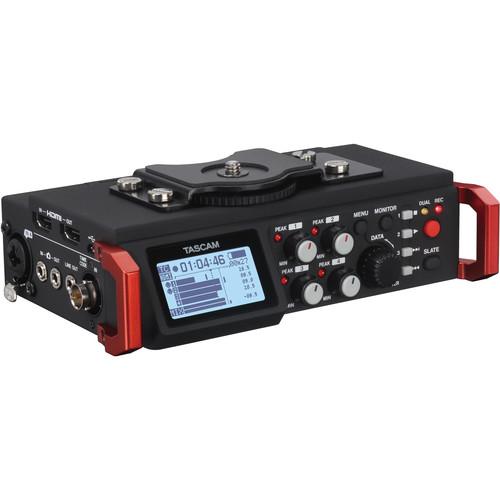 Contents of the user manual for the Tascam DR-701D 6-Track Field Recorder for
- Product category: Portable Digital Recorders Tascam
- Brand: Tascam
- Description and content of package
- Technical information and basic settings
- Frequently asked questions – FAQ
- Troubleshooting (does not switch on, does not respond, error message, what do I do if...)
- Authorized service for Tascam Portable Digital Recorders
 |
User manual for the Tascam DR-701D 6-Track Field Recorder for contain basic instructions
that need to be followed during installation and operation.
Before starting your appliance, the user manual should be read through carefully.
Follow all the safety instructions and warnings, and be guided by the given recommendations.
User manual is an integral part of any Tascam product,
and if it is sold or transferred, they should be handed over jointly with the product.
Following the instructions for use is an essential prerequisite for protecting
health and property during use, as well as recognition of liability on the part of the manufacturer
for possible defects should you make a warranty claim. Download an official Tascam user manual in which you will find instructions on how to install, use, maintain and service your product.
And do not forget – unsuitable use of a Tascam product will considerably shorten its lifespan!
|
Product description First Look At The Tascam DR-701D Read More - Tascam DR-701D: First Look
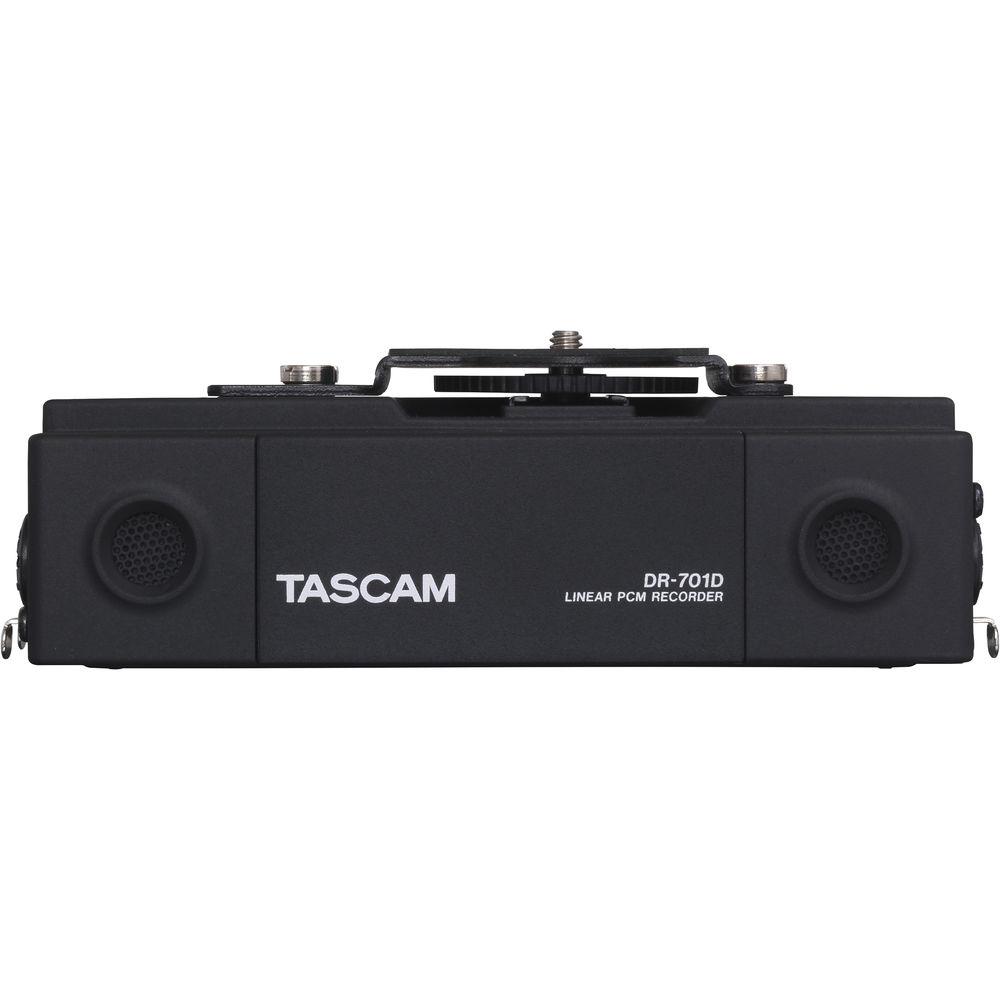
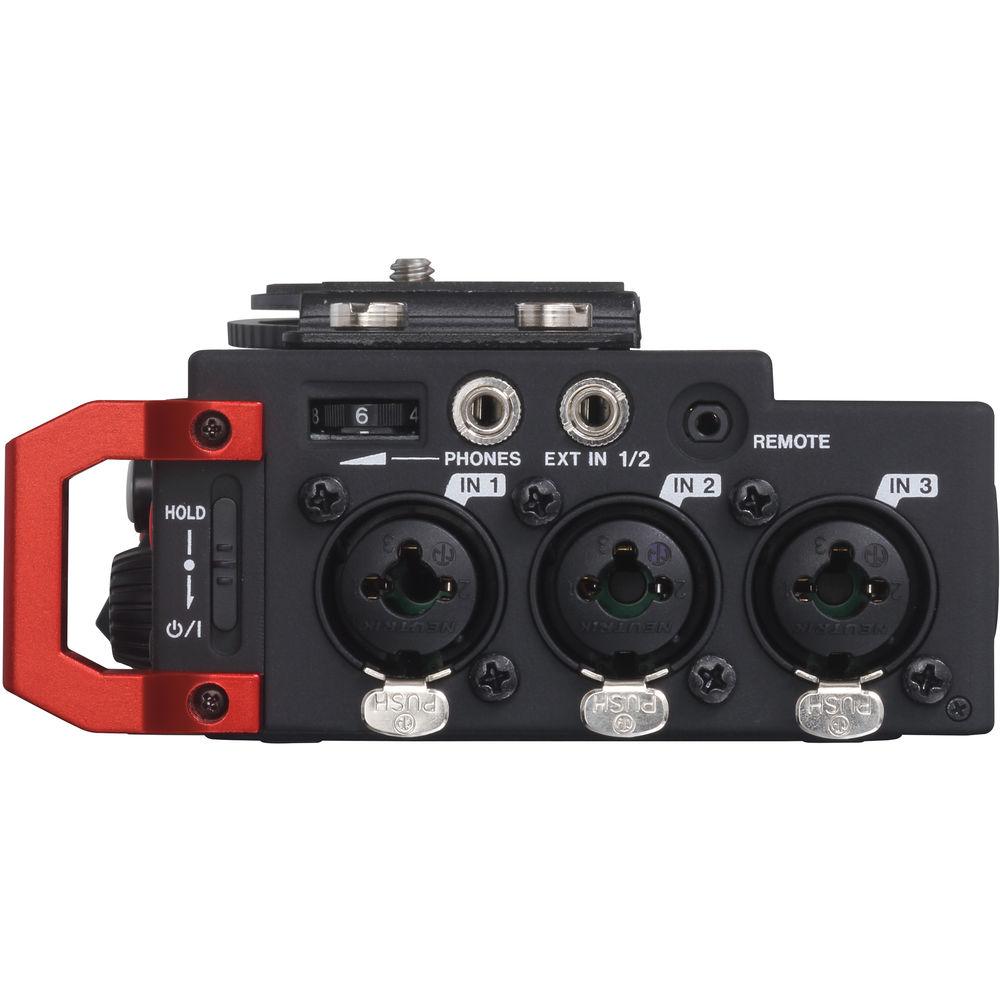
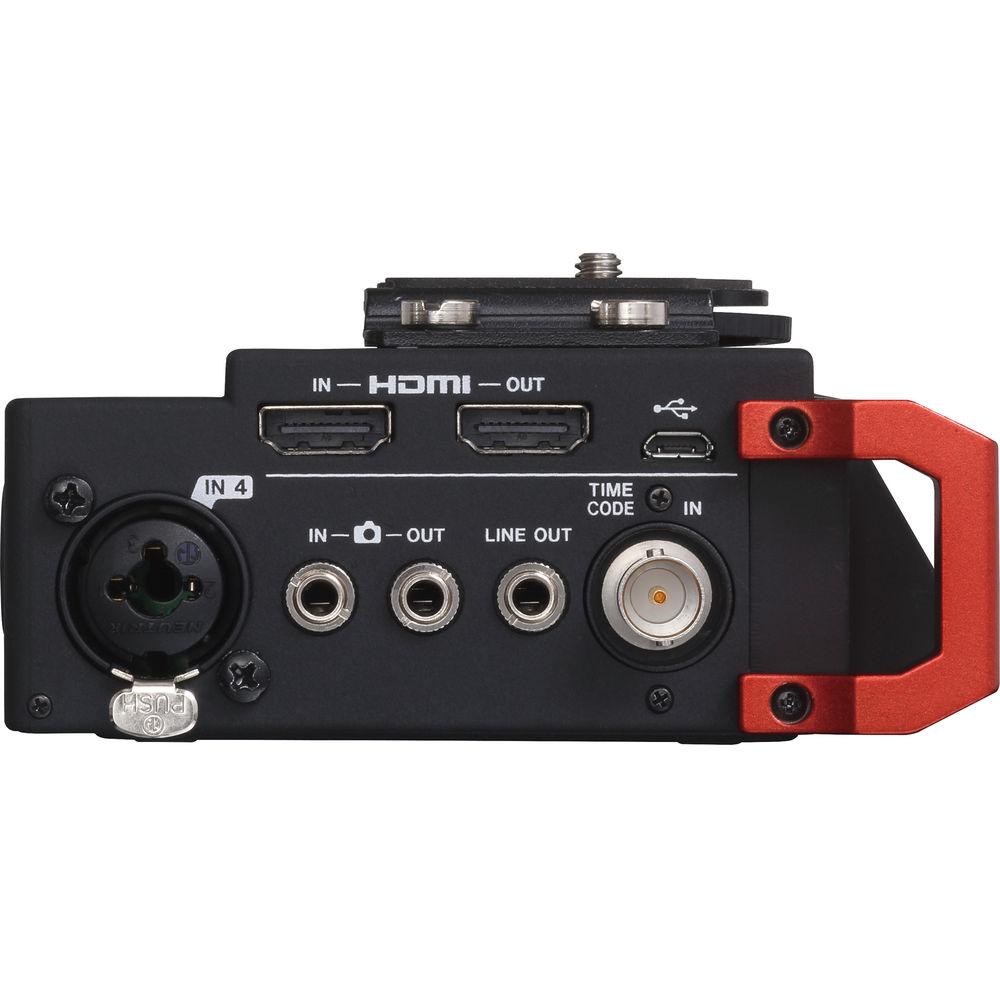
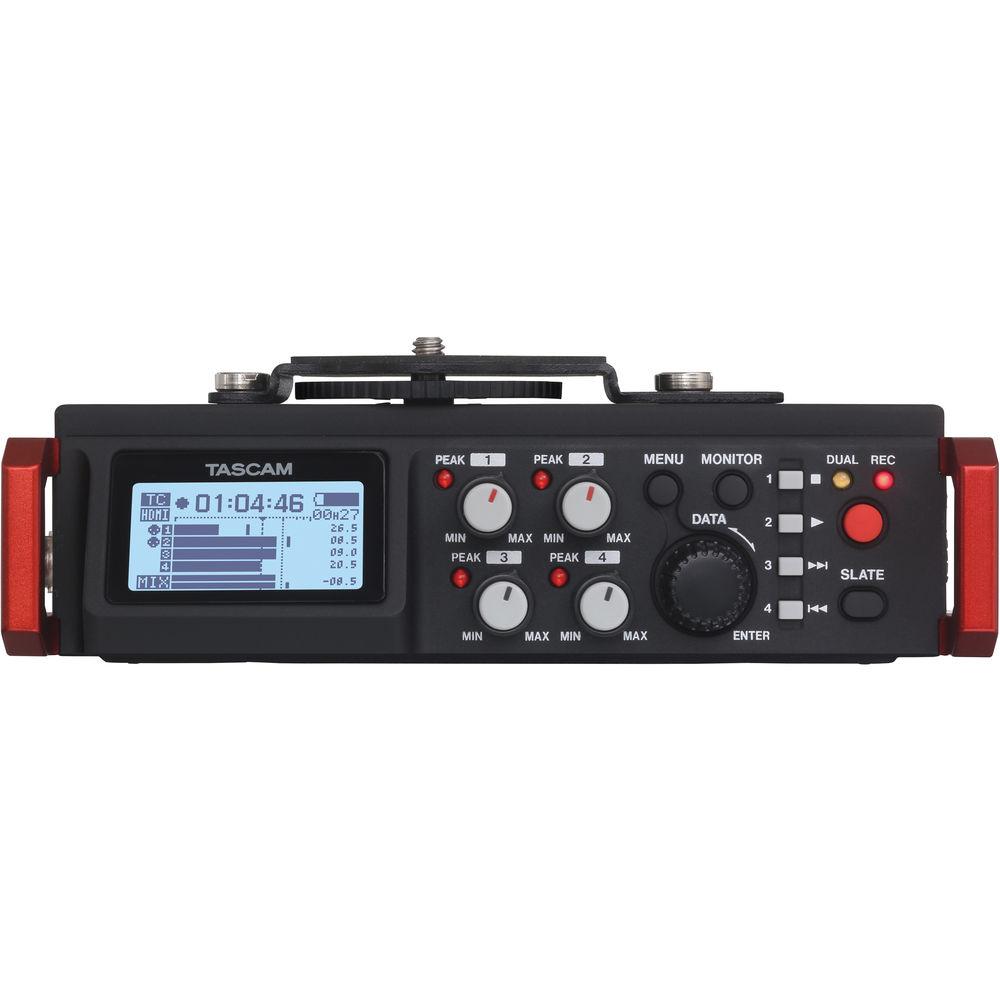
Designed specifically as an audio recording solution for DSLR video applications, the DR-701D 6-Track Field Recorder from Tascam features dual built-in omnidirectional microphones and four XLR/TRS inputs with phantom power and is capable of recording up to 6 tracks simultaneously. It supports a variety of mounting configurations, featuring a 1/4"-20 thread on the bottom for tripod mounting, as well as a removable camera or cage system attachment bracket with a 1/4"-20 screw.The DR-701D features an HDMI input that can be connected to your camera's HDMI output, allowing you to start and stop recording remotely via the camera's record button if your camera sends HDMI signal triggering. If your camera sends timecode via HDMI, the DR-701D will follow it and write it to the recorded file. Your NLE software will then read that embedded timecode to lock sound and picture together in post. Additionally, audio being recorded on the DR-701D can be added to the incoming video and timecode from the HDMI In port and sent from the DR-701D's HDMI Out to an HDMI monitor recorder. The recorder can also lock to SMPTE timecode coming into its BNC connector. The DR-701D features a rugged build quality yet weighs less than a pound and a half including the 4 AA batteries that power it. Battery life depends on usage, but with 4 lithium batteries, internal clock, and phantom power on two inputs, the unit is designed to record for over 5 hours at 16-bit/48kHz. The unit can also be powered using the optional PS-P515U AC adapter. Audio is recorded to SD, SDHC, or SDXC cards up to 128 GB and can be recorded at resolutions of up to 24-bit, 192kHz. In addition to the four XLR/TRS inputs, a 3.5mm stereo mini-jack input with optional plug-in power is provided for connecting an external stereo mic.The recorder also features a camera out mini-jack that allows you to record the output of the DR-701D to your camera to use as a sync reference, and a camera-in mini-jack allows you to playback the camera's audio and monitor from the 3.5mm line out or 3.5mm headphone out jacks. Note: For a full list of tested cameras and the most current firmware, please visit manufacturer's website. - 6 maximum simultaneous recording tracks
- SD/SDHC/SDXC cards used for recording media
- MONO, STEREO, 2MIX, DUAL MONO, DUAL ST and DUAL2MIX recording modes
- Recording formats: 16/24-bit, 44.1/48/96/192kHz (WAV/BWF) (192kHz only for two-track recording)
- Built-in original TASCAM HDDA mic preamps provide high audio quality
- Input levels can be adjusted separately for each track
- XLR/TRS inputs support +4dBu line level and 24/48V phantom power
- Clock and record start/stop can be synchronized with a camera using the HDMI port
- DR-701D audio signal can be output to an external camera or recorder from the HDMI OUT or line output
- Cascade function using HDMI connections allows multiple DR-701D transport and monitoring operations
- SMPTE Timecode can be input through the TC IN connector to add recording start times to files
- Timecode generator (RTC) allows recording start times to be added to files even when there is no timecode input
- Plug-in power mics and high output mics (EXT IN 1/2) supported
- CAMERA OUT connector can output audio mixed by the DR-701D to a DSLR camera
- CAMERA IN connector enables monitoring the sound from a DSLR camera through the DR-701D
- High quality audio output through a line output jack separate from the headphones jack
- Headphones jack with 50mW+50mW maximum output
- Tripod attachment threads (bottom), camera screw attachment that can be installed or removed with a coin (top) and shoe mount (top) included
- Handles on the left and right sides of the front protect the control surface and also enable attachment of a shoulder strap
- Transport and SLATE buttons made of rubber suppress noise during operation
- HOLD switch prevents inadvertent control adjustments
- 128×64-dot graphic LCD with backlight
- LED lights have high visibility even in direct sunlight
- High-speed transfer of files to computers possible using USB 2.0
- Micro-B type USB cable included
- Powered by 4 AA batteries, USB bus power or a PS-P515U AC adapter (sold separately)
- BP-6AA external battery pack (sold separately) enables operation for even longer times
- Optional RC-3F foot switch and RC-10 wireless remote control can be connected (both sold separately)
- Built-in mixer enables pan and level adjustments as well as solo monitoring and can output a mix of 4 channels
- GANG function allows the levels of multiple channels to be controlled simultaneously
- Individual channel trim settings shown
- 5-position low-cut filter (50/80/120/180/220 Hz) cuts unwanted low frequencies
- Multi-band limiter automatically adjusts input overloads (stereo-linking possible with 1/L and 2/R)
- Delay function can compensate for distances between mics (+/-150 ms)
- Mid-side decoder function enables use with mid-side stereo mics
- Slate tone insertion functions (AUTO/MANUAL)
- Slate tone insertion points can be selected (recording start or recording start and stop when slate AUTO function used)
- DR-701D Tested Camera List
- HDMI Clock Sync, Start/Stop Trigger & HDMI Timecode Supported Cameras:
- CANON EOS 5D Mark III
- Panasonic DMC-GH4
- SONY α7S
- SONY α7 II
HDMI Clock Sync & Start/Stop Trigger Supported Cameras (HDMI Timecode Not Supported): UPC: 043774031986 In the Box Tascam DR-701D 6-Track Field Recorder for DSLR with SMPTE Timecode USB Cable 6 x Camera Attachment Bracket Screw Hole Covers Limited 1-Year Warranty Announcing the TASCAM DR-701D Linear PCM Recorder for DSLR Filmmaking Daniel Bockrath 11/16/2015 User Manual PDF 2.1mb Table of Contents
|
Upload User Manual
Have you got an user manual for the Tascam DR-701D 6-Track Field Recorder for DSLR with SMPTE Timecode in electronic form? Please send it to us and help us expand our library of instruction manuals.
Thank you, too, on behalf of other users.
To upload the product manual, we first need to check and make sure you are not a robot. After that, your "Submit Link" or "Upload File" will appear.
Technical parametersTascam DR-701D Specs | | | Number of Tracks | 6 | | Max Sample Rate/Resolution | 192 kHz / 24-Bit | | Built-In Speaker | No | | Memory Card Support | SD (64 MB to 2 GB)
SDHC (4 to 32 GB)
SDXC (48 to 128 GB) | | | | Audio File Formats | BWF, WAV | | Sample Rates | 44.1 / 48 / 96 / 192 kHz | | Bit Depth | 16/24-Bit | | Timecode | Yes | | Recording Time | WAV 44.1 kHz/16-Bit:
1 Hr 32.4 Mins per GB (Stereo)
WAV 96 kHz/24-Bit:
28.75 Mins per GB (Stereo)
WAV 192 kHz/24-Bit:
14.25 Mins per GB (Stereo) | | | | Analog I/O | 1 x 2.5 mm TRS Remote Input
4 x Combo XLR / 1/4" TRS Input
1 x 1/8" / 3.5 mm TRS Input
1 x 1/8" / 3.5 mm TRS Camera Input
1 x 1/8" / 3.5 mm TRS Headphone Output
1 x 1/8" / 3.5 mm TRS Camera Output
1 x 1/8" / 3.5 mm TRS Line Output | | Digital I/O | 1 x HDMI Type-A Input
1 x HDMI Type-A Output
1 x BNC Timecode Input | | Phantom Power | +48 V | | Plug-In Power | Yes | | Host Connection | 1 x Micro-USB (USB 2.0) | | | | Frequency Response | Line Outputs, Mic/Line Inputs:
20 Hz to 20 kHz +0.5/-1 dB (at 48 kHz, JEITA)
20 Hz to 40 kHz +0.5/-1 dB (at 96 kHz, JEITA)
20 Hz to 80 kHz +0.5/-5 dB (at 192 kHz, JEITA) | | SNR | ≥100 dB | | THD | <0.007% | | EIN | ≤-124 dBu | | | | Power Options | Batteries, AC/DC Power Adapter | | Battery Type | 4 x AA | | Approximate Battery Life | WAV 48 kHz/16-Bit:
3.75 Hours (Alkaline, 2 Channels, Phantom Off)
2 Hours (Alkaline, 2 Channels, Phantom On)
4 Hours (NiMH, 2 Channels, Phantom Off)
2.5 Hours (NiMH, 2 Channels, Phantom On)
7.5 Hours (Lithium, 2 Channels, Phantom Off)
6.5 Hours (Lithium, 2 Channels, Phantom On) | | | | Operating Temperature | 32 to 104°F / 0 to 40°C | | Dimensions | 6.7 x 2.3 x 4.5" / 169.0 x 57.3 x 113.5 mm (with Adapter Attached) | | Weight | 23.1 oz / 654.0 g (with Batteries)
19.8 oz / 561.0 g (without Batteries) | | | | Package Weight | 2.0 lb | | Box Dimensions (LxWxH) | 9.9 x 7.2 x 4.2" |
Rating86% users recommend this product to others. And what about you?

This product has already been rated by 52 owners. Add your rating and experience with the product.
Discussion
 Ask our technicians if you have a problem with your settings,
or if anything is unclear in the user manual you have downloaded.
You can make use of our moderated discussion.
The discussion is public and helps other users of our website who may be encountering similar problems.
Ask our technicians if you have a problem with your settings,
or if anything is unclear in the user manual you have downloaded.
You can make use of our moderated discussion.
The discussion is public and helps other users of our website who may be encountering similar problems.
The discussion is empty - enter the first post
Post a new topic / query / comment:
|
|
|
| Request for user manual |
You can’t find the operation manual you are looking for? Let us know and we will try to add the missing manual:
I’m looking for a manual / Request for manual
Current requests for instruction manuals:
Call Of Duty World War Two For Xbox...
controller stratus XL...
stratus XL...
smart whatch serie S11 42mm...
Allen & Heath SQ-6 manual...
|
| Discussion |
Latest contributions to the discussion:
AEW R 4100
Name: MAURICIO ANGARITA
Audio-Technica AEW-R4100 UHF Diversity Receiver for
AEW R 4100 has the mute function blocked and does not allow audio to pass. I tried several times to turn off the mute from the transmitter but it does nothing, the mute stays on. Solution?
Thank you...
Instructions for assembling the 2015 Forecast Image Master Consoles GC3-A
Name: mike elam
Forecast Consoles GC3-A ImageMaster Editing Console
Looking for instructions for assembling this console. ...
EMPTY TONER ERROR MESSAGE AFTER REPLACING TONER
Name: LINDA BAD YELLOW EYES
Brother TN223BK Standard-Yield Toner
I HAD TO CHANGE OUT ALL THREE TONERS DUE TO LEAKS IN THE YELLOW AND CYAN. AFTER I REPLACED THEM, THE MACHINE KEEPS GIVING ME AN EMPTY TONER ERROR MESSAGE. HELP!!...
PS480D 20/24 pin Switching 480W Power Supply
Name: swkargo
Logisys 480W Power Supply
This item states in can run -5vdc .It is NOT listed on the board or I beleive is r4 is missing the resitior. Any body have thid issue. Shawn
...
Help needed
Name: Ann Carter
SanDisk 1TB Extreme Portable USB 3.1
When I click the link to download the user manual for my Sandisk Extreme external hard drive, it gives me the manual for the LG Cricket. Can you please change the link so I can download the Sandisk manual and begin using this drive? Thank you....
|
|


