|
User Manual for Tascam MiNiSTUDIO Creator US-42 Podcast Studio Click to enlarge the picture
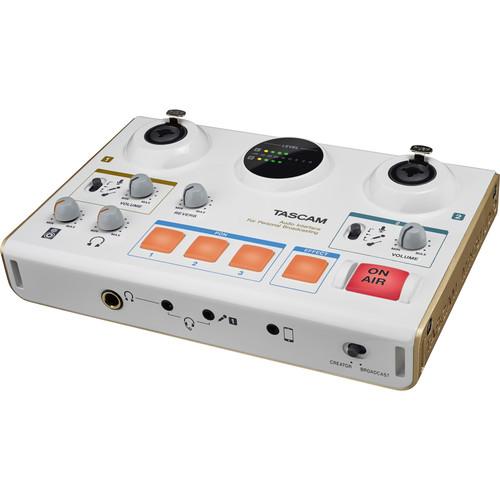 Contents of the user manual for the Tascam MiNiSTUDIO Creator US-42 Podcast Studio
- Product category: Audio Interfaces & Systems Tascam
- Brand: Tascam
- Description and content of package
- Technical information and basic settings
- Frequently asked questions – FAQ
- Troubleshooting (does not switch on, does not respond, error message, what do I do if...)
- Authorized service for Tascam Audio Interfaces & Systems
 |
User manual for the Tascam MiNiSTUDIO Creator US-42 Podcast Studio contain basic instructions
that need to be followed during installation and operation.
Before starting your appliance, the user manual should be read through carefully.
Follow all the safety instructions and warnings, and be guided by the given recommendations.
User manual is an integral part of any Tascam product,
and if it is sold or transferred, they should be handed over jointly with the product.
Following the instructions for use is an essential prerequisite for protecting
health and property during use, as well as recognition of liability on the part of the manufacturer
for possible defects should you make a warranty claim. Download an official Tascam user manual in which you will find instructions on how to install, use, maintain and service your product.
And do not forget – unsuitable use of a Tascam product will considerably shorten its lifespan!
|
Product description - Tascam MiniStudio US-42
- Review - Tascam MiNiStudio Creator Personal Broadcast Interface
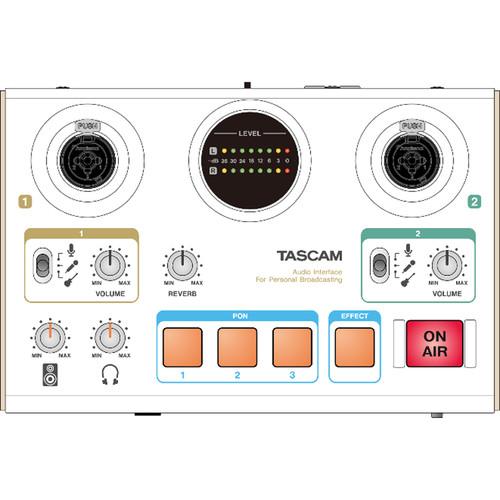
The Tascam MiNiSTUDIO Creator US-42 Podcast Studio is made for beginner and intermediate podcasters, streamers, and gamers looking to make their audio productions stand out on YouTube, FaceBook Live, Twitch, and elsewhere in the podcasting universe. This tabletop solution combines simple hardware with user-friendly software, putting all the essential tools for podcasting right at your fingertips in a versatile interface that plugs into your Mac or Windows computer via USB. What's more, with a flick of its Creator switch, the US-42 becomes a powerful audio interface—allowing you to record vocals and instruments to your computer with studio-quality results.The MiNiSTUDIO Creator US-42 is streamlined to have first-time users up and broadcasting a two-person podcast in minutes. It features inputs for plugging in just about any kind of microphone or instrument to record you and your guest with a clean, professional sound, and has two headphone jacks that let both the host and the guest clearly hear themselves.The US-42 allows you to create a polished and fully produced podcast on the fly, without having to focus on engineering. Easy-to-reach controls and effects pads let you adjust levels, add reverb, instantly transform your voice, and even trigger fun sound effects like applause, air horns, or music. With a pair of microphones, stands, cables, and headphones, you're ready to hit the On Air button and start the show. - Features
-
- Tabletop broadcast- and music-production studio for podcasting, streaming, and gaming
- Lightweight design convenient for mobile use
- USB 2.0 audio interface compatible with Mac, Windows, and iOS devices
- 2 combo XLR/TRS jacks support balanced input for microphones and instruments
- HDDA (High Definition Discrete Architecture) microphone preamps with individual level controls and +48V phantom power to accommodate dynamic and condenser microphones
- Preamps double as Hi-Z inputs for your electric guitar or bass
- TRRS and TRS connections for gaming headsets
- 3.5mm stereo aux input can be used to connect smartphones, tablets, and game devices
- Unit can be connected to record or stream on an iOS device using an Apple Lightning-USB camera adapter (available separately)
- Meter lets you visually monitor the level of the mic inputs
- Stereo 1/4" and 3.5mm jack headphone outputs with shared volume knob
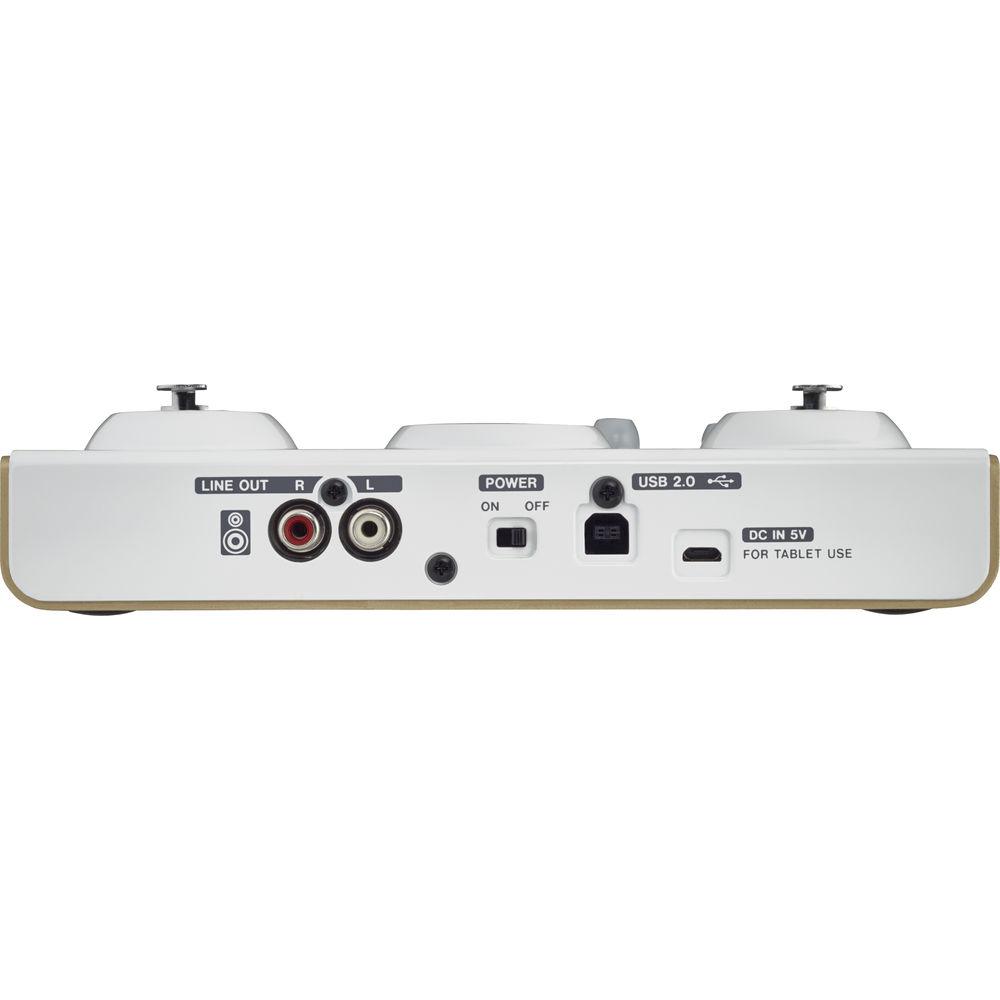
- Stereo RCA outputs with level knob for connecting unit to a PA system or powered speakers
- 3 PON sound-effect pads for triggering preselected audio sound bites, songs, or samples of your choice (bell, buzzer, and applause samples are included)
- Trigger pads are self-lighting and velocity-sensitive
- Effect on/off button creates pitch-change, walkie-talkie, echo, and chopper voice FX
- Digital reverb effect with a convenient front-panel control knob to add depth to your voice
- 4-band parametric EQ and adjustable compression to add presence to your voice
- Use On Air button to start or mute broadcast transmission
- Illuminated On Air button confirms that you're live on the air
- Input monitoring function allows you to hear input sounds before they are transmitted
- Creator/Broadcast switch: select Broadcast to turn on live streaming; or select Creator switch to activate the two-channel USB interface and record audio straight to your computer (music or video recording software is available separately)
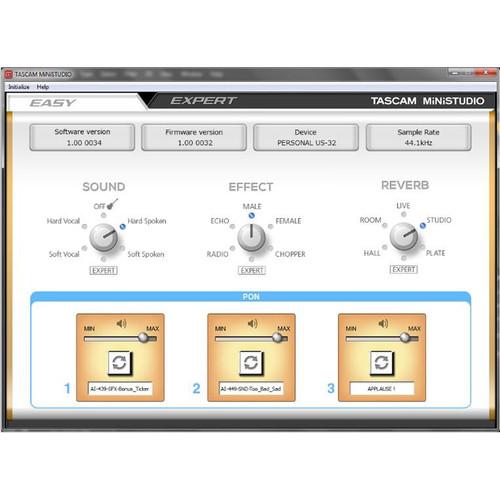
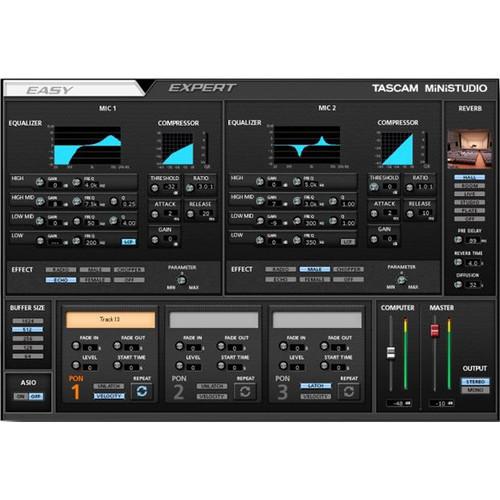
- Includes dedicated MiNiSTUDIO software with Easy and Expert tabs to provide complete control over the unit's parameters
- USB-powered operation is supported when connected to a computer
- When using with an iOS device, unit can be powered via a USB power adapter or the TASCAM BP-6AA external battery pack (both available separately)
- Support for high-resolution recording formats up to 96 kHz / 24-bit
- Works with all major streaming software/services (YouTube, Facebook Live, Twitch, Skype, and more)
- Compatible with major DAW software including Audacity, SONAR, Pro Tools, Cubase, Live, Studio One, and GarageBand
MiNiSTUDIO Configuration Software - Easy Mode for Quick Setup
-
- The Easy tab breaks down your options for manipulating audio into three categories: Sound (presets for your particular sonic setup); Effect (presets for manipulating your vocals upon pressing the effect on/off button); and Reverb (types of ambiance with which you can effect your vocal)
- Beneath these knobs, you may assign sounds to the trigger pads and set the volume of each pad sound
- Expert Mode for In-Depth Control
-
- The Expert tab gives you comprehensive controls for the US-42's compressor, equalizer, and reverb
- In this panel, you also have control over buffer size, as well as the ability to manipulate the trigger pad's settings; for example, you can set the rate of fade-in and fade-out for the sample being triggered
UPC: 043774032419 In the Box Tascam MiNiSTUDIO Creator US-42 Podcast Studio USB Cable Limited 1-Year Warranty User Manual PDF 2.1mb Table of Contents
|
Upload User Manual
Have you got an user manual for the Tascam MiNiSTUDIO Creator US-42 Podcast Studio in electronic form? Please send it to us and help us expand our library of instruction manuals.
Thank you, too, on behalf of other users.
To upload the product manual, we first need to check and make sure you are not a robot. After that, your "Submit Link" or "Upload File" will appear.
Technical parametersTascam US-42 Specs | | | Max Sample Rate/Resolution | 96 kHz / 24-Bit | | | | Host Connection | USB Type-B (USB 2.0) | | Analog I/O | 2 x Combo XLR / 1/4" TRS Input
1 x 1/8" (3.5 mm) TRS Input
1 x 1/8" (3.5 mm) TRS Aux Input
2 x RCA Output
1 x 1/4" (6.3 mm) TRS Headphone Output
1 x 1/8" (3.5 mm) TRS Headphone Output | | Digital I/O | None | | MIDI I/O | None | | | | Sample Rates | Up to 96 kHz | | Bit Depth | Up to 24-Bit | | | | OS Compatibility | iOS iOS compatible with Apple Lightning-USB camera adapter (available separately). | | | | Package Weight | 1.85 lb | | Box Dimensions (LxWxH) | 10.7 x 6.8 x 4.0" |
Rating90% users recommend this product to others. And what about you?

This product has already been rated by 94 owners. Add your rating and experience with the product.
Discussion
 Ask our technicians if you have a problem with your settings,
or if anything is unclear in the user manual you have downloaded.
You can make use of our moderated discussion.
The discussion is public and helps other users of our website who may be encountering similar problems.
Ask our technicians if you have a problem with your settings,
or if anything is unclear in the user manual you have downloaded.
You can make use of our moderated discussion.
The discussion is public and helps other users of our website who may be encountering similar problems.
The discussion is empty - enter the first post
Post a new topic / query / comment:
|
|
|
| Request for user manual |
You can’t find the operation manual you are looking for? Let us know and we will try to add the missing manual:
I’m looking for a manual / Request for manual
Current requests for instruction manuals:
Call Of Duty World War Two For Xbox...
controller stratus XL...
stratus XL...
smart whatch serie S11 42mm...
Allen & Heath SQ-6 manual...
|
| Discussion |
Latest contributions to the discussion:
AEW R 4100
Name: MAURICIO ANGARITA
Audio-Technica AEW-R4100 UHF Diversity Receiver for
AEW R 4100 has the mute function blocked and does not allow audio to pass. I tried several times to turn off the mute from the transmitter but it does nothing, the mute stays on. Solution?
Thank you...
Instructions for assembling the 2015 Forecast Image Master Consoles GC3-A
Name: mike elam
Forecast Consoles GC3-A ImageMaster Editing Console
Looking for instructions for assembling this console. ...
EMPTY TONER ERROR MESSAGE AFTER REPLACING TONER
Name: LINDA BAD YELLOW EYES
Brother TN223BK Standard-Yield Toner
I HAD TO CHANGE OUT ALL THREE TONERS DUE TO LEAKS IN THE YELLOW AND CYAN. AFTER I REPLACED THEM, THE MACHINE KEEPS GIVING ME AN EMPTY TONER ERROR MESSAGE. HELP!!...
PS480D 20/24 pin Switching 480W Power Supply
Name: swkargo
Logisys 480W Power Supply
This item states in can run -5vdc .It is NOT listed on the board or I beleive is r4 is missing the resitior. Any body have thid issue. Shawn
...
Help needed
Name: Ann Carter
SanDisk 1TB Extreme Portable USB 3.1
When I click the link to download the user manual for my Sandisk Extreme external hard drive, it gives me the manual for the LG Cricket. Can you please change the link so I can download the Sandisk manual and begin using this drive? Thank you....
|
|


