|
User Manual for Tektronix WFM5250 SDI HDMI Waveform Monitor Click to enlarge the picture
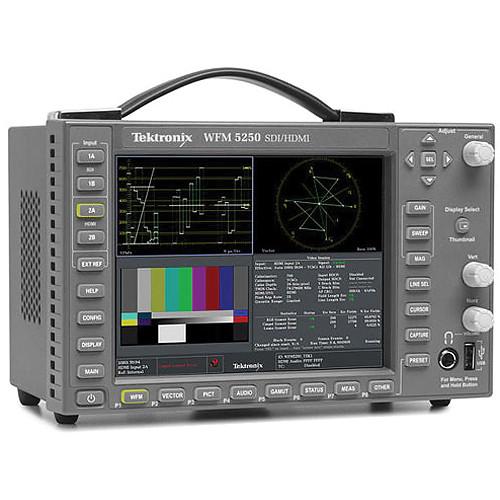 Contents of the user manual for the Tektronix WFM5250 SDI HDMI Waveform Monitor
- Product category: Waveform Monitors & Scopes Tektronix
- Brand: Tektronix
- Description and content of package
- Technical information and basic settings
- Frequently asked questions – FAQ
- Troubleshooting (does not switch on, does not respond, error message, what do I do if...)
- Authorized service for Tektronix Waveform Monitors & Scopes
|
User manual for the Tektronix WFM5250 SDI HDMI Waveform Monitor contain basic instructions
that need to be followed during installation and operation.
Before starting your appliance, the user manual should be read through carefully.
Follow all the safety instructions and warnings, and be guided by the given recommendations.
User manual is an integral part of any Tektronix product,
and if it is sold or transferred, they should be handed over jointly with the product.
Following the instructions for use is an essential prerequisite for protecting
health and property during use, as well as recognition of liability on the part of the manufacturer
for possible defects should you make a warranty claim. Download an official Tektronix user manual in which you will find instructions on how to install, use, maintain and service your product.
And do not forget – unsuitable use of a Tektronix product will considerably shorten its lifespan!
|
Product description The WFM5250 Waveform Monitor offers uncompromised monitoring quality with sharp CRT-like traces and SDI (SD/HD) and HDMI monitoring. Its other features include Gamut displays, picture thumbnail, display freeze, and an error log for 10,000 events for efficient content compliance verification. This portable video waveform monitor weighs less than 6.6 lb (3 kg) and provides a suitable solution for basic video monitoring needs in a convenient 3RU half-rack short depth form factor, suitable for space-constrained environments.The WFM5250 Compact Video Waveform Monitor features an integrated high-brightness, low-power consumption LED backlit display in a convenient 3RU, half-rack, short-depth form factor, suitable for space-constrained environments. This versatile instrument can accept power from a 12VDC source, a battery, or a 100 to 240VAC converter.Its SDI input provides multi-format support for HD-SDI (SMPTE 292), SD-SDI (ITU-R BT.601), and Dual Link (SMPTE 372) signal formats. The instrument provides automatic format detection for 3G/HD/SD-SDI on each input. The WFM5250 unit has HDMI inputs with HDCP support that can be connected to encrypted (HDCP) consumer devices for monitoring the video and audio signals.This instrument provides the reliability of the Tektronix waveform monitors family in a portable, basic monitoring product. - General
- Two Serial Digital Inputs (SDI) and two High Definition Multimedia Interface (HDMI) inputs with High-bandwidth Digital Content Protection (HDCP)Comes standard with auto-detection of 3G/HD/SD-SDI, Dual Link, and HDMI video formatsHDCP support on HDMI input and HDMI output for connectivity with consumer electronics products such as set top boxes and DVD/Blu-ray disk players 1
Please Note: 3G-SDI requires Option 3G (sold separately) close - Diamond and Arrowhead Displays for Color Gamut Compliance Monitoring
- Detect and decode ANC data including AFD, WSS, Video Index, TSID, V-Chip, Broadcast Flag/CGMS-A, VITC, LTC, and ANC TCARIB STD-B35/B37/B39, TR-B22, and TR-B23 supportHDMI / HDCP status with Extended Display Identification Data (EDID), which is information that helps users troubleshoot connectivity problems
- Variety of Monitoring Displays
- Timing and Lightning displays make facility and inter-channel timing easyWaveform display of external reference (Black Burst or Tri-Level Sync)Black Picture and Frozen Picture DetectionExtensive alarms, status reporting, and error logging for 10,000 events simplifies error correction tasksUser-definable Safe Area Graticules and AFD Graticule facilitate editing and format conversion tasks
- Display Versatility
- Flexible Quad Tile Display tailored to various applications needs to increase productivityTandemVu Display for efficient camera adjustments of luma and chromaFull Screen mode that maximizes display size for precise adjustments
- Superior Usability
- 3 RU height, half-rack width, short-depth (5.5” or 14cm) instrument suitable for space-constrained environments4-pin XLR DC power input with AC power adapter for both AC/DC operation32 instrument presets for quick recall of commonly used configurations tailored to colorists, editors, or operatorsFront-panel USB port enables easy transfer of presets, screenshots, and error logFront-panel headphone port for easy monitoring of audio channelsHigh-brightness display with crisp, high-resolution LED backlight, suitable for indoor and outdoor usageSNMP and Ethernet remote interface capabilities and GPI control facilitate centralized monitoring and controlDVI-I external display output for easy connection to digital or analog XGA display
- Automatic Detection of a Wide Range of Signal Formats
- WFM5250 Waveform Monitor accepts a wide variety of input signal formats and external referencesMonitor automatically detects the signal format and establishes the appropriate settings for various displays
- Ease of Use
- Intuitive user interface provides backlit buttons and online helpThirty-two user-configurable presets allow users to recall commonly used configurations tailored to your personal work practicesPresets can be transferred to and from other units (same model) using the front-panel USB portEthernet port allows for easy download of screenshots and the Error Log
- See and Solve with Tektronix Displays
- See and Solve displays simplify video monitoring tasks such as calibration, error detection, and content correction allowing the user to detect errors at a glance and troubleshoot them efficientlyTektronix displays offer sharp CRT-like trace quality for clear waveform monitoring with the look and feel of an analog displayThe familiar video waveform display can show SD/HD/3G-SDI signals in RGB, YPbPr, YRGB, or pseudo compositeSignal components can be displayed in either Parade or Overlay modeWith several sweep rates and easy control of vertical gain and horizontal magnification, you can efficiently monitor and measure video waveform parametersSpecialized displays provide summarized yet comprehensive reports of alarms, session, and status of contentPowerful displays such as Video Status show a condensed view of error statistics, signal format, presence of ancillary data, and more, which simplify monitoring tasks by providing important content information at a glanceBlack and Frozen frame detection can be used to alert the operator to a problem in the transmission chain; these and other errors can automatically be logged in the Error Log and provided as a report
- Alarms, Quality Statistics, and Logging; Thorough and Fast Content Verification
- The WFM5250 unit offers a variety of displays designed to show status at a glance, in addition to the status bar continually displayed at the bottom of the screenA comprehensive overview of the video content status is presented in the Video Session display for both SDI and HDMI interfacesOffering a time-based compilation of information, this screen is suitable for presenting evidence of compliance after content screeningInformation on input format and session time is presented along with statistics on Error Detection and Handling (EDH) / Cyclic Redundancy Check (CRC), gamut errors, and Black / Freeze frame detectionFor an HDMI source, the HDMI formats (Colorimetry, Color space, Color depth, TMDS clock, HDMI/DVI ID, Pixel repetition rate, Quantization range), as well as HDCP status also presentedAn EDID information display helps diagnose connectivity issues when they occurAlarm Status display provides continuous information on the state of each condition currently being monitored by the instrumentTo support unattended monitoring and QC applications, as well as provide documentation for service-level agreements, this instrument maintains an error log of 10,000 events, which facilitates the detection and correction of problemsLog entries are recorded with date, time of day, and time code (VITC, LTC, ANC)Error log can be downloaded to a USB memory stick or through a network connection to .txt or .htm formats for easy record keeping and processing on spreadsheets or database software
- Picture Display: Quick Visual Confirmation and Precision Content Adjustment
- For a qualitative view of the content, a full-color Picture display is offered, which can be displayed as a full-screen presentationThis display is compatible with all input formats and features automatic adjustment for aspect ratio and number of active linesYou can select bright-up conditions that show the location of RGB or composite gamut errors on the Picture displayLine Select mode shows the location of the line currently selected within the Picture display
- Efficiently Detect and Allow Correction of Gamut Problems
- Diamond, Split Diamond, and Arrowhead displays simplify the process of verifying gamut compliance and are suitable for colorists, editors, and operators to visualize whether the content is RGB or Composite Gamut compliant with a single glanceThey are designed to help isolate the Out-of-Gamut component just as easilyFor SDI component content that is destined for broadcast in composite systems, the Arrowhead display can be used to monitor Composite Gamut compliance without the need for a separate encoderWithin this display, a separate upper and lower luma-only gamut limit can be appliedEach of these displays offers user-selectable gamut thresholds so operators can set monitoring limits appropriate to their specific operation and include a preset for EBU-R103Also select bright-up conditions to see the location of gamut errors on the Picture displayGamut monitoring is fully integrated with the alarm logging and reporting capabilities of the WFM5250 unit
- Facility Timing Made Easy
- Timing display clearly shows the timing offsets between HD and SD signals relative to the referenceThis display makes facility timing easy through a simple graphical representation that shows the relative timing of the input signal and the reference signal (or a saved offset reference) on an X-Y axisSimply adjust the timing of the equipment until the circle is within the center of the display for precise, direct measurements of vertical offset in number of lines and horizontal offset in μsLightning display shows luma and chroma amplitudes and helps users verify component timing using a color-bar signalBowtie display complements the timing measurement capability of the Lightning displayUsing a special Bowtie test signal in component format, this display helps make precise, accurate measurements of inter-channel amplitude and timing 2
Please Note: Timing display not available for HDMI inputs close - Applications
- Content Acquisition with DSLR camerasQuality Control (QC) at DVD / Blu-ray master disk authoring in post productionCALM and Picture quality monitoring in distribution with STB outputColor Correction and ManipulationContent editing and special effectsContent Quality Control (QC) in production and post productionField production setup and troubleshooting
In the Box Tektronix WFM5250 SDI/HDMI Waveform Monitor Limited 1-Year Warranty Table of Contents
|
Upload User Manual
Have you got an user manual for the Tektronix WFM5250 SDI HDMI Waveform Monitor in electronic form? Please send it to us and help us expand our library of instruction manuals.
Thank you, too, on behalf of other users.
To upload the product manual, we first need to check and make sure you are not a robot. After that, your "Submit Link" or "Upload File" will appear.
Technical parametersTektronix WFM5250 Specs | | | Inputs | 2 inputs
Auto-detection between 3G, Dual Link, HD, and SD signals (Option 3G required for 3G formats) | | Range | Limited Range Support: 4:2:2 YCbCr, 4:4:4 YCbCr
Limited and Full Quantization Range Support: 4:4:4 RGB
For 640 x 480p, 59.94/60 Hz, 4:3 only RGB is supported. | | 3G | Single Link: 1920 x 1080, 2048 x 1080, 2 x HD 1920 x 1080, 2 x HD 1280 x 720 | | Supported Formats | Dual Link: 1920 x 1080, 2048 x 1080
HDMI: 640 x 480p, 59.94/60 Hz, 4:3
720 x 480p, 59.94/60 Hz, 4:3
720 x 576p, 50 Hz, 4:3
1280 x 720p, 59.94/60 Hz, 16:9
1280 x 720p, 50 Hz, 16:9
1920 x 1080i, 59.94/60 Hz, 16:9
1920 x 1080i, 50 Hz, 16:9
1920 x 1080p, 59.94/60 Hz, 16:9
1920 x 1080p, 50 Hz, 16:9
1920 x 1080p, 23.98/24 Hz, 16:9
1920 x 1080p, 25 Hz, 16:9
1920 x 1080p, 29.97/30 Hz, 16:9 | | Input Type | BNC, internally terminated 75 Ω | | Input Level | 800 mVpp, ±10% | | Input Equalization | 270 Mb/s: Up to 705' (215 m) of type 1694A cable
1.5 Gb/s: Up to 656' (200 m) of type 1694A cable
3 Gb/s: Up to 427' (130 m) of type 1694A cable | | Output | SDI Switched Output
Selectable, active input, or test signal | | Return Loss | Inputs and Outputs:
>15 dB from 1 MHz to 1.5 GHz, power On or Off
>10 dB from 1.5 to 3 GHz, power On or Off | | Monitor Output | Signal Format (DVI-I Output) - 1024 x 768, 60 Hz vertical rate Picture display will be disabled while monitoring the HDCP-encrypted video signal through an HDMI input. | | | | Sync Formats | NTSC and PAL and tri-level sync | | Input Type | Passive loop through BNC, 75 Ω compensated | | DC Input Impedance | 20 kΩ, nominal | | Return Loss | >40 dB to 6 MHz
>35 dB to 30 MHz | | Lock Range | ±50 ppm | | | | Inputs | 2 inputs
Auto format detection | | Output | HDMI switched output with HDCP | | Connector Type | Type A receptacle | | HDCP | HDMI output is encrypted while receiving the HDCP encrypted content on a selected input. The picture display and the thumb nail display on the DVI output will be disabled while receiving the HDCP encrypted content on a selected input. | | | | Vertical Measurement Accuracy | At 1x Gain: ±0.5% of 700 mV full scale
At 5x Gain: ±0.2% of 700 mV full scale | | Gain | 1x, 5x, variable range 0.25x to >7.5x | | Frequency Response | SD:
Luminance (Y) Channel: ±0.5% to 5.75 MHz
Color Difference Channels (Pb, Pr): ±0.5% to 2.75 MHz
HD:
Luminance (Y) Channel: ±0.5% to 30 MHz
Difference Channels (Pb, Pr): ±0.5% to 15 MHz | | | | Sweep Timing Accuracy | ±0.1% | | Sweep Linearity | ±0.1% | | | | Level Meter Resolution | 0.056 dB steps at 30 dB scale from full scale to -20 dBFS
0.20 dB steps at 70 dB scale for signals above -20 dBFS | | Meter Ballistics | True peak, PPM type 1, PPM type 2, BBC PPM, Loudness | | Defined / Programmable Level Detection | Mute, clip, user-programmable silence, over | | Level Meter Accuracy | -0.5 dB (for analog), -0.2 dB (for digital) from 20 Hz to 20 kHz,
0 to -40 dBFS sine wave, Peak Ballistic mode | | | | Input | 12 VDC | | Power Supply | Adapter accepts 100 to 240 VAC ±10%, 50/60 Hz | | | | Voltage Range | 12 to 15 VDC nominal
10.75 to 18 VDC minimum-maximum operating | | Supply Connection | XLR 4-pin male connector
Pin 1 = V(-)
Pin 4 = V(+)
Pin 2, 3: NC | | Power Consumption | 27 W typical
35 W maximum | | Surge | 10 A at 12 V | | Fuse Rating | 4 A, internal self-resetting fuse | | Voltage | Transient, Over, and Reverse Voltage: Reverse- and over-voltage protected to ±30 VDC The unit may power itself down in the presence of high transient voltages. This prevents damage to the unit and is not a fault. | | | | Dimensions (HxWxD) | 5.30 x 8.40 x 5.50" (13.46 x 21.34 x 13.97 cm) | | Weight | 3.3 lb (1.5 kg) |
Rating70% users recommend this product to others. And what about you?

This product has already been rated by 41 owners. Add your rating and experience with the product.
Discussion
 Ask our technicians if you have a problem with your settings,
or if anything is unclear in the user manual you have downloaded.
You can make use of our moderated discussion.
The discussion is public and helps other users of our website who may be encountering similar problems.
Ask our technicians if you have a problem with your settings,
or if anything is unclear in the user manual you have downloaded.
You can make use of our moderated discussion.
The discussion is public and helps other users of our website who may be encountering similar problems.
The discussion is empty - enter the first post
Post a new topic / query / comment:
|
|
|
| Request for user manual |
You can’t find the operation manual you are looking for? Let us know and we will try to add the missing manual:
I’m looking for a manual / Request for manual
Current requests for instruction manuals:
Call Of Duty World War Two For Xbox...
controller stratus XL...
stratus XL...
smart whatch serie S11 42mm...
Allen & Heath SQ-6 manual...
|
| Discussion |
Latest contributions to the discussion:
AEW R 4100
Name: MAURICIO ANGARITA
Audio-Technica AEW-R4100 UHF Diversity Receiver for
AEW R 4100 has the mute function blocked and does not allow audio to pass. I tried several times to turn off the mute from the transmitter but it does nothing, the mute stays on. Solution?
Thank you...
Instructions for assembling the 2015 Forecast Image Master Consoles GC3-A
Name: mike elam
Forecast Consoles GC3-A ImageMaster Editing Console
Looking for instructions for assembling this console. ...
EMPTY TONER ERROR MESSAGE AFTER REPLACING TONER
Name: LINDA BAD YELLOW EYES
Brother TN223BK Standard-Yield Toner
I HAD TO CHANGE OUT ALL THREE TONERS DUE TO LEAKS IN THE YELLOW AND CYAN. AFTER I REPLACED THEM, THE MACHINE KEEPS GIVING ME AN EMPTY TONER ERROR MESSAGE. HELP!!...
PS480D 20/24 pin Switching 480W Power Supply
Name: swkargo
Logisys 480W Power Supply
This item states in can run -5vdc .It is NOT listed on the board or I beleive is r4 is missing the resitior. Any body have thid issue. Shawn
...
Help needed
Name: Ann Carter
SanDisk 1TB Extreme Portable USB 3.1
When I click the link to download the user manual for my Sandisk Extreme external hard drive, it gives me the manual for the LG Cricket. Can you please change the link so I can download the Sandisk manual and begin using this drive? Thank you....
|
|


