User Manual for Teracue ENC-300-DVI H.264 MPEG-4 AVC HD SD Encoder Blade Click to enlarge the picture
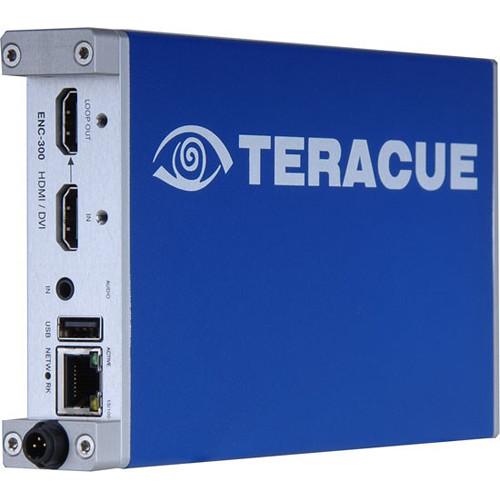 Contents of the user manual for the Teracue ENC-300-DVI H.264 MPEG-4 AVC HD
- Product category: Signal Converters Teracue
- Brand: Teracue
- Description and content of package
- Technical information and basic settings
- Frequently asked questions – FAQ
- Troubleshooting (does not switch on, does not respond, error message, what do I do if...)
- Authorized service for Teracue Signal Converters
|
User manual for the Teracue ENC-300-DVI H.264 MPEG-4 AVC HD contain basic instructions
that need to be followed during installation and operation.
Before starting your appliance, the user manual should be read through carefully.
Follow all the safety instructions and warnings, and be guided by the given recommendations.
User manual is an integral part of any Teracue product,
and if it is sold or transferred, they should be handed over jointly with the product.
Following the instructions for use is an essential prerequisite for protecting
health and property during use, as well as recognition of liability on the part of the manufacturer
for possible defects should you make a warranty claim. Download an official Teracue user manual in which you will find instructions on how to install, use, maintain and service your product.
And do not forget – unsuitable use of a Teracue product will considerably shorten its lifespan!
|
Product description The ENC-300-DVI H.264 MPEG-4 AVC HD/SD Encoder Blade from Teracue is designed for IPTV and live streaming. It is suitable where single computer based DVI signals are distributed or published on a network or the Internet. The encoder mainly targets medical, military, control room, and training applications where high resolution DVI signals from medical instruments, cameras, radar devices, digital signage players, or any kind of PC monitor output needs to be shared, published, distributed, and recorded.
The encoder incorporates low latency signal compression, creating full resolution video streams in HD, SD, and various computer resolutions. To access the intuitive graphical user interface, use your standard web browser from any PC on the network, no additional tools are required. The remote network configuration is also supported over SNMP, by Telnet, and by control over the local COM port. Furthermore, the ENC-300-DVI supports Talkback that allows audio conferencing and communication between encoder standpoint and viewer. Talkback to ENC encoders is supported by PCs. - General
-
- Real-time encoding of DVI signals
- Embedded audio or analog audio
- Forward error correction Pro-MPEG FEC
- KLV metadata insertion (STANAG 4609)
- Supports DVI loop through
- DVI resolutions up to 1920x1200 60 Hz
- Logo inserter
- Audio talkback conferencing
- Adjustable frame rate (e.g. 5 fps)
- Downscaling to 720p, SD and CIF supported
- Low-latency compression technology
- UDP & TCP (error correction) streaming
- RTMP & RTP/RTSP streaming
- Low power consumption
- Extended temperature range
In the Box Teracue ENC-300-DVI H.264 MPEG-4 AVC HD/SD Encoder Blade Limited 1-Year Warranty Table of Contents
|
Upload User Manual
Have you got an user manual for the Teracue ENC-300-DVI H.264 MPEG-4 AVC HD SD Encoder Blade in electronic form? Please send it to us and help us expand our library of instruction manuals.
Thank you, too, on behalf of other users.
To upload the product manual, we first need to check and make sure you are not a robot. After that, your "Submit Link" or "Upload File" will appear.
Technical parametersTeracue ENC-300 Specs | Video Input / Output | 1 x HDMI Type-A Input
1 x HDMI Type-A Loop Output | | Supported Video Signals | RGB 4:4:4, YCbCr 4:4:4, YCbCr 4:2:2 | | Video Encoding | H.264 (MPEG-4 AVC Part 10; ISO/IEC 14496-10)
Profiles: Baseline, main, high
Bit Rates: 250 Kb/s to 14 Mb/s, CBR/VBR, low latency support | | Maximum DVI Resolution | 1920 x 1200 (with 2:1 frame converter), 1600 x 1200 (with 2:1 frame converter), 1280 x 1024, 1024 x 768, 800 x 600 | | Video Resolutions | 1920 x 1080p 30/29.97/25 Hz, 1920 x 1080p 60/59.94/50 Hz (with 2:1 frame converter), 1920 x 1080i 60/59.94/50 Hz, 1280 x 720p 60/59.94/50/30/29.97/25 Hz, 720 x 480/576i 60/59.94/50 Hz | | Audio Inputs | 1 x Stereo, unbalanced, AC-coupled, mini-jack 3.5 mm
Audio Nominal Level: -10 dBV (0.316 Vrms)
Maximum Level: 2 V P-P
Microphone Nominal Level: -60 dBV (1m Vrms), gain control for microphone | | Audio Encoding | MPEG-4 AAC LC (ISO/IEC 14496-3), 48 kHz, 16-bit sample rate, 16 to 576 kbit data rate | | Audio Outputs | 1 x Stereo, unbalanced, AC-coupled
Output gain adjustment from (off) -78 dB to 9 dB
TALKBACK: 16-bit stereo, PCM
Sample Rate 48 kHz, 20.05 kHz | | Multiplex Operation | ISO/IEC 13818-1 Transport
ISO/IEC 14496-10 NAL (Network Abstraction Layer)
Stream types: Transport stream and elementary audio/video stream | | Scaling | Downscaling from 720p and 1080i to 720, D1 or CIF, adjustable frame rate divider | | Additional Features | Logo inserted for SD and HD, Presets can be saved, download and upload option | | Network | 10/100TX Ethernet, RJ45, half/full duplex, auto-sensing, or manual control | | IP | HTTP, TCP/IP control protocol, UDP/RTP/TCP streaming, IGMP, SAP, unicast/multicast, SNMPv2, DHCP | | Management | Web browser, SNMP, Telnet and RS-232, software updates via web browser
Fault measurement with log generation, authorization via user password, RTC (Real Time Clock) support | | Agency Approvals | CE, RoHS, EN 55103-1, EN 55103-2, EN 55022 | | Humidity | Up to 90%, non-condensing | | Temperature | -31 to 122°F (-35 to 50°C) and 140°F (60°C) up to 5 hours environment temperature | | Power | 5 VDC ± 5% / 8 W per blade | | Dimensions | 0.8 x 5.1 x 7.5" (20 x 130 x 190 mm) | | Weight | 5.6 oz (160 g) |
Rating60% users recommend this product to others. And what about you?

This product has already been rated by 69 owners. Add your rating and experience with the product.
Discussion
 Ask our technicians if you have a problem with your settings,
or if anything is unclear in the user manual you have downloaded.
You can make use of our moderated discussion.
The discussion is public and helps other users of our website who may be encountering similar problems.
Ask our technicians if you have a problem with your settings,
or if anything is unclear in the user manual you have downloaded.
You can make use of our moderated discussion.
The discussion is public and helps other users of our website who may be encountering similar problems.
The discussion is empty - enter the first post
Post a new topic / query / comment:
|
|


