User Manual for Tether Tools Case Air Wireless Tethering Power Bundle Click to enlarge the picture
 Contents of the user manual for the Tether Tools Case Air Wireless Tethering
- Product category: Shutter Releases Tether Tools
- Brand: Tether Tools
- Description and content of package
- Technical information and basic settings
- Frequently asked questions – FAQ
- Troubleshooting (does not switch on, does not respond, error message, what do I do if...)
- Authorized service for Tether Tools Shutter Releases
|
User manual for the Tether Tools Case Air Wireless Tethering contain basic instructions
that need to be followed during installation and operation.
Before starting your appliance, the user manual should be read through carefully.
Follow all the safety instructions and warnings, and be guided by the given recommendations.
User manual is an integral part of any Tether Tools product,
and if it is sold or transferred, they should be handed over jointly with the product.
Following the instructions for use is an essential prerequisite for protecting
health and property during use, as well as recognition of liability on the part of the manufacturer
for possible defects should you make a warranty claim. Download an official Tether Tools user manual in which you will find instructions on how to install, use, maintain and service your product.
And do not forget – unsuitable use of a Tether Tools product will considerably shorten its lifespan!
|
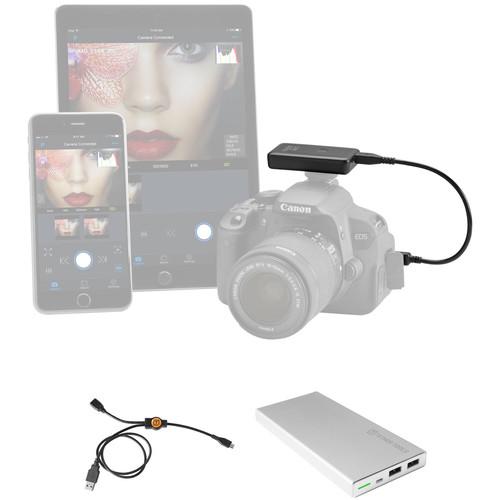
Product description Embrace Wireless Tethering with the Tether Tools Case Air System Read More A wireless system along with sufficient power to keep you shooting, the Tether Tools Case Air Wireless Tethering Power Bundle from pairs the Case Air Wireless Tethering System with the Rock Solid External Battery Pack and the Case Air Power Split Y-Cable for a seamless means to simultaneously power and charge the Case Air. - Tether Tools Case Air Wireless Tethering System A seamless means for wirelessly controlling your camera from a mobile device or computer, the Case Air Wireless Tethering System from Tether Tools is a compact device affording remote control and monitoring capabilities. The Case Air attaches to your camera via USB connection, and can be mounted via its hot shoe, and then produces an 802.11b/g/n ad-hoc Wi-Fi network for connecting to the camera via the Case Remote app for iOS or Android. A wireless range of approximately 150' is well-suited to a variety of on-location shooting applications, and within the app you are afforded a live view image along with tap-to-focus control, and pinch-to-zoom within the live view image for more critical focusing. Within the app you can also adjust exposure settings, including aperture, shutter speed, and ISO, as well as access creative shooting controls, such as exposure bracketing, bulb timer, focus stacking, HDR, and time-lapse shooting modes. The Case Air also lets you wirelessly share imagery from your camera to your mobile device for instant sharing on social media.
- Camera Compatibility
- Canon:
- Canon EOS Rebel T3/1100D, T5/1200D, SL1/100D, T1i/X3/500D, T2i/550D, T3i/600D, T4i/650D, T5i/700D, T6s/750D, 50D, 60D, 70D, 80D, 5D Mark II, 5D Mark III, 5D Mark IV, 5DS/5DS R, 6D, 7D, 7D Mark II, 1D X, 1D X Mark II, and 1D Mark IV
Nikon:
- D3200, D3300, D3400, D5200, D5300, D5500, D5600, D7000, D7100, D7200, D300/D300S, D610, D800/D800E, D810/D810A, D850, D750, D500, D90, D3/D3S, D4/D4S, and D5
- D3100, D5000, D5100, D600, D700 are compatible, but live view may not be supported
- Features
-
- Wireless tethering system connects camera to smartphone, tablet, or computer
- Connects via an ad-hoc or wireless network to provide a wireless range of approximately 150'; no internet connection required
- Dedicated Case Remote app available for both iOS and Android devices
- Remote live view mode and tap-to-focus control
- Pinch-to-zoom during live view for critical focusing
- Aperture, shutter speed, and ISO exposure adjustments are possible
- Support for exposure bracketing, bulb timer, focusing stacking, HDR, and advanced time-lapse shooting
- Supports video recording with the ability to control recording settings and remotely monitor
- Case Remote app supports direct image sharing to social media sites
- Case Air can be mounted to the camera via its hot shoe, secured with a lanyard, and then connected to the camera via USB
- Approximate battery life is 6-9 hours, and an optional USB-connected battery pack can be used for additional power
UPC: 818307013766 - Tether Tools USB Type-A Male to USB Micro-B Male & USB Micro-B Female Case Air Power Split Y-Cable Recharge and power the Case Air (sold separately) simultaneously with the Tether Tools USB Type-A Male to USB Micro-B Male & USB Micro-B Female Case Air Power Split Y-Cable. The USB Type-A male connector can connect to a standard external USB power bank or a USB wall power adapter. Plug your Case Air cable (sold separately) into your camera and into the USB Micro-B female port of the Y-cable. Then, you can plug the USB Micro-B connector of the Y-cable into the Case Air unit.
Features - Keep your Case Air charged on long photo shoots
- Recharge the Case Air via power bank or wall charger
- Shoot longer videos with the Case Air
- Shoot extended time-lapse shots with the Case Air
UPC: 818307013865 - Tether Tools Rock Solid 10,000mAh External Battery Pack Power your portables with the Rock Solid 10,000mAh External Battery Pack from Tether Tools. This external battery pack provides you with 10,000mAh of charging capacity for your phone, tablet, or any USB-compatible device. It has dual output ports so you can charge up to two devices at once. One of the ports has a 5V, 2.1A power output for fast charging, while the other has a standard 5V, 1A output. With an internal microchip controlling the voltage, the Rock Solid battery pack ensures that your devices will get the power they need without damaging them. When it runs out of battery, recharge it the same way you charge any phone or tablet, via a desktop, laptop, or wall charger. UPC: 818307013001
In the Box - Case Air Wireless Tethering System tvrvqdzbeurzc
- Case Air Camera Connector Cable (USB 2.0 Mini-B 5-Pin)
- Case Air Camera Connector Cable (USB 2.0 Micro-B 5-Pin)
- Case Air Camera Connector Cable (USB 2.0 Mini-B 8-Pin)
- Case Air Camera Connector Cable (USB 3.0 Micro-B)
- Case Air USB Connector Cable (OTG)
- Case Air Charging Cable
- Lanyard with Threading Tool
- Limited 90-Day Warranty
- USB Type-A Male to USB Micro-B Male & USB Micro-B Female Case Air Power Split Y-Cable
- Rock Solid 10,000mAh External Battery Pack
Time-Lapse Tips and Tools Shawn C. Steiner 07/24/2018 Table of Contents
|
Upload User Manual
Have you got an user manual for the Tether Tools Case Air Wireless Tethering Power Bundle in electronic form? Please send it to us and help us expand our library of instruction manuals.
Thank you, too, on behalf of other users.
To upload the product manual, we first need to check and make sure you are not a robot. After that, your "Submit Link" or "Upload File" will appear.
Technical parameters - Tether Tools Case Air Wireless Tethering System
| Wireless Range | 150' / 45 m | | CPU | 400 MHz MIPS | | RAM | 64 MB DDR2 | | Wi-Fi | 802.11b/g/n | | Battery Life | Approx. 6 hours | | Dimensions | 2.6 x 1.6 x 0.6" / 67.25 x 40.1 x 14 mm | | Weight | 1.8 oz / 50 g | | | | Box Dimensions (LxWxH) | 6.1 x 4.4 x 1.5" | - Tether Tools USB Type-A Male to USB Micro-B Male & USB Micro-B Female Case Air Power Split Y-Cable
| Connectors | 1 x USB Type-A (male)
1 x USB Micro-B (male)
1 x USB Micro-B (female) | | Power | Compatible with 1 A and 2.1 A power sources | | Cable Length | 22" / 55.88 cm | | Weight | Not specified by manufacturer | | | | Box Dimensions (LxWxH) | 5.4 x 2.8 x 0.8" | - Tether Tools Rock Solid 10,000mAh External Battery Pack
| | | Input Charging Port | Micro-USB | | Output Ports | 2 x USB Type-A | | | | Battery Chemistry | Lithium-Ion Polymer (LiPo) | | Capacity (mAh) | 10,000 mAh | | Charging Time | 5 to 6 Hours | | | | Port Output Power | 5 V, 1 A
5 V, 2.1 A | | | | Dimensions (W x H x D) | 0.5 x 2.8 x 5.5" / 12.5 x 70.0 x 139.0 mm | | Weight | 9.7 oz / 275.0 g | | | | Box Dimensions (LxWxH) | 7.4 x 4.5 x 0.9" |
Rating60% users recommend this product to others. And what about you?

This product has already been rated by 22 owners. Add your rating and experience with the product.
Discussion
 Ask our technicians if you have a problem with your settings,
or if anything is unclear in the user manual you have downloaded.
You can make use of our moderated discussion.
The discussion is public and helps other users of our website who may be encountering similar problems.
Ask our technicians if you have a problem with your settings,
or if anything is unclear in the user manual you have downloaded.
You can make use of our moderated discussion.
The discussion is public and helps other users of our website who may be encountering similar problems.
The discussion is empty - enter the first post
Post a new topic / query / comment:
|
|


