|
User Manual for Tether Tools Peter Hurley Professional Camera Tethering Kit Click to enlarge the picture
 Contents of the user manual for the Tether Tools Peter Hurley Professional Camera
- Product category: Notebook Stands & Mounts Tether Tools
- Brand: Tether Tools
- Description and content of package
- Technical information and basic settings
- Frequently asked questions – FAQ
- Troubleshooting (does not switch on, does not respond, error message, what do I do if...)
- Authorized service for Tether Tools Notebook Stands & Mounts
|
User manual for the Tether Tools Peter Hurley Professional Camera contain basic instructions
that need to be followed during installation and operation.
Before starting your appliance, the user manual should be read through carefully.
Follow all the safety instructions and warnings, and be guided by the given recommendations.
User manual is an integral part of any Tether Tools product,
and if it is sold or transferred, they should be handed over jointly with the product.
Following the instructions for use is an essential prerequisite for protecting
health and property during use, as well as recognition of liability on the part of the manufacturer
for possible defects should you make a warranty claim. Download an official Tether Tools user manual in which you will find instructions on how to install, use, maintain and service your product.
And do not forget – unsuitable use of a Tether Tools product will considerably shorten its lifespan!
|
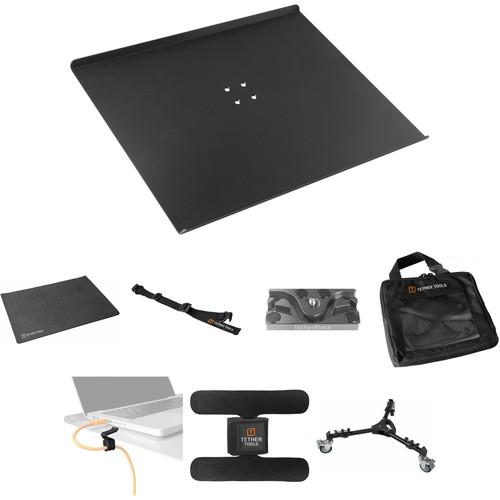
Product description This Professional Camera Tethering Kit from features a collection of Tether Tools products recommended by professional photographer, Peter Hurley. Peter Hurley is an avid user of tethering products during his shoots. By shooting tethered, you get your photos up on a hi-resolution display immediately, which allows you to tweak camera settings, lighting and more.
In a single kit, you get the essentials of a professional quality tethering setup. The Aero Traveler mounts to a tripod to give you a platform to place a laptop nearby. Other items include straps and locks to secure your laptop and cabling; a pad to protect your Aero Traveler; a case for your cables; a rolling tripod platform; and a strap to attach an additional accessory to your tripod. - Tether Tools Tether Table Aero Traveler (Non-Reflective Black Finish) The Tether Table Aero Traveler from Tether Tools is a portable tethering platform engineered by professional photographers and aerospace engineers. Made completely of T6 aerospace aluminum, this non-reflective black textured platform is sleek in design as well as stable and durable. The Aero Traveler is perfect for small netbooks and ultraportable notebooks, thanks to its a surface area of 16 x 14" (40 x 35cm).Located on this tripod platform is the LAJO-4 ProBracket. This bracket makes it easy to mount to any 1/4"-20 tripod head, 3/8" tripod mount, 5/8" stud studio stand or an Arca style mounting attachment. Mounting to any of these stands and supports is quick, seamless and painless. This tripod platform also comes with a custom, high quality storage case to protect the table when not in use as well as a lifetime limited warranty in the rare case that it gets damaged.
- Excellent Build
- Constructed from T6 aerospace aluminum, the Aero Traveler has a sleek design with a non-reflective black finish and a 16 x 14" (40 x 35cm) surface area. Optimally balanced to provide a stable surface, this laptop tripod platform has a maximum load capacity of 30 lb (13.5 kg), which enable it to be extremely durable
- LAJO-4 ProBracket
- Outfitted on this laptop tripod platform is the LAJO-4 ProBracket. This state of the art design allows optimal efficiency for integrated mounting to any 1/4"-20 tripod head, 3/8" tripod mount, 5/8" stud studio stand or an Arca style mounting attachment. Mounting takes just a few seconds and does not need any additional adapters
- Ideal for Compact Netbooks & Notebooks
- The compact design of the Aero Traveler makes it ideal for small netbook and notebook computers
UPC: 858977002073 - Tether Tools Aero ProPad (Fits Aero Traveler) Protect your Aero Table and gear with the Aero ProPad from TetherTools. This cushioned non-slip pad sits on your Aero Traveler, providing a non-slip, anti-scratch surface for electronics and more. Made from memory foam, the Aero ProPad springs back to its original form and thickness after compression. Its heat-dispersing air channels help to conduct heat away from laptops and other hot-running electronic devices. UPC: 818307012820
- Tether Tools SecureStrap for Aero System The SecureStrap for Aero System from Tether Tools is a simple, easy way to secure your laptop to your Tether Table Aeros. This strap fastens around your laptop and your Tether Table Aeros and buckles on two sides. It is made of a non-slip industrial strength stretch fabric. No permanent installation is required, so you can use it or leave it in your bag.
- Made of a non-slip industrial strength stretch fabric
- Fits Tether Table Aeros (and no other Tether Table types) and all laptop sizes
UPC: 858977002134 - TetherBLOCK MC Multi Cable Mounting Plate The MC Multi Cable Mounting Plate from TetherBLOCK is designed to prevent accidental removal of a cable from your camera's data ports, therefore preventing damage to the port and to your camera. By snaking a USB or FireWire, or HDMI cable through the TetherBLOCK's S-channel and attaching the TetherBLOCK to your camera's tripod mount you'll be able to shoot tethered to a computer without fear that a trip over the cable will damage the camera's sensitive data ports.
This second version of the mounting plate replaces the TetherBLOCK Slim, and adds a third channel for thick heavy duty cables as well as thin and medium sized cables. It has both a 1/4"-20 and a 3/8" tripod thread mount, allowing it to be mounted directly onto a tripod head. A 1/4"-20 slotted screw attaches the plate to the camera, and can be tightened with a coin. On the bottom of the plate are two 1/4"-20 threaded holes for adding accessories like microphones or video monitors. - Prevents camera damage and lost images by ensuring data cables do not get accidentally pulled out of camera.
- Fits camera's tripod mount via either a 1/4"-20 or 3/8" thread mount.
- Multiple channels accept FireWire, USB and HDMI cables.
- Non-slip friction pads prevent camera twist.
UPC: 862612000003 - Tether Tools Cable Organization Case (Standard) The Cable Organization Case (Standard) from Tether Tools is an easily accessible, durable storage case for all of your tethering cables, straps and cable retention devices. The standard case design is ideal to store cables and additional accessories. If you are transporting or storing cables less than 20' / 6m this case is ideal. Features include a clear front window that enables quick and easy access to exactly what you need. Keeping all of your tethering gear together, the TetherPro Cable Case fits nicely inside your Tether Table storage bag.
- Standard size cable bag ideal for tethering cables less than 20' / 6m
- Clear front window for quick and easy access to exactly what you need
- Stay organized and keep your tethering gear together
- Fits inside the Tether Table storage bag
UPC: 858977002165 - Tether Tools JerkStopper Computer Support (Clip-On for the Aero) The JerkStopper Computer Support (Clip-On for the Aero), exclusively from Tether Tools, allows you to create a complete tethered setup when used with a Tether Tools Camera Support (sold separately) to secure the cables of both your computer and camera. This JerkStopper Computer Support will remove all the stress and strain placed on the cable or cord to ensure that it stays plugged in and prevents cable or equipment damage. This particular computer support model uses a clip-on for the Aero as an anchor point by allowing slack in the cord in order to prevent damage or dislodging. This kit can be used with any standard A/C power adapter cord, flash sync cord, HDMI, USB or FireWire cable. It supports cable diameters from 3.5mm to 8.5mm. This JerkStopper Computer Support is a versatile and inexpensive tool that could potentially save you hundreds if not thousands of dollars in preventative damage. Offered at an affordable price, you will find this JerkStopper Computer Support an invaluable resource on all your tethered photo shoots.
- JerkStopper Computer Support (Clip-On for the Aero)
- One of five different JerkStopper Computer Support models is included in this kit. This kit comes with a clip-on for the Aero. Using a clip-on for the Aero as an anchor point, the cables are provided slack and are protected against accidental dislodging
UPC: 858977002813 - Tether Tools StrapMoore The StrapMoore from Tether Tools can be attached to the leg of a tripod, light stand, pole, beam, or other object to give you quick and easy access to items you'll need during photo shoots. These could include a laptop power brick, charger, phone, off-camera flash, eyeglass case, external hard drive, water bottle or anything else you need to have on hand.
The StrapMoore has adjustable two-leg securing straps and another strap that holds the object. The interior of the leg and object straps are lined with heavy-duty GripperElastic to protect your gear and prevent slippage. And when you're not using it, simply leave it on the support, on the object or remove it entirely for storage. - Application
- The StrapMoore secures to the leg of any tripod, light stand, pole, beam, table, chair and more to secure just about anything you need near your camera or computer weighing two pounds or less
- Two-Leg Securing Straps
- The two-leg securing straps are adjustable and can be attached to any pole or beam as small as 1/4-inch and as large as 3-inches in diameter
- Adjustable Object Strap
- The strap that holds the object is adjustable as well and accommodates any item as small as 1/4-inch and as large as 3.5-inches in diameter
- Non-Slip Lining
- Heavy-duty GripperElastic lines the interiors of both the leg and object straps to ensure your gear is well secured and won't slide. This allows you to easily keep small items within reach for when you need them during photo shoots
UPC: 858977002899 - Tether Tools Rock Solid Tripod Roller Allowing you to add mobility to nearly any tripod, the Rock Solid Tripod Roller from Tether Tools is a universal tripod dolly for quickly and easily moving a tripod-mount camera or workstation around the room. The 3" rubber-cushioned glide wheels enable smooth rolling, and each incorporates individual foot locks for securing the dolly in place. The legs of the dolly are extendable in order to accommodate tripods of varying heights and to adjust the working base diameter between 23-31". The legs also feature easy-to-secure tightening knobs for locking the tripod in place on the dolly for greater stability. Additionally, the legs also collapse for increased portability, and a built-in handle facilitates carrying.
-
- Aluminum alloy legs features an ABS plastic housing
- A metal locking thumbscrew and marring-free rubber feet are used to secure tripod legs in place
- All-metal locking casters with cushioned rubber threads secure the 3" wheels in place and offer smooth and stable performance
- The dolly's base legs can expand from the center within a 10.75-15.25" range, offering a total working base diameter of 23-31"
UPC: 818307012318 In the Box - Tether Table Aero Traveler (Non-Reflective Black Finish) zttvdqxtbwcqzxbwcuutr
- Custom, High Quality Storage Case
- LAJO-4 ProBracket (Black)
- Lifetime Limited Warranty
- Aero ProPad (Fits Aero Traveler)
- SecureStrap for Aero System
- TetherBLOCK - MC Multi Cable Mounting Plate
- Cable Organization Case (Standard)
- JerkStopper Computer Support (Clip-On for the Aero)
Table of Contents
|
Upload User Manual
Have you got an user manual for the Tether Tools Peter Hurley Professional Camera Tethering Kit in electronic form? Please send it to us and help us expand our library of instruction manuals.
Thank you, too, on behalf of other users.
To upload the product manual, we first need to check and make sure you are not a robot. After that, your "Submit Link" or "Upload File" will appear.
Technical parameters - Tether Tools Tether Table Aero Traveler (Non-Reflective Black Finish)
| Material | T6 aerospace aluminum | | Compatibility | 5/8" stud
1/4"-20 or 3/8" mount
Arca style attachment | | Maximum Load Capacity | 30 lb / 13.5 kg | | Dimensions | 16 x 14" / 40 x 35cm | | Weight | 2.50 lbs / 1.13 kg | | | | Box Dimensions (LxWxH) | 17.2 x 14.3 x 2.6" | - Tether Tools Aero ProPad (Fits Aero Traveler)
| Number of Fans | None | | Material | Memory Foam | | USB Powered | No | | Dimensions (W x H x D) | 15.7 x 13.8" / 39.9 x 35.0 cm | | | | Box Dimensions (LxWxH) | 13.0 x 2.4 x 1.2" | - Tether Tools SecureStrap for Aero System
| Compatibility | Fits Tether Table Aeros (and no other Tether Table types) and all laptop sizes | | | | Box Dimensions (LxWxH) | 5.9 x 2.4 x 1.3" | - TetherBLOCK MC Multi Cable Mounting Plate
| Material | Aircraft aluminum | | Threaded Holes | 3 x 1/4"-20
1 x 3/8"-16 | | Camera Mount Thread Size | Male, 1/4"-20 | | Dimensions | 0.4 x 1.8 x 3.3" (1.0 x 4.6 x 8.4 cm) | | Weight | 2.5 oz (70.9 g) | | | | Box Dimensions (LxWxH) | 6.6 x 3.4 x 1.1" | - Tether Tools Cable Organization Case (Standard)
| Dimensions (W x H x D) | 8 x 8 x 2" / 20.32 x 20.32 x 5.08 cm | | | | Box Dimensions (LxWxH) | 7.6 x 7.4 x 0.9" | - Tether Tools JerkStopper Computer Support (Clip-On for the Aero)
| Included | JerkStopper Computer Support (Clip-On for the Aero) | | Supported | Fits cable diameters from 3.5 - 8.5mm | | | | Box Dimensions (LxWxH) | 10.0 x 8.0 x 1.0" | - Tether Tools StrapMoore
| Material | Interior: Heavy-duty GripperElastic lining on leg and object straps | | Attachment Method | Touch fastener | | Adjustments | Adjustable to any pole or beam from 0.25 - 3" (6.35 - 76.2 cm) in diameter | | Accommodates | Any object from 0.25 - 3.5" (6.35 - 88.9 mm) in diameter | | Maximum Weight Capacity | 2 lb (907 g) | | | | Box Dimensions (LxWxH) | 7.3 x 4.0 x 0.9" | - Tether Tools Rock Solid Tripod Roller
| Construction | Aluminum alloy with ABS plastic housing | | Doorway Width | 23-31" / 58.4-78.7" | | Folded Length | 18" / 45.7 cm | | Wheel Diameter | 3" / 7.6 cm | | Wheel Lock | Yes | | Cable Guards | No | | Maximum Load Capacity | 33 lb / 15 kg | | Weight | 4 lb / 1.8 kg | | | | Box Dimensions (LxWxH) | 17.2 x 6.3 x 2.9" |
Rating60% users recommend this product to others. And what about you?

This product has already been rated by 69 owners. Add your rating and experience with the product.
Discussion
 Ask our technicians if you have a problem with your settings,
or if anything is unclear in the user manual you have downloaded.
You can make use of our moderated discussion.
The discussion is public and helps other users of our website who may be encountering similar problems.
Ask our technicians if you have a problem with your settings,
or if anything is unclear in the user manual you have downloaded.
You can make use of our moderated discussion.
The discussion is public and helps other users of our website who may be encountering similar problems.
The discussion is empty - enter the first post
Post a new topic / query / comment:
|
|
|
| Request for user manual |
You can’t find the operation manual you are looking for? Let us know and we will try to add the missing manual:
I’m looking for a manual / Request for manual
Current requests for instruction manuals:
Call Of Duty World War Two For Xbox...
controller stratus XL...
stratus XL...
smart whatch serie S11 42mm...
Allen & Heath SQ-6 manual...
|
| Discussion |
Latest contributions to the discussion:
AEW R 4100
Name: MAURICIO ANGARITA
Audio-Technica AEW-R4100 UHF Diversity Receiver for
AEW R 4100 has the mute function blocked and does not allow audio to pass. I tried several times to turn off the mute from the transmitter but it does nothing, the mute stays on. Solution?
Thank you...
Instructions for assembling the 2015 Forecast Image Master Consoles GC3-A
Name: mike elam
Forecast Consoles GC3-A ImageMaster Editing Console
Looking for instructions for assembling this console. ...
EMPTY TONER ERROR MESSAGE AFTER REPLACING TONER
Name: LINDA BAD YELLOW EYES
Brother TN223BK Standard-Yield Toner
I HAD TO CHANGE OUT ALL THREE TONERS DUE TO LEAKS IN THE YELLOW AND CYAN. AFTER I REPLACED THEM, THE MACHINE KEEPS GIVING ME AN EMPTY TONER ERROR MESSAGE. HELP!!...
PS480D 20/24 pin Switching 480W Power Supply
Name: swkargo
Logisys 480W Power Supply
This item states in can run -5vdc .It is NOT listed on the board or I beleive is r4 is missing the resitior. Any body have thid issue. Shawn
...
Help needed
Name: Ann Carter
SanDisk 1TB Extreme Portable USB 3.1
When I click the link to download the user manual for my Sandisk Extreme external hard drive, it gives me the manual for the LG Cricket. Can you please change the link so I can download the Sandisk manual and begin using this drive? Thank you....
|
|


