User Manual for Toa Electronics BG-2120 Mixer Amplifier Click to enlarge the picture
 Contents of the user manual for the Toa Electronics BG-2120 Mixer Amplifier
- Product category: Mixer/Amplifiers Toa Electronics
- Brand: Toa Electronics
- Description and content of package
- Technical information and basic settings
- Frequently asked questions – FAQ
- Troubleshooting (does not switch on, does not respond, error message, what do I do if...)
- Authorized service for Toa Electronics Mixer/Amplifiers
|
User manual for the Toa Electronics BG-2120 Mixer Amplifier contain basic instructions
that need to be followed during installation and operation.
Before starting your appliance, the user manual should be read through carefully.
Follow all the safety instructions and warnings, and be guided by the given recommendations.
User manual is an integral part of any Toa Electronics product,
and if it is sold or transferred, they should be handed over jointly with the product.
Following the instructions for use is an essential prerequisite for protecting
health and property during use, as well as recognition of liability on the part of the manufacturer
for possible defects should you make a warranty claim. Download an official Toa Electronics user manual in which you will find instructions on how to install, use, maintain and service your product.
And do not forget – unsuitable use of a Toa Electronics product will considerably shorten its lifespan!
|
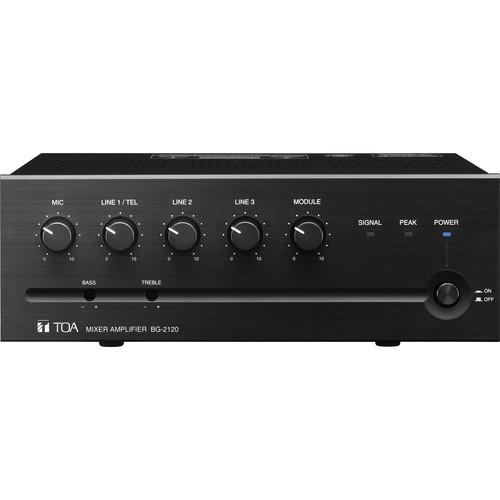
Product description The Toa BG-2120 Mixer Amplifier is designed to operate as the front end to any commercial audio system in background music (BGM), foreground music, paging applications and more. The BG-2120 features 5-channels and a power rating of 120 watts, with operation allowing for programming in one zone. The front panel features an intuitive set of controls with level dials for each channel. The rear is fitted with removable euroblock connectors and DIP switches for easy programming. The rugged chassis is easily rack mounted with the optional MB-1000 rack mount brackets. - Compact five channel Mixer-Amplifier for paging, background/foreground music distribution and music/messaging-on-hold
- All inputs/outputs with removable terminal blocks allow quick and easy installation
- Any of five inputs assignable to MOH/ZONE 2 output
- RCA pin jacks for LINES 2 & 3
- Phantom Power (+ 24V DC) incorporated for MIC input
- Module slot accepts 900 Series input plug-in modules for custom system configurations
- Rear panel-mounted DIP switches allow easy configuring of settings
- Provides auto/manual mute function with adjustable muting sensitivity
- Incorporates Remote volume control connection
- 2-channel broadcast capability
- Tamper-proof, front-panel bass and treble controls are recessed to protect their settings
- Thermal protection circuitry prevents potential damage from excessive heat build-up
- Accessory security knobs for volume control prevent unauthorized volume setting changes
In the Box Toa Electronics BG-2120 Mixer Amplifier 5 Year Warranty User Manual PDF 1.2mb Table of Contents
|
Upload User Manual
Have you got an user manual for the Toa Electronics BG-2120 Mixer Amplifier in electronic form? Please send it to us and help us expand our library of instruction manuals.
Thank you, too, on behalf of other users.
To upload the product manual, we first need to check and make sure you are not a robot. After that, your "Submit Link" or "Upload File" will appear.
Technical parametersToa Electronics BG-2120 Specs | Rated Power Output | 120 Watts | | Power Consumption | 265W (rated output), 120 W (based on cULus standards)
Power Source: 120 VAC, 60Hz | | Frequency Response | 50Hz - 20kHz | | Total Harmonic Distortion (THD) | 0.5% or less, at 1 kHz, rated output | | Input | Mic: -60dB, 600Ω, electronically balanced, removable terminal block
Line 1: -10 dB*/TEL: -20dB Line 1/TEL: selectable, 10kΩ, electronically balanced, removable terminal block
Line 2, 3: -10 dB, 10 kΩ, unbalanced, removable terminal block or RCA jack Module | | Output | Speaker Output 4 Ω, 25 V (18 Ω), 70 V (140 Ω) 4 Ω, 25 V (10 Ω), 70 V (83 Ω) 4 Ω, 25 V(5.2Ω), 70 V (42Ω) Balanced, removable terminal block
MOH Output 0 dB*, 600 Ω, balanced, removable terminal block Line Output 0 dB*, 600 Ω, unbalanced, removable terminal block
*0dB = 1V | | Output Regulation | 2dB or less, no load to full load (1k Hz) | | Phantom Power | On/Off switch for Mic,+24V DC | | Signal-to-Noise Ratio | Mic: 60 dB or more, Line 1/TEL, Line 2, 3, Module: 75 dB or more (Band Pass: 20 Hz - 20 kHz, Tone Controls: Centered) | | Tone Control | Bass: ±10dB at 100Hz, Treble: ±10dB at 10kHz | | Muting | Manual mute/Automatic mute | | Control | Mic gain control, Line 1/TEL gain control, Line 2 gain control, Line 3 gain control, Module: gain control, Bass tone control, Treble tone control, MOH out gain control, Mute control (Manual mute), Remote volume control, Mute sensitivity control, Line 1/TEL selector switch, Phantom power switch (Mic), Auto mute switch (Mic, Line 1/TEL, Module), Mute receive switch (Mic, Line 1/TEL, Line 2, 3, Module), MOH assign switch (Mic, Line 1/TEL, Line 2, 3, Module), Power ON/OFF switch | | Indicators | Power LED, Signal level LED, Peak LED | | Operating Temperature | Operating Temperature: 0°C to 40 °C (32°F to 104 ºF)
Operating Humidity: 35% to 80% RH (no condensation) | | Finish | Panel: ABS resin, black/Case: Steel plate, black, paint | | Dimensions (WxHxD) | 10.39 × 3.71 × 10.52" (264 x 94.3 x 267.3mm) | | Weight | 13.23 lb (6kg) | | | | Package Weight | 15.9 lb | | Box Dimensions (LxWxH) | 14.4 x 14.2 x 6.2" |
Rating100% users recommend this product to others. And what about you?

This product has already been rated by 47 owners. Add your rating and experience with the product.
Discussion
 Ask our technicians if you have a problem with your settings,
or if anything is unclear in the user manual you have downloaded.
You can make use of our moderated discussion.
The discussion is public and helps other users of our website who may be encountering similar problems.
Ask our technicians if you have a problem with your settings,
or if anything is unclear in the user manual you have downloaded.
You can make use of our moderated discussion.
The discussion is public and helps other users of our website who may be encountering similar problems.
The discussion is empty - enter the first post
Post a new topic / query / comment:
|
|


