User Manual for Tone2 Electra2 - Virtual Instrument Click to enlarge the picture
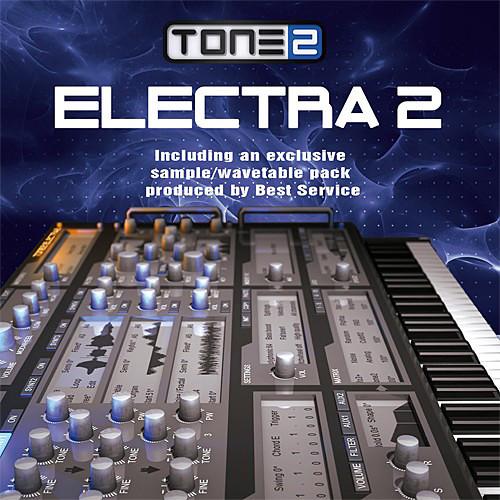 Contents of the user manual for the Tone2 Electra2 - Virtual Instrument
- Product category: Virtual Instruments Others
- Brand: Others
- Description and content of package
- Technical information and basic settings
- Frequently asked questions – FAQ
- Troubleshooting (does not switch on, does not respond, error message, what do I do if...)
- Authorized service for Others Virtual Instruments
|
User manual for the Tone2 Electra2 - Virtual Instrument contain basic instructions
that need to be followed during installation and operation.
Before starting your appliance, the user manual should be read through carefully.
Follow all the safety instructions and warnings, and be guided by the given recommendations.
User manual is an integral part of any Others product,
and if it is sold or transferred, they should be handed over jointly with the product.
Following the instructions for use is an essential prerequisite for protecting
health and property during use, as well as recognition of liability on the part of the manufacturer
for possible defects should you make a warranty claim. Download an official Others user manual in which you will find instructions on how to install, use, maintain and service your product.
And do not forget – unsuitable use of a Others product will considerably shorten its lifespan!
|
Product description Available for download, Tone2 Electra2 from Best Service is a virtual instrument that expands upon its predecessor, ElectraX, to bring you 14 different kinds of synthesis, over 35 filter-types, 32 effects processors, extensive sample manipulation, and single-key control over four separate oscillators, all in one interface. Furthermore, the synth comes stocked with 1,200 presets to get you started. The software is compatible with Mac and Windows platforms, and operates in standalone, AU, and VSTi formats at 32- and 64-bit. - Multilayer Architecture
- Multilayer architecture allows you to trigger up to four synthesizers simultaneously. Each of the four layers works as an independent multi-timbral synthesizer consisting of up to 54 oscillators, dual multi-mode filters, a flexible modulation system, an effects section, and an arpeggiator. You can edit your sounds layer by layer, or edit multiple layers simultaneously. Synthesizer layers can be saved and loaded individually, allowing you to take any layer you like from a patch and fold it into another patch. Combine layers, mix synthesis methods, and utilize keyboard splits with different play modes like Poly, Mono, Legato, or Glide per synth layer.
- Sampling Capabilities
- Electra2 allows you to load and manipulate your samples, triggering them in single mode, loop mode, or by using loop markers to set your own loop points. A comfortable auto-loop function allows click-free loops. The on-board sample engine offers a menu with a selection of sample-edit options, as well as 12 effects to further process your samples. Quick-import and Quick-Vocoder menu options can guide you through setting up a sample or vocoder patch. Custom sample content is stored automatically within your DAW, or if you prefer, as an FXP file.
- Oscillators and Synthesis
- Electra2 features 14 different types of synthesis such as Virtual Analog, Wavetable, Subtractive, Phase Distortion, and FM synthesis. Also included is Physical Modeling, Ultra-saw, Vocoder, Sync, Ringmod, PWM, Noise, Wave-shaping and Tone2's proprietary Fractal synthesis.
- Filters
- Electra2 contains two multi-mode filters with 37 types, as well as 3 tone controls and multi-mode distortions. These filter types range from traditional analog filters such as Moog Low Pass, High Pass and Bandpass, to digital filters such as Vocal, Phaser, Aliaser and Fractal filters. The filters can self-oscillate, allowing you to produce a wide range of custom timbres. An analog control allows you to vary the amount of analog behavior in many of the filters. A real-time display lets you see, and more importantly understand, how the filter is modifying your audio signal. Lastly, a dual distortion unit rounds out the filters with six different modes, ranging from tube pre-amp distortions, to fuzz and wave-shaping.
- Effects
- Electra2 offers a suite of effects that can sync to the BPM of your DAW. 32 different processors are available in this section, including reverb, delay, multi-tap delay, smart unison, trancegate, chorus, flanger and phaser, Vocoder, tremolo, vibrato, surround encode, rotary, EQ, distortion, amp simulation and compressor. Four insert-effect slots are provided, as well as a master effects area.
- Miscellaneous Goodies
- Electra2 offers micro-tuning to lend heft to harmonic sounds. Optional punch and psycho-acoustic features are also included.
- General Features
-
- Four synthesizers in one interface
- 14 separate and combinable synthesis methods
- Psychoacoustic processing
- Low CPU load with multicore processor support
- 4x multi-timbral and 4x stereo unison
- Over 3000 sounds in 1230 presets
- 38 filter types
- 46 oscillator types
- 32 effect types
- Master effect section with Equalizer
- Over 1000 waveforms
- 64 x 4 voices
- Midi learn
- Customizable user interface with 4 skins
- Standalone version for Windows
- Features in Individual Synthesizer Layer
-
- Several play-modes: Monophonic, legato, polyphonic, glide
- 3 multi-synthesis oscillators
- Dual multimode filters
- Dual multimode distortion/waveshaper
- 3 LFOs (global or per voice), one Step LFO, BPM-syncable
- Four Envelope generators
- Arpeggiator
- Insert effect, BPM-syncable
- Flexible modulation
- Key splitting
- Included Effects
-
- Reverbs: Hall, Cathedral, Room, Infinity, Reverb Big, Glass, Band, Real, Hall old, Cathedral old
- Delays: Delay, Delay band, Ping Pong, Multitap
- Smart Unison, Phaser FB, Phaser Stereo, Vibrato, Vibrato Stereo, Tremolo, Stereo Tremolo, Chorus, Ensemble, Phaser, Flanger, Rotary, Trancegate, Compressor, Ampsim, Equalizer, Surround Encode
- Vocoder
- Synthesis Methods and OSC Features
-
- Virtual analog
- FM
- Sample playback and import of own samples with loop support
- Wavetables
- Resynthesis function and the ability to load own waveforms
- Ultrasaw (up to 18 detuned oscillators per voice)
- Fractal
- Physical modeling
- Phase distortion
- Waveshaping
- Exclusive oscillator types
- PWM
- Sync
- Noise
- Ringmod
- Vocoder
- Analog oscillator drift modeling
- Fat tuning
- Filter Types
-
- 11 analog-modeled filters with self oscillation: Low-pass/High-pass/Band-pass 12 dB / 18 dB / 24 dB, Moog, Filter-FM
- Digital filters: Low-pass, High-pass, Bandpass, Notch
- Equalizers: Low Shelf, High Shelf, Peak, Wide
- Phaser, Comb+, Comb-, Vocals, Vocals2, Vocal AM, LP Shaped, LP AM, BP Boobs, M-Shape, Aliaser, Ringmod
- Proprietary fractal filters
- Physical modeling String, Physical modeling Flute
Table of Contents
|
Upload User Manual
Have you got an user manual for the Tone2 Electra2 - Virtual Instrument in electronic form? Please send it to us and help us expand our library of instruction manuals.
Thank you, too, on behalf of other users.
To upload the product manual, we first need to check and make sure you are not a robot. After that, your "Submit Link" or "Upload File" will appear.
Technical parametersTONE2 73609 Specs | General Requirements | An internet connection on any computer is required to authorize and activate this product | | System Requirements | Mac: OS X 10.5 or higher
Windows: Windows ME / XP / Vista / 7 / 8 / 10 (32-/64-bit) | | Supported Interfaces | Mac: VSTi (32-/64-bit), AU (32-/64-bit)
Windows: VSTi (32-/64-bit), Standalone (32-/64-bit) |
Rating60% users recommend this product to others. And what about you?

This product has already been rated by 99 owners. Add your rating and experience with the product.
Discussion
 Ask our technicians if you have a problem with your settings,
or if anything is unclear in the user manual you have downloaded.
You can make use of our moderated discussion.
The discussion is public and helps other users of our website who may be encountering similar problems.
Ask our technicians if you have a problem with your settings,
or if anything is unclear in the user manual you have downloaded.
You can make use of our moderated discussion.
The discussion is public and helps other users of our website who may be encountering similar problems.
The discussion is empty - enter the first post
Post a new topic / query / comment:
|
|


