User Manual for TP-Link T2600G-28TS JetStream 24-Port Gigabit L2 Managed Switch with 4 SFP Slots Click to enlarge the picture
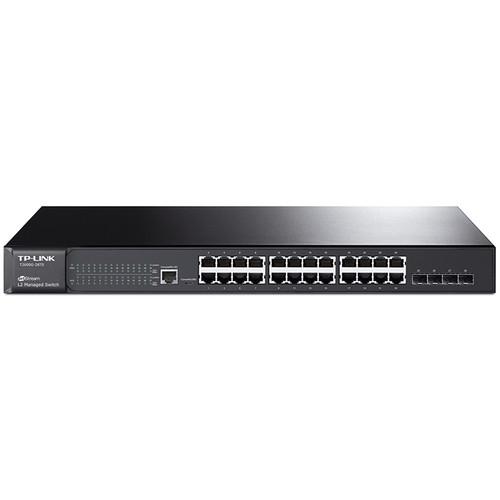 Contents of the user manual for the TP-Link T2600G-28TS JetStream 24-Port Gigabit L2
- Product category: Network Switches, Bridges & Hubs TP-Link
- Brand: TP-Link
- Description and content of package
- Technical information and basic settings
- Frequently asked questions – FAQ
- Troubleshooting (does not switch on, does not respond, error message, what do I do if...)
- Authorized service for TP-Link Network Switches, Bridges & Hubs
|
User manual for the TP-Link T2600G-28TS JetStream 24-Port Gigabit L2 contain basic instructions
that need to be followed during installation and operation.
Before starting your appliance, the user manual should be read through carefully.
Follow all the safety instructions and warnings, and be guided by the given recommendations.
User manual is an integral part of any TP-Link product,
and if it is sold or transferred, they should be handed over jointly with the product.
Following the instructions for use is an essential prerequisite for protecting
health and property during use, as well as recognition of liability on the part of the manufacturer
for possible defects should you make a warranty claim. Download an official TP-Link user manual in which you will find instructions on how to install, use, maintain and service your product.
And do not forget – unsuitable use of a TP-Link product will considerably shorten its lifespan!
|
Product description With 24 Gigabit Ethernet ports the T2600G-28TS JetStream 24-Port Gigabit L2 Managed Switch with 4 SFP Slots from TP-Link makes it easy to increase the bandwidth and capacity of a network by connecting additional routers and access points. In addition to the numerous Gigabit Ethernet ports, this TP-Link switch also comes equipped with 4 Gigabit SFP slots supporting a variety of small form factor pluggable devices and fibre channel applications. This T2600G-28TS also features a fanless design to keep everything quiet regardless of how hard you push the switch.
Once installed, this TP-Link switch offers a wealth of Layer 2 and Layer 2+ features including static routing to help route internal traffic, 802.1Q VLAN tagging, port mirroring, link aggregation, 802.3x flow control, and more. For network maintainence TP-Link has included features such as loop back detection, cable diagnostics, and IGMP snooping. Securing the network has also been simplified thanks to IP-MAC-port binding, port security, storm control, and HDCP snooping, while 802.1X compliance offers an added level of authentication for users attempting to gain access to the network. - Secure Networking
- The T2600G-28TS supports IP-MAC-Port Binding, Port Security, Storm control, and DHCP Snooping, which protect against broadcast storms, ARP attacks, etc. In addition, the Access Control Lists (ACL, L2 to L4) feature restricts access to sensitive network resources by denying packets based on source and destination MAC address, IP address, TCP/UDP ports, and even VLAN ID. Moreover, the switch supports 802.1X, which allows network clients to be authenticated through external Radius servers. Guest VLAN function supports to enable the non-802.1X clients to access the specific network resource.
- Advanced QoS Features
- To integrate voice, data and video service on one traffic based on a variety of means, including IP or MAC address, TCP or UDP port number, etc, to ensure that voice and video are always clear, smooth, and jitter free. In conjunction with the Voice VLAN the switch is supporting, the voice applications will operate with much smoother performance.
- L2 and L2+ Features
- The T2600G-28TS supports a complete lineup of L2 features, including 802.1Q tag VLAN, Port Mirroring, STP/RSTP/MSTP, Link Aggregation Control Protocol, and 802.3x Flow Control function. Furthermore, the switch provides advanced features for network maintenance. Such as Loop Back Detection, Cable Diagnostics and IGMP Snooping. IGMP snooping ensures the switch intelligently forward the multicast stream only to the appropriate subscribers while IGMP throttling and filtering restrict each subscriber on a port level to prevent unauthorized multicast access. Moreover, T2600G-28TS supports L2+ feature-static routing, which is a simple way to provide segmentation of the network with internal routing through the switch and helps network traffic for more efficient use.
- IPv6 Support
- The T2600G-28TS supports various IPv6 functions such as Dual IPv4/IPv6 Stack, MLD Snooping, IPv6 ACL, DHCPv6 Snooping, IPv6 Interface, Path Maximum Transmission Unit (PMTU) Discovery, and IPv6 Neighbor Discovery, which helps to ensure your network is ready for the Next Generation Network (NGN) without upgrading your network equipment.
- OAM
- The T2600G-28TS provide 802.3ah OAM and Device Link Detection Protocol (DLDP) functions, improving monitoring as well as helping to troubleshoot Ethernet networks, facilitate network management.
- Enterprise Level Management Features
- The T2600G-28TS supports various user-friendly standard management features, such as intuitive web-based Graphical User Interface (GUI) or industry-standard Command Line Interface (CLI); either administration traffic can be protected through SSL or SSH encryptions. SNMP (v1/v2c/v3) and RMON support enables the switch to be polled for valuable status information and send traps on abnormal events.
- IPv6 Applications
- DHCPv6 Client, Ping6, Tracert6, Telnet(v6), IPv6 SNMP, IPv6 SSH, IPv6 SSL, Http/Https, IPv6 TFTP, IPv6 ACL, IPv6 Interface, IPv6 Routing, DHCPv6 Relay, DHCPv6 Snooping
- Management
- Web-based GUI and CLI management
SNMP v1/v2c/v3,compatible with public MIBs and TP-LINK private MIBs
RMON (1, 2, 3, 9 groups)
sFlow
PPPoE Circuit ID
DHCP Relay
DHCP Server
DHCP/BOOTP Client, DHCP Snooping, DHCP Option82
Dual Image
CPU Monitoring
Port Mirroring
Time Setting: SNTP
Integrated NDP/NTDP feature
Firmware Upgrade: TFTP & Web
System Diagnose: VCT
SYSLOG & Public MIBS
Password Recovery UPC: 845973092498 In the Box TP-Link T2600G-28TS JetStream 24-Port Gigabit L2 Managed Switch with 4 SFP Slots Power Cord Resource CD Rackmount Kit Rubber Feet Limited 5-Year Warranty Table of Contents
|
Upload User Manual
Have you got an user manual for the TP-Link T2600G-28TS JetStream 24-Port Gigabit L2 Managed Switch with 4 SFP Slots in electronic form? Please send it to us and help us expand our library of instruction manuals.
Thank you, too, on behalf of other users.
To upload the product manual, we first need to check and make sure you are not a robot. After that, your "Submit Link" or "Upload File" will appear.
Technical parametersTP-Link T2600G-28TS Specs | | | Ports | 24 x 10/100/1000 Mb/s Gigabit Ethernet (RJ45)
4 x 10/100/1000 Mb/s Gigabit SFP
1 x Ethernet (RJ45) (Console)
1 x Micro-USB | | | | Supported Protocols | Auto-MDIX/MDI
IGMP Snooping
IPv6 | | Queuing | Strict Priority, Weighted Round Robin (WRR) | | Jumbo Frames Support | 9,216 Bytes | | MAC Address Table Size | 16K | | VLAN IDs | 4000 | | | | Security Features | DHCP Snooping
DoS Attack Prevention
RADIUS Authentication
Storm Control | | | | Supported IEEE Standards | 802.1d, 802.1p, 802.1q, 802.1s, 802.1w, 802.1x, 802.3ab, 802.3ad, 802.3i, 802.3u, 802.3x, 802.3z | | | | Forwarding Rate | 41.67 Mpps | | Switching Bandwidth | 56 Gb/s | | Priority Queues | 8 | | | | OS Compatibility | Windows XP or Later
macOS
Linux
UNIX | | | | Power Draw | 19.15 W (Active) | | AC Input Power | 100 to 240 VAC, 50 / 60 Hz | | | | Operating Temperature | 32 to 104°F / 0 to 40°C | | Operating Humidity | 10 to 90% | | Storage Temperature | -40 to 158°F / -40 to 70°C | | Storage Humidity | 5 to 90% | | Certifications | RoHS, as per Manufacturer | | | | Cooling System | Passive | | Dimensions | 17.3 x 8.7 x 1.7" / 44 x 22 x 4.4 cm | | | | Package Weight | 9.0 lb | | Box Dimensions (LxWxH) | 20.8 x 13.2 x 4.0" |
Rating100% users recommend this product to others. And what about you?

This product has already been rated by 94 owners. Add your rating and experience with the product.
Discussion
 Ask our technicians if you have a problem with your settings,
or if anything is unclear in the user manual you have downloaded.
You can make use of our moderated discussion.
The discussion is public and helps other users of our website who may be encountering similar problems.
Ask our technicians if you have a problem with your settings,
or if anything is unclear in the user manual you have downloaded.
You can make use of our moderated discussion.
The discussion is public and helps other users of our website who may be encountering similar problems.
The discussion is empty - enter the first post
Post a new topic / query / comment:
|
|


