User Manual for Triplett CamView HD Pro Ruggedized HD Camera Tester Click to enlarge the picture
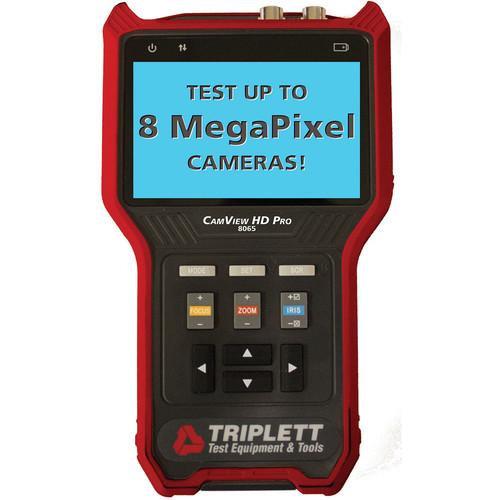 Contents of the user manual for the Triplett CamView HD Pro Ruggedized HD
- Product category: Test Monitors Triplett
- Brand: Triplett
- Description and content of package
- Technical information and basic settings
- Frequently asked questions – FAQ
- Troubleshooting (does not switch on, does not respond, error message, what do I do if...)
- Authorized service for Triplett Test Monitors
|
User manual for the Triplett CamView HD Pro Ruggedized HD contain basic instructions
that need to be followed during installation and operation.
Before starting your appliance, the user manual should be read through carefully.
Follow all the safety instructions and warnings, and be guided by the given recommendations.
User manual is an integral part of any Triplett product,
and if it is sold or transferred, they should be handed over jointly with the product.
Following the instructions for use is an essential prerequisite for protecting
health and property during use, as well as recognition of liability on the part of the manufacturer
for possible defects should you make a warranty claim. Download an official Triplett user manual in which you will find instructions on how to install, use, maintain and service your product.
And do not forget – unsuitable use of a Triplett product will considerably shorten its lifespan!
|
Product description Test a variety of cameras, including cameras up to 8MP, with the CamView HD Pro Ruggedized HD Camera Tester from Triplett. This camera tester comes compatible with a variety of camera formats, including NTSC/PAL, AHD 2.0, CVI 3.0, and TVI 3.0, and supports the RS-485 PTZ control test. The CamView HD Pro is also capable of identifying the type of encoding being used, provides up to 12V / 1A of power to the camera, and even supports data monitoring giving you complete control over the camera being tested. Seeing the camera statistics is simple thanks to the built-in 4" TFT display which supports up to 16.7 million colors and includes a dedicated backlight so you can view the screen regardless of available light. -
- Analog testing for up to 8MP cameras, including NTSC/PAL, AHD 2.0, CVI 3.0, and TVI 3.0, along with RS-485 PTZ control test functionality
- Automatically identifies type of encoding
- Generate analog NTSC/PAL and HD video test patterns
- Provides 12V / 1A power to the camera
- Data monitoring
- Screen shot, video recording, and frame-by-frame or streaming playback
- 16M color, backlit 4" TFT display
- Built-in super bright flashlight
- Rechargeable, long-lasting LiPo battery
UPC: 614395001889 Table of Contents
|
Upload User Manual
Have you got an user manual for the Triplett CamView HD Pro Ruggedized HD Camera Tester in electronic form? Please send it to us and help us expand our library of instruction manuals.
Thank you, too, on behalf of other users.
To upload the product manual, we first need to check and make sure you are not a robot. After that, your "Submit Link" or "Upload File" will appear.
Technical parametersTriplett CamView Specs | Video Test | Video Format
Auto recognizes NTSC/PAL, HD-CVI 3.0, HD-TVI 3.0, AHD 2.0
Test Pattern
Generates NTSC/PAL, HD-CVI, HD-TVI, or AHD test patterns (720P/1080P)
Signal Level
1 Vpp
Input/Output
Video in BNC, video out BNC
Digital Zoom
Supports 8-level portion view
Capture
Take snapshot or record video | | Power Output | Output
12 V / 1 A power output to camera. Connector is 4 mm diameter; pin is 1.6 mm diameter | | Audio Test | Audio Test
One channel audio input | | PTZ Control | Communications Port
RS-485
Protocol
More than 30 protocols including Dahua, Pelco-D/P, Samsung, Panasonic, Lilin, Yaan, etc.
Baud Rate
150, 300, 600, 1200, 2400, 4800, 9600, 19200 bps | | Data Monitor | Baud Rate
150, 300, 600, 1200, 2400, 4800, 9600, 19200 bps | | Playback | Video
Supports frame-by-frame playback; digital zoom; full-screen play; fast forward/rewind; delete file; and fast switching between files
Screen Shot
Supports image playback; digital zoom; full-screen display; delete file; and fast switching between files | | System | Screen
4.0-inch TFT 800 RGB, 480 WVGA resolution; 16.7 million colors; backlight with adjustable brightness
Operation
Power key, 13 control keys
Language
User selectable - English, French, Spanish, Russian, Chinese
Auto Shut-Off
Disable / 5~60 minutes
Keyboard Tone
Enable / disable
Software
Supports online upgrade through USB sharing using a Windows computer | | Power | Charger
12 V / 1 A (5.5 mm) power supply
Battery
Dedicated battery, user replaceable, 7.4 V lithium-ion polymer battery, capacity 10.4 Wh. Battery runtime approximately 5 hours
Charge
12 V / 1 A, charge time 2 hours; using cord provided
Power Saving
Auto power off. Real-time battery level indicator | | Other Specifications | Storage
8 GB flash built-in; use micro-USB port to connect external device
LED Light
2 x 35 lm LED lights | | Temperature & Humidity | Operating Temperature
14 to 131°F / -10 to 55°C
Operating Humidity
30 to 90% | | Dimensions | 6.9 x 4.4 x 1.5" / 17.5 x 11.3 x 3.7 cm | | Weight | 3.5 lb / 1.6 kg | | | | Package Weight | 2.7 lb | | Box Dimensions (LxWxH) | 10.8 x 6.7 x 4.6" |
Rating90% users recommend this product to others. And what about you?

This product has already been rated by 43 owners. Add your rating and experience with the product.
Discussion
 Ask our technicians if you have a problem with your settings,
or if anything is unclear in the user manual you have downloaded.
You can make use of our moderated discussion.
The discussion is public and helps other users of our website who may be encountering similar problems.
Ask our technicians if you have a problem with your settings,
or if anything is unclear in the user manual you have downloaded.
You can make use of our moderated discussion.
The discussion is public and helps other users of our website who may be encountering similar problems.
The discussion is empty - enter the first post
Post a new topic / query / comment:
|
|


