User Manual for TV One HDTV Dual Color Monitor with Audio Click to enlarge the picture
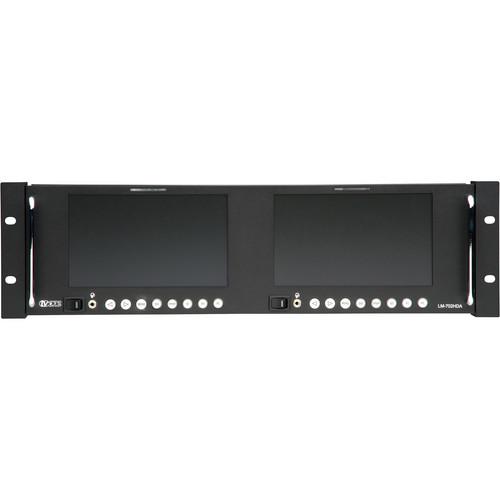 Contents of the user manual for the TV One HDTV Dual Color Monitor
- Product category: Production Monitors TV One
- Brand: TV One
- Description and content of package
- Technical information and basic settings
- Frequently asked questions – FAQ
- Troubleshooting (does not switch on, does not respond, error message, what do I do if...)
- Authorized service for TV One Production Monitors
|
User manual for the TV One HDTV Dual Color Monitor contain basic instructions
that need to be followed during installation and operation.
Before starting your appliance, the user manual should be read through carefully.
Follow all the safety instructions and warnings, and be guided by the given recommendations.
User manual is an integral part of any TV One product,
and if it is sold or transferred, they should be handed over jointly with the product.
Following the instructions for use is an essential prerequisite for protecting
health and property during use, as well as recognition of liability on the part of the manufacturer
for possible defects should you make a warranty claim. Download an official TV One user manual in which you will find instructions on how to install, use, maintain and service your product.
And do not forget – unsuitable use of a TV One product will considerably shorten its lifespan!
|
Product description The TV One HDTV Dual Color Monitor with Audio features a 7” (17.8 cm) color LCD monitor designed for the broadcast and professional industries. In addition to a contrast ratio of 400:1, and a brightness rating of 250 cd/m2, the monitor produces high-quality images at resolutions up to 1040 x 600 for SD and 1080p for HD video. Viewing angles of 140 x 110° (H x V) ensure that you can view images clearly from any corner of the room or when the display is mounted at a height. Additionally, the tiltable rackmount housing offers enhanced viewing option to suit the viewer’s eye level.
With a response time of 20 milliseconds, the LCD display produces clear images with less blurring effect. The HDTV Dual Color Monitor supports SD/HD-SDI, analog RGBHV, YPbPr Component Video, CV and YC inputs, and automatically detects the NTSC and PAL television supported standards. With the help of a DB9 connector, you can externally activate the Front panel Tally LED’s. OSD menu enables you to adjust various monitor setting such as contrast, brightness, sharpness, and color level (R-G-B).
Built-in audio function allows you to access multimedia applications. You can view vertical and horizontal sync in a Sync Delay (Pulse Cross) mode that allows you to view the vertical blanking intervals, additionally the Blue Only feature switches off red and green scan guns to produce an image made only from a blue scan gun. - 7" (17.8 cm) color LCD monitor designed for the broadcast and professional industries
- Brightness rating - 250 cd/m2
- Produces high-quality images at a resolution up to 1040 x 600 for SD and 1080p for HD video
- Viewing angles of 140 x 110° (H x V) ensure that you can view images clearly from extreme angles
- Tiltable rackmount housing offers enhanced viewing option to suit the Viewer's eye level
- 20 milliseconds response time for images with less blurring effect
- Supports SD/HD-SDI, analog RGBHV, YPbPr Component Video, CV and YC inputs, and automatically detects the NTSC and PAL television supported standards
- DB9 connector enables you to externally activate the Front panel Tally LED's
- OSD menu for adjusting various monitor setting such as contrast, brightness, sharpness, and color level (R-G-B)
- Built-in speakers minimize the need for an external audio system
- View vertical and horizontal sync in a Sync Delay (Pulse Cross) mode, and the vertical blanking intervals
- Blue Only feature switches off red and green scan guns to produce an image made only from a blue scan gun
- Locking external DC power supply
In the Box TV One HDTV Dual Color Monitor with Audio (7") Power Adapter Operations Manual 4 x Rackmount Screws Set Rackmount Ears 3 Year Parts and Labor (except LCD) Table of Contents
|
Upload User Manual
Have you got an user manual for the TV One HDTV Dual Color Monitor with Audio in electronic form? Please send it to us and help us expand our library of instruction manuals.
Thank you, too, on behalf of other users.
To upload the product manual, we first need to check and make sure you are not a robot. After that, your "Submit Link" or "Upload File" will appear.
Technical parametersTV One LM-702HDA Specs | LCD Size | 7.0" (434 mm) | | Display Area | 6.03 x 3.54" (153 x 90 mm) | | Resolution | 1024 x 600 (16 x 9) | | Dot Pitch | 0.297 mm | | Color Resolution | 262,000 colors | | Contrast Ratio | 400:1 | | Brightness | 250 cd/m2 | | Response Time | 20 msec | | Viewing Angle | Left / right: 140° Up / down: 110° | | Aspect Ratio | 4:3 or 16:9 | | Video Inputs | SD/HD-SDI: 1x via BNC with active output, Analog RGBHV: 1x via HD-15 female, Composite video: 1x via BNC connectors, YC (S-Video): 1x via 4-pin mini-DIN connector, YPbPr Component: 1x via 3 BNC connectors | | SD/HD-SDI Input Range | SDTV: 480i, 576i HDTV: 1080P/30 Hz, 1080P/29.97 Hz, 1080P/25 Hz, 1080P/24 Hz, 1080P/23.98 Hz, 1080i/60 Hz, 1080i/59.94 Hz, 1080i/50 Hz, 1035i/60 Hz, 1035i/59.94 Hz, 720P/60 Hz, 720P/59.94 Hz, 720P/50 Hz | | Analog Component Input Range | SDTV: 480i, 576i HDTV - YPbPr: 480p, 576p, 720p, 1080i, 1080p | | Analog RGBHV Input Range | 640 x 350: 70, 85 Hz 720 x 350: 70, 85 Hz 640 x 400: 56, 70, 85 Hz 720 x 400: 70, 85 Hz 640 x 480: 60, 66, 72, 75, 85 Hz 800 x 600: 56, 60, 70, 72, 75, 85 Hz 1024 x 768: 60, 70, 72, 75, 85 Hz | | Composite & S-Video Input Range | Vertical frequency: NTSC 60 Hz, PAL 50 Hz Horizontal frequency: NTSC 15.75 KHz, PAL 15.625 KHz | | Tally Control | Tally input: 1x via DB9 connector | | Display Element | Active matrix TFT | | Video Adjustments | Brightness, contrast, sharpness, color level (RGB) | | TV Standards | NTSC / PAL auto-detect | | HD/SD-SDI | SD-SDI: 270 Mbps (525/625 line) HD-SDI: 1.485, 1.4835 Gpbs | | Mode | Blue Only mode: for setup with color bars Sync Delay mode: for checking sync | | Menu Navigation | Menu, left, right | | Input Selection | SDI, YPbPr, CV, SV, PC (RGB) | | Power | On / off | | Power Supply | 12 VDC @ 4 A (external) | | Operating Temperature | 14 to 122° F (-10 to 50° C) | | Operating Humidity | 10% to 90%, non-condensing | | Storage Temperature | -14 to 140° F (-10 to 60° C) | | Storage Humidity | 10% to 90%, non-condensing | | Regulatory Approvals | Monitors: FCC, CE, RoHS Power supplies: UL, CUL, CE, PSE, GS, RoHS | | Dimensions (HxWxD) | 5.2 x 19 x 5.9" (132 x 483.5 x 150 mm) | | Weight | 12.1 lb (5.5 kg) | | | | Package Weight | 12.38 lb | | Box Dimensions (LxWxH) | 20.5 x 9.75 x 7.75" |
Rating70% users recommend this product to others. And what about you?

This product has already been rated by 18 owners. Add your rating and experience with the product.
Discussion
 Ask our technicians if you have a problem with your settings,
or if anything is unclear in the user manual you have downloaded.
You can make use of our moderated discussion.
The discussion is public and helps other users of our website who may be encountering similar problems.
Ask our technicians if you have a problem with your settings,
or if anything is unclear in the user manual you have downloaded.
You can make use of our moderated discussion.
The discussion is public and helps other users of our website who may be encountering similar problems.
The discussion is empty - enter the first post
Post a new topic / query / comment:
|
|


