|
User Manual for Two Notes Torpedo Studio Multi-Impedance Digital Loadbox for Electric Guitars & Basses Click to enlarge the picture
 Contents of the user manual for the Two Notes Torpedo Studio Multi-Impedance Digital
- Product category: Amplifier Accessories Two Notes
- Brand: Two Notes
- Description and content of package
- Technical information and basic settings
- Frequently asked questions – FAQ
- Troubleshooting (does not switch on, does not respond, error message, what do I do if...)
- Authorized service for Two Notes Amplifier Accessories
 |
User manual for the Two Notes Torpedo Studio Multi-Impedance Digital contain basic instructions
that need to be followed during installation and operation.
Before starting your appliance, the user manual should be read through carefully.
Follow all the safety instructions and warnings, and be guided by the given recommendations.
User manual is an integral part of any Two Notes product,
and if it is sold or transferred, they should be handed over jointly with the product.
Following the instructions for use is an essential prerequisite for protecting
health and property during use, as well as recognition of liability on the part of the manufacturer
for possible defects should you make a warranty claim. Download an official Two Notes user manual in which you will find instructions on how to install, use, maintain and service your product.
And do not forget – unsuitable use of a Two Notes product will considerably shorten its lifespan!
|
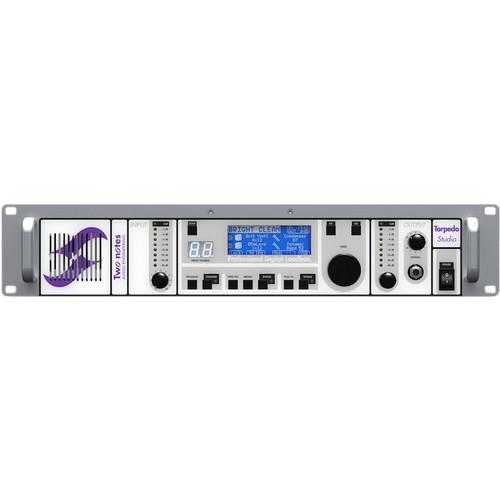
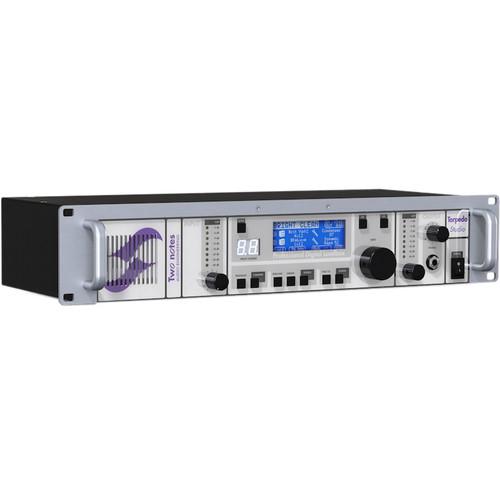
Product description Designed for electric guitar players and bassists, the Torpedo Studio from Two Notes is a digital loadbox, interfacing with your favorite preamplifier in a comprehensive effort to replace or obviate your large—and often cumbersome—speaker cabinet. The device goes farther than giving you authentic sounding impulse responses of many different cabinets by providing emulations of power amplifiers, microphones, microphone preamplifiers, and effects often used in capturing recording (equalizers, compressors, etc.). It can be used as a digital alternative to miking your cabinet on stage or in the studio, for silent practicing, and as a means to put many different cabinet configurations at your disposal for experimentation.The Torpedo Studio not only replicates the sound of many different combinations of gear, but also protects the circuitry of your favorite preamp. Quite often—and especially with amps not sporting fuses or other protection systems—failure to connect a tube-amplifier’s power output to a speaker cabinet can cause significant problems to the output stage of your amp. Plugging into the Torpedo Studio solves this problem effectively, handling the load of your preamplifier (hence the term “loadbox”), while giving you both Reactive and Resistive options when it comes to matching impedances of your amplifier. Resistive offers a fixed impedance value and usually produces a warmer tone than Reactive mode, which mimics the complex impedance of corporeal speakers and gives you a brighter, and some would say more natural timbre.Adaptations of the convolution techniques long used to model hardware reverberators have been employed to give you high-quality digital algorithms. These authentically mimic the sound and feel of a power amp/cabinet/microphone setup. 50 cabinets and eight microphones ship standard with the Torpedo Studio, but you can also load third-party impulse responses, or even your own, home-created IRs. Further Two-Note sounds are accessible via the included Torpedo Remote software, wherein you can audition and purchase additional models, and also, control the Torpedo Studio with software, rather than through the hardware unit itself.To accommodate both beginners and seasoned experimenters, two different operational modes have been provided: Arcade mode, which is for novice users, and Simulation mode, which allows for comprehensive customization of the loadbox’s parameters. A temperature fan ensures that heat is efficiently dissipated, with an automatic warning and a failsafe built-in to the unit, should you exceed specific temperatures. A power cable is provided for your convenience. - Emulated Tube-Stage Output
- When using guitar/bass preamplifiers with conventional power amps, players often get their sound from a particular use of its tube complement. To replicate this feel, Two Notes has developed a tube-stage modeling that gives you a choice of 4 different tube models (6L6, EL34, EL84 and KT88) in AB-class Push-Pull (PP) or A-class Single Ended (SE) configurations. You can push this tube stage like a conventional amplifier, achieving for that subtle kind of distortion.
- Not Just for Guitars
- In addition for stringed instruments, the Torpedo Studio can be used to warm up keyboards, synthesizers, organs, or digital pianos/soft-synths.
- Adjustable Impedance
- The loadbox's adjustable impedance of 4, 8, or 16 Ohms—and its high-admissible power of 150W—makes it suitable for use with any amplifier. The reactive impedance faithfully imitates a speaker, allowing the amp to work exactly as if it was connected to a speaker cabinet.
- Dual Mono/Stereo Miking Emulations
- Provided is a combined simulation of two cabinets matched with two microphones for choices in tonal configurations. You can also virtually position two different microphones in front of your selected, emulated speaker, or in front of two different modeled-speakers.
- Post-FX Section
- When recording guitars and basses, it is common to apply a few effects to shape the sound before it is sent to the house PA or your recording interface. To assist in this task, the Torpedo Studio ships with a semi-parametric EQ, an exciter, a compressor, and a reverb.
- Connection Possibilities
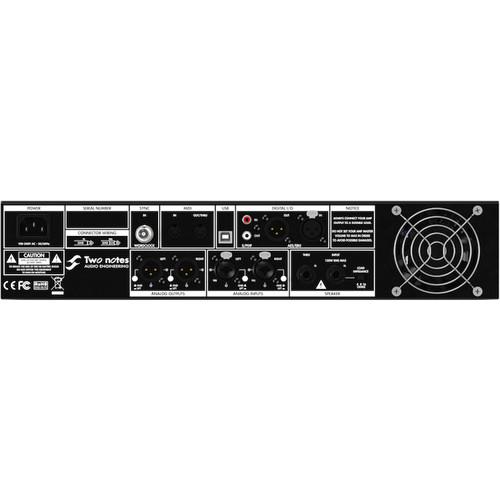
- Go ahead and connect your instrument to your desired amplifier as usual. Then, where you would connect your amplifier to the speaker cabinet, connect to the Torpedo Studio instead. Now route the setup to a mixing board, house PA, or recording interface. You can also use headphones for direct monitoring and silent practice. If you still want to use your desired speaker, you can do so through the THRU output, so long as it sports a 1/4" termination for inputs.You can also use the Torpedo Studio with a preamplifier, or as an external effect processor in a studio/home-studio environment. A hefty complement of analog and digital I/O allows the Torpedo Studio to work in virtually any situation.
- MIDI Implementation
- The Torpedo Studio can be controlled by MIDI messages, accepting both program changes and control changes. The controlling device, hooked into the Torpedo Studio's 5-Pin DIN MIDI input jack, can be a foot controller, a keyboard, or a computer. Also on hand is a 5-Pin DIN MIDI out/THRU jack, which will mirror every MIDI message coming in through the MIDI input to connected devices.
- Torpedo Remote System
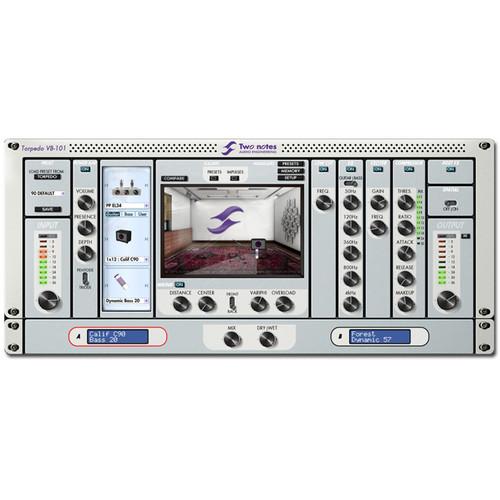
- The Torpedo Studio includes a remote software application called Torpedo Remote. This software provides a clear and intuitive interface, giving you access to all the parameters on your Torpedo. These include loading/saving presets, loading new IRs, and updating the unit's firmware. You can also try out additional speaker cabinets from the Two Notes store, preview them on your own tracks in real time, and choose to buy the ones you prefer.
- Power Amps Emulated
-
- SE 6L6: Configuration Single Ended - Class A with 6L6
- SE EL34: Configuration Single Ended - Class A with EL34
- SE EL84: Configuration Single Ended - Class A with EL84
- SE KT88: Configuration Single Ended - Class A with KT88
- PP 6L6: Configuration Push-Pull - Class AB with 6L6
- PP EL34: Configuration Push-Pull - Class AB with EL34
- PP EL84: Configuration Push-Pull - Class AB with EL84
- PP KT88: Configuration Push-Pull - Class AB with KT88
- Microphones Emulated
-
- Dynamic 57: Shure SM57
- Dynamic 421: Sennheiser MD421
- Knightfall: Blue Dragonfly
- Condenser 87: Neumann U87
- Ribbon160: Beyerdynamic M160N
- Ribbon121: Royer R121
- Bass 20: Electro-Voice RE20
- Bass 5: Shure Beta 52
- Cabinets Emulated (Electric Guitar)
-
- 2Notes CSG: Two Notes Custom 1x12" Electro-Voice EVM12L
- Alichino: Cornford Harlequin 1x12" OB Celestion Vintage 30 UK
- Angl VintC: Engl 4x12" Celestion V30
- Bayou: Jenkins Sound Lab 2x12” OB Eminence Patriot Swamp Thang
- BDeLuxe: Fender Blues Deluxe 1x12"
- Blonde 63: Fender Bassman ’63 Blonde Tolex Piggy Back 2x12"
- Brit 65C: Marshall 1965A 4x10" Celestion G10L-35 close back
- Brit 65O: Marshall 1965A 4x10" Celestion G10L-35 open back
- Brit Std: Marshall JCM900 2x12" Celestion G12T
- Brit VintC: Marshall Slash Signature 4x12" Celestion V30 close back
- Brit VintO: Marshall Slash Signature 4x12" Celestion V30 open back
- Calif C90: Mesa/Boogie 1x12" Celestion C90 (Black Shadow)
- Calif StdC: Mesa/Boogie Rectifier Standard 4x12" Celestion V30 close back
- Calif StdO: Mesa/Boogie Rectifier Standard 4x12" Celestion open back
- Eddie: Peavey 5150 2x12" Sheffield 1200
- Forest: Elmwood 2x12" Celestion V30
- Free Rock: VHT Deliverance 4x12" Eminence P50E
- Free Rock2: VHT Deliverance 2x12" Eminence P50E
- Green Tri: Hughes&Kettner Triamp 4x12" Celestion Greenback
- Jazz 120: Vintage Roland JC120 2x12"
- JubilGreen: Marshall 2550 2x12" Celestion Greenback
- JubilV30: Marshall 2550 2x12" Celestion V30
- Kerozen: Diezel 4x12" Celestion V30
- R2D2: Musicman 112 RD 1x12" Electro-Voice EVM12L
- Silver77: Vintage Fender Twin Reverb 2x12" orange JBL
- SilverJen: Vintage Fender Twin Reverb 2x12" Jensen C12K
- StrongBack: VHT Fat Bottom 4x12" Eminence P50E
- The One: Brunetti Neo1512 1x15" + 1x12"
- Twill 15: Clark Tweed Replica 1x15" OB Jensen 1959
- Vibro Utah: Vintage 1961 Fender Vibrolux 1x12" original Utah speaker
- Vibro V30: Vintage 1961 Fender Vibrolux 1x12" Celestion V30
- Voice 30: Original Vox AC30 JMI 2x12" Celestion Silver Bell
- Voice 65: 1965 Vox 2x12"
- VoiceModrn: Vox V212H, 2x12" Celestion Alnico Blue
- Watt FanC: Hiwatt 2x12" Fane close back
- Watt FanO: Hiwatt 2x12" Fane open back
- XTCab: Bogner 4x12" Celestion V30
- Cabinets Emulated (Electric Basses)
-
- 2Notes: CSB Two Notes Custom 1x15"
- Alu XL: Hartke XL 4x12"
- AZ Ben: SWR Big Ben 1x18"
- AZ Work: SWR WorkingMan 4x10"
- Calif Low: Mesa/Boogie 2x10"
- Fridge: Ampeg 8x10"
- Heaven Bot: David Eden 1x15"
- Heaven Top: David Eden 4x10"
- Marco: Markbass 2x10"
- New York: Markbass 4x6"
- Rea One: AER Cab One 2x10"
- Voice V125: Vox V125 2x12"
- WGrandBlvd: Ampeg B15N 1x15" CB Jensen C15N, Vintage Ceramic
In the Box Two Notes Torpedo Studio Multi-Impedance Digital Loadbox for Electric Guitars & Basses Power Cable Torpedo Remote Software Limited 2-Year Warranty Table of Contents
|
Upload User Manual
Have you got an user manual for the Two Notes Torpedo Studio Multi-Impedance Digital Loadbox for Electric Guitars & Basses in electronic form? Please send it to us and help us expand our library of instruction manuals.
Thank you, too, on behalf of other users.
To upload the product manual, we first need to check and make sure you are not a robot. After that, your "Submit Link" or "Upload File" will appear.
Technical parametersTwo Notes Studio Specs | | | Speaker Input | Input Connection: 1 x 1/4" TS, phone type
Maximum Input Voltage: 280 VAC / +51 dBu
Security Load: 200 Ohms / 10 W | | Output | 1 x 1/4" TS Speaker THRU, phone type | | | | I/O | 2 x Combo XLR-1/4" inputs, balanced TRS or unbalanced TS
2 x XLR outputs, balanced
1 x 1/4" Mono headphone output, balanced TRS | | Maximum Input Level | +8.70 dBu | | Input Impedance | Balanced: 20 kOhms
Unbalanced: 10 kOhms | | Maximum Output Level | No Load, Balanced: +11.2 dBu
10-kOhm Load, Balanced: +10.7 dBu
No Load, Unbalanced: +5.1 dBu
10-kOhm Load, Unbalanced: +4.9 dBu | | Output Impedance | Balanced: 600 Ohms
Unbalanced: 300 Ohms | | Loadbox | Reactive or Resistive Load (relay), Nominal Impedance: 4, 8, or 16 Ohms (switch)*
Maximum Admissible Power: 150 W (assuming proper ventilation)
Maximum Temporary Admissible Power: 200 W (assuming proper ventilation)
Cooling System: Temperature-controlled fan
*High Impedance mode if a cabinet is connected to the THRU output (loadbox is disconnected) | | | | I/O | 2 x RCA for S/PDIF I/O
2 x XLR for AES/EBU I/O
1 x BNC for Wordclock input
2 x 5-Pin DIN for MIDI I/O/Thru
1 x USB Type-B | | Sampling Frequency | S/PDIF: 44.1 to 96 kHz master or slave configuration
AES: 44.1 to 96 kHz master or slave configuration
ADC: 192 kHz
DAC: 96 kHz | | Resolution | ADC: 24-bit
DAC: 24-bit | | Noise Level | ADC: -111 dB, A-weighted
DAC: -109 dB, A-weighted | | THD | ADC: 0.0026%
DAC: 0.0008% | | Crosstalk | ADC, Stereo: -109 dB
DAC, Stereo: -106 dB | | Frequency Response | 13 Hz to 45 kHz at -1 dB | | Latency | Normal-Latency Mode: 5.063 ms
Low-Latency Mode: 3.064 ms (line input to line output) | | | | Thermal / Fan Control | Temperature-controlled fan
At 239°F / 115°C, a visual warning is displayed and the output signal is muted
At 257°F / 125°C, the loadbox is disconnected, and the amplifier sees a 200-Ohm security load to help lowering the temperature by taming the amplifier | | Power Supply | IEC60320 C14 power connector | | Input Voltage | 85 to 264 VAC, 47-63 Hz | | Power | Approximately 10 W | | Dimensions (W x D x H) | 17.3 x 7.1 x 3.5" / 44.0 x 18.0 x 8.8 cm, excluding external features
19.0 x 9.1 x 3.5" / 48.3 x 23.0 x 8.8 cm, including external features (rackmount edges / connectors and knobs) | | Weight | 8.8 lb / 4.0 kg |
Rating90% users recommend this product to others. And what about you?

This product has already been rated by 43 owners. Add your rating and experience with the product.
Discussion
 Ask our technicians if you have a problem with your settings,
or if anything is unclear in the user manual you have downloaded.
You can make use of our moderated discussion.
The discussion is public and helps other users of our website who may be encountering similar problems.
Ask our technicians if you have a problem with your settings,
or if anything is unclear in the user manual you have downloaded.
You can make use of our moderated discussion.
The discussion is public and helps other users of our website who may be encountering similar problems.
The discussion is empty - enter the first post
Post a new topic / query / comment:
|
|
|
| Request for user manual |
You can’t find the operation manual you are looking for? Let us know and we will try to add the missing manual:
I’m looking for a manual / Request for manual
Current requests for instruction manuals:
Call Of Duty World War Two For Xbox...
controller stratus XL...
stratus XL...
smart whatch serie S11 42mm...
Allen & Heath SQ-6 manual...
|
| Discussion |
Latest contributions to the discussion:
AEW R 4100
Name: MAURICIO ANGARITA
Audio-Technica AEW-R4100 UHF Diversity Receiver for
AEW R 4100 has the mute function blocked and does not allow audio to pass. I tried several times to turn off the mute from the transmitter but it does nothing, the mute stays on. Solution?
Thank you...
Instructions for assembling the 2015 Forecast Image Master Consoles GC3-A
Name: mike elam
Forecast Consoles GC3-A ImageMaster Editing Console
Looking for instructions for assembling this console. ...
EMPTY TONER ERROR MESSAGE AFTER REPLACING TONER
Name: LINDA BAD YELLOW EYES
Brother TN223BK Standard-Yield Toner
I HAD TO CHANGE OUT ALL THREE TONERS DUE TO LEAKS IN THE YELLOW AND CYAN. AFTER I REPLACED THEM, THE MACHINE KEEPS GIVING ME AN EMPTY TONER ERROR MESSAGE. HELP!!...
PS480D 20/24 pin Switching 480W Power Supply
Name: swkargo
Logisys 480W Power Supply
This item states in can run -5vdc .It is NOT listed on the board or I beleive is r4 is missing the resitior. Any body have thid issue. Shawn
...
Help needed
Name: Ann Carter
SanDisk 1TB Extreme Portable USB 3.1
When I click the link to download the user manual for my Sandisk Extreme external hard drive, it gives me the manual for the LG Cricket. Can you please change the link so I can download the Sandisk manual and begin using this drive? Thank you....
|
|


