|
User Manual for Ubiquiti Networks Rocket M365 MIMO airMAX BaseStation Click to enlarge the picture
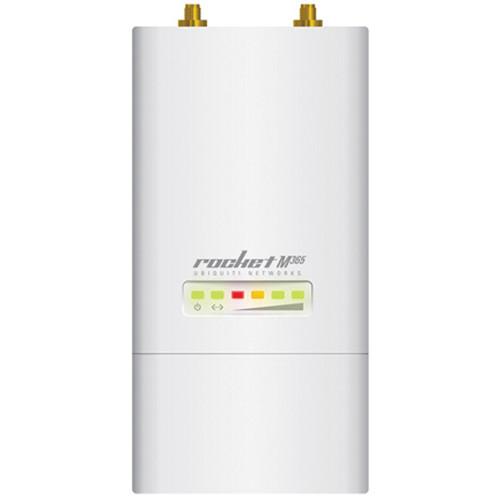 Contents of the user manual for the Ubiquiti Networks Rocket M365 MIMO airMAX
- Product category: Wireless Bridges Ubiquiti Networks
- Brand: Ubiquiti Networks
- Description and content of package
- Technical information and basic settings
- Frequently asked questions – FAQ
- Troubleshooting (does not switch on, does not respond, error message, what do I do if...)
- Authorized service for Ubiquiti Networks Wireless Bridges
|
User manual for the Ubiquiti Networks Rocket M365 MIMO airMAX contain basic instructions
that need to be followed during installation and operation.
Before starting your appliance, the user manual should be read through carefully.
Follow all the safety instructions and warnings, and be guided by the given recommendations.
User manual is an integral part of any Ubiquiti Networks product,
and if it is sold or transferred, they should be handed over jointly with the product.
Following the instructions for use is an essential prerequisite for protecting
health and property during use, as well as recognition of liability on the part of the manufacturer
for possible defects should you make a warranty claim. Download an official Ubiquiti Networks user manual in which you will find instructions on how to install, use, maintain and service your product.
And do not forget – unsuitable use of a Ubiquiti Networks product will considerably shorten its lifespan!
|
Product description The Ubiquiti Networks Rocket M365 MIMO airMAX BaseStation features enhanced radio performance and waterproof, durable construction. Its carrier-class capabilities provide speeds of up to 150+ Mbps. The M365 features Ethernet (10/100 Mbps) connection that delivers high throughput for reliable data transfers. The rugged enclosure is designed to improve performance in harsh RF environments and in volatile weather conditions. The M365 may be deployed in PtP bridging or PtMP airMAX BaseStation applications. It supports plug-and-play integration with your choice of airMAX antennas. This versatility gives network architects unparalleled flexibility and convenience. Plus, Ubiquiti's Time Division Multiple Access (TDMA) airMAX protocol allows each client to send and receive data using pre-designated time slots, scheduled by an intelligent AP controller. Other features include airView advanced spectrum analyzer functionality, access to airControl network management tools, and the convenience of an intuitive user interface design thanks to the airOS 5 operating system. - Flexibility
- The Rocket is available in a variety of frequency models that are designed to support your specific application. The M365 model works within the 3.65 GHz frequency band, which gives you the freedom to locate, deploy, and operate the unit in an unlicensed band (subject to local country regulations). The Rocket also allows for a high degree of flexibility in configuring channel bandwidths, depending on the specific model and local country regulations.
- Plug-&-Play Integration
- Rocket radios and airMAX antennas have been designed to work seamlessly together. Every airMAX Sector, RocketDish, Omni, or Yagi antenna has a built-in Rocket mount, so installation requires no special tools. Snap the Rocket securely into place and mount the antenna; then you have the optimal combination of Rocket radio and airMAX antenna for your PtP or PtMP application.
- airMAX Technology Included
- Unlike standard Wi-Fi protocol, Ubiquiti's Time Division Multiple Access (TDMA) airMAX protocol allows each client to send and receive data using pre-designated time slots scheduled by an intelligent AP controller. This time slot method eliminates hidden node collisions and maximizes airtime efficiency. It also provides high-performance latency, throughput, and scalability.
- Intelligent QoS
- Intelligent QoS priority is given to voice/video for seamless streaming.
- Scalability & Throughput
- The M365 supports speeds of up to 150+ Mbps real TCP/IP throughput, as well as impressive scalability to handle growing workloads and high-capacity applications.
- Designed for Long Distance
- The M365 is capable of high-speed, carrier-class links.
- airOS
- airOS is a versatile Ubiquiti firmware technology. It is an intuitive and user-friendly software that requires no training to operate. Behind the user interface is a powerful firmware architecture that enables high performance and outdoor multi-point networking. It features channel shifting, spectral width adjustment, ACK auto-timing, AAP technology, DHCP relay, protocol support, multiple VLAN support, and multi-language support.
- airOS 5 Advanced Operating System
- Built upon an intuitive user interface foundation, airOS 5 is an advanced operating system for airMAX M Series products that provides airMAX protocol support, long-range PtP link mode, automatic/manual transmit power control, automatic distance selection (ACK Timing), device statistics, and diagnostic tools.
- airView Functionality
- airView provides advanced spectrum analyzer functionality. Waterfall (aggregate energy over time for each frequency), waveform (aggregate energy collected), and real-time (energy is shown in real time as a function of frequency) spectral views allow operators to identify noise signatures and plan networks to minimize noise interference. You can also automate airView to record and report results.
- airControl Network Management
- airControl is a powerful and intuitive, Web-based server network management application that allows operators to centrally manage entire networks of Ubiquiti devices. It features a network map, device status monitoring, mass firmware upgrades, Web UI access, support for managing groups of devices, and task scheduling capabilities.
UPC: 810354021565 In the Box Ubiquiti Networks Rocket M365 MIMO airMAX BaseStation 24V PoE Adapter Power Cord Metal Strap Limited 1-Year Warranty Table of Contents
|
Upload User Manual
Have you got an user manual for the Ubiquiti Networks Rocket M365 MIMO airMAX BaseStation in electronic form? Please send it to us and help us expand our library of instruction manuals.
Thank you, too, on behalf of other users.
To upload the product manual, we first need to check and make sure you are not a robot. After that, your "Submit Link" or "Upload File" will appear.
Technical parametersUbiquiti Networks Rocket M365 Specs | Frequency Band | 3.65 GHz | | Operating Frequency Range | 3650 ‐ 3675 MHz | | Output Power | 25 dBm | | Processor | MIPS 24 Kc | | Memory | 64 MB (SDRAM)
8 MB (Flash) | | Networking Interface | LAN Ethernet (10/100 Mbps) x 1 | | RF Connectors | RP‐SMA (Waterproof) x 2 | | LED Indicators | Power LED x 1
Ethernet LED x 1
Signal Strength LED x 4 | | Enclosure Material | Outdoor UV Stabilized Plastic | | Shock and Vibration | ETSI300-019-1.4 | | Software Features | Modes: Access Point, Station
Services: Web Server, SNMP, SSH Server, Telnet, Ping Watchdog, DHCP, NAT, Bridging, Routing
Utilities: Antenna Alignment Tool, Discovery Utility, Site Survey, Ping, Traceroute, Speed Test
Distance Adjustment: Dynamic Ack and Ackless Mode
Power Adjustment: Software Adjustable UI or CLI
Security: WPA2 AES Only
QoS: Supports Packet Level Classification WMM and User Customer Level (High/Medium/Low)
Statistical Reporting: Up Time, Packet Errors, Data Rates, Wireless Distance, Ethernet Link Rate
Other Info: Remote Reset Support, Software Enabled/Disabled, VLAN Support, 64QAM, 5/8/10/20/30/40 MHz Channel Width Support
Ubiquiti Specific Features: airMAX Mode, Traffic Shaping with Burst Support, Discovery Protocol, Frequency Band Offset, Ackless Mode | | Compliance | Wireless Approvals: FCC, IC, CE
RoHS Compliance: Yes | | Power Method | Passive PoE (pairs 4, 5+ ; 7, 8 return) | | Power Supply | 24 V / 1 A PoE adapter (included) | | Maximum Power Consumption | 6.5 W | | ESD/EMP Protection | ± 24 KV (air/contact) | | Operating Temperature | -22 to 167°F (-30 to 75°C) | | Operating Humidity | 5 to 95% (non-condensing) | | Dimensions (WxHxD) | 3.2 x 6.3 x 1.2" (80 x 160 x 30 mm) | | Weight | 1.1 lb (500 g) | | | | Package Weight | 1.55 lb | | Box Dimensions (LxWxH) | 9.2 x 5.0 x 3.2" |
Rating100% users recommend this product to others. And what about you?

This product has already been rated by 50 owners. Add your rating and experience with the product.
Discussion
 Ask our technicians if you have a problem with your settings,
or if anything is unclear in the user manual you have downloaded.
You can make use of our moderated discussion.
The discussion is public and helps other users of our website who may be encountering similar problems.
Ask our technicians if you have a problem with your settings,
or if anything is unclear in the user manual you have downloaded.
You can make use of our moderated discussion.
The discussion is public and helps other users of our website who may be encountering similar problems.
The discussion is empty - enter the first post
Post a new topic / query / comment:
|
|
|
| Request for user manual |
You can’t find the operation manual you are looking for? Let us know and we will try to add the missing manual:
I’m looking for a manual / Request for manual
Current requests for instruction manuals:
Call Of Duty World War Two For Xbox...
controller stratus XL...
stratus XL...
smart whatch serie S11 42mm...
Allen & Heath SQ-6 manual...
|
| Discussion |
Latest contributions to the discussion:
AEW R 4100
Name: MAURICIO ANGARITA
Audio-Technica AEW-R4100 UHF Diversity Receiver for
AEW R 4100 has the mute function blocked and does not allow audio to pass. I tried several times to turn off the mute from the transmitter but it does nothing, the mute stays on. Solution?
Thank you...
Instructions for assembling the 2015 Forecast Image Master Consoles GC3-A
Name: mike elam
Forecast Consoles GC3-A ImageMaster Editing Console
Looking for instructions for assembling this console. ...
EMPTY TONER ERROR MESSAGE AFTER REPLACING TONER
Name: LINDA BAD YELLOW EYES
Brother TN223BK Standard-Yield Toner
I HAD TO CHANGE OUT ALL THREE TONERS DUE TO LEAKS IN THE YELLOW AND CYAN. AFTER I REPLACED THEM, THE MACHINE KEEPS GIVING ME AN EMPTY TONER ERROR MESSAGE. HELP!!...
PS480D 20/24 pin Switching 480W Power Supply
Name: swkargo
Logisys 480W Power Supply
This item states in can run -5vdc .It is NOT listed on the board or I beleive is r4 is missing the resitior. Any body have thid issue. Shawn
...
Help needed
Name: Ann Carter
SanDisk 1TB Extreme Portable USB 3.1
When I click the link to download the user manual for my Sandisk Extreme external hard drive, it gives me the manual for the LG Cricket. Can you please change the link so I can download the Sandisk manual and begin using this drive? Thank you....
|
|


