User Manual for Vello Accessory Kit for Nikon D850 Click to enlarge the picture
 Contents of the user manual for the Vello Accessory Kit for Nikon D850
- Product category: Accessory Kits Vello
- Brand: Vello
- Description and content of package
- Technical information and basic settings
- Frequently asked questions – FAQ
- Troubleshooting (does not switch on, does not respond, error message, what do I do if...)
- Authorized service for Vello Accessory Kits
|
User manual for the Vello Accessory Kit for Nikon D850 contain basic instructions
that need to be followed during installation and operation.
Before starting your appliance, the user manual should be read through carefully.
Follow all the safety instructions and warnings, and be guided by the given recommendations.
User manual is an integral part of any Vello product,
and if it is sold or transferred, they should be handed over jointly with the product.
Following the instructions for use is an essential prerequisite for protecting
health and property during use, as well as recognition of liability on the part of the manufacturer
for possible defects should you make a warranty claim. Download an official Vello user manual in which you will find instructions on how to install, use, maintain and service your product.
And do not forget – unsuitable use of a Vello product will considerably shorten its lifespan!
|
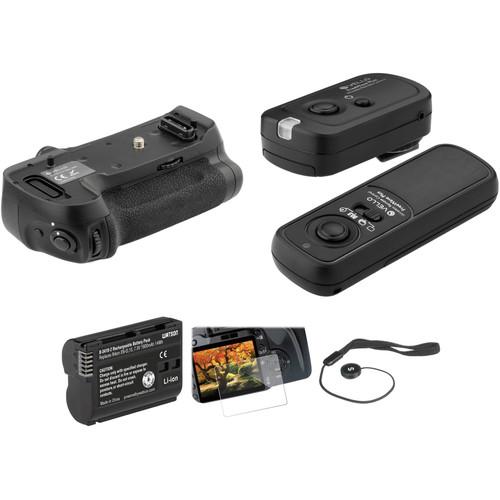
Product description Reach your camera's full potential with the Vello Accessory Kit for Nikon D850 from that includes the BG-N19-2 Battery Grip and a Watson EN-EL15 battery, which resides within the grip and doubles the camera's battery life. It also offers a vertical shutter button. To fire your camera wirelessly, the remote has 16 channels to choose from, and a wireless range of 320'. The LCD Screen Protector Ultra defends against damage, and the Cap Keeper ensures your lens cap does not get lost. - Vello BG-N19-2 Battery Grip for Nikon D850 Shoot for longer and improve the ergonomics of your Nikon D850 DSLR with the BG-N19-2 Battery Grip from Vello. This accessory can hold an additional EN-EL15a battery to effectively double your shooting time, and offers a shutter-release button for easy vertical shooting as well as two command dials, AF-ON button, and Function button. The grip can also be used with an EN-EL18b battery when paired with the BL-5 cover (for up to 9 fps), or power the camera directly via AC with an EP-5B power supply connector and EH-5c adapter combination. It can even accept eight AA batteries when deployed with an alternate battery plate; just make sure to select the correct AA battery type in the D850's setup menu.To install the grip, remove the contact protectors from both the grip and the camera and align the mounting screw with the D850's tripod socket. An attachment wheel helps ensure a secure fit, while the contact cover from the camera can be kept in a dedicated holder on the grip to prevent its loss. For use with a tripod or monopod, the BG-N19-2 offers a 1/4"-20 threaded slot at the bottom for easy mounting. Finally, a control lock switch next to the shutter-release locks all buttons on the grip to prevent accidental triggering. Note: Not compatible with earlier EN-EL18 or EN-EL18a version
- Functionality
-
- Shutter-release button on grip allows for easy shooting in portrait mode
- Two command dials for controlling exposure settings
- AF-ON button for activating autofocus without pressing the shutter-release button
- Programmable Function button allows for customizable operation
- Control lock switch locks all buttons on the grip, prevents accidental triggering
- 1/4"-20 threaded mount at the bottom for use with a tripod, monopod, or other compatible stands
- Dedicated contact cover slot, holds the camera's protective rubber piece for safe storage
- Push button for ejecting battery inside the holder
- Power Options
-
- Accepts regular EN-EL15a battery from D850 to effectively double shooting time
- Can be used with optional BL-5 battery chamber cover to hold an optional EN-EL18b battery (for up to 9 fps)
- Alternate battery tray allows you to power the camera with eight AA batteries (ensure the correct battery type is selected on the D850's setup menu)
- Supports EP-5B power supply connector for use with the EH-5c AC adapter
UPC: 847628008489 - Watson EN-EL15 Lithium-Ion Battery Pack (7.0V, 1900mAh) This second version of the Watson EN-EL15 Lithium-Ion Battery Pack works with all cameras that take the Nikon EN-EL15. This replacement pack features a 1900-2000mAh capacity, 7.0V of output power, and 14 watt-hours. Small and lightweight, lithium-ion batteries can be charged or discharged at any time without developing memory effect.
- Compatible Cameras
-
- Z6
- Z7
- 1 V1
- D600
- D610
- D750
- D800
- D800E
- D810
- D810A
- D850
- D7000
- D7100
- D7200
- D7500
UPC: 847628598140 - Vello LCD Screen Protector Ultra for Nikon Df, D4s, D7100, D7200, D500, D610, D750, D810 & D850 Camera This LCD Screen Protector Ultra from Vello is a sheet of ultra-thin (0.02") optical glass used to safeguard the LCD monitor of the Nikon Df, D4, D4s, D7100, D7200, D500, D600, D610, D750, D800, D810, and D850. It easily adheres to the screen via static, without trapping air bubbles, and if removed, won't leave a sticky residue behind. Multiple layers of protective material shield your display from dirt, scratches, sweat, smears, and light impact. The shatter-proof glass blocks UV rays while allowing visible light in. It can be easily cleaned using the supplied microfiber cloth and wet wipe.
- Camera Compatibility
-
Nikon:- D800
- D800E
- D810
- D850
- D500
- D600
- D610
- D7200
- D3
- D3s
- D3x
- D4
- D4s
- D5
- Df
UPC: 847628561199 - Vello FreeWave Plus Wireless Remote Shutter Release for Nikon Trigger your camera's shutter wirelessly with the FreeWave Plus Wireless Remote Shutter Release from Vello, a lightweight remote control system that will help you avoid unwanted camera movement. This 2.4 GHz model is compatible with Nikon cameras and will work both wired and wirelessly up to 320', depending on your own needs and setup. This makes it useful for photographing wildlife or for macro and long exposures where it is necessary to eliminate any chance of camera shake.
The FreeWave system also has access to 16 channels for triggering multiple receivers and has an internal antenna that will be protected from any accidental damage. Multiple features are available for shooting, such as a four-second delay as well as multi-exposure and long exposure modes. The device also has a dual function release, enabling focus on half press and triggering the shutter release on a full press. Additionally, it has LED indicators to confirm pre-focus and exposure while in wireless mode and the receiver and transmitter each run on two AAA batteries. - Compatible Cameras
- Nikon: D5, D4S, D4, D3x, D3s, D3, D2Xs, D2X, D2Hs, D2H, D2, D1X, D1H, D1, D850, D810, D800, D800e, D700, D500, D300s, D300, D200
D750, D610, D600, Df, D7500, D7200, D7100, D7000, D90, D5600, D5500, D5300, D5200, D5100, D5000, D3300, D3200, D3100, Z7, Z6; Coolpix A, P7800, P7700
Fuji: S3 and S5
Kodak: DCS-14N UPC: 847628029514 - Sensei Cap Keeper Plus Lens Cap Holder The Cap Keeper Plus Lens Cap Holder from Sensei prevents the loss of lens caps. An adhesive-backed disc secures the lens cap to the elastic leash which wraps around the lens barrel. With the lens cap removed from the lens while shooting, it hangs out of the way but secure and within reach for easy retrieval. The Cap Keeper Plus is made with tough and extremely secure elastic. UPC: 847628553064
In the Box - BG-N19-2 Battery Grip for Nikon D850
- EN-EL15a Battery Holder
- AA Battery Holder
- Limited 1-Year Warranty
- Watson - EN-EL15 Lithium-Ion Battery Pack (7.0V, 1900mAh)
- LCD Screen Protector Ultra for Nikon Df, D4s, D7100, D7200, D500, D610, D750, D810 & D850 Camera
- FreeWave Plus Wireless Remote Shutter Release for Nikon
- Sensei - Cap Keeper Plus Lens Cap Holder bywwurqvyeuzyuzrutat
Table of Contents
|
Upload User Manual
Have you got an user manual for the Vello Accessory Kit for Nikon D850 in electronic form? Please send it to us and help us expand our library of instruction manuals.
Thank you, too, on behalf of other users.
To upload the product manual, we first need to check and make sure you are not a robot. After that, your "Submit Link" or "Upload File" will appear.
Technical parameters - Vello BG-N19-2 Battery Grip for Nikon D850
| Battery Type | 1 x Battery Pack (EN-EL15a) 1 x Battery Pack (EN-EL18b with BL-5 Cover) 8 x (AA) | | Tripod Mounting Thread | 1/4"-20 Female | | Dimensions (L x W x H) | 6.0 x 3.1 x 2.0" / 15.2 x 7.9 x 5.1 cm | | Weight | 8 oz / 226.8 g | | | | Box Dimensions (LxWxH) | 6.1 x 4.9 x 3.2" | - Watson EN-EL15 Lithium-Ion Battery Pack (7.0V, 1900mAh)
| Chemistry | Lithium-ion | | Capacity | Min: 1900 mAh
Max: 2000 mAh | | Output Voltage | 7.0 V | | Watt-Hours | 14 Wh | | | | Box Dimensions (LxWxH) | 3.2 x 2.5 x 1.3" | - Vello LCD Screen Protector Ultra for Nikon Df, D4s, D7100, D7200, D500, D610, D750, D810 & D850 Camera
| Material | Glass | | Thickness | 19.69 mil / 0.5 mm | | | | Box Dimensions (LxWxH) | 3.8 x 3.8 x 0.9" | - Vello FreeWave Plus Wireless Remote Shutter Release for Nikon
| Release Type | Wireless: RF (Radio Frequency) | | Camera Connection | Nikon 10-pin | | Channels | 16 | | Wireless Frequency | 2.4 GHz | | Interval Timer/Programmable | No | | Live View | No | | Mobile Device/App-enabled | No | | Shutter Modes | Bulb, Continuous, Single Shot, 4-Second Delay, 1-Second Continuous | | Wireless Range | 328' / 100 m | | Receiver Power Source | Battery | | Receiver Battery Requirements | 2 x AAA | | Transmitter Power Source | Battery | | Transmitter Battery Requirements | 2 x AAA | | | | Box Dimensions (LxWxH) | 8.7 x 4.1 x 1.5" | - Sensei Cap Keeper Plus Lens Cap Holder
| | | Box Dimensions (LxWxH) | 4.0 x 2.5 x 0.01" |
Rating80% users recommend this product to others. And what about you?

This product has already been rated by 77 owners. Add your rating and experience with the product.
Discussion
 Ask our technicians if you have a problem with your settings,
or if anything is unclear in the user manual you have downloaded.
You can make use of our moderated discussion.
The discussion is public and helps other users of our website who may be encountering similar problems.
Ask our technicians if you have a problem with your settings,
or if anything is unclear in the user manual you have downloaded.
You can make use of our moderated discussion.
The discussion is public and helps other users of our website who may be encountering similar problems.
The discussion is empty - enter the first post
Post a new topic / query / comment:
|
|


