User Manual for Vello FreeWave Fusion Pro Kit with 2 Receivers for Canon DSLRs Click to enlarge the picture
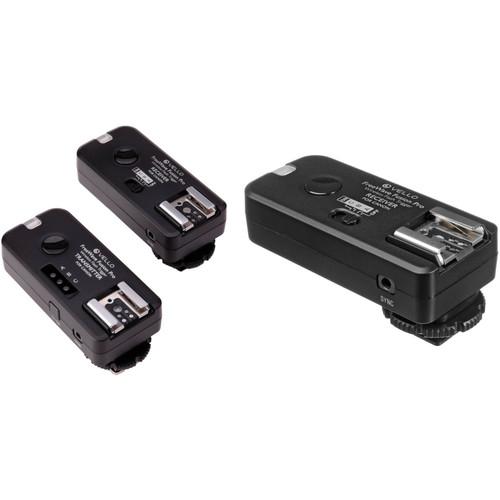 Contents of the user manual for the Vello FreeWave Fusion Pro Kit with
- Product category: Radio & Infrared Transmitters Vello
- Brand: Vello
- Description and content of package
- Technical information and basic settings
- Frequently asked questions – FAQ
- Troubleshooting (does not switch on, does not respond, error message, what do I do if...)
- Authorized service for Vello Radio & Infrared Transmitters
|
User manual for the Vello FreeWave Fusion Pro Kit with contain basic instructions
that need to be followed during installation and operation.
Before starting your appliance, the user manual should be read through carefully.
Follow all the safety instructions and warnings, and be guided by the given recommendations.
User manual is an integral part of any Vello product,
and if it is sold or transferred, they should be handed over jointly with the product.
Following the instructions for use is an essential prerequisite for protecting
health and property during use, as well as recognition of liability on the part of the manufacturer
for possible defects should you make a warranty claim. Download an official Vello user manual in which you will find instructions on how to install, use, maintain and service your product.
And do not forget – unsuitable use of a Vello product will considerably shorten its lifespan!
|
Product description The Vello FreeWave Fusion Pro Kit with 2 Receivers for Canon DSLRs put together by B&H is a versatile, reliable remote control kit that will trigger off-camera flash units and studio lights from up to 600' away. It can be used to configure up to three different light groups, which can be triggered individually or simultaneously, for a total of seven different combinations using its multiple groups feature. Simultaneous triggering of multiple lights requires separate purchase of additional FreeWave Fusion Pro Receivers.The FreeWave Fusion Pro also provides the convenience of a wireless camera shutter release, ideal for photographing wildlife, and also for macro and close-up photos or long exposures where the slightest camera movement can ruin a picture. Working on the 2.4GHz frequency gives you reduced radio interference and an extended range up to 600', and since radio signals pass through obstructions you don't need to position them in line-of-sight. The FreeWave Fusion Pro is compatible with most cameras, flash units and studio lights. The transmitter connects to the hot shoe of the camera. In case the hot shoe is needed for another function, the transmitter can alternatively connect to the camera's PC plug via its 3.5mm sync plug (PC cable not included). The transmitter also features a top hot shoe, which fully supports E-TTL metering when used with Canon TTL compatible components. This allows you to keep a TTL flash mounted on top of the camera, while using the transmitter to control off-camera flash units (in manual mode) via radio signal. Note!
Since the FreeWave Fusion Pro does not transmit TTL settings, use of a flash or light unit with full manual control is recommended. You will need to set the power output manually.
The FreeWave Fusion Pro is compatible with most cameras, flash units and studio lights. However, for flash wake-up functionality and/or high shutter speeds, you will need full Canon TTL support via your camera, flash and FreeWave Fusion Pro trigger. Included Shutter Release Cables Support:
Canon EOS: Elan series, Digital Rebel (300D), XT (350D), XTi (400D), XSi (450D), T1i (500D), T2i (550D), T3 (1100D), T3i (600D), T4i (650D), T5i (700D), SL1 (100D) and XS (1000D), 60D & 70D
10D, 20D, 30D, 40D, 50D, 5D, 5D Mark II, 5D Mark III, 6D, 7D, 1D, 1D Mark II, 1D Mark II N, 1D Mark III, 1D Mark IV, 1Ds, 1Ds Mark II, 1Ds Mark III, 1D X and 1D C
PowerShot G10, G11, G12, G15, G16 & G1 X
Contax: N and 645
Hasselblad: H series
Pentax: K10D, K20D, K100D, K110D, K200D, K-3, K-5, K-5 II, K-7, K30, K-50, K-500, *istDS, DS2, DS, DL2, DL, and D
Samsung: NX10 & NX100; GX-1S, GX-1L, GX-10 & GX-20
Sigma: SD1, SD9, SD10, SD14 & SD15 - Vello FreeWave Fusion Pro Wireless Flash Trigger and Remote Control for Canon DSLRs
- Vello FreeWave Fusion Remotes
The FreeWave Fusion Pro Wireless Flash Trigger and Remote Control for Canon DSLRs from Vello is a versatile, reliable remote control kit that will trigger off-camera flash units and studio lights from up to 600' away. It can be used to configure up to three different light groups, which can be triggered individually or simultaneously, for a total of seven different combinations, using its multiple groups feature. Simultaneous triggering of multiple lights requires separate purchase of additional FreeWave Fusion Pro Receivers. The FreeWave Fusion Pro also provides the convenience of a wireless camera shutter release, ideal for photographing wildlife, and also for macro and close-up photos or long exposures, where the slightest camera movement can ruin a picture. Working on the 2.4 GHz frequency gives you reduced radio interference and an extended range up to 600', and since radio signals pass through obstructions you don't need to position them in line-of-sight. Four RF channels are available to prevent interference from other users. The FreeWave Fusion Pro is compatible with most cameras, flash units, and studio lights. The transmitter connects to the hot shoe of the camera. In case the hot shoe is needed for another function, the transmitter can alternatively connect to the camera's PC plug via its 3.5mm sync plug (PC cable not included). The transmitter also features a top hot shoe, which fully supports E-TTL metering when used with Canon TTL compatible components. This allows you to keep a TTL flash mounted on top of the camera, while using the transmitter to control off-camera flash units (in manual mode) via radio signal. Note: Since the FreeWave Fusion Pro does not transmit TTL settings, use of a flash or light unit with full manual control is recommended. You will need to set the power output manually.
The FreeWave Fusion Pro is compatible with most cameras, flash units and studio lights. However, for flash wake-up functionality and/or high shutter speeds, you will need full Canon TTL support via your camera, flash and FreeWave Fusion Pro trigger.
This remote does not provide high-voltage sync protection, and is not recommended for use with flash units that have a trigger voltage of more than 6V. - 2.4 GHz Radio Frequency
- Reduced interference and improved wireless signal quality.
- Extended Range
- Range up to 600'.
- Multi-Purpose
- Use as an individual or group wireless flash trigger, and/or as a shutter release remote trigger.
- Multiple Groups
- Configure up to three different light groups and up to seven different group combinations.
- Flash Sync Speed up to 1/200 sec
- Take advantage of sync speeds that match the rating of your camera all the way up to 1/200 sec on compatible cameras.
- TTL Pass-Through
- The transmitter features a top hot shoe, which fully supports TTL metering when used with TTL compatible components. This pass-through feature allows you to fire both TTL-controlled flash units controlled by the camera and manual units triggered by the transmitter, at the same time.
- Flash Wake Up
- Simply depress the trigger button on the transmitter half-way to pull the flash out of sleep mode. Sleep mode allows the flash to power down in between shooting sessions to extend battery life. The wake-up function is only available when used as part of a complete Canon TTL system. The wake up function can be switched off for flash units without a sleep mode.
- Versatile
- One receiver works with multiple camera and light models. Just swap out the connecting cables.
- Dual-Function Shutter Release Button
- Press halfway to focus; press fully to trigger shutter.
- LED Indicators
- Confirm pre-focus, shutter release, flash wake-up, and flash trigger in wireless mode.
- Included Shutter Release Cables Support:
- Canon EOS: Elan series, Digital Rebel (300D), XT (350D), XTi (400D), XSi (450D), T1i (500D), T2i (550D), T3 (1100D), T3i (600D), T4i (650D), T5i (700D), T6i (750D), T6s (670D), SL1 (100D) and XS (1000D), 60D, & 70D
10D, 20D, 30D, 40D, 50D, 5D, 5D Mark II, 5D Mark III, 6D, 7D, 1D, 1D Mark II, 1D Mark II N, 1D Mark III, 1D Mark IV, 1Ds, 1Ds Mark II, 1Ds Mark III, 1D X, and 1D C
PowerShot G10, G11, G12, G15, G16, & G1
Contax: N and 645
Hasselblad: H series
Pentax: K10D, K20D, K100D, K110D, K200D, K-3, K-5, K-5 II, K-7, K30, K-50, K-500, *istDS, DS2, DS, DL2, DL, & D
Samsung: NX10 & NX100; GX-1S, GX-1L, GX-10, & GX-20
Sigma: SD1, SD9, SD10, SD14, & SD15
Flash:
All Canon TTL flash units - Optional shutter release cables are available to make the remote control function compatible with other brand camera models.
UPC: 847628561304 - Vello FreeWave Fusion Pro Wireless Flash Receiver / Remote Control for Canon DSLRs
- Vello FreeWave Fusion Remotes
The FreeWave Fusion Pro Receiver for Canon DSLRs from Vello is part of the versatile FreeWave Fusion Pro Wireless system that controls flashes and cameras from up to 600'. You'll need the FreeWave Fusion Pro Remote Transmitter (available separately) which employs 4 different channels to avoid interference from other wireless devices. The complete system is capable of handling 3 groups of flashes or cameras with 7 group combinations. Simultaneous triggering of additional lights or cameras requires separate purchase of a receiver for each additional device. The FreeWave Fusion Pro is compatible with most cameras, flash units and studio lights. However, for flash wake-up functionality and/or high shutter speeds, you will need full Canon TTL support via your camera, flash and FreeWave Fusion Pro trigger. Note: This remote does not provide high-voltage sync protection, and is not recommended for use with flash units that have a trigger voltage of more than 6V. - For FreeWave Fusion Pro System
- Extra Receiver for the FreeWave Fusion Pro system.
- Versatile
- Receiver works with multiple camera and light models. Just swap out the connecting camera release cables (available separately).
- Flash Wake-Up
- Sleep mode allows the flash to power down in between shooting sessions to extend battery life. Simply depress the trigger button on the transmitter half-way to pull the flash out of sleep-mode. The wake-up function is only available when used as part of a complete Canon TTL system. If your flash does not have a wake up function, you may turn off sleep mode.
UPC: 847628561311 In the Box - FreeWave Fusion Pro Wireless Flash Trigger and Remote Control for Canon DSLRs xrbctfzatdafqtwrcbbscrbzffazrzurwyw
- FreeWave Fusion Pro Transmitter
- FreeWave Fusion Pro Receiver
- 3.5mm Remote Shutter Release Cable for Cameras with 2.5mm Sub-Mini Connections
- 3.5mm Remote Shutter Release Cable for Canon 3-Pin Cameras
- Studio Trigger Cable (3.5mm Mini to 3.5mm Mini)
- Studio Trigger Adapter (3.5mm Mini to 1/4" Phono)
- 4 x AAA Batteries
- Limited 1-Year Warranty
- FreeWave Fusion Pro Wireless Flash Receiver / Remote Control for Canon DSLRs
Table of Contents
|
Upload User Manual
Have you got an user manual for the Vello FreeWave Fusion Pro Kit with 2 Receivers for Canon DSLRs in electronic form? Please send it to us and help us expand our library of instruction manuals.
Thank you, too, on behalf of other users.
To upload the product manual, we first need to check and make sure you are not a robot. After that, your "Submit Link" or "Upload File" will appear.
Technical parameters - Vello FreeWave Fusion Pro Wireless Flash Trigger and Remote Control for Canon DSLRs
| | | Channels | 4 | | Groups | 7 | | Wireless Range | 600' / 182.9 m | | Radio Frequency | 2.4 GHz | | | | Dimensions | 3.3 x 1.5 x 1.4" / 83 x 38 x 35 mm (Transmitter)
3.3 x 1.5 x 1.4" / 83 x 38 x 35 mm (Receiver) | | Weight | 1.7 oz / 48 g (Transmitter)
1.5 oz / 42 g (Receiver) | | | | Box Dimensions (LxWxH) | 8.5 x 3.9 x 1.6" | - Vello FreeWave Fusion Pro Wireless Flash Receiver / Remote Control for Canon DSLRs
| | | Channels | 4 | | Groups | 7 | | Wireless Range | 600' / 182.9 m | | Radio Frequency | 2.4 GHz | | | | Dimensions | 3.3 x 1.5 x 1.4" / 83 x 38 x 35 mm (Receiver) | | Weight | 1.5 oz / 42.5 g | | | | Box Dimensions (LxWxH) | 7.5 x 3.9 x 1.7" |
Rating100% users recommend this product to others. And what about you?

This product has already been rated by 78 owners. Add your rating and experience with the product.
Discussion
 Ask our technicians if you have a problem with your settings,
or if anything is unclear in the user manual you have downloaded.
You can make use of our moderated discussion.
The discussion is public and helps other users of our website who may be encountering similar problems.
Ask our technicians if you have a problem with your settings,
or if anything is unclear in the user manual you have downloaded.
You can make use of our moderated discussion.
The discussion is public and helps other users of our website who may be encountering similar problems.
The discussion is empty - enter the first post
Post a new topic / query / comment:
|
|


