User Manual for Vello FreeWave Stryker II Motion Sound Lightning Trigger Kit for Select Nikon Fujifilm Cameras Click to enlarge the picture
 Contents of the user manual for the Vello FreeWave Stryker II Motion Sound
- Product category: Camera Trigger Systems Vello
- Brand: Vello
- Description and content of package
- Technical information and basic settings
- Frequently asked questions – FAQ
- Troubleshooting (does not switch on, does not respond, error message, what do I do if...)
- Authorized service for Vello Camera Trigger Systems
|
User manual for the Vello FreeWave Stryker II Motion Sound contain basic instructions
that need to be followed during installation and operation.
Before starting your appliance, the user manual should be read through carefully.
Follow all the safety instructions and warnings, and be guided by the given recommendations.
User manual is an integral part of any Vello product,
and if it is sold or transferred, they should be handed over jointly with the product.
Following the instructions for use is an essential prerequisite for protecting
health and property during use, as well as recognition of liability on the part of the manufacturer
for possible defects should you make a warranty claim. Download an official Vello user manual in which you will find instructions on how to install, use, maintain and service your product.
And do not forget – unsuitable use of a Vello product will considerably shorten its lifespan!
|
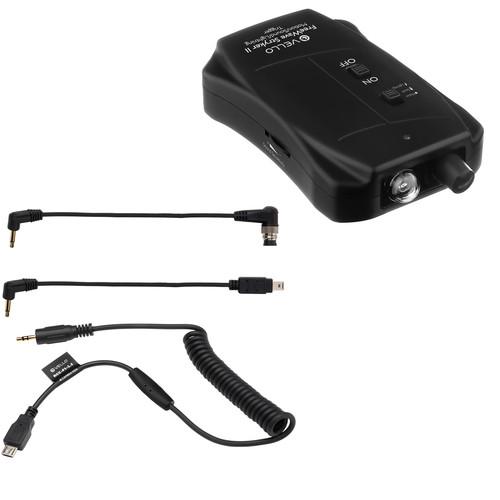
Product description Make sure you can capture some of the most fleeting subjects by picking up this Vello FreeWave Stryker II Motion/Sound/Lightning Trigger Kit from , which provides photographers with a motion-, sound-, and lightning-sensitive trigger and appropriate connection cables for select Nikon and Fujifilm cameras. - Vello FreeWave Stryker II Motion/Sound/Lightning Trigger for Select Nikon Cameras For capturing short-lived scenes and unpredictable objects, a dedicated device such as the FreeWave Stryker II Motion/Sound/Lightning Trigger from Vello will help photographers by triggering a Nikon camera after detecting motion, sound, or a lightning flash. The portable unit features a passive IR sensor with a 16.4' range to detect motion and has an angle of view of 94° H x 82° V, allowing fast-moving subjects to be captured with ease. Also, for items that make a distinct noise, like a popping balloon, a microphone is incorporated into the unit to detect sound from up to 6.5' away when outdoors. Along with this, a light sensor can be used to help capture lightning by registering bright flashes of light and triggering within 0.1 ms.
In order to adjust sensitivity, dials for lightning and sound are available on each side of the unit. It easily connects to a camera using the included 2.5mm remote cables. Also, it mounts via a locking foot or a 1/4"-20 thread, permitting use on camera, stand, or other support system. Included with the camera is a mounting arm, which slides into the camera's hot shoe and extend the trigger's sensors to avoid interference. Additionally, it runs on two AAA batteries. - Detects motion, sound, and lightning
- Light sensor response time of just 0.1 ms
- Motion sensor has an effective range of 16.4' and field of view of 94° H x 82° V
- Sensitivity dials for lightning and sound
- Microphone is rated to pick up sounds from up to 6.5' away when outdoors or up to 11.5' indoors
- LED indicator lights up when sensitivity is set too high for current environment
- Uses 2.5mm remote cables to connect to camera
- Compatible Cameras
- Nikon: D1, D1H, D1X, D2, D2H, D2Hs, D2X, D2Xs, D3, D3s, D3x, D4, D4s, D5, D200, D300, D300s, D500, D700, D800, D800e, D810 and D850
Df, D90, D600, D610, D750, D3100, D3200, D3300, D5000, D5100, D5200, D5300, D7000 and D7100; CoolPix A, P7700, P7800
Fuji: S3 and S5
Kodak: DCS-14N UPC: 847628594715 - Vello 2.5mm Remote Shutter Release Cable for Select Fujifilm Cameras This Vello 2.5mm Remote Shutter Release Cable is a coiled cable for connecting a Vello remote shutter release receiver or other remote receiver with a 2.5mm jack to select Fujifilm cameras.
- Compatibility
- Fujifilm X-H1, X-PRO2, X-T2, X-T1, X-T20, XT10, X-T100, X-E3, X-E2s, X-E2, X-A5, X-A3, X-A10, X-A2, X-M1, X-100F, X-100T, X70, X30, XF10
UPC: 847628588196 In the Box - FreeWave Stryker II Motion/Sound/Lightning Trigger for Select Nikon Cameras yryqqcwfrbebsaerbfzfzqxwwa
- 2.5mm Remote Shutter Release Cable for Nikon 10-Pin Cameras
- 2.5mm Remote Shutter Release Cable for Nikon DC-2 Cameras
- Mounting Arm
- Limited 1-Year Warranty
- 2.5mm Remote Shutter Release Cable for Select Fujifilm Cameras
Table of Contents
|
Upload User Manual
Have you got an user manual for the Vello FreeWave Stryker II Motion Sound Lightning Trigger Kit for Select Nikon Fujifilm Cameras in electronic form? Please send it to us and help us expand our library of instruction manuals.
Thank you, too, on behalf of other users.
To upload the product manual, we first need to check and make sure you are not a robot. After that, your "Submit Link" or "Upload File" will appear.
Technical parameters - Vello FreeWave Stryker II Motion/Sound/Lightning Trigger for Select Nikon Cameras
| Motion Detection Range | 16.4' / 5 m | | PIR Detection Area | Horizontal: 94°
Vertical: 82°
64 zones | | IR Temperature Detection | 39.2°F / 4°C | | Response Time | Lightning: 0.1 ms | | Sound Level | Volume: 0 dB
Range: 6.5' / 2 m outdoors; 11.5' / 3.5 m indoors | | Power Source | 2 x AAA batteries | | Dimensions | 1.2 x 4.1 x 2.4" / 3 x 10.4 x 6.1 cm | | Weight | 1.9 oz / 54 g | | | | Box Dimensions (LxWxH) | 6.6 x 5.8 x 1.8" | - Vello 2.5mm Remote Shutter Release Cable for Select Fujifilm Cameras
| Length | Coiled: Approximately 16" / 40.6 cm
Stretched: Approximately 36" / 91.4 cm | | Connections | 2.5 mm jack to select Fujifilm cameras | | | | Box Dimensions (LxWxH) | 5.0 x 3.0 x 0.4" |
Rating70% users recommend this product to others. And what about you?

This product has already been rated by 18 owners. Add your rating and experience with the product.
Discussion
 Ask our technicians if you have a problem with your settings,
or if anything is unclear in the user manual you have downloaded.
You can make use of our moderated discussion.
The discussion is public and helps other users of our website who may be encountering similar problems.
Ask our technicians if you have a problem with your settings,
or if anything is unclear in the user manual you have downloaded.
You can make use of our moderated discussion.
The discussion is public and helps other users of our website who may be encountering similar problems.
The discussion is empty - enter the first post
Post a new topic / query / comment:
|
|


