User Manual for Video Copilot Aerial 3D Bundle Click to enlarge the picture
 Contents of the user manual for the Video Copilot Aerial 3D Bundle
- Product category: Video Editing Plug-Ins Video Copilot
- Brand: Video Copilot
- Description and content of package
- Technical information and basic settings
- Frequently asked questions – FAQ
- Troubleshooting (does not switch on, does not respond, error message, what do I do if...)
- Authorized service for Video Copilot Video Editing Plug-Ins
|
User manual for the Video Copilot Aerial 3D Bundle contain basic instructions
that need to be followed during installation and operation.
Before starting your appliance, the user manual should be read through carefully.
Follow all the safety instructions and warnings, and be guided by the given recommendations.
User manual is an integral part of any Video Copilot product,
and if it is sold or transferred, they should be handed over jointly with the product.
Following the instructions for use is an essential prerequisite for protecting
health and property during use, as well as recognition of liability on the part of the manufacturer
for possible defects should you make a warranty claim. Download an official Video Copilot user manual in which you will find instructions on how to install, use, maintain and service your product.
And do not forget – unsuitable use of a Video Copilot product will considerably shorten its lifespan!
|
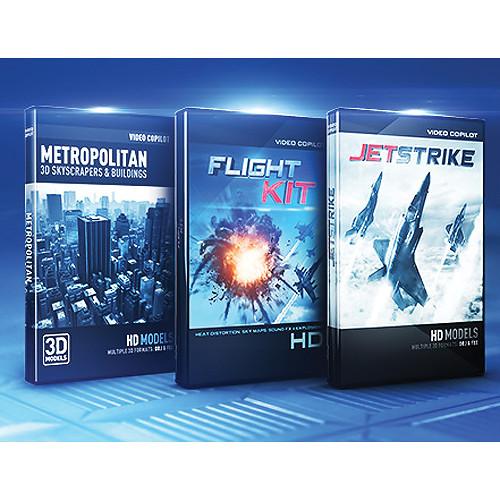
Product description The Aerial 3D Bundle from Video Copilot provides you with a collection of 3D aircraft and building models, a Heat Distortion plug-in for After Effects, and a library of sky and aerial effects. The Bundle features JetStrike 3D HD Models, Metropolitan Pack: 3D Skyscrapers and Buildings, and Flight Kit.
JetStrike features pre-made 3D HD models of military and commercial aircraft for importing into Video Copilots Element 3D plug-in for Adobe After Effects, or other 3D programs such as Cinema 4D, 3D Studio Max, Maya, and Blender. JetStrike includes 10+ highly detailed, high-resolution models, multiple 4K texture skins, and a large selection of decals. The 4K skins cover both the exterior and interior of the planes. You'll have access to the movement of the landing gear, turbines, propellers, exhaust intake nozzles, flaps, slats, elevators, rudders, ailerons, weapons bays, and more.
Metropolitan Pack features over 100 additional HD 3D models, in the form of skyscrapers and buildings, with both day and night textures. Create cityscapes or add buildings to footage and animate your 3D aircraft to interact them. Detailed buildings skins feature antenna arrays and satellites, helipads, air-conditioners, vents, grime, and more.
Flight Kit is designed to accompany JetStrike by providing a collection of sky and aerial tools. It features a Heat Distortion plug-in for After Effects, which lets you create realistic heat distortion for the jet engines and missiles found in JetStrike, as well as providing over 200 aircraft sounds effects, 25 HDR sky maps, and 12 HD aerial explosion clips.
Please see the links below for more information on the various components of this bundle. - Metropolitan Pack: 3D Skyscrapers and Buildings Video Copilot's Metropolitan Pack: 3D Skyscrapers and Buildings is a collection of 3D Models that are ready to use inside your favorite 3D program including the Element 3D plug-in. Note: Element v1.5+ required.
- Featured Details
-
- Over 100 high definition 3D models
- Antenna arrays and satellites
- Helipads
- Air-conditioners
- Vents
- Grime and worns edges
- Day and night textures included
- Multiple 3D formats: OBJ, C4D, FBX, 3DS Max, Vray
- Use with Cinema 4D, 3ds Max, Maya, Blender, and Element 3D plug-in
JetStrike 3D HD Models (Electronic Download) The Video Copilot JetStrike 3D HD Models (Electronic Download) is a collection of 3D military and commercial aircraft models for customizable use in After Effects and other 3D programs. For After Effects, JetStrike requires Video Copilot's Element 3D After Effects plug-in, sold separately, as it functions within the plug-in. Outside of After Effects, JetStrike can be used in any 3D program that supports any of the following 3D formats: OBJ Quads, C4D (R12+), FBX Quads, 3ds Max, 3ds+ Max (Vray 1.5+). Compatible programs include Cinema 4D, 3D Studio Max, Maya, and Blender.
JetStrike includes 10+ highly detailed, high-resolution models, multiple 4K texture skins, and a large selection of decals. The 4K skins cover both the exterior and interior of the planes. In After Effects, you can animate complex formations and movements, create epic establishing shots, and launch rockets. You'll have access to the movement of the landing gear, turbines, propellers, exhaust intake nozzles, flaps, slats, elevators, rudders, ailerons, weapons bays, and more. In a feature called "Mesh Visibility," you'll be able to hide and solo any part of a plane. Using this feature, you can, for example, make the plane skin see-through to show how a missile is lining up for launch.
JetStrike is compatible with both Macs and PCs and is supported by After Effects CS4 and higher. In order to license properly with Element 3D, JetStrike must be purchased using the same account used to purchase Element 3D. - Key Features
-
- 10+ highly detailed, high-resolution, 3D military and commercial aircraft models
- Customizable in After Effects (Element 3D required) and other 3D programs
- 4K exterior/interior texture skins
- Large selection of decals
- Animates complex formations and movements
- Creates epic establishing shots
- Launches rockets
- Mesh Visibility hide/solo feature
- Mac and PC compatible
Flight Kit Flight Kit from Video Copilot is collection of sky and aerial post-production tools. It features a Heat Distortion plug-in for Adobe After Effects, over 200 aircraft sounds effects, 25 HDR sky maps, and 12 HD aerial explosions clips. The collection is designed to go perfectly with Video Copilot's JetStrike 3D HD Models, but the tools can also be used independently with any project. - Heat Distortion Plug-in
- Create realistic heat distortion effects from things such as jet engines and missiles in After Effects.
- Over 200 Aircraft Sound Effects
- Choose from an extensive library of over 200 aircraft sound effects. Sound effects are in the .wav file format. Categories include: Alarms and Beeps, Explosion, Guns, Jet Engines, Large Planes, Mechanical, Missiles, and Super Sonic.
- 25 HDR Sky Maps in 4K Resolution
- Full 360° map at 4K resolution in 25 different cloud types and sunsets. The sky maps are designed to be used as environment maps in 3D programs and Video Copilot's Elemnet 3D plug-in for use within Adobe After Effects. The HDR maps can also be used for lighting an HDR scene.
- 12 HD Aerial Explosions
- Add excitement and action to your project with high definition aerial explosions stock footage.
In the Box Bundle Items Metropolitan Pack: 3D Skyscrapers and Buildings tbvqfbbrerudzfdaezcsruabwdcyxutu JetStrike 3D HD Models (Electronic Download) Flight Kit Table of Contents
|
Upload User Manual
Have you got an user manual for the Video Copilot Aerial 3D Bundle in electronic form? Please send it to us and help us expand our library of instruction manuals.
Thank you, too, on behalf of other users.
To upload the product manual, we first need to check and make sure you are not a robot. After that, your "Submit Link" or "Upload File" will appear.
Technical parameters - Metropolitan Pack: 3D Skyscrapers and Buildings
| | | Delivery Method | Download | | Version | Standard | - JetStrike 3D HD Models (Electronic Download)
| | | Delivery Method | Download | | Version | Standard | | Number of Users Supported | 1 | | | | Supported Operating Systems | macOS X 10.6.8
Windows XP SP3 | - Flight Kit
| | | Delivery Method | Download | | Version | Standard | | Number of Users Supported | 1 | | | | Supported Operating Systems | macOS X 10.6.8
Windows 7 |
Rating70% users recommend this product to others. And what about you?

This product has already been rated by 71 owners. Add your rating and experience with the product.
Discussion
 Ask our technicians if you have a problem with your settings,
or if anything is unclear in the user manual you have downloaded.
You can make use of our moderated discussion.
The discussion is public and helps other users of our website who may be encountering similar problems.
Ask our technicians if you have a problem with your settings,
or if anything is unclear in the user manual you have downloaded.
You can make use of our moderated discussion.
The discussion is public and helps other users of our website who may be encountering similar problems.
The discussion is empty - enter the first post
Post a new topic / query / comment:
|
|


