User Manual for Video Copilot All-Star Bundle Click to enlarge the picture
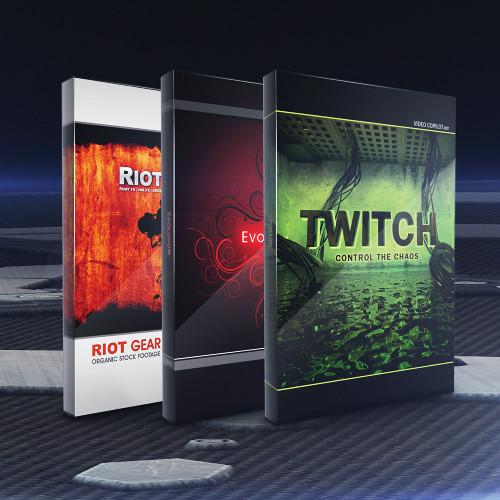 Contents of the user manual for the Video Copilot All-Star Bundle
- Product category: Video Editing Plug-Ins Video Copilot
- Brand: Video Copilot
- Description and content of package
- Technical information and basic settings
- Frequently asked questions – FAQ
- Troubleshooting (does not switch on, does not respond, error message, what do I do if...)
- Authorized service for Video Copilot Video Editing Plug-Ins
|
User manual for the Video Copilot All-Star Bundle contain basic instructions
that need to be followed during installation and operation.
Before starting your appliance, the user manual should be read through carefully.
Follow all the safety instructions and warnings, and be guided by the given recommendations.
User manual is an integral part of any Video Copilot product,
and if it is sold or transferred, they should be handed over jointly with the product.
Following the instructions for use is an essential prerequisite for protecting
health and property during use, as well as recognition of liability on the part of the manufacturer
for possible defects should you make a warranty claim. Download an official Video Copilot user manual in which you will find instructions on how to install, use, maintain and service your product.
And do not forget – unsuitable use of a Video Copilot product will considerably shorten its lifespan!
|
Product description The All-Star Bundle from Video Copilot provides you with Twitch, an After Effect plug-in for adding stylized visual and motion effects to your footage, and a library of pre-keyed design elements and visual effects to enhance your videos. The bundle features Twitch, Evolution, and Riot Gear.
Twitch is a plug-in designed for use within Adobe After Effects. It comes with 6 built-in operators (blur, color, light, scale, slide, and time) for adding 'twitch' to your video. You can toggle on/off individual effects, as well as adjust the quantity and speed of each effect. It also features 10 twitch sound effects, 25 effect presets, and advanced features such as distortion FX, film shifting, and twitching to the beat of music. 7 video tutorials are included.
Evolution provides over 170 decorative designed elements, such as flourishes, objects, textures, arrows, and extension and bonus elements. The elements are pre-keyed for built-in transparency, so they are ready to use simply by dragging the clips onto your editing timeline. In addition, Evolution comes with 10 professional 720p 60fps design projects, compatible with Adobe After Effect 7 and higher, and 7 video tutorials.
Riot Gear is a collection of visual elements suitable for opening title graphics, move trailers, motion graphics, and organic special effects. The collection includes brush strokes, ink effects, paint splatter and splatter images, paper and grunge textures, and TV noise effects. More than 90% of the elements come from live action footage. Riot Gear also comes with a selection of royalty-free video and five tutorial videos.
Please see the links below for more information on the various components of this bundle. - Twitch (Download) The Video Copilot Twitch Create Chaos is an After Effects plug-in that allows you to match random operators to make stylistic video effects for motion graphics and visual effects. You can use Twitches with multiple operators to generate unique custom effects. The Twitches can be adjusted to make them fast or slow.The Twitch Create Chaos comes with 6 built-in operators such as blur, color, light, scale, slide, and time. The operators feature an on/off switch, and enable you to easily toggle on or off individual effects. Multiple operators can be quickly reframed with 1 parameter as the functions are controlled by a master amount and speed slider. In addition to advanced individual controls over amount and speed, the operators also offer an option to use a unique random seed value.Featuring a Twitch Only function, the Twitch Create Chaos is an ideal tool for blending 2 separate shots with twitch, and only renders the frames that comprise twitching and keeps the rest transparent. The plug-in also comes with Freeze Twitch that allows you to hold the twitch values over a full piece of footage, using After Effects. The twitch values remain editable, and settings can be modified.In addition to 10 twitch sound effects and 25 effects presets, the Twitch Create Chaos comes with 7 video tutorials (75 minutes) that offer training on advanced features such as distortion FX, film shifting, and twitching to the beat of music. The plug-in is suitable to be used with motion graphics, music videos, film flashbacks, transitions, and frightening effects.
- Allows you to match random operators to make stylistic video effects for motion graphics and visual effects
- Twitches - random values at random points in time can be adjusted to make them fast or slow
- You can use Twitches with multiple operators to generate unique custom effects
- 6 built-in operators:
- Blur Operator - contains advanced features such as a threshold slider, transfer modes, and aspect control
- Color Operator - allows you to colorize twitches and randomize color
- Light Operator - similar to an exposure function; allows you to select from adding brightness or darkness to Twitches or even both
- Scale Operator – built-in motion blur and random anchor
- Slide Operator - offers many controls over slide, motion blur, tendency, and the advanced RGB split
- Time Operator – allows you to randomly offset footage forward or backwards
- Operators feature an on/off switch - enables you to easily toggle on or off individual effects
- Multiple operators can be quickly reframed with 1 parameter as functions are controlled by a master amount and speed slider
- Operators offer advanced individual controls over amount and speed, and an option to use a unique random seed value
- Twitch Only function - ideal tool for blending 2 separate shots with twitch, and only renders the frames that comprise twitching and keeps the rest transparent
- Freeze Twitch - allows you to hold the twitch values over a full piece of footage, using After Effects. Twitch values remain editable, and settings can be modified
- 10 twitch sound effects and 25 effects presets
- Offers 7 video tutorials (75 minutes) - training on advanced features such as distortion FX, film shifting, and twitching to the beat of music
- Suitable for use with motion graphics, music videos, film flashbacks, transitions, and frightening effects
- Evolution Decorative Design Elements The Video Copilot Evolution Decorative Design Elements offers 170 design elements such as flourishes, objects, textures, arrows, extension, and bonus elements. The elements are pre-keyed, ready to use or broadcast - built-in transparency of video files allow you to merge without removing the background, simply by dragging it on the top of the video. Featuring 10 professional design projects (compatible with After Effects 7 - CS4 only), the Evolution Decorative Design Elements suite offers designs generated at 720p (1280 x 720) at 60 frames per second. With a high resolution about 20% higher than 720p (HD), the elements are high definition. In addition to an advanced gallery page and 7 video tutorials, the Evolution Decorative Design Elements comes with the free Twister Preset, which is an advanced animation preset that enables you to make custom unique creations and allows animation of all the design elements. Scrupulously crafted and animated with wide-ranging detail and quality, the suite ensures that the vines grow and the leaves sprout with a trivial bounce. Note: All versions are compatible with After Effects 6.5 and above, except Italian and Spanish which are only compatible with AE 7 and CS3. Most versions of After Effects can be launched in English mode to ensure compatibility.
- For creative video professionals
- 170 design elements such as flourishes, objects, textures, arrows, extension, and bonus elements
- Pre-keyed; ready to use or broadcast
- Built-in transparency of video files - allows you to merge without removing the background, simply by dragging it on the top of the video
- 10 professional design projects (compatible with After Effects 7 - CS4 only)
- Offers designs generated at 720p (1280 x 720) at 60 frames per second
- Allows you to convert the designs to NTSC or PAL by changing the frame rate
- High definition - elements are about 20% higher than 720p (HD)
- Advanced gallery page and 7 video tutorials
- Free Twister Preset - advanced animation preset that enables you to make custom unique creations, and allows animation of all the design elements
- Presets - compatible with English, French, German, Italian, and Spanish versions of After Effects
- Scrupulously crafted and animated with wide-ranging detail and quality - ensures that the vines grow and the leaves sprout with a trivial bounce
UPC: 659570300647 - Riot Gear Pre-Matted Organic Stock Footage The Video Copilot Riot Gear Pre-Matted Organic Stock Footage is a collection of 155 visual elements such as brush painted images, ink effects, paint splatters and splatter images, paper and grunge textures, and TV noise effects. The collection features more than 90% of elements from live action footage. It is suitable for use with opening title graphics, movie trailers, motion graphics, and organic special effects.
In addition to support for resolutions up to 1280x720 (HD, 720p), the Riot Gear Pre-Matted Organic Stock Footage provides royalty free video. It also comes with 5 video tutorials that cover topics such as using Riot Gear with After Effects, red paint, green grunge, 3D painted wall, and text bleed-in.
Note: Video Tutorials only available with Riot Gear. - Collection of 155 visual elements
- Features 30 Brush Paint Images (Brush Painted Images), 5 Ink Bleed FX (Effect of ink being absorbed), 25 Ink Drop FX (Ink dropped in water and dispersing), 10 Ink Flow FX (Smoke-like ink flowing slowly), 20 Paint Splatter FX (Paint Spattered footage), 10 Paper Textures (Unique textures from various paper sources), 20 Grunge Textures (Organic photos of rust and mold and grunge), 30 Splatter Images (High resolution pictures of ink splatter & dripping), and 5 TV Noise FX (Bad cable like effect and TV snow)
- Features more than 90% of elements from live action footage
- Suitable for use with opening title graphics, movie trailers, motion graphics, and organic special effects
- Support for resolutions up to 1280x720 (HD, 720p)
- Provides royalty free video
- 5 video tutorials - using Riot Gear with After Effects, red paint, green grunge, 3D painted wall, and text bleed-in
UPC: 659570300661 In the Box Bundle Items Twitch (Download) warcawqzdqbtrbvcqfdvvqyryzduubsues Evolution Decorative Design Elements warcawqzdqbtrbvcqfdvvqyryzduubsues Riot Gear Pre-Matted Organic Stock Footage Table of Contents
|
Upload User Manual
Have you got an user manual for the Video Copilot All-Star Bundle in electronic form? Please send it to us and help us expand our library of instruction manuals.
Thank you, too, on behalf of other users.
To upload the product manual, we first need to check and make sure you are not a robot. After that, your "Submit Link" or "Upload File" will appear.
Technical parameters - Twitch (Download)
| | | Delivery Method | Download | | Version | Standard | | Number of Users Supported | 1 | - Evolution Decorative Design Elements
| Requirements | After Effects 7, CS3, CS4, or CS5 | - Riot Gear Pre-Matted Organic Stock Footage
| Requirements | After Effects 7, CS3, CS4, or CS5 | | Video Formats | NTSC & PAL, HD or SD | | Video Frame Size | HD 720p 1280x720 | | Frame Rate | 60 fps Paint Splatter and Ink FX, 30 fps TV Noise | | File Format | QuickTime - 6 Movies & JPG Images | | Effect Type | Pre-Matted Grayscale Effects and Color Grunge Textures |
Rating90% users recommend this product to others. And what about you?

This product has already been rated by 96 owners. Add your rating and experience with the product.
Discussion
 Ask our technicians if you have a problem with your settings,
or if anything is unclear in the user manual you have downloaded.
You can make use of our moderated discussion.
The discussion is public and helps other users of our website who may be encountering similar problems.
Ask our technicians if you have a problem with your settings,
or if anything is unclear in the user manual you have downloaded.
You can make use of our moderated discussion.
The discussion is public and helps other users of our website who may be encountering similar problems.
The discussion is empty - enter the first post
Post a new topic / query / comment:
|
|


