User Manual for Video Copilot Music Design Bundle Click to enlarge the picture
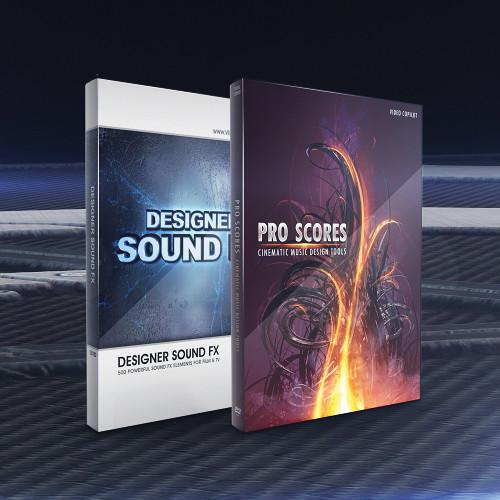 Contents of the user manual for the Video Copilot Music Design Bundle
- Product category: Video Editing Plug-Ins Video Copilot
- Brand: Video Copilot
- Description and content of package
- Technical information and basic settings
- Frequently asked questions – FAQ
- Troubleshooting (does not switch on, does not respond, error message, what do I do if...)
- Authorized service for Video Copilot Video Editing Plug-Ins
|
User manual for the Video Copilot Music Design Bundle contain basic instructions
that need to be followed during installation and operation.
Before starting your appliance, the user manual should be read through carefully.
Follow all the safety instructions and warnings, and be guided by the given recommendations.
User manual is an integral part of any Video Copilot product,
and if it is sold or transferred, they should be handed over jointly with the product.
Following the instructions for use is an essential prerequisite for protecting
health and property during use, as well as recognition of liability on the part of the manufacturer
for possible defects should you make a warranty claim. Download an official Video Copilot user manual in which you will find instructions on how to install, use, maintain and service your product.
And do not forget – unsuitable use of a Video Copilot product will considerably shorten its lifespan!
|
Product description The Music Design Bundle from Video Copilot provides you with a collection of sounds, audio elements, and music tracks for adding sound effects to your videos and creating your own soundtracks. The bundle features Designer Sound FX and Pro Scores.
Designer Sound FX is a collection of 500 sound effects and audio elements. Audio files encompass categories such as Abstract, Swishes, Drums, Ambience, and Impacts. Also part of the collection is royalty-free sound, 5 pre-scored audio tracks with project files, a complete promo video project file, and 3 video tutorials.
Pro Scores contains a variety of sound elements which allow you to create your own soundtracks and scores. The collection includes orchestral music tracks, epic musical elements, layered music tracks, tension building elements, and music effects. The 500 audio tracks are encoded as 24-bit, 44.4 kHz WAV files for professional quality sound. Also included are 5 in-depth tutorials and 5 layered soundtrack templates.
Please see the links below for more information on the various components of this bundle. - Designer Sound FX The Video Copilot Designer Sound FX is a collection of 500 powerful sound effects and audio elements encompassing categories such as Abstract, Swishes, Drums, Ambience, and Impacts, and features royalty free sound. It also includes 5 pre-scored audio tracks with AE project files and a complete promo video project file and footage. Featuring 5 video tutorials (over 80 min), the Designer Sound FX shows you ways to create audio scores. In addition to an introduction for organizing and managing sounds, it includes tutorials on creating an audio score, adding motion graphics to audio scores, creating a powerful ice shattering effect, and creating movie trailer titles. You are also provided advice and mixing tips from Video Copilot president and founder Andrew Kramer. The Designer Sound FX is suitable for movie trailers and promos, and film scores. It can also be used by developers in Flash intros and button roll-overs. The collection is ideal for DVD menus, motion graphics, special effects studios, video games, and scary movie tones.
- 500 powerful sound effects and audio elements
- 5 categories (100 sounds each): Impacts (sounds of slams, explosive hits, and hard impacts) Swishes (thick whooshes and swishes) Drums (orchestral percussion beds and build-ups and climactic drum elements and short fills) Ambience (compelling background sounds and textures and drones and tone builds) Abstract (effects like heart beats, liquid sounds, splats, crumbled paper, record scratches, TV noise, ice cracking, and freezing)
- Features royalty free sound
- 5 pre-scored audio tracks with AE project files
- Complete promo video project file and footage
- 5 video tutorials (over 80 min) - shows you ways to create audio scores: Introduction & Getting Started - learn to organize and effectively manage sounds Create an Audio Score - mix sounds and musical elements to create impactful scores for promos Add Motion Graphics to Audio Score - match up titles and effects to follow the pace of the music and sound effects Create a Powerful Ice Shattering Effect - use After Effects to create a powerful shattering effect in 3D Create Movie Trailer Titles - create title with light rays, similar to many popular movie trailers
- Advice and mixing tips from Video Copilot president and founder Andrew Kramer
- Suitable for movie trailers and promos, and film scores
- Can be used by developers in Flash intros and button roll-overs
- Ideal for DVD menus, motion graphics, special effects studios, video games, and scary movie tones
- Pro Scores Cinematic Music Design Tools (Download) Pro Scores Cinematic Music Design Tools (Download) from Video Copilot is a professionally-created toolkit that contains a variety of sound elements, allowing you to create your own soundtracks and scores, ideal for TV, gaming, film, and more. The collection includes orchestral music tracks, epic musical elements, layered music tracks, tension building elements, and editorial music effects. There are also 5 in-depth tutorials and 5 layered soundtrack templates, so you can get started right away.
The collection has 500 audio tracks, which are encoded as 24-bit/44.1kHz WAV files. The files can be used in After Effects, Premiere, Vegas, Final Cut Pro, and most other audio editing applications. The content works with AE 7, CS3, CS4, CS5, and CS5.5 to support current and legacy users. Note: You will receive a serial number that will allow you to download the collection when you purchase this item. Download is approximately 3GB. - Professionally-created toolkit with a variety of sound elements that allow you to create soundtracks and scores, ideal for TV, gaming, film, and more
- Royalty-free use for any production
- Includes orchestral music tracks, epic musical elements, layered music tracks, tension building elements, and editorial music effects
- There are 5 in-depth tutorials and 5 layered soundtrack templates, so you can get started right away
- Unlike other collections that provide simple loops, Pro Scores offers fully-orchestrated tracks that have been layered for easy access to individual elements
- The collection has 500 audio tracks, including 50 full-length musical tracks and hundreds of music design elements, which are encoded as 24-bit/44.1kHz WAV files
- The files can be used in After Effects, Premiere, Vegas, Final Cut Pro, and most other audio editing applications. The collection works with AE 7, CS3, CS4, CS5, and CS5.5 to support current and legacy users
In the Box Bundle Items Designer Sound FX svweqbuszsxfuxtwzxvbuttybz Pro Scores Cinematic Music Design Tools (Download) Table of Contents
|
Upload User Manual
Have you got an user manual for the Video Copilot Music Design Bundle in electronic form? Please send it to us and help us expand our library of instruction manuals.
Thank you, too, on behalf of other users.
To upload the product manual, we first need to check and make sure you are not a robot. After that, your "Submit Link" or "Upload File" will appear.
Technical parameters - Designer Sound FX
| Requirements | After Effects 7, CS3, CS4, or CS5 | | 3 Resolutions (for sound elements) | Wave 96khz, 24bit Wave 48khz, 16bit (recommended for use with After Effects) MP3 320 kbps | - Pro Scores Cinematic Music Design Tools (Download)
| File Format | 24-bit/44.1kHz WAV |
Rating100% users recommend this product to others. And what about you?

This product has already been rated by 15 owners. Add your rating and experience with the product.
Discussion
 Ask our technicians if you have a problem with your settings,
or if anything is unclear in the user manual you have downloaded.
You can make use of our moderated discussion.
The discussion is public and helps other users of our website who may be encountering similar problems.
Ask our technicians if you have a problem with your settings,
or if anything is unclear in the user manual you have downloaded.
You can make use of our moderated discussion.
The discussion is public and helps other users of our website who may be encountering similar problems.
The discussion is empty - enter the first post
Post a new topic / query / comment:
|
|


