User Manual for Videotec MAXIMUS MVXHD 1080p Explosion-Proof Outdoor Bullet Camera with 4.3-129mm Lens & Integrated Wiper Click to enlarge the picture
 Contents of the user manual for the Videotec MAXIMUS MVXHD 1080p Explosion-Proof Outdoor
- Product category: Wired IP Cameras Videotec
- Brand: Videotec
- Description and content of package
- Technical information and basic settings
- Frequently asked questions – FAQ
- Troubleshooting (does not switch on, does not respond, error message, what do I do if...)
- Authorized service for Videotec Wired IP Cameras
|
User manual for the Videotec MAXIMUS MVXHD 1080p Explosion-Proof Outdoor contain basic instructions
that need to be followed during installation and operation.
Before starting your appliance, the user manual should be read through carefully.
Follow all the safety instructions and warnings, and be guided by the given recommendations.
User manual is an integral part of any Videotec product,
and if it is sold or transferred, they should be handed over jointly with the product.
Following the instructions for use is an essential prerequisite for protecting
health and property during use, as well as recognition of liability on the part of the manufacturer
for possible defects should you make a warranty claim. Download an official Videotec user manual in which you will find instructions on how to install, use, maintain and service your product.
And do not forget – unsuitable use of a Videotec product will considerably shorten its lifespan!
|
Product description - VIDEOTEC for critical environments
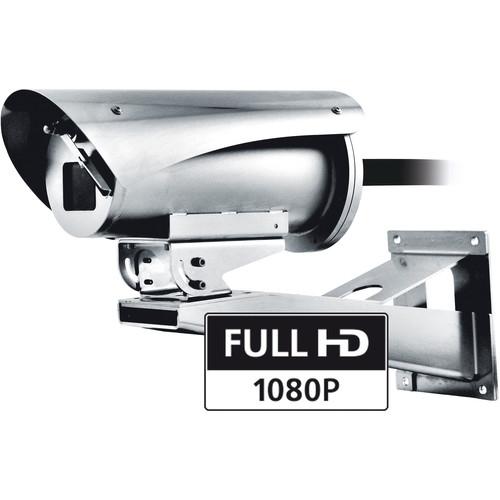
The MAXIMUS MVXHD 1080p Explosion-Proof Outdoor Bullet Camera from Videotec features a 1/2.8 type Exmor CMOS sensor and 3.4-38mm varifocal lens that offers up to 10x optical zoom. This day/night camera can be operated via a 12 to 24 VDC/VAC power source. It comes with an integrated wiper, and a 13' cable tail. The explosion-protected camera is suitable for harsh settings where the presence of gases or flammable dust can create a potentially explosive environment (oil and gas industries or marine and industrial sectors). The housing is made entirely out of AISI316L stainless steel and is resistant to corrosion and enhanced by way of polishing processes. The extended certification temperature range of -46 to 149°F, along with a cold start system, allows it to operate in harsh environments. The Full HD MVXHD camera with 10x motorized zoom lens offers multiple video streams (H.264/AVC or MJPEG) and provides improved image quality in harsh environmental conditions. The camera features plug-and-play installation with multipolar wiring that makes it ready to use without complex electrical connections. The IP66/IP68 ratings lend protection against harsh weather and submersion in up to 16' of water for 2 hours. The IP69 rating rating of the camera's housing allows the device to be cleaned with high-pressure water jets. It comes with wipers and an explosion-proof washer. - Certifications for use in zones 1 and 2, IIC T5 and T6 Group (Gas) and in Zones 21 and 22, IIIC T100°C and T85°C Group (Dust)
- AISI 316L stainless steel construction
- External shot peened and electro-polished surfaces
- Camera Full HD camera with 10x zoom and a frame rate of 60 fps
- Video compression H.264/AVC and MJPEG
- Up to 4 simultaneous video streams, 1 alarm input, and 1 relay output
- 12 to 24 VDC/24 VAC power supply
- AISI 316L stainless steel construction
- Shot peened and electro-polished surfaces
- Sunshield and integrated wiper
Table of Contents
|
Upload User Manual
Have you got an user manual for the Videotec MAXIMUS MVXHD 1080p Explosion-Proof Outdoor Bullet Camera with 4.3-129mm Lens & Integrated Wiper in electronic form? Please send it to us and help us expand our library of instruction manuals.
Thank you, too, on behalf of other users.
To upload the product manual, we first need to check and make sure you are not a robot. After that, your "Submit Link" or "Upload File" will appear.
Technical parametersVideotec MVXHD2G0WFZ01A Specs | Image Device | 1/2.8" type Exmor CMOS sensor | | Effective Pixels | Approximately 2.38 MP | | Image Sensor | 1/2.8" type Exmor CMOS | | Minimum Illumination | Day/Night Full HD (10x):
Color (ICR Off): 1.4 lux, 1/30 sec, 50% (Normal mode)
0.35 lux, 1/30 sec, 50% (High sensitivity mode)
0.19 lux, 1/3 sec, 50% (Normal mode)
0.05 lux, 1/3 sec, 50% (High sensitivity mode)
B&W (ICR On):
0.12 lux, 1/30 sec, 50% (Normal mode)
0.03 lux, 1/30 sec, 50% (High sensitivity mode)
0.002 lux, 1/3 sec, 30% (High sensitivity mode) | | Focal Length | 3.8-38mm | | Aperture | f/1.8 to 3.4 | | Zoom | 10x (120x with digital zoom) | | Horizontal Viewing Angle | Wide to Tele: 67° to 7.6° | | Minimum Object Distance | 0.3 to 31.4" (10 to 800 mm) | | Electronic Shutter | 1/10,000 to 1 sec, 22 steps | | White Balance | Auto, ATW, Indoor, Outdoor, Outdoor Auto, Sodium vapor lamp (Fix, Auto, Outdoor Auto), One-push, Manual | | Gain | Auto/Manual (0 to 28 steps, 2 steps / total 15 steps)
Maximum Gain Limit: 6 to 28 steps, 2 steps / total 12 steps | | Wide Dynamic Range | On/Off/Visibility enhancer, Light level, Brightness compensation selection, Compensation level | | Focus System | Auto (Sensitivity: Normal, Low), One-push AF, Manual, Focus compensation with ICR On, Interval AF, Zoom trigger AF | | Picture Effects | E-flip, Mirror image, Color enhancement | | Exposure Control | Auto, EV Compensation, Manual, Priority (Shutter priority, Iris priority), Brightness, Slow AE | | S/N Ratio | More than 50 dB | | Wide Dynamic Range | 130 dB | | Defog | On/off | | Video Encoder | Communication Protocol: ONVIF, Profile S
Device Configuration: TCP/IPv4-IPv6, UDP/IPv4-IPv6, HTTP, NTP, DHCP, WS-DISCOVERY, QoS, IGMP (Multicast)
Streaming: RTSP, RTCP, RTP/IPv4
Video Compression: H.264/AVC, MJPEG
2 independent 1920 x 1080 video streams or 4 independent video streams depending on the configuration
Image Resolution: From 1920 x 1080 to 352 x 240 in 18 steps
Selectable frame rate from 1 to 60 fps
Web Server | | Alarm | 1 x alarm input
1 x relay oputput (1 A, 30 VAC / 60 VDC maximum) | | Cable Entry | 1 hole, 3/4", NPT | | Housing | Material: Thermally tempered glass
Dimensions: 2 x 1.6" (51 x 41 mm) 0.47" (12 mm) | | Supply Voltage | 24 VDC | | Current Consumption | 2.2 A | | Heater | Ton 59 ±5°F (15 ±3°C), Toff 72 ±5°F (22 ±3°C) | | Cable | Tail Composition
3 x 2.5 mm², Rated External Diameter 0.34" (8.7 mm)
7 x 0.34 mm², Rated External Diameter 0.25" (6.4 mm)
4 x 2 x 0.21 mm², (Cat 5e), Rated External Diameter 0.26" (6.7 mm) | | Network | Connector:
RJ45, 10Base-T/100Base-T
Cable Length: 328' (100 m) maximum | | Certifications | ATEX (EN 60079-0: 2012, EN 60079-1: 2014, EN 60079-31: 2014)
IECEx (IEC 60079-0: 2011 Ed.6, IEC 60079-1: 2014-06 Ed.7, IEC 60079-31: 2013 Ed.2)
INMETRO (ABNT NBR IEC 60079-0:2008 + Errata 1:2011, ABNT NBR IEC 60079-1:2009 + Errata 1:2011, ABNT NBR IEC 60079-31:2011)
EAC Ex (TR CU 012/2011)
ETL listed for USA (UL 60079-0: Ed: 6, UL 60079-1:Ed:6, UL 60079-31: Ed.2), cable tail versions
ETL listed for Canada (C22.2-60079-0:2015, CSA C22.2-60079-1Ed: 2 CSA C22.2-60079- 31Ed: 1), cable tail versions
TYPE 6P, TYPE 4X (UL50E)
IP69 (EN/IEC60529), housing only
IP66/IP68 (2 hours, 16'(5 m), EN/IEC60529) | | Dimensions | 6.1 x 10.3" (155.5 x 264 mm) | | Weight | Not Specified by Manufacturer |
Rating100% users recommend this product to others. And what about you?

This product has already been rated by 14 owners. Add your rating and experience with the product.
Discussion
 Ask our technicians if you have a problem with your settings,
or if anything is unclear in the user manual you have downloaded.
You can make use of our moderated discussion.
The discussion is public and helps other users of our website who may be encountering similar problems.
Ask our technicians if you have a problem with your settings,
or if anything is unclear in the user manual you have downloaded.
You can make use of our moderated discussion.
The discussion is public and helps other users of our website who may be encountering similar problems.
The discussion is empty - enter the first post
Post a new topic / query / comment:
|
|


