|
User Manual for Vienna Symphonic Library MIR PRO 24 - Mixing and Reverb Plug-In Click to enlarge the picture
 Contents of the user manual for the Vienna Symphonic Library MIR PRO 24
- Product category: Virtual Processor Plug-Ins Vienna Symphonic Library
- Brand: Vienna Symphonic Library
- Description and content of package
- Technical information and basic settings
- Frequently asked questions – FAQ
- Troubleshooting (does not switch on, does not respond, error message, what do I do if...)
- Authorized service for Vienna Symphonic Library Virtual Processor Plug-Ins
|
User manual for the Vienna Symphonic Library MIR PRO 24 contain basic instructions
that need to be followed during installation and operation.
Before starting your appliance, the user manual should be read through carefully.
Follow all the safety instructions and warnings, and be guided by the given recommendations.
User manual is an integral part of any Vienna Symphonic Library product,
and if it is sold or transferred, they should be handed over jointly with the product.
Following the instructions for use is an essential prerequisite for protecting
health and property during use, as well as recognition of liability on the part of the manufacturer
for possible defects should you make a warranty claim. Download an official Vienna Symphonic Library user manual in which you will find instructions on how to install, use, maintain and service your product.
And do not forget – unsuitable use of a Vienna Symphonic Library product will considerably shorten its lifespan!
|
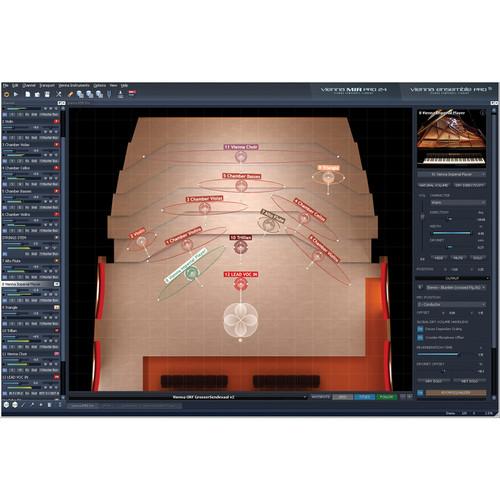
Product description Vienna MIR PRO 24 from Vienna Symphonic Library is a network-capable, mixing and reverberation solution for Mac and Windows, based on Multi Impulse Response (MIR) convolution. As a special version of Vienna MIR Pro, with a maximum of twenty-four instruments and ensembles that can be placed on its virtual stages, it merges all parts of the creative process – composition, orchestration, and mixing – into a single intuitive workflow.
Aside from the instrument limitation, Vienna MIR Pro 24 includes the full set of features and options of Vienna MIR Pro. It offers a unique approach to the spatial modeling of virtual orchestras, and allows the user to interact with the players more like a conductor than an engineer. The multi-parameter control icon replaces conventional faders and pan pots, and offers concise control for positioning each instrument on the virtual stage, changing volume and stereo width, and even rotating it within a three-dimensional environment.
The software is more than just "a multi-sample" of a hall, as it combines specific directional frequency profiles with reflectional information for every instrument, delivering an accurate recreation of musicians playing in situ. Vienna MIR Pro 24 is multi-source, multi-directional, multi-positional, and multi-format. The plug-in comes in AAX Native, Audio Units, RTAS, or VST formats, allowing it to run directly in a preferred sequencer or DAW. Additionally, the company's cross-platform MIDI and audio LAN solution, Vienna Ensemble Pro, allows for a one-click integration of Vienna MIR Pro 24. Note: Requires at least one MIR RoomPack (sold separately). - Features
-
- Mixing and reverberation engine based on Multi Impulse Response (MIR) convolution
- Optional one-click integration in Vienna Ensemble Pro (sold separately)
- Over 900 MIRx pre-configured placements and EQ settings for instruments, precisely adjusted and perfectly seated in a concert hall or scoring stage
- Dedicated "MIRx Mode" brings both the ease of use and sound settings of MIRx to Vienna MIR PRO 24, while still allowing for individual adjustments of all parameters
- Includes access to all available MIRx Venues - Vienna Konzerthaus Grosser Saal, Konzerthaus Mozartsaal, Teldex Scoring Stage Berlin, and The Sage Gateshead (corresponding Vienna MIR RoomPack licenses required, sold separately)
- Tailor-made output formats and RoomEQ settings for all four venues in MIRx Mode
- Full latency compensation
- Graphical user interface depicts 3D renderings of the selected room (venue maps) with scroll wheel zooming
- Intuitive multi-parameter control icon for quick interaction with instruments and visual feedback, with direct access to the connected instrument
- Character presets such as Air, Silk, Bite, Distant, Warm, for quick timbral changes, available for most Vienna Instruments
- Multiple wet signal busses allow for individual RoomEQ settings for different signal sources
- GUI options such as Instrument Grouping, Hide Icon, Instrument Focus
- Room and master EQ
- Pre-listening feature prior to selecting a room
- Adjustable room tone (natural noise floor)
- Microphone position offset allows for movement of virtual microphones in the room
- Reverb length can be changed individually for each microphone position
- Enhanced possibilities for defining the format and for the handling of the virtual main microphone(s), including the option for using a secondary microphone in most rooms
- Works with any commonly used sampling frequency, up to 192 kHz
- MIRacle plug-in - direct access to a tailor-made algorithmic global reverb for "sweetening"
- With Vienna Ensemble Pro (Not Included)
-
- LAN capability
- Direct and/or stem outputs
- 3rd Party VSTi/Audio Units hosting
- Audio inputs
- Auxiliary sends for individual instruments and input signals
- Automation of user-defined parameters
- MIDI remote control of user-defined parameters
- Learn All/Optimize All for Vienna Instruments
- Master Tune for Vienna Instruments
Table of Contents
|
Upload User Manual
Have you got an user manual for the Vienna Symphonic Library MIR PRO 24 - Mixing and Reverb Plug-In in electronic form? Please send it to us and help us expand our library of instruction manuals.
Thank you, too, on behalf of other users.
To upload the product manual, we first need to check and make sure you are not a robot. After that, your "Submit Link" or "Upload File" will appear.
Technical parametersVienna Symphonic Library VSLS0524 Specs | Mac System Requirements | For Smaller Projects
Intel i7-Quad CPU or better
OS X 10.8 or later
12 GB RAM
ViennaKey or other USB eLicenser
eLicenser Control Center software
Vienna MIR RoomPack with dedicated impulse responses (sold separately)
For Larger Projects
Mac Pro 8-Core Xeon 5520 "Gainstown" or better
OS X 10.8 or later
24 GB RAM
ViennaKey or other USB eLicenser
eLicenser Control Center software
Vienna MIR RoomPack with dedicated impulse responses (sold separately) | | Windows System Requirements | For Smaller Projects
Intel i7-Quad CPU or better
Windows 7, 8, 10 (latest update), 64-bit
12 GB RAM
ViennaKey or other USB eLicenser
eLicenser Control Center software
Vienna MIR RoomPack with dedicated impulse responses (sold separately)
For Larger Projects
Dual Intel Quad Core XEON 5520 or better
Windows 7, 8, 10 (latest update), 64-bit
24 GB RAM
ViennaKey or other USB eLicenser
eLicenser Control Center software
Vienna MIR RoomPack with dedicated impulse responses (sold separately) | | Plug-In Formats | AAX Native, Audio Units (Mac only), RTAS, VST |
Rating100% users recommend this product to others. And what about you?

This product has already been rated by 71 owners. Add your rating and experience with the product.
Discussion
 Ask our technicians if you have a problem with your settings,
or if anything is unclear in the user manual you have downloaded.
You can make use of our moderated discussion.
The discussion is public and helps other users of our website who may be encountering similar problems.
Ask our technicians if you have a problem with your settings,
or if anything is unclear in the user manual you have downloaded.
You can make use of our moderated discussion.
The discussion is public and helps other users of our website who may be encountering similar problems.
The discussion is empty - enter the first post
Post a new topic / query / comment:
|
|
|
| Request for user manual |
You can’t find the operation manual you are looking for? Let us know and we will try to add the missing manual:
I’m looking for a manual / Request for manual
Current requests for instruction manuals:
Call Of Duty World War Two For Xbox...
controller stratus XL...
stratus XL...
smart whatch serie S11 42mm...
Allen & Heath SQ-6 manual...
|
| Discussion |
Latest contributions to the discussion:
AEW R 4100
Name: MAURICIO ANGARITA
Audio-Technica AEW-R4100 UHF Diversity Receiver for
AEW R 4100 has the mute function blocked and does not allow audio to pass. I tried several times to turn off the mute from the transmitter but it does nothing, the mute stays on. Solution?
Thank you...
Instructions for assembling the 2015 Forecast Image Master Consoles GC3-A
Name: mike elam
Forecast Consoles GC3-A ImageMaster Editing Console
Looking for instructions for assembling this console. ...
EMPTY TONER ERROR MESSAGE AFTER REPLACING TONER
Name: LINDA BAD YELLOW EYES
Brother TN223BK Standard-Yield Toner
I HAD TO CHANGE OUT ALL THREE TONERS DUE TO LEAKS IN THE YELLOW AND CYAN. AFTER I REPLACED THEM, THE MACHINE KEEPS GIVING ME AN EMPTY TONER ERROR MESSAGE. HELP!!...
PS480D 20/24 pin Switching 480W Power Supply
Name: swkargo
Logisys 480W Power Supply
This item states in can run -5vdc .It is NOT listed on the board or I beleive is r4 is missing the resitior. Any body have thid issue. Shawn
...
Help needed
Name: Ann Carter
SanDisk 1TB Extreme Portable USB 3.1
When I click the link to download the user manual for my Sandisk Extreme external hard drive, it gives me the manual for the LG Cricket. Can you please change the link so I can download the Sandisk manual and begin using this drive? Thank you....
|
|


