User Manual for Vivotek C-Series 4-Channel Wi-Fi 4-Channel Wired 8MP NVR Click to enlarge the picture
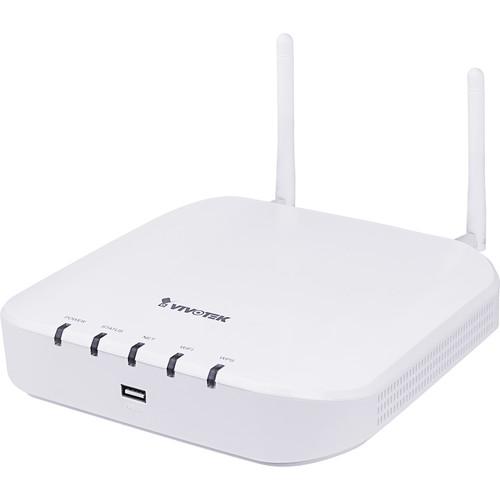 Contents of the user manual for the Vivotek C-Series 4-Channel Wi-Fi 4-Channel Wired
- Product category: Network Video Recorders (NVRs) Vivotek
- Brand: Vivotek
- Description and content of package
- Technical information and basic settings
- Frequently asked questions – FAQ
- Troubleshooting (does not switch on, does not respond, error message, what do I do if...)
- Authorized service for Vivotek Network Video Recorders (NVRs)
|
User manual for the Vivotek C-Series 4-Channel Wi-Fi 4-Channel Wired contain basic instructions
that need to be followed during installation and operation.
Before starting your appliance, the user manual should be read through carefully.
Follow all the safety instructions and warnings, and be guided by the given recommendations.
User manual is an integral part of any Vivotek product,
and if it is sold or transferred, they should be handed over jointly with the product.
Following the instructions for use is an essential prerequisite for protecting
health and property during use, as well as recognition of liability on the part of the manufacturer
for possible defects should you make a warranty claim. Download an official Vivotek user manual in which you will find instructions on how to install, use, maintain and service your product.
And do not forget – unsuitable use of a Vivotek product will considerably shorten its lifespan!
|
Product description Stream and record from up to four Wi-Fi and four wired IP video channels with this C-Series NVR from Vivotek at resolutions up to 8MP. This NVR is equipped with one 3.5" SATA storage bay which can accommodate an HDD up to 6TB (HDD available separately). External storage options include PCs via internet connection, network servers, and USB storage devices.
This C-Series NVR enables simultaneous live viewing of up to eight channels, or simultaneous playback of up to four channels, via its HDMI output or remote network access at display resolutions up to 3840 x 2160. Network bandwidth use is optimized while ensuring high-quality recording and playback using H.264 or MPEG compression. Audio output is supported, as is remote monitoring from iOS and Android devices, via the VIVOCloud and iViewer apps. ONVIF compliance ensures compatibility with a wide range of surveillance equipment. - System Structure
- This NVR connects wirelessly to up to four IP cameras via Wi-Fi. A PoE switch (available separately) allows you to add four additional IP cameras via a wired connection.
- VIVOCloud App & Portal for 24/7 Viewing
- The VIVOCloud app makes surveillance lightweight and portable. By scanning the QR code and installing the app, users can view live streams and play recorded clips via an intuitive interface. The push notification function sends users an alert message on their Android or iOS mobile device and allows them to play back video directly.
- Easy Connection with IP Cameras and Quick Auto Setup
- Wi-Fi Protected Setup locates your IP cameras and allows them to connect to the NVR without asking you to enter long passphrases. Auto Setup Wizard then sets up a centralized configuration to reduce connection times to 4 minutes or less.
- Wi-Fi Connection
- This NVR supports up to four IP cameras via 2.4 GHz Wi-Fi connection, allowing for easy installation and greater mobility.
- Four Display Modes for Fisheye Dewarp
- This NVR offers four modes for displaying the footage captured by a fisheye network camera: Live view, playback, snapshot, and instant playback. Instant playback dewarp allows users to quickly review 360° images and react immediately.
- 4-Channel 1080p Continuous Recording & Storing for Up to Approximately 40 Days
- The NVR allows users to record and store 1080p video continuously for up to 40 days on a 6TB hard disk drive (available separately).
In the Box Vivotek C-Series 4-Channel Wi-Fi + 4-Channel Wired 8MP NVR (No HDD) Power Adapter 8 x HDD Screws 2 x HDD Brackets USB Mouse 2 x 2.4 GHz Wi-Fi Antennas Limited 2-Year Warranty Table of Contents
|
Upload User Manual
Have you got an user manual for the Vivotek C-Series 4-Channel Wi-Fi 4-Channel Wired 8MP NVR in electronic form? Please send it to us and help us expand our library of instruction manuals.
Thank you, too, on behalf of other users.
To upload the product manual, we first need to check and make sure you are not a robot. After that, your "Submit Link" or "Upload File" will appear.
Technical parametersVivotek ND8212W Specs | | | Video Channels Supported | 8 max (4 channels Wi-Fi & 4 channels wired via PoE switch) | | Throughput | Record: 24 Mb/s, default setting 1920 x 1080 at 32 fps (4 channels)
Network: 40 Mb/s | | Audio Format | G.711, G.726 | | Video Format | MJPEG, H.264 | | Video Resolution | Up to 8 MP | | Recording Time | Pre-Record: 5 seconds (max 10 seconds)
Post-Record: 20 seconds (max 300 seconds) | | Streaming | Single | | Recording Mode | Continuous, schedule, manual, event, and activity adaptive streaming | | Setting | Recycle
Unit: Day | | Recording Path | Local path | | Recording Video Format | 3 GP | | Watermark | Supported | | Backup | Scheduled backup supported | | | | Stream Application | Constant / auto-adaptive stream | | LiveView Display | 8 channels (4 channels Wi-Fi plus 4 channels wired)
Display Layouts: 1x1, 3V, 2x2, 3x3, 1P+3, 2P+3, 1M+5, and 1P+6 | | Monitor Enhancement | OSD display (NVR), OSD display (camera), camera information, remote I/O control, event notification, aspect ratio, and fisheye dewarp (1O, 1P, 1R, 1O3R, 1P3R, and 1O8R) | | PTZ Control | Panel control / joystick | | PTZ Operation | Direction control, home, iris, preset, patrol (group), and PiP control | | | | Playback Display | 4 channels
Display Layouts: 1x1, 2x2, 1P+3, and 1V+3 | | Playback Control | Regular (play, pause, stop), rewind, next/previous frame, speed control, calendar, event, timeline, timeline scale, and thumbnail (storyboard) | | Video Search | Calendar, date/time, and alarm | | Thumbnail Explorer | Listing the thumbnail of recorded video (max 2 channels) | | Monitor Enhancement | OSD display (camera), event notification, aspect ratio, PiP control, and fisheye dewarp (1O, 1P, 1R, 1O3R, 1P3R, and 1O8R) | | Snapshot | JPEG | | Video Clip Export | EXE | | | | Stream Application | Stream selection | | Audio Capability | One-way | | LiveView Display | 4 channels
Display Layouts: 1x1, 2x2, and 1V+3 | | Monitor Enhancement | OSD display (NVR), drag & drop, image freeze, audio control, remote I/O control, event notification, bookmark, and fisheye dewarp (1O, 1P, and 1R) | | PTZ Control | Panel control | | PTZ Operation | Direction control, home, zoom, focus, iris, preset, patrol (group), and PiP control | | Snapshot | JPEG | | | | Playback Display | 4 channels
Display Layouts: 1x1, 2x2, and 1V+3 | | Playback Control | Regular (play, pause, and stop), next frame, speed control, calendar, timeline, timeline scale, and bookmark | | Monitor Enhancement | OSD display (NVR), drag & drop, audio control, PiP control, and fisheye dewarp (1O, 1P, and 1R) | | Snapshot | JPEG | | Video Clip Export | EXE | | | | Schedule Setting | Continuous, schedule, and manual | | Event | Motion detection, PIR detection, tampering detection, digital input (camera), digital output (camera), connection abnormal, storage abnormal, storage full, and camera network loss | | Alarm Actions | Record, email (text), email (snapshot), FTP, buzzer, ePTZ control (go to preset), camera DO, and VIVOCloud APP notification | | Recording Time | Pre-Record: 5 seconds (max 10 seconds)
Post-Record: 20 seconds (max 300 seconds) | | | | Manual | USB dongle (FAT format) and FTP server upload | | | | User Management | User Accounts: 16
User Account Time-Limit: 10 minutes
User Level: Administrator/regular user
User Feature Definition: By camera | | Log | System, recording, user, and error | | Date & Time | Time zone, manual, automatic sync NTP, and daylight saving time | | Firmware | Manual update | | Restore Default | Supported | | Backup / Restore | Supported | | Languages | Czech, English, French, German, Italian, Japanese, Korean, Portuguese, Russian, Spanish, Chinese (simplified), Chinese (traditional), and Polish | | | | Insert Camera | Manual and search | | Video Setting | Video Media Settings: Compression, resolution, fps, and video quality | | Image Settings | Image display and image adjustment | | Motion Detection | Supported | | ONVIF | Core Spec: Version 2.2 or above (by project)
Stream: Video (H.264 and MJPEG)
Recording: Continuous, schedule, and manual
Discover: Discover other brand camera through "Insert Camera & Batch Insert" | | | | OS | Embedded Linux | | CPU | ARM processor | | Flash | 256 MB | | RAM | 1 GB | | WatchDog | Hardware & software | | Power Restoration | System restarts automatically after power recovery | | | | Drive Bays | 1 x 3.5" SATA HDD bay | | HDD Capacity | 6 TB (HDD available separately) | | Disk Management | Create, format, and remove disk
HDD S.M.A.R.T | | | | Video Output | 1 x HDMI | | Resolution | 3840 x 2160
1920 x 1080
1280 x 720 | | Graphics Decoder | Hardware decoding | | Video/Audio Decoding | H.264:
3840 x 2160 at 30 fps (1 channel)
1920 x 1080 at 120 fps (4 channels)
1280 x 720 at 240 fps (8 channels) | | Camera Position | Change viewcell position on live-view screens | | | | USB Interface | Front: 1 x USB 2.0
Back: 1 x USB 2.0 | | Audio | HDMI audio output | | | | Network Interface | 1 x RJ45 Ethernet 10/100 Mb/s | | Wi-Fi | 2.4 GHz 802.11b/g/n | | Protocols | IPv4, TCP/IP, HTTP, HTTPS, UPnP, RTSP/RTP/RTCP, SMTP, FTP, DHCP, NTP, DNS, DDNS, IP filter, and WPS | | | | Power Input | 12 VDC, 3 A | | Power Consumption | 15.6 W maximum | | | | LED Indicators | Power, status, NET, Wi-Fi, and WPS | | | | Operating System | Microsoft Windows OS: XP/Vista/7/8/10/2008/2012 | | CPU | Intel Celeron or above | | Memory | 2 GB or more | | Ethernet | 10/100 Mb/s | | Display Resolution | 1024 x 768 or more | | Web Browser | Internet Explorer 10 (32-bit) or above | | Software AP | Installation Wizard 2, Shepherd, VAST, and VAST 2 | | Mobile App | VIVOCloud, iViewer (iOS)
VIVOCloud, iViewer (Android) | | Cloud Connection | VIVOCloud Portal | | | | Safety Certfication | CE, LVD, FCC, VCCI, C-Tick, MIC, NCC, and BSMI | | | | Form Factor | Desktop | | Buttons | Reset/WPS (rear panel) | | Operating Temperature | 32-104°F (0-40°C) | | Humidity | 0-95% | | Dimensions | 7.80 x 7.87 x 1.85" (19.8 x 20.0 x 4.7 cm) | | Weight | 1.26 lb (560 g) without HDD | | | | Package Weight | 2.585 lb | | Box Dimensions (LxWxH) | 10.05 x 8.7 x 4.05" |
Rating70% users recommend this product to others. And what about you?

This product has already been rated by 38 owners. Add your rating and experience with the product.
Discussion
 Ask our technicians if you have a problem with your settings,
or if anything is unclear in the user manual you have downloaded.
You can make use of our moderated discussion.
The discussion is public and helps other users of our website who may be encountering similar problems.
Ask our technicians if you have a problem with your settings,
or if anything is unclear in the user manual you have downloaded.
You can make use of our moderated discussion.
The discussion is public and helps other users of our website who may be encountering similar problems.
The discussion is empty - enter the first post
Post a new topic / query / comment:
|
|


